By Nikhil Kumar. Last updated October 2026.
YouTube is the one big platform whose official API actually lets you read public comments. So the real question is not whether you can, it is which of the three ways is worth your time.
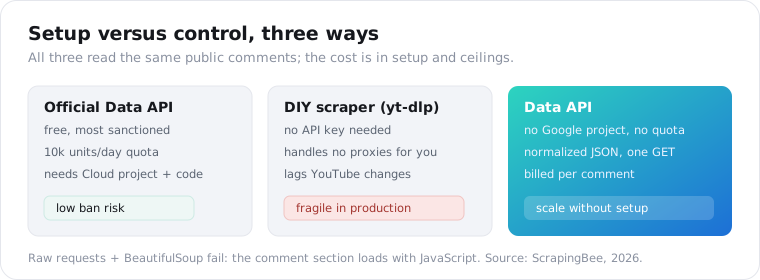
You can scrape YouTube comments three ways in 2026: the official YouTube Data API, a DIY scraper, or a third-party data API. The official API is free but capped by a daily quota and needs a Google Cloud project and code. A DIY scraper needs no key but breaks when YouTube shifts. A data API returns the comments as clean JSON with no key and no quota, billed per comment. This guide walks all three, with the real quota math and a copy-paste export.
How do you scrape YouTube comments?
Three methods, with a clear tradeoff between setup and control. The official YouTube Data API is the most sanctioned and the lowest ban risk, but it costs you a Google Cloud project, an API key, code, and a daily quota. A DIY scraper with a community tool like yt-dlp needs no key, but it lags YouTube’s frequent changes and is fragile in production. A data API sits in between: no key, no quota, a normalized JSON response, and a per-comment bill.
Which one fits depends on what you are optimizing for.
If you are a developer who wants the sanctioned path and can live with quota limits, the official API is right. If you are tinkering on your own machine for a one-off, yt-dlp is quick. If you need comments across many videos, in your own code, without wiring up a Google Cloud project, a data API removes the setup.
One method that does not work anymore is the naive one. As ScrapingBee notes, the comment section loads dynamically with JavaScript, so raw HTTP requests and BeautifulSoup return an empty page. Comments are not in the initial HTML.
The DIY route that does work is more involved. You replicate YouTube’s own hidden /youtubei/v1/next calls and follow the continuation tokens that page through the thread, which is exactly what Scrapfly documents. It works, but Scrapfly is blunt that scaling it needs proxy and header handling to get past anti-bot detection, which is the maintenance a managed path removes.
Does the YouTube Data API let you read comments?
Yes, and this is what makes YouTube different from LinkedIn or Threads. The official YouTube Data API v3 reads public comments on any video through commentThreads.list, so there is a real, sanctioned path here that simply does not exist on some other platforms. The catch is the quota and the setup, not access.
The quota is the part people underestimate. Per Clay’s method comparison and ScrapingBee, the free tier gives 10,000 quota units per day per project, commentThreads.list costs 1 to 3 units per call, and each call returns up to 100 comments.
Do the math and that is roughly 3,000 to 10,000 comments a day, and the quota resets at midnight Pacific.
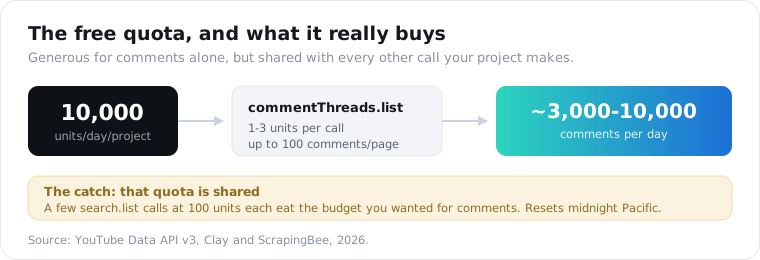
The word “shared” is the real limit. That 10,000 units covers everything your project does, so a few search.list calls at 100 units each, or heavy video-metadata pulls, eat the budget you wanted for comments. And it comes after you have created a Google Cloud project, enabled the API, generated a key, and written the pagination loop, including handling the 403 commentsDisabled error that videos with comments turned off return.
None of that is hard. It is just setup and a ceiling, which is exactly what a data API removes.
To be fair to the official API: if you already run a Google Cloud project, you are pulling comments from a handful of videos a day, and you want the most defensible source, it is free and it is the right answer. The friction only bites at scale, when the shared quota runs thin, when you need many videos in one job, or when you would rather not own a Cloud project just to read a comment section. That is the line where per-comment billing starts to win, and it is worth being honest that plenty of projects never cross it.
How do you scrape YouTube comments with a data API?
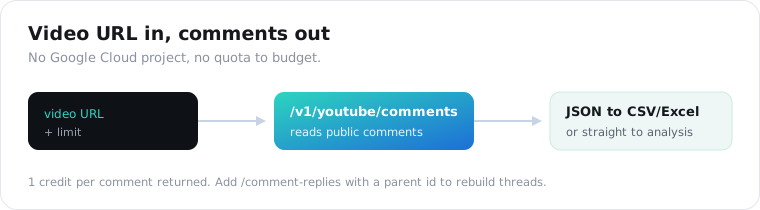
Send the video URL to an endpoint and read the comments back as JSON. A data API skips the Google Cloud project and the daily quota: you pass the URL, it returns the public comments already structured, and you are billed per comment returned instead of against a shared unit budget. On ScraperSocial that is GET /v1/youtube/comments, 1 credit per comment, tied for the lowest rate of any comments endpoint we offer.
Here is the whole thing, pull and export to CSV.
import csv, requests
r = requests.get(    "https://api.scrapersocial.com/v1/youtube/comments",    params={"url": "https://www.youtube.com/watch?v=abc123", "limit": 50},    headers={"Authorization": "Bearer sk_live_..."},)comments = r.json()["data"]
with open("youtube_comments.csv", "w", newline="", encoding="utf-8") as f:    w = csv.DictWriter(f, fieldnames=["author", "text", "likes", "replies", "posted_at", "is_creator"])    w.writeheader()    for c in comments:        w.writerow({k: c.get(k) for k in w.fieldnames})
No API key from Google, no project, no quota to budget.
Swap the csv writer for pandas and you have an Excel file; keep the raw JSON and you have a feed for a model. The limit is your budget dial, since you pay per comment returned.
What does a YouTube comment look like as JSON?
A flat object per comment, richer than most platforms. Each comment carries the id, the text, the author, the likes, an ISO posted_at, and a replies count. YouTube also gives two flags the others do not: is_creator, true when the channel owner wrote the comment, and hearted, true when the creator gave it a heart.
{ "data": [ { "id": "UgxAbC123", "text": "the part at 4:12 finally made this click for me", "author": "somechannel", "likes": 342, "replies": 12, "posted_at": "2026-08-04T18:20:00Z", "is_creator": false, "hearted": true } ], "meta": { "count": 50 }, "request_id": "a18e4ef88ad4b00b"}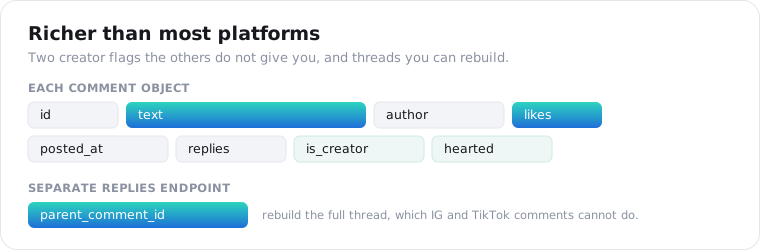
Those two flags are quietly useful. hearted surfaces the comments a creator endorsed, which is a fast way to find the sentiment they want associated with a video, and is_creator lets you pull the creator’s own replies out of the noise.
How do you get replies to YouTube comments?
Through a second endpoint, and unlike most platforms you can rebuild the thread. The main comments endpoint returns top-level comments with a replies count, and /v1/youtube/comment-replies returns the replies themselves, each carrying a parent_comment_id. Because that parent id is present, you can reconstruct the full conversation tree, which the Instagram and TikTok comment endpoints cannot do.
There is also a top-sorted variant if you only want the loudest comments.
The comments-top endpoint returns YouTube’s own “Top comments” ordering, which is the fast path when you want the 50 comments that carry the video’s dominant reaction rather than a full sweep.
Two honest cost notes. Replies are billed per reply, the same as comments, so an active video with deep threads adds up. And on the official API, replies page per comment, which is where quota use explodes on popular videos, another reason the per-comment model is easier to predict.
What does scraping YouTube comments cost?
1 credit per comment, half a cent, with no daily ceiling and no Google Cloud project to set up. That is the same rate as our TikTok and Instagram comments. The 25 free signup credits pull 25 comments from a real video before you pay anything, and a request that fails costs nothing.
Billing follows the comments that come back: a 50-comment call is 50 credits, roughly 25 cents monthly. If a video has comments switched off, you get an empty array, free for your first 25 empty results each day and 1 credit after that.
For a sense of a real job, pulling 200 comments from each of 10 videos in a niche is 2,000 credits, or $10 on the monthly plan. Here is how that sits next to the free quota.
| Approach | How you pay | To start | Setup you own |
|---|---|---|---|
| Official Data API | Free within 10,000 units/day, shared across your project | Free | Google Cloud project, key, pagination code |
| ScraperSocial API | 1 credit per comment (half a cent); no charge for failed calls | $5/mo plan, 25 credits free | One API key, one GET |
| No-code tool | Free to ~$185/mo | Free tiers | None, but not scriptable |
The rule of thumb: under a few thousand comments a day and you already have a Google Cloud project, the official API is free and fine. Above that, or when you would rather not manage a project and a shared quota, per-comment billing is simpler and uncapped.
The wider field splits the way it does everywhere. Free no-code tools cover a one-off read (ExportComments at 25 exports a month, CommentShark up to 1,000 comments free, TubeAlfred 100 with no key), and Bright Data sells YouTube records in bulk from about $1 per 1,000. A per-comment API is the one you can script today with no setup: a single GET, replies with parent ids, and the same JSON envelope as every other platform on the API.
What can you do with YouTube comment data?
Read a video’s audience the way the creator cannot at a glance. Comment text plus like count is a weighted signal, and the hearted and is_creator flags add context no other platform gives you. That makes exported YouTube comments strong raw material for sentiment analysis, mining the questions a niche keeps asking, and studying what a creator themselves chooses to endorse.
The FAQ-mining play is the cheapest content research going: pull the comments on the top videos for a topic, cluster the questions, and you have a content calendar drawn from real demand.
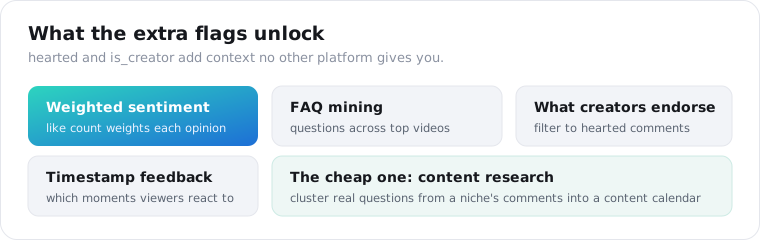
A concrete version: pull the top 100 comments on the ten highest-viewed videos for a query, count how often each timestamp like “4:12” appears, and you learn which exact moments viewers react to, then filter to hearted to see which reactions the creator co-signed. That is audience research the YouTube UI cannot assemble for you.
For turning this into a repeatable cross-video pipeline, the social listening guide shows the pattern, and the same approach on other platforms is in the TikTok and Instagram comment guides.
Is it legal to scrape YouTube comments?
Reading public comments is generally allowed, but method and storage are where the care goes. The official API exists precisely so developers can read public comments, which tells you the data is not off-limits. YouTube’s terms still prohibit automated collection without permission, so a sanctioned API path is safer than raw scraping, and comments are personal data about identifiable people, which puts anything you store under GDPR and CCPA.
I am not a lawyer, and this is not legal advice.
The practical posture is boring on purpose: prefer the official API or a compliant data API over a homemade scraper, keep only the fields you need, hash or drop handles for aggregate work, and keep a deletion path. Repeat calls hit the documented cache and return fast; pass fresh=true when you are monitoring a live video.
The short version
YouTube is the rare platform where the official API reads public comments, so your choice is about setup and scale, not access. Use the free Data API if you have a Google Cloud project and stay under a few thousand comments a day. Use a DIY scraper for one-off tinkering, knowing it will break. Use a data API when you want comments across many videos as JSON, with replies, creator flags, and no quota, at 1 credit each. Match the method to your scale, and you never fight a quota you did not need to.
Frequently asked questions
How do I scrape YouTube comments?
Three ways. Use the official YouTube Data API, which is free within a daily quota but needs a Google Cloud project, an API key, and code. Build a DIY scraper with a tool like yt-dlp, which needs no key but breaks when YouTube changes. Or call a data API that returns the comments as JSON with no key and no quota, billed per comment. Pick the API for structure, the DIY route for one-off tinkering, a data API for scale without setup.
Can I scrape YouTube comments without an API key?
Yes. A community tool like yt-dlp reads comments off the public page with no key but lags behind YouTube’s changes, and a third-party data API returns them as JSON with just its own key, no Google Cloud project required. The official YouTube Data API is the one that needs a key and a project. Raw requests plus BeautifulSoup do not work, because the comment section loads dynamically with JavaScript.
How do I export YouTube comments to CSV or Excel?
Pull the comments as JSON, then write the rows to a file. With ScraperSocial you send the video URL to /v1/youtube/comments, get an array of comment objects back, and dump them to CSV in a few lines of Python, or to Excel with pandas. YouTube has no native export, so every exporter, tool or API, is reading the public comments and formatting them for you.
How many YouTube comments can I get per day with the official API?
Roughly 3,000 to 10,000 with the free tier. The YouTube Data API gives 10,000 quota units a day per project, commentThreads.list costs 1 to 3 units per call and returns up to 100 comments per page, and the quota resets at midnight Pacific. That quota is shared across every operation your project runs, so heavy search or video calls eat into it. A data API bills per comment instead, with no daily ceiling.
How do I get replies to YouTube comments?
Replies sit under a separate call. On ScraperSocial, /v1/youtube/comments returns top-level comments with a reply count, and /v1/youtube/comment-replies returns the replies with a parent_comment_id on each, so unlike most platforms you can rebuild the full thread. The official API exposes replies too, but you page through them per comment, which multiplies your quota use fast on active videos.
Is it legal to scrape YouTube comments?
Reading public comments is generally permitted, and the official API exists for exactly that, but YouTube’s terms prohibit automated collection without permission, so method matters. Comments are also personal data about identifiable people, which puts anything you store under GDPR and CCPA. Keep only what you need, keep a deletion path, and treat the official API or a compliant data API as safer than raw scraping. This is not legal advice.
Export a video’s comments
Pick one video whose comments you want to read. Send its URL to the YouTube comments endpoint, take back the JSON, and write it to a CSV with the script above; add comment-replies when you need the full threads. The quickstart issues a key in a minute, and 25 free credits are enough to sample a real video’s comments before you decide.