By Nikhil Kumar. Last updated October 2026.
TikTok will happily tell you when an account you follow posts. It won’t send that alert to your team, and it won’t tell you what the video said.
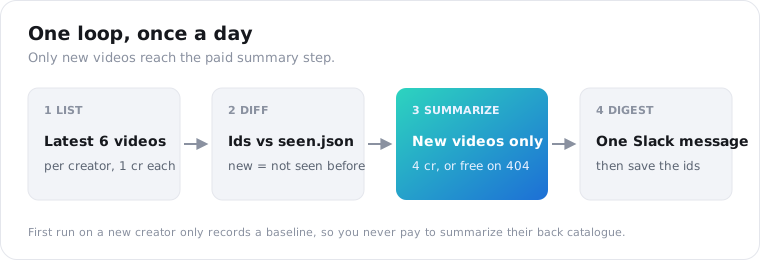
To monitor a TikTok creator, run a small script once a day: pull their latest six videos, compare the ids with the ones you stored last time, summarize anything new with an AI summary endpoint, and post one digest to Slack. Ten creators checked daily costs about $12.50 a month. This guide gives you the full Python script, plus a fix for the pinned-video trap that can hide new uploads.
How do you monitor a TikTok creator for new videos?
Poll their public video list on a schedule and diff it against what you saw last time. Call the TikTok channel-videos endpoint with the creator’s handle, store the video ids in a small file, and treat any id you haven’t seen as a new upload. That’s the whole detection logic. Everything else is summaries, alerts and keeping the bill predictable.
TikTok doesn’t offer an official route for this. Its developer platform returns videos for creators who connect their own account to your app, not for a competitor or a creator you’re scouting.
So every working option sits on top of public data. The difference is who does the checking and how you pay for it.
What are your options for TikTok creator alerts?
There are five realistic routes: the in-app bell, a no-code applet, a page-change monitor, a push feed, or your own polling script. They differ on scale and price, and on whether you learn what the video actually said. The in-app bell is free but personal. Push feeds alert within seconds but charge per creator. A polling script is the cheapest way to get summaries for a list of creators.
Here’s how they compare, with prices as listed by each vendor in October 2026:
| Route | How fast | Price | What you get |
|---|---|---|---|
| TikTok’s post-notification bell | Instant | Free | A phone alert, for accounts you follow |
| IFTTT applet | Hourly on Free, 5 min on Pro | Free tier | An email that a video was posted |
| PageCrawl page monitor | 1 to 24 hours | Free for 6 pages, $8/mo for 100 | A change alert on the profile page |
| 1322 push feed | Seconds | $200/mo for 5 creators | Upload and live events, no backlog |
| Polling script + data API | Whatever you schedule | Per video returned | New videos, stats and AI summaries |
The IFTTT applet checks every hour on the free plan. The 1322 feed is real-time only, so anything posted while your client is disconnected isn’t queued for you.
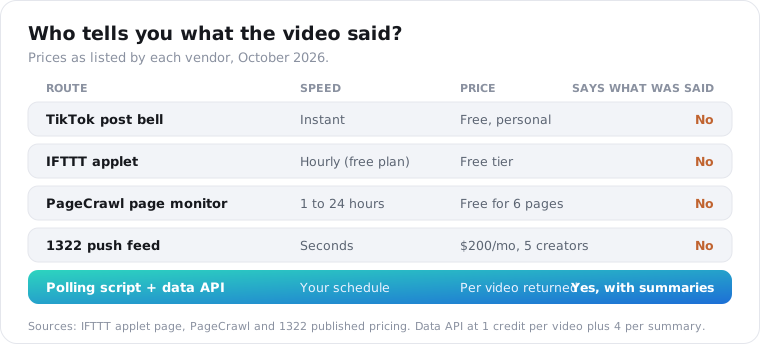
None of the first four tells you what was said in the video. For competitor research, that’s the part that matters.
You could also scrape TikTok yourself. A popular Python tutorial on Substack does exactly that with an unofficial library, and its author warns the library runs on a headless browser and needs a session token copied from your own TikTok login.
That works for a weekend project. For something a team relies on every morning, I’d rather pay a few cents per check than babysit a scraper each time TikTok changes its pages.
How do you detect new uploads reliably?
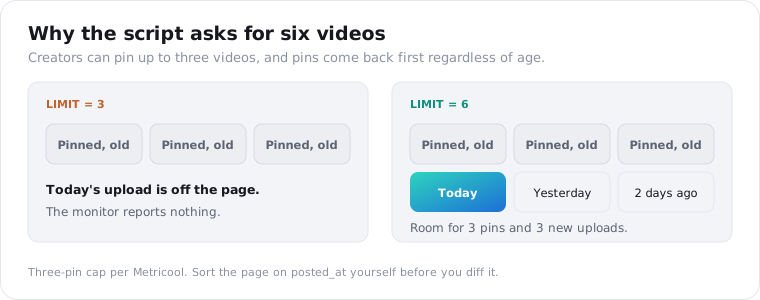
Store every video id you’ve seen per creator, ask for six videos a check, and sort by posted_at yourself. Six matters because TikTok lets creators pin up to three videos to the top of their profile, and pinned videos can come back first regardless of age. With a smaller page, three old pins could fill it and hide a new upload completely.
This one is easy to miss in testing, because the first creators you try probably won’t have three pins. Metricool’s guide confirms the three-pin cap and that pins stay on top no matter when they were posted.
Three more rules keep the detection honest.
First, record a baseline on the first run. When the script meets a creator for the first time, it saves their current ids and summarizes nothing, so you never pay to summarize a back catalogue you didn’t ask about.
Second, watch for gaps. If every video on the page is new, the creator may have posted more than the page holds since your last check, so raise the limit for that creator.
Third, mind the cache. The list is cached briefly, so a video posted in the last hour may not appear yet.
The caching docs explain fresh=true, which forces a live pull at the same price. A daily check doesn’t need it.
How do you summarize each new TikTok video?
Send each new video’s URL to the TikTok summary endpoint. It reads the caption track and sends back a two-sentence summary, a handful of key_points and the caption language, at 4 credits per video. Videos without captions return 404 not_found and cost nothing. For those, fall back to the caption text the creator typed, which comes free with the video list.
A successful response has the usual envelope:
{ "data": { "summary": "A side-by-side test of two standing desks, focused on wobble at full height.", "key_points": [ "The cheaper desk wobbles because of its crossbar, not its legs", "Both desks reach the same maximum height", "The creator recommends the pricier frame for tall users" ], "language": "en" }, "request_id": "req_01JZX7Q2M4"}Plan for a lot of caption-only lines. In a May 2026 analysis, Apify put the share of TikToks with no text track at roughly one in three, and creators who post music-led clips will run well above that.
Treat the summary as a pointer to the video, not a quote. A model compressed the transcript, so names and numbers are the soft spots. If a figure matters, pull the full transcript and check it.
Two details help the budget. A summary is stored once it’s made, so if two of your scripts ask about the same video, the second gets the same text back quickly, though it’s billed again.
And the language field tells you what the captions were in. If you watch creators in several markets, route non-English entries to the person who reads that language, or translate the key points before they reach the digest.
What does the full monitor script look like?
About 50 lines of Python with one dependency. It reads a list of handles, calls channel-videos for each, diffs the ids against seen.json, summarizes new videos, posts one Slack message and saves state. It also stops summarizing when your credit balance drops below a floor you set, so a runaway list can’t drain the account overnight.
You need an API key and a Slack incoming webhook URL, both in environment variables:
import json, os, pathlib, requests
API = "https://api.scrapersocial.com/v1/tiktok"H = {"Authorization": f"Bearer {os.environ['SCRAPERSOCIAL_KEY']}"}SLACK = os.environ["SLACK_WEBHOOK_URL"]CREATORS = ["creator_one", "creator_two"]LIMIT = 6            # room for up to 3 pinned videos plus 3 new onesMIN_BALANCE = 200    # stop summarizing below this many creditsSTATE = pathlib.Path("seen.json")
seen = json.loads(STATE.read_text()) if STATE.exists() else {}lines = []
for handle in CREATORS:    r = requests.get(f"{API}/channel-videos", params={"handle": handle, "limit": LIMIT},                     headers=H, timeout=60)    if not r.ok:        lines.append(f"@{handle}: {r.json()['error']['code']}")        continue    videos = sorted(r.json()["data"], key=lambda v: v["posted_at"] or "", reverse=True)    if handle not in seen:                       # first run: baseline only        seen[handle] = [v["id"] for v in videos]        continue    known = set(seen[handle])    new = [v for v in videos if v["id"] not in known]    if new and len(new) == len(videos):        lines.append(f"@{handle}: every video on the page is new, raise LIMIT")    for v in new:        if int(r.headers.get("X-Credits-Remaining", MIN_BALANCE)) < MIN_BALANCE:            lines.append("Credit floor reached, summaries paused")            break        s = requests.get(f"{API}/summary", params={"url": v["url"]}, headers=H, timeout=120)        if s.status_code == 404:            lines.append(f"@{handle} {v['url']}\nNo captions. Caption: {v['caption'] or 'none'}")        elif not s.ok:            lines.append(f"@{handle} {v['url']}: {s.json()['error']['code']}, retrying next run")            continue        else:            d = s.json()["data"]            lines.append(f"@{handle} {v['url']}\n{d['summary']}\n- " + "\n- ".join(d["key_points"]))        r = s if s.ok else r                     # keep the freshest balance header        known.add(v["id"])    seen[handle] = sorted(known)
STATE.write_text(json.dumps(seen))if lines:    requests.post(SLACK, json={"text": "\n\n".join(lines)}, timeout=30)
A failed summary isn’t marked as seen, so it retries on the next run. Error codes such as rate_limited and out_of_credits are listed in the errors reference.
Schedule it with cron on any small server, once a day at 8am:
0 8 * * * cd /opt/creator-watch && python3 monitor.py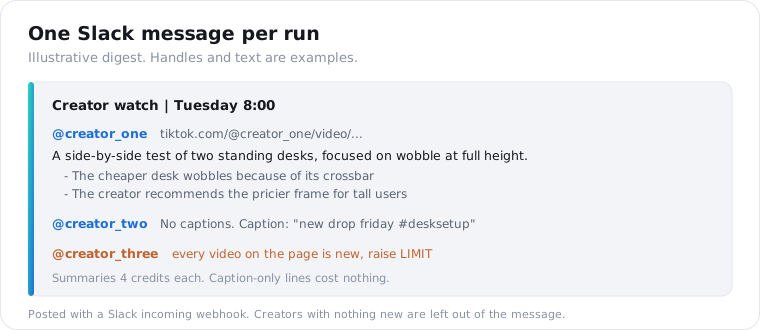
Where you run it matters less than keeping seen.json between runs. A $5 virtual server, a Raspberry Pi or an always-on office machine all work.
GitHub Actions can run it on a schedule too, but every run starts from a clean checkout. You’d have to commit seen.json back to the repo or keep it in a cache, or the script records a fresh baseline every morning and never reports anything.
If you’d rather not run a server, the n8n guide builds a no-code creator watch with the same endpoints.
How often should you check, and what does it cost?
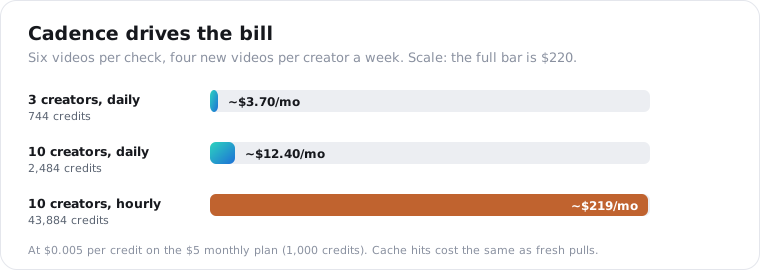
Once a day for almost everyone. The list endpoint bills 1 credit per video returned, cached or not, so cost scales with how often you check, not with how many videos creators post. Ten creators checked daily at six videos a check, plus summaries, is about 2,500 credits a month. The same list checked hourly is about 43,900.
Daily is enough for accounts on a typical schedule. Buffer’s data scientist analysed 11.4 million posts from more than 150,000 accounts and found the biggest jump comes from posting 2 to 5 times a week, worth about 17% more views per post than posting once.
That’s under one post a day. A creator who posts several times a day needs a bigger LIMIT, not more checks.
Here’s the math, assuming each creator posts four times a week, a hypothetical rate inside that range:
| Setup | List checks | Summaries | Credits/month | Cost |
|---|---|---|---|---|
| 3 creators, daily | 3 x 6 x 30 = 540 | ~51 x 4 = 204 | ~744 | ~$3.70 |
| 10 creators, daily | 10 x 6 x 30 = 1,800 | ~171 x 4 = 684 | ~2,484 | ~$12.40 |
| 10 creators, hourly | 10 x 6 x 24 x 30 = 43,200 | ~171 x 4 = 684 | ~43,884 | ~$219 |
All costs assume the monthly plan, where $5 buys 1,000 credits, or half a cent each. The first row fits inside it, and top-ups cost the same rate.
If you truly need alerts within minutes, a push feed is the better fit. For a morning briefing on what competitors posted and said, daily polling wins.
How do you test the monitor before you trust it?
Run it twice in a row, then fake a new upload. The first run should post nothing and write a baseline. The second should also post nothing, which proves the diff works. Then delete one id from seen.json and run again: that video should come back as new, with a summary, for 4 credits. Four small tests cover the common ways this script fails.
Here’s the full sequence:
- First run on a fresh
seen.json: no message, a baseline file appears. - Second run straight after: no message, no summary charges.
- Remove one id from the file and rerun: one new entry with a summary.
- Do the same with a video you know has no captions: expect a caption-only line, charged nothing.
Then test the guardrails. Set MIN_BALANCE above your current balance and rerun step 3. You should see “summaries paused” instead of a charge.
Finally, add a misspelled handle to the list. The digest should name the error code for that creator and carry on with the rest, instead of crashing the run.
Watch the X-Credits-Charged header while you test. It tells you exactly what each call cost, so you can check the cost table above against real numbers.
What should a creator digest include?
The link, how long ago it went up, the summary, the key points and the views so far, grouped by creator, with creators who posted nothing left out entirely. Keep it to one message per run. A digest your team reads in two minutes beats a channel full of single alerts that everyone mutes by Friday.
The script above already posts the link, summary and key points. Adding views and age takes two more fields from data you’ve already paid for, since every video object carries views and posted_at.
A few choices that make the digest more useful:
- Put the creator handle first, so people can scan for the accounts they care about.
- Show views with the age of the video, such as “41k views in 6 hours.” A raw number without age misleads.
- Mark caption-only entries clearly, so nobody mistakes the typed caption for a summary of the speech.
- Send a weekly roll-up on Mondays with each creator’s most-viewed video of the week.
- Skip the message entirely on days with nothing new. Silence is a fine signal.
Resist adding every field you have. Likes, shares and saves are all on the video object, but a digest with six numbers per video stops being skimmable. Views plus age covers most of what people ask about the morning after.
If more than one team reads it, split the creator list by channel instead of building filters. Sales can watch partner creators while marketing watches competitors, from the same script with two lists.
How do you spot a video that’s taking off?
Re-check each new video’s stats a day after you first see it, and compare its views with that creator’s usual numbers. I’d start by flagging any video at three times the creator’s median after 24 hours. The re-check costs 1 credit per video through the stats endpoint, so watching every new upload this way adds pennies a month.
The median needs history. Six videos from one check is a thin baseline, so store each video’s views when you first see it and build up a few weeks of rows before you trust the comparison.
Keep the rule simple at first. One threshold, such as three times the median, with the alert added to the next morning’s digest rather than sent on its own.
Spikes are where the summaries pay off. When a competitor’s video takes off, the key points show what it said in ten seconds: the hook, the claim, the product they named. You can decide whether to watch it before you spend three minutes on it.
What can’t a TikTok creator monitor tell you?
It sees public videos only, up to 50 per call, and its summaries depend on captions. Private accounts return an error, and live streams, Stories and followers-only posts never show up. Views on a video posted an hour ago are far from final, so a first-day count says little about how it will perform. Know these limits before you promise a client “full coverage.”
Plan for roughly a third of videos arriving with no summary, only the creator’s typed caption.
If you report on performance, re-check stats a few days later with the stats endpoint at 1 credit a video. First-day counts move too much to quote.
Handles change, too. Store video ids and handles together, so a renamed account doesn’t orphan your history.
And videos get deleted, sometimes between the alert and your click. Keep the digest; it may be the only record you have.
The channel-videos endpoint page lists every field on the video objects, including views, likes, shares, saves and hashtags, if you want stats in the digest too.
Frequently asked questions
How do I get notified when a TikTok account posts a new video?
For a few accounts you follow, turn on post notifications from the bell on their profile. For a list of creators, or for a team, run a scheduled check instead: pull each creator’s latest videos, compare the ids with the ones you saw last time, and send the new ones to Slack or email. A daily check costs a few cents per creator.
Is there an API to monitor a TikTok creator’s new uploads?
Not from TikTok for creators you don’t control. Its developer platform only returns videos for accounts that connect to your app. Third-party options either push events to you for a flat monthly fee per creator, or let you poll a public video list on your own schedule. Polling once a day with a social data API costs about 6 credits per creator per check.
How do I summarize a TikTok creator’s videos with AI?
Send each video URL to a summary endpoint that reads the caption track and returns a short summary with key points, or fetch the transcript and prompt your own model. A summary call costs 4 credits, about 2 cents. Videos without captions can’t be summarized from speech this way, so log them and fall back to the posted caption.
How often should I check a TikTok account for new videos?
Once a day suits most competitor and creator tracking. Buffer’s analysis of 11.4 million TikTok posts found the biggest lift in views comes from posting 2 to 5 times a week, a pace a daily check with room for six videos covers easily. Check hourly only when minutes matter, such as partner posts you need to amplify, because each check bills for every video returned.
Can I monitor a private TikTok account?
No. Monitoring tools that work without a login only get the public, logged-out view of a profile, so a private account returns an error instead of videos. Followers-only content, Stories and live streams are out of reach too. If you need a private account’s data, the account owner has to share it through TikTok’s own authenticated tools.
How much does it cost to monitor TikTok creators?
With a polling script, cost follows how often you check. Ten creators checked daily, six videos a check, plus a summary for each new video, comes to about 2,500 credits a month, roughly $12.50. Checking the same ten every hour costs around $219. Push feeds that alert within seconds charge per tracked creator instead; one we checked starts at $200 a month for five.
Start with three creators tomorrow morning
Put three handles in CREATORS, run the script once to record a baseline, and schedule it for 8am. That setup costs about $3.70 a month and fits inside the $5 plan. Get a free API key, and by tomorrow’s coffee you’ll have your first digest of what they posted and what they said.