By Nikhil Kumar. Last updated October 2026.
Instagram keeps a running count of every post tagged at your competitor’s cafe. Its API just won’t hand it to you.
To get Instagram location data with an API, you go through Instagram’s public location pages with a data API, because Meta’s official API has no location search at all. You make three calls: search for a place by name and city, read its details (coordinates, address, category, post count), then pull the public posts tagged there as JSON. On ScraperSocial each call costs 1 credit per place or post, and none needs an Instagram login.
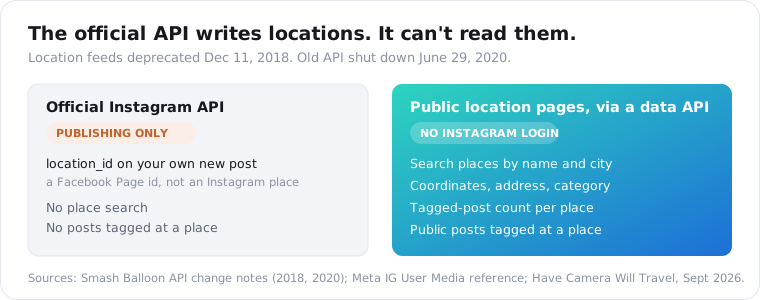
Does Instagram have an official API for location data?
No. Instagram deprecated location feeds for all developers on December 11, 2018, according to Smash Balloon’s record of the change, and the old API itself shut down on June 29, 2020. Meta’s current Instagram Platform covers media, comments, hashtags and users. The one location field left is location_id, and it only exists so you can tag your own new post.
It’s easy to lose a day hunting for the endpoint that replaced it.
There isn’t one.
Meta’s media publishing reference defines location_id as “the ID of a Page associated with a location.” That’s a Facebook Page, not an Instagram place. You find it through the Pages Search API, which needs Meta’s Page Public Metadata Access feature, and you can only use it to publish.
It does nothing for reading. You can’t ask the official API what got posted at a stadium last Saturday.
David Coleman, who writes the travel photography site Have Camera Will Travel, put it bluntly in his September 2026 update: the current Instagram API “has no location features at all.”
Every tool offering an Instagram location feed, then, reads the public location pages instead: the Apify actors, the WordPress feed plugins, ScraperSocial too.
Those pages are still up, and they load fine when you’re logged out.
| What you want | Official Instagram API | A data API reading public location pages |
|---|---|---|
| Search places by name | No | Yes |
| Place coordinates and address | No | Yes, where Instagram has them |
| Tagged post count for a place | No | Yes |
| Posts tagged at a place | No | Yes, a public sample |
| Tag your own new post with a place | Yes, via a Facebook Page id | No |
| Needs an Instagram account | Yes, Business or Creator | No |
How do you get Instagram location data with an API?
You chain three calls. First, location-search turns a phrase like “coffee shop austin” into a list of places, each with a numeric id. Next, location-stats takes one id and returns that place’s full record. Last, location-posts takes the same id and returns the posts tagged there. Every call is a plain GET with an API key, and you never touch an Instagram account.
Order matters here. The last two calls accept nothing but an id.
Already holding an id from a location URL? Skip the search.
Holding only a business name and a city? Start with it.
On ScraperSocial the three endpoints sit next to the rest of the Instagram data API, and they share its response envelope. So you can join a place’s posts to the profile data you pull elsewhere without remapping field names.
You’re billed per item returned, so a search that finds 10 places is 10 credits, a stats call is 1, and 50 tagged posts come to 50.
My suggestion: run the search with a limit of 10 first. Popular venues often show up as more than one entry, and you want to see them side by side before you spend credits pulling posts from the wrong one.
Phrase the search the way the place index is built. A business type plus a city, like “ramen seattle” or “climbing gym berlin”, works best. A bare category with no city gives you places scattered across the world, and you pay 1 credit for each one.
The first call looks like this:
curl "https://api.scrapersocial.com/v1/instagram/location-search?query=coffee%20shop%20austin&limit=10" \ -H "Authorization: Bearer sk_live_..."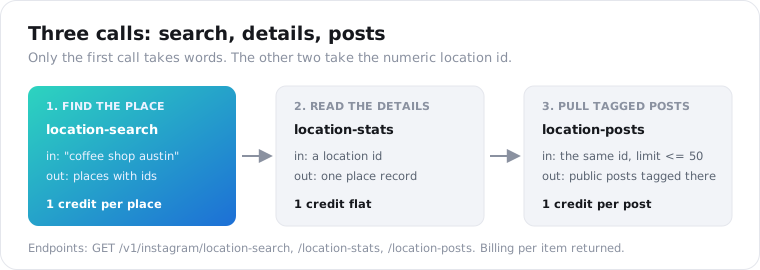
How do you find an Instagram location ID?
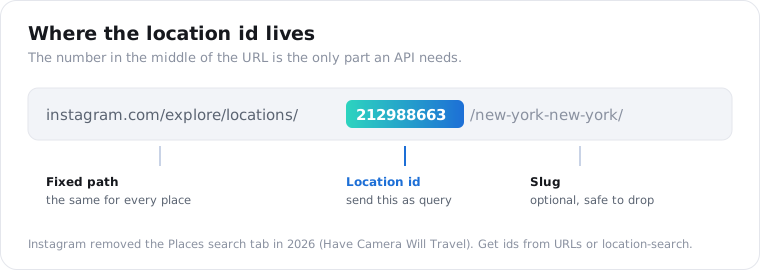
Every place on Instagram has a numeric id. It’s the digits after /explore/locations/ in the place’s web address: in instagram.com/explore/locations/212988663/new-york-new-york/, the id is 212988663. You can copy it by hand from a browser, or get it from the id field of a location search result. The search route is the only one that scales past a handful of places.
This year the manual route got harder.
Instagram removed the Places tab from its search in 2026, Coleman reports. Searching a place name in the app now returns accounts, hashtags and an AI summary, not a list of venues.
He works around it with a Google search, site:instagram.com/explore/locations "tidal basin", which is fine when you need one place.
A hundred places by hand is a chore. That’s the job the search endpoint’s 1 credit pays for.
Either way, one quirk will bite you: Instagram keeps no master list of real places. Users can create a location called “My Favorite City,” so one coffee shop can have several entries with slightly different spellings and very different post counts.
Pick the one with the right address and the most posts. For anything you plan to track over months, though, keep every duplicate and merge them yourself. Otherwise your trend line jumps the day someone tags the other spelling.
What Instagram location data can you get for a place?
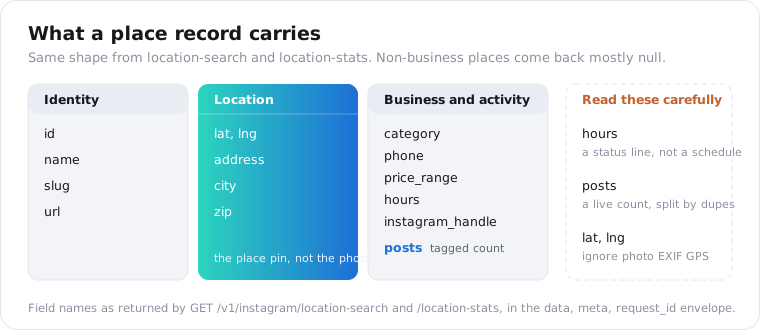
A place record carries the id, name and category, the latitude and longitude, the street address, city and zip, a phone number, a price range, the linked Instagram business handle and the number of posts tagged there. Location search and location stats share that shape, wrapped in the usual { data, meta, request_id } response. Many fields come back null for places that aren’t businesses, like a public park or somebody’s made-up “home” tag.
One place from a search response:
{ "data": [ { "id": "1022374839", "name": "Sightglass Coffee", "slug": "sightglass-coffee", "category": "Coffee Shop", "phone": "+14155551234", "posts": 18342, "price_range": 2, "lat": 37.77699, "lng": -122.40851, "address": "270 7th St", "city": "San Francisco, California", "zip": "94103", "hours": "Open now", "instagram_handle": "sightglass", "url": "https://www.instagram.com/explore/locations/1022374839/", "search_term": "coffee san francisco" } ], "meta": { "count": 1, "limit": 10 }, "request_id": "req_01K7D4N2RM8WQ5"}Those values are made up for the example. The keys match the live response one for one.
Be careful with three of these. hours is a status line, something like “Open now”, not a weekly schedule. If you need opening times, get them from the business’s own site or a maps API.
posts is a live count. It moves between calls, and duplicate entries split one venue’s posts across several ids.
lat and lng are the place’s pin. They are not where any given photo was taken.
That last one trips people up more than anything else. Coleman points out that Instagram ignores a photo’s EXIF GPS data completely. The location is whatever place the poster picked, so someone can post yesterday’s beach photo tagged at their living room.
So use the pin to put venues on a map, and don’t use it to guess where people were standing. (I’d love for that second one to work. It just doesn’t.)
To keep payloads small, add fields=id,name,lat,lng,posts and the response carries only those keys. The field projection docs cover the syntax.
How do you pull the posts tagged at an Instagram location?
Send the location id to location-posts with a limit of 50 or less. You get back the public posts tagged at that place, each with its caption, likes, comments, video views where relevant, author handle, timestamp, hashtags, mentions and the location id itself. It costs 1 credit per post returned. It’s a sample of what Instagram’s public page serves for that place, not the venue’s complete history.
Keep limit at 50 or under, so the posts come back in a single response.
Posts arrive in Instagram’s order rather than newest first, so if recency matters, reorder them by posted_at yourself.
There’s no date filter on Instagram’s location pages, so there isn’t one here either. To track a place over time, pull on a schedule and keep only the posts you haven’t seen.
When you start counting, know that shares is always null. Instagram doesn’t show a share count publicly, and a zero would lie to you.
views is filled for video and reels and empty for photos.
Each post repeats its location and location_id, which helps when you merge pulls from several duplicate place entries.
Here’s how I’d pull and rank one place’s posts in Python:
import requests
API = "https://api.scrapersocial.com/v1/instagram"HEADERS = {"Authorization": "Bearer sk_live_..."}
places = requests.get(f"{API}/location-search",                      params={"query": "coffee shop austin", "limit": 10},                      headers=HEADERS, timeout=120).json()["data"]place = max(places, key=lambda p: p["posts"] or 0)
posts = requests.get(f"{API}/location-posts",                     params={"query": place["id"], "limit": 50},                     headers=HEADERS, timeout=120).json()["data"]
for p in sorted(posts, key=lambda p: p["likes"] or 0, reverse=True)[:10]:    print(p["likes"], p["author"]["handle"], p["posted_at"], p["url"])
That picks the busiest entry from the search, then ranks its posts by likes.
The or 0 guards keep one null count from crashing the sort, and the 120-second timeout leaves room for a cache miss. The caching docs explain how long place records and post lists stay cached before the next call refreshes them.
What can you build with Instagram location data?
Mostly things a local business, or someone selling to local businesses, would want. The common builds are competitor foot-traffic proxies (watching how many posts get tagged at rival venues each week), lead lists of local businesses with their Instagram handles, user-generated content discovery for a venue or event, and influencer scouting by place. Every one of them is the same three calls with different filters on your side.
Of these, the lead list takes the least work.
Search “dentist chicago” or “yoga studio denver” and every result that has an instagram_handle is a business you can find on Instagram. You also get its category, phone and post count. Sort by posts and you have a rough ranking of who’s actually active.
Instagram has been pushing in this direction itself.
It launched a searchable map for local businesses in 2022 and an opt-in location-sharing Map inside Direct Messages in August 2025, as CNN reported via local stations. Both are built for someone scrolling on a phone, and neither exports anything.
If you run a physical business, though, I’d start with competitor tracking.
Every Monday, pull the tagged-post count for your venue and three rivals. It won’t give you exact foot traffic. But a rival whose tagged posts double in a month is doing something, and you’ll see it before their reviews say so.
For events, pull the venue’s posts during the event window and you have a ready-made pile of attendee content. Pair it with a hashtag pull from the Instagram hashtag guide and you catch the people who tagged the event without tagging the place.
If you care about reels that mention a place rather than posts tagged there, the reels search endpoint searches by keyword instead. Plenty of people name a restaurant in the caption and never add the location tag, so running both catches more of the conversation.
To see what a single creator posts from a place over time, the channel posts endpoint pulls their whole recent feed. Their location_id values then tell you which of their posts came from where.
How much does Instagram location data cost?
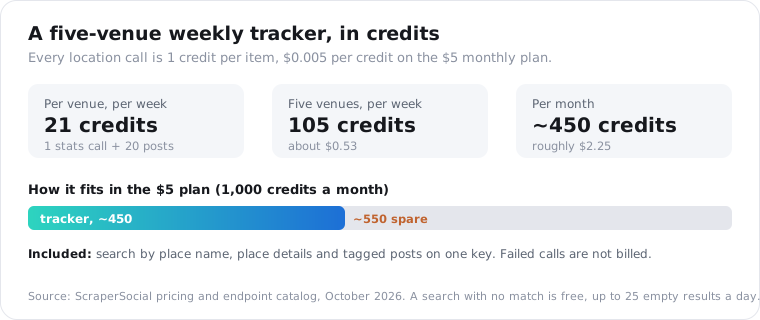
On ScraperSocial every location call is 1 credit per item: 1 per place in a search, 1 for a stats lookup, 1 per tagged post. Checking one venue with 20 of its posts is 21 credits, about 10.5 cents. A new account’s 25 free credits pay for one such venue check without a card, and after that the $5 monthly plan gives you 1,000 credits with no contract.
Where the options really differ is in how many steps you run before you have data.
| Route | Billing model | First step | Covers, and work left to you |
|---|---|---|---|
| Official Instagram API | Free | Nothing to read | Publishing tags only, no place search or tagged posts |
| Apify location posts actor | Per result, $0.50 per 1,000 posts as published | Apify account and an actor run | Posts by location id, so you need the ids first |
| Apify place details actor | Per result, $2.00 per 1,000 locations as published | Apify account and an actor run | Place records by id or URL, no name search |
| ScraperSocial | 1 credit per item returned | Signup credits, then $5 monthly | Name search, place details and tagged posts on one key, same schema as other platforms |
Prices as listed in October 2026.
The search step is the part you would otherwise build. Neither actor above starts from “yoga studio denver”, so you’d collect location ids some other way first. Here one search call returns the ids, and each id feeds the stats and posts calls directly.
Billing also follows what actually comes back. A location call that fails costs nothing, and a search that matches no place is free, up to 25 empty results a day per account, so a misspelled city is a cheap mistake.
Price a realistic job and it stays small. A weekly tracker on five venues, each with one stats call and 20 posts, uses 21 credits per venue and 105 a week, about 450 a month, or roughly $2.25, inside the $5 plan with room for a few extra searches.
For millions of tagged posts from a single city, get a quote from a per-result scraper as well.
Is it legal to collect Instagram location data?
Reading Instagram’s public location pages without an account is generally lower risk than touching private data, but this isn’t legal advice. A US district court found in January 2024, in Meta v. Bright Data, that collecting public pages while logged out didn’t break Meta’s terms. That’s one court on contract claims, and privacy law still applies to what you keep.
With location data, the privacy question gets sharper than usual.
A business’s address is not personal data. A list of the people who posted from a particular clinic can be, and health-related location data falls under stricter rules in a lot of countries.
Aggregate where you can, then. Weekly counts per venue carry little risk. A file of named individuals and the places they visited is the kind of thing that needs a lawyer’s eye before you build it.
Under GDPR and CCPA, keep only the fields you need, set an expiry on stored posts, and honor deletion requests.
Private accounts never appear. The endpoints see only the public version of each page, and that’s the same reason you don’t need an Instagram account to call them.
Pull one place before you build the tracker
Pick a venue you care about and run the search with a limit of 5. Check the duplicates, take the id with the right address, and pull 20 tagged posts, five a page. That’s 25 credits at most, and it tells you whether the place is busy enough to track. Get a key from the quickstart in a couple of minutes, and the 25 free signup credits cover that first test.
Frequently asked questions
Is there an Instagram API for location data?
Not an official one. Instagram retired its location endpoints on December 11, 2018, and Meta’s current Instagram Platform has no way to search places or read the posts tagged at one. The only location parameter left is location_id for publishing your own posts. Reading it means going through Instagram’s public location pages, which still load for logged-out visitors, with a data API.
How do I find an Instagram location ID?
Open the place’s page on instagram.com and copy the digits after /explore/locations/ in the URL. In instagram.com/explore/locations/212988663/new-york-new-york/ the id is 212988663. Because Instagram removed the Places search tab in 2026, the faster route is an API: send a place name and city to a location search endpoint and read the id from each result.
Can I scrape Instagram locations without logging in?
Yes, for public location pages. Instagram’s location pages load for logged-out visitors, so a data API can read a place’s details and its public tagged posts without any Instagram account, cookie or app review. Private accounts never show up, because their posts are not on the public page. What you cannot get without the account owner is anything private, like who saved a place.
Are the coordinates accurate enough to map?
Usually yes for real venues, but treat them as the place record’s pin, not the photo’s GPS. Instagram ignores a photo’s EXIF location and uses whatever place the poster picked, so a post tagged at a stadium may have been taken across town. For mapping venues, the lat and lng on a place record are fine. For mapping where photos were really taken, they are not.
Does it return the posts tagged at a location?
Yes. A location posts endpoint takes the numeric location id and returns the public posts tagged there, each with likes, comments, caption, author handle, timestamp, hashtags and media type. It returns a sample of what Instagram’s public page serves for that place, not the full archive, and the order is Instagram’s own, so sort by posted_at yourself if you need newest first.
How many posts are tagged at an Instagram location?
Read the posts field on a place record. Location search and location stats both return it, taken from Instagram’s own tagged-post count for that place. Treat it as a moving number: it changes between runs, and duplicate place entries split one real venue’s posts across several ids, so add up the duplicates if you want a fuller count.