By Nikhil Kumar. Last updated October 2026.
A funding round, a new VP of Sales, a hiring spree. Every good reason to reach out to an account is sitting on its LinkedIn page. None of it is in LinkedIn’s API.
LinkedIn’s official API returns full company data only for pages you administer. For any company you do not own, its firmographics, funding, open roles, and people, you send a URL to a data API that reads the public page. This guide shows how to pull each of those, what fields come back, and how they turn into the buying signals sales teams actually act on.
“linkedin company api” is a low-volume search, about 20 a month per DataforSEO data pulled in September 2026, but it is one of the highest-intent queries on the platform, because the people running it are building sales-intelligence and lead-enrichment products.
Can you get company data from LinkedIn’s official API?
Only for pages you manage. LinkedIn’s Organization Lookup API returns full company data through 3-legged OAuth, but only when the authenticated member has an ADMINISTRATOR role on that organization. For a company you do not administer, the same call returns a handful of limited fields, and firmographics at scale are simply not on offer.
This is the same wall the rest of LinkedIn’s API puts up.
Access runs through the Partner Program, and the commercial products that hold real company data, the Marketing API, Sales Navigator, Talent Solutions, are partner-approved and not self-service. Our LinkedIn API pricing post walks that gating in full.
So the search “LinkedIn company API” ends where the others do. If you own the page, the official API serves it. If you want a competitor’s or a prospect’s company data, it was never built to give it to you, and no tier changes that.
What company data can you pull with a data API?
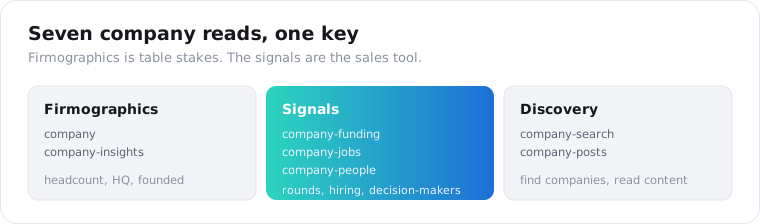
Any public company’s, across seven distinct reads. A data API reads the public company page, so a firmographic profile, funding history, open jobs, employees, posts, and company search all come back as JSON from one key, with no admin role and no partner application. The headcount everyone sells is the least of it; the funding, hiring, and people reads are what turn a company record into a sales signal.
Here is the field guide before the code.
The firmographic endpoints, company and company-insights, return the profile: name, industry, employee count and size band, founding year, headquarters, and every office location. The signal endpoints are where it gets useful: company-funding for rounds and investors, company-jobs for open roles, and company-people for decision-makers. company-search finds companies by keyword, and company-posts reads their content.
| Endpoint | Credits | Returns |
|---|---|---|
| company | 2 | Name, industry, headcount, followers, website |
| company-insights | 2 | Headcount + band, founded, HQ, all locations, type |
| company-funding | 2 | Rounds, last round type/amount/date, lead investors |
| company-jobs | 1 | Open roles at the company |
| company-people | 2 (min 10 a call) | Employees: name, headline, location, role |
| company-search | 1 (min 2 a call) | Companies matching a keyword |
| company-posts | 1 | The company’s recent public posts |
How do you pull a company’s firmographics?
You send the company’s LinkedIn page URL or handle to the insights endpoint and read its profile back as JSON. The API reads the public page, so there is no OAuth and no admin role. On ScraperSocial you GET /v1/linkedin/company-insights with a company URL, billed 2 credits per company.
Here is the whole call in a few lines of Python.
import requests
r = requests.get(    "https://api.scrapersocial.com/v1/linkedin/company-insights",    params={"handle": "https://www.linkedin.com/company/stripe"},    headers={"Authorization": "Bearer sk_live_..."},)c = r.json()["data"]print(c["name"], c["employees"], c["headquarters"], c["founded"])
URL in, firmographics out. No token exchange, no partner application.
The insights response is built for account scoring. It returns the name and industry, the employees count and an employee_range band, the followers, the company_type, the founded year, the headquarters, and a locations list with every office’s city, country, and address. That is enough to size an account, place it in a territory, and match it to an ideal-customer profile in one call.
The headcount fields are the ones sales ops lives on. An exact employees number plus the employee_range band lets you segment accounts by size reliably even when the exact count is fuzzy, and the locations list tells you which offices to route to which rep.
If you do not have the company URL yet, company-search is the way in. Point it at an industry, a keyword, or a name and it returns matching companies, so you can build a target list from a description of your market rather than a spreadsheet you already own. Feed those results into the insights endpoint and you have gone from a market definition to a sized, enriched account list in two calls, which is the front end of most territory-planning workflows.
How do you get funding, hiring, and people signals?
Three more endpoints, each a different buying trigger. Funding tells you a company just got money to spend, open jobs tell you where it is investing, and its people tell you who to talk to. Send the same company to /v1/linkedin/company-funding, /v1/linkedin/company-jobs, and /v1/linkedin/company-people, and you have moved from a static record to a live account signal.
Funding is the sharpest signal of the three.
import requests
r = requests.get(    "https://api.scrapersocial.com/v1/linkedin/company-funding",    params={"handle": "https://www.linkedin.com/company/stripe"},    headers={"Authorization": "Bearer sk_live_..."},)f = r.json()["data"]print(f["rounds"], f["last_round_type"], f["last_round_amount"], f["last_round_at"])
The funding endpoint returns the number of rounds, the last_round_type, last_round_amount, last_round_currency, and last_round_at, and the lead_investors, from the Crunchbase data LinkedIn shows on company pages. A company that just closed a Series B is a company with a new budget, and this is how you catch that the week it happens instead of the quarter after.
Two honest limits keep this accurate. The funding is only as complete as what LinkedIn surfaces, so a private company with no disclosed rounds returns the firmographic profile with the funding fields empty rather than an invented number. And because it is Crunchbase-sourced, it reflects announced rounds, not unannounced ones, so treat a null as “not public” instead of “no funding.” Used that way, the endpoint is a reliable trigger for the rounds that are public, which are the ones a sales team can reference anyway.
The company-jobs endpoint is the hiring signal. A company opening ten sales roles is scaling its go-to-market, and the roles it posts tell you what it is building. Our LinkedIn jobs guide covers that endpoint on its own.
The company-people endpoint returns employee profiles, each with a name, headline, location, and current role, so you can find the decision-makers at a target account. One honest limit: a work email sits behind LinkedIn’s login, so people come back with names and titles, not contact details, and you pair them with a separate enrichment step to reach out.
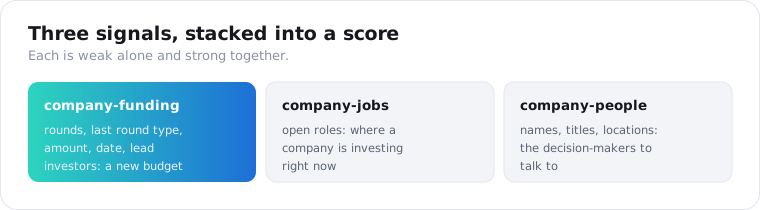
The three signals compound when you read them together. A recent round from company-funding, a jump in open roles from company-jobs, and a new VP in company-people are each a weak signal alone and a strong one stacked, so an account score that weights all three surfaces the companies actually in a buying window. On ScraperSocial, insights plus funding for one account is 4 credits, or 2 cents, each open role adds 1 credit, and each employee adds 2 (at least 10 per people call). Scoring 20 target accounts with five open roles and five people each is 20 x 19 = 380 credits, or $1.90, well inside a single $5 month set against the value of one qualified meeting.
What can you build with LinkedIn company data?
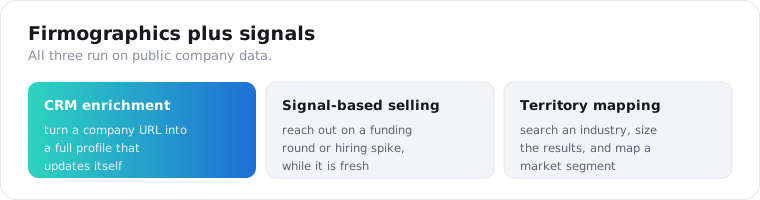
Mostly sales intelligence and lead enrichment, run on signals instead of static lists. Teams enrich CRM records with live firmographics, score and route accounts by size and industry, and, increasingly, monitor for the triggers that say an account is ready to buy: a funding round, a leadership hire, a hiring spike. The data is public company information, so the products are about targeting and timing.
Signal-based selling is the shift this data enables.
The old way was a static list and a cold blast. The 2026 way is to watch a set of target accounts for a trigger and reach the prospect inside the short window before competitors catch the same signal. Funding, headcount jumps, and new leadership are exactly those triggers, and pulling them on a schedule turns a company API into an early-warning system.
CRM enrichment is the steady-state use. A record with a company URL and nothing else becomes a full firmographic profile, industry, size, HQ, and founding year, so routing and scoring rules have something to run on, and reps open an account already knowing its shape.
The stable handle is what makes the enrichment durable. A company’s LinkedIn handle does not change when it rebrands its display name, so keying your CRM records to it lets a nightly job re-enrich the same accounts without duplicates, catching a headcount jump or a new round on the record you already have. That is the difference between a one-time import that goes stale and a live account profile that updates itself.
Territory and market mapping rounds it out. Point company-search at an industry keyword, pull the firmographics for the results, and you have a sized, located map of a market segment, built from public data rather than bought as a stale list.
One worked loop ties it together. A revenue team keeps a list of target accounts, runs company-funding and company-jobs against each one every morning, and flags any account that raised in the last quarter or opened a role on the team they sell to. The rep gets a short daily list of accounts with a fresh reason to reach out and the trigger attached, so the first line of the email references the round or the hire instead of a template. The whole thing is a scheduled set of company calls and a scoring rule, not an analyst reading press releases.
What should you check before you pick a company data API?
Two things beyond price: whether it covers signals beyond firmographics, and how it collects. Most company APIs return headcount and industry and stop there, which is a lookup, not a sales tool. And on LinkedIn, collection method decides your legal and continuity risk more than anything on the pricing page.
Signal coverage is the first gap. A firmographic-only API tells you what a company is; it cannot tell you when it changed. If your use is sales, check for funding, jobs, and people reads specifically, because those are the endpoints that turn a record into a reason to reach out, and plenty of providers do not have them.
Freshness matters more for signals than for firmographics. A headquarters address rarely changes, but a funding round or a new VP is only useful if you catch it fresh, so a source that refreshes signal data slowly hands you triggers after the window has closed.
Collection method is the LinkedIn-specific one. LinkedIn sues over data, and a provider that runs logged-in accounts to reach gated fields is on the ground LinkedIn wins in court, while one that reads public pages logged out is on the ground courts have protected. Ask how a provider collects before you build a pipeline on it.
Is it legal to pull LinkedIn company data?
It is genuinely contested, and this is not legal advice. US courts have generally held that scraping public data does not violate the Computer Fraud and Abuse Act, but LinkedIn’s User Agreement separately prohibits scraping, and that contract question is distinct from the federal-law one. LinkedIn enforces its terms aggressively.
Company data sits in a slightly easier spot than personal data.
A company’s headcount, industry, and funding are business facts, not an individual’s personal information, so a firmographic profile carries less privacy weight than a person’s profile does. The company-people endpoint is the exception, because employee names and titles are personal data under GDPR and CCPA the moment you store them.
The safe posture is the same as everywhere else on LinkedIn. Read public company pages logged out, never log in with an account to reach gated data, keep a retention window, and get your own legal read before you build a commercial product on it. The Proxycurl shutdown is the reminder that LinkedIn acts on this.
Which route should you choose?
Match the route to whose company it is. If it is a page you administer and you need official, compliant access to your own data, use LinkedIn’s Organization Lookup API with OAuth. If you need any other company’s data, firmographics for enrichment, funding and hiring for signals, people for targeting, a data API is the only route that returns it, and it needs no admin role or partner application. Sales-intelligence work is almost entirely the second case, because it is built on the companies you do not own.
Frequently asked questions
Can you get company data from LinkedIn’s official API?
Only for pages you administer. LinkedIn’s Organization Lookup API returns full company data through 3-legged OAuth, but only when the authenticated member has an ADMINISTRATOR role on that organization. For a company you do not manage, it returns a few limited fields, and firmographics at scale are not available at any tier. To read any public company’s data, developers use a third-party data API that reads the public page instead.
How do I get a company’s firmographics with an API?
Send the company’s LinkedIn page URL or handle to a data API’s company endpoint. On ScraperSocial that is a GET to /v1/linkedin/company-insights, billed 2 credits per company, and it returns the employee count and size band, industry, company type, founding year, headquarters, and every office location as JSON, with no LinkedIn login and no partner application.
Can I get a company’s funding data from LinkedIn?
Yes, where LinkedIn surfaces it. The company-funding endpoint returns the number of funding rounds, the last round’s type, amount, currency, and date, and the lead investors, drawn from the Crunchbase data LinkedIn shows on company pages. Private companies with no disclosed funding return the firmographic base with the funding fields empty rather than guessed values.
Can I get a company’s employees or decision-makers?
Yes, through the company-people endpoint, which returns employee profiles for a company: name, headline, location, and current role. It is how teams find decision-makers at a target account. Contact details like a work email sit behind LinkedIn’s login and come back empty from a public reader, so pair the names with a separate contact-enrichment step if you need to reach them.
Is it legal to pull LinkedIn company data?
It is contested, and this is not legal advice. US courts have generally held that scraping public data does not violate the CFAA, but LinkedIn’s User Agreement separately prohibits scraping and LinkedIn enforces it hard, as the Proxycurl shutdown showed. Read only public company pages, do not log in with an account to reach gated data, keep a short retention window, and get your own legal read before building anything commercial.
How much does it cost to pull LinkedIn company data?
On ScraperSocial the company, company-insights, and company-funding endpoints are 2 credits each, company-people is 2 credits per profile with at least 10 a call, and company-jobs, company-posts, and company-search (at least 2 a call) are 1 credit per item. At $0.005 a credit, a firmographic pull is about 1 cent and each employee record about 1 cent, and the plan begins at $5 monthly after a 25-credit free trial that needs no card. Enriching 50 accounts with company-insights is 100 credits, a tenth of one $5 month. Failed calls are not charged, and there is no admin role or partner contract to secure first.
Turn a company URL into a signal
Take one target account. Send its LinkedIn page to the company endpoint for the firmographics, then to company-funding and company-jobs for the triggers, and you have a live read on whether it is worth a call right now. Grab a key from the quickstart, check the per-company credit cost on the pricing page, and let 25 free credits enrich a few accounts before you commit. For the full provider comparison, the best LinkedIn scraping APIs guide maps the market.