By Nikhil Kumar. Last updated October 2026.
The most-used LinkedIn scraping API in 2026 is one you cannot buy anymore. It shut down last summer, and how it died tells you which of the survivors to trust.
The best LinkedIn scraping API in 2026 depends on the job: a normalized read API like ScraperSocial for per-profile lookups, Bright Data or Coresignal for bulk datasets, Apify for running your own scrapers, PhantomBuster for no-code automation. But the field just got smaller and riskier, because Proxycurl shut down on July 4, 2025 after LinkedIn sued it. Method now matters as much as price.
What happened to Proxycurl, and why does it matter?
Proxycurl was the biggest LinkedIn API, and LinkedIn killed it in court. In January 2025, LinkedIn sued Proxycurl’s parent company Nubela in California federal court, alleging it ran hundreds of thousands of fake accounts to scrape millions of profiles, including non-public data. Nubela settled, shut the service down on July 4, 2025, and agreed to delete everything it had collected.
The founder said the company had bootstrapped to around $10M in annual revenue with no funding to fight Microsoft-owned LinkedIn. So it folded.
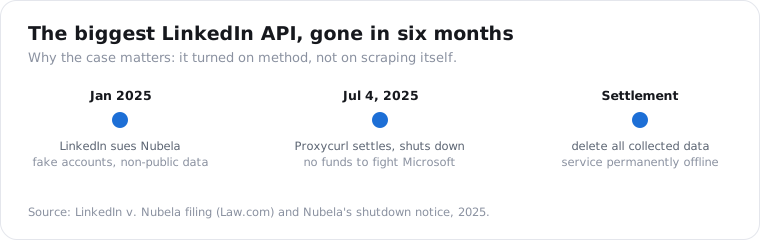
Here is why it matters for your shortlist. The lawsuit did not turn on “scraping is illegal.” It turned on how Proxycurl collected: fake member accounts and data that was never public.
So the question for any LinkedIn API in 2026 is not just what it costs. It is whether it reads public pages the way a logged-out visitor does, or whether it is doing the thing that just got a $10M company deleted.
How do LinkedIn scraping APIs actually collect data?
Three ways, with very different risk. Some read public profile pages logged out, the way any anonymous visitor does. Some drive your own logged-in LinkedIn account through automation, which violates LinkedIn’s terms and can get that account banned. And some, like Proxycurl, used fake accounts to reach non-public data, which is what draws lawsuits. The method decides the risk more than the price does.
Public-page reading is the calmest of the three. There is no login, no member session, and nothing behind a gate.
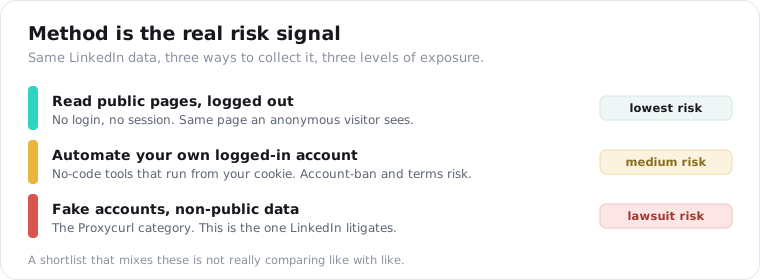
Logged-in automation is where most no-code tools sit. PhantomBuster and its kind run from a cookie you paste in from your own account, which is powerful and also puts your account on the line.
The sharpest line the 2026 scraping guides draw is this: do not hand your logged-in LinkedIn cookie to a third-party cloud you do not control, and keep any bulk work off your primary account. A public-page API sidesteps that entirely, because there is no cookie to hand over.
Fake-account scraping is the Proxycurl category. It reaches data the other two cannot, and it is the one LinkedIn litigates. No honest 2026 shortlist should include it.
What are the best LinkedIn scraping APIs in 2026?
The ones still standing, matched to what you need. After the Proxycurl shutdown, the field splits by job: per-profile lookups, bulk datasets, or no-code automation. Here are the six worth knowing, and the one thing each is best at. Prices were verified in August 2026 and move often, so re-check before you commit.
- ScraperSocial. A normalized read API with 38 LinkedIn endpoints covering profiles, companies, people and job search, posts, comments, and stats, at 1 to 5 credits each. Reads public pages logged out, no Sales Navigator seat. Best for broad LinkedIn coverage in one schema.
- Bright Data. Enterprise data infrastructure with a LinkedIn dataset around $2.50 per 1,000 records and volume discounts. Best for bulk file delivery at scale.
- Coresignal. A data provider with 895M-plus records, priced from $49 to $1,500 a month at roughly half a cent to twenty cents per record. Best for bulk employee and firmographic datasets.
- Apify. A marketplace of LinkedIn actors at $2 to $3 per 1,000 profiles, on a free tier or paid plans from $19 a month. Best for developers who want to run and control their own scrapers.
- PhantomBuster. A no-code automation tool from $69 a month that runs from your own logged-in session. Best for visual lead-gen workflows, with the account-risk caveat above.
- Scrapingdog. A general scraping API with LinkedIn endpoints from $40 a month that handles proxies for you. Best for cheap, do-it-yourself page fetches.
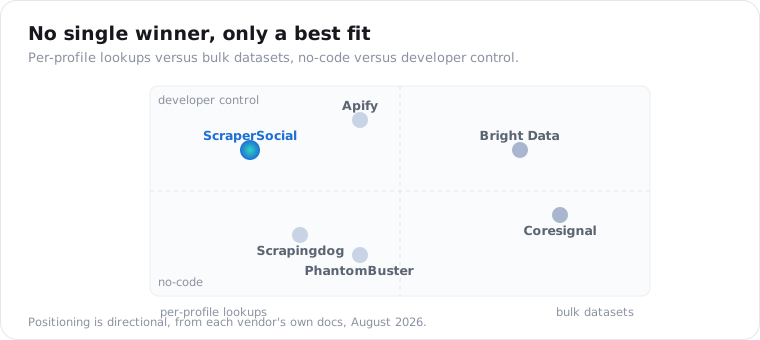
If you need Proxycurl’s old job, per-profile lookups by URL or name, the first row is the closest replacement. If you need millions of rows for enrichment, that is Bright Data or Coresignal, or another enterprise-infrastructure provider like Oxylabs or Nimble.
How much do LinkedIn scraping APIs cost?
For per-profile work, far less than a seat. ScraperSocial needs no Sales Navigator subscription and no logged-in account at risk, it starts at $5 a month against PhantomBuster’s $69 and Apify’s $19 paid tier, and 25 free credits let you pull 12 real profiles before paying. A profile that fails to come back is not billed.
Put a real workload through it. Enriching 80 inbound leads a month at 2 credits a profile is 160 credits, and one people search returning a full page of 25 matches at 2 credits each adds 50. That is 210 credits, about $1.05 of one $5 month, with no actor to run and no cookie to paste.
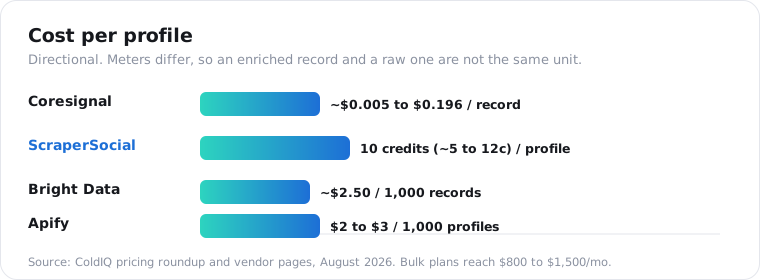
Here is the field side by side. The units are not identical across vendors, so weigh each bill against the work it leaves on your plate.
| Tool | Meter | Entry | Included, and what stays your job |
|---|---|---|---|
| ScraperSocial | Credits per item: 2 per profile (about 1 cent), 2 per search result, at least 45 a call | 25 free credits, then $5/mo | 38 LinkedIn endpoints, logged-out reads, one schema; nothing to run |
| Bright Data | Per record, ~$2.50 per 1,000 | Pay as you go | Bulk file delivery at enterprise scale |
| Coresignal | Plan, $49-$1,500/mo (~$0.005-$0.196 per record) | $49/mo | Pre-collected records; freshness varies |
| Apify | Plan plus actor fees, $2-$3 per 1,000 profiles | Free tier, paid from $19/mo | You pick, run, and maintain the actor |
| PhantomBuster | Per seat, $69-$439/mo | $69/mo | No-code flows on your own logged-in account |
Whatever the meter, price the whole job: the plan floor, the per-record rate, and the hours you spend running scrapers or protecting the account they log in with.
There is also a fork in what you are buying. A read API charges you to pull a profile live, while a B2B database like Coresignal sells access to records it already collected. The first is fresher and pay-as-you-go; the second is cheaper in bulk and can be months stale.
For the full official-versus-third-party math, the LinkedIn API pricing post walks through why LinkedIn’s own API has no public price list at all.
What LinkedIn data can you actually pull?
The public surface: profiles, companies, posts, comments, and search. A public-page LinkedIn API returns what a logged-out visitor can see, which is more than people expect. ScraperSocial exposes 38 LinkedIn endpoints, from a profile lookup at 2 credits to people search by keyword at 2 credits per result (at least 45 a call), plus company pages, job search, posts, comments, reactions, and stats.
What you do not get is the gated stuff. There is no full CV export, no private connections, no data behind a login.
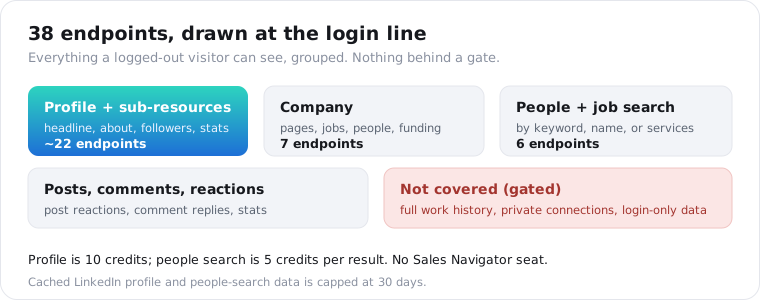
The profile object is deliberately flat: handle, name, headline, followers, location, current company, bio, verified badge, and an optional work email. No positions array, no education, no skills, because those sit behind LinkedIn’s gate and a public-page reader does not go there.
That boundary is the point. The endpoints document the public surface honestly rather than promising a resume dump they cannot deliver.
Is scraping LinkedIn legal?
Reading public pages has generally held up in US courts, but that is not a blanket yes. The long-running hiQ v. LinkedIn case established that scraping public data likely does not violate the Computer Fraud and Abuse Act, and LinkedIn’s enforcement has since shifted toward contract and fake-account claims, which is exactly how it beat Proxycurl. Public access and lawful use are different questions.
I am not a lawyer, and this is not legal advice.
The part that catches teams is privacy law, not access law. A LinkedIn record describes an identifiable person, so GDPR and CCPA apply to what you store regardless of the data being public. ScraperSocial caps cached LinkedIn profile and people-search data at 30 days for that reason, and you should set a retention window of your own.
The safe posture is boring on purpose: read public pages, do not automate a logged-in account, keep a short retention window, and honor deletion requests. That is the posture that does not end up in a filing.
The short version
The best LinkedIn scraping API in 2026 is the one whose method you can defend, at the price shape you need. Proxycurl’s shutdown made that the deciding factor: read public pages logged out, avoid fake accounts and logged-in automation, and treat every record as personal data. For per-profile lookups pick a normalized read API; for millions of rows pick a bulk dataset provider. Match the meter to your workload and re-check prices quarterly.
Frequently asked questions
What is the best LinkedIn scraping API in 2026?
It depends on the job. For broad LinkedIn coverage in one normalized API without a Sales Navigator seat, ScraperSocial fits. For enterprise bulk datasets, Bright Data or Coresignal. For running your own scrapers, Apify. For no-code lead-gen automation, PhantomBuster. Match the tool to whether you want per-profile lookups, bulk records, or a visual workflow.
What happened to Proxycurl?
Proxycurl shut down on July 4, 2025. LinkedIn sued its parent company Nubela in January 2025, alleging it created hundreds of thousands of fake accounts to scrape millions of profiles, including non-public data. Rather than fight LinkedIn, which is owned by Microsoft, Nubela settled, wound the service down, and agreed to delete the data it had collected.
Is scraping LinkedIn legal?
Reading public LinkedIn pages has generally survived legal challenges in the US, but it is not a blanket yes. Results describe identifiable people, so GDPR and CCPA apply to what you store, LinkedIn’s terms prohibit scraping while logged in, and using fake accounts or non-public data is what got Proxycurl sued. This is not legal advice; check your jurisdiction.
How much does a LinkedIn scraping API cost?
Less than a seat. ScraperSocial is $5 a month for 1,000 credits, a public profile is 2 credits (about 1 cent), and the 25 free credits at signup pull 12 profiles with no card. Failed calls are not billed. PhantomBuster starts at $69 a month, Apify charges $2 to $3 per 1,000 profiles in actor fees on top of a $19 paid tier, Bright Data is about $2.50 per 1,000 records, and bulk dataset plans reach $800 to $1,500 a month.
Can I scrape LinkedIn without a Sales Navigator seat?
Yes. A read API that pulls public pages does not need a LinkedIn login or a Sales Navigator subscription. You pass a profile URL or a search query and get structured JSON back. Tools that automate your own logged-in account, like PhantomBuster, do need a seat and put that account at risk; a public-page API does not.
What is the best Proxycurl alternative?
For per-profile lookups that replace Proxycurl’s core use, a public-page LinkedIn API like ScraperSocial returns profiles and people search by URL or keyword at a per-item price. For bulk datasets, Coresignal or Bright Data. The migration is mostly swapping the base URL and remapping fields, since both return JSON keyed on the profile.
Why does LinkedIn data come back with blank fields?
Because a public-page reader returns only what is on the public profile, and much of a LinkedIn profile sits behind a login. Full work history, private connections, and a work email are gated, so they come back null rather than guessed. A good API leaves them empty instead of inventing them, and does not charge for a call that fails outright.
Pull one public profile
Test the low-risk path before you commit to a plan. Send one public profile URL to the LinkedIn profile endpoint, read the JSON back, and see the 30-day retention and per-item price in practice. The quickstart issues a key in a minute, pricing has the credit math, and 25 free credits are enough to pull a 12-profile shortlist end to end.