By Nikhil Kumar. Last updated October 2026.
You want LinkedIn’s job data in a script, you go looking for the API, and you find a partner program with an application form and no price.
To get LinkedIn jobs data with an API, you send a query to a data API’s job-search endpoint and read the matching postings back as JSON: title, company, location, salary when it exists, and an apply link. LinkedIn has no self-serve official jobs API, so a third-party data API is the practical route. On ScraperSocial that is one GET request, 1 credit per job returned.
Is there a LinkedIn jobs API?
There is, but not one you can sign up for. LinkedIn’s official Job Posting API lives inside Talent Solutions, it exists to publish jobs through approved ATS and distribution partners, and LinkedIn is not accepting new ones. There is no self-serve, public endpoint to search or read the job inventory. So developers who want to query LinkedIn’s jobs reach for a third-party data API instead.
The distinction trips people up, so it is worth being blunt.
The official API is a write tool. It lets an approved partner push a job onto LinkedIn from their own system. It does not let you read the millions of jobs already there.
There is no credit-card tier that unlocks a read endpoint. The Recruiter and Jobs API sits behind a partnership agreement, costs $900 or more per seat a month, and still is not a public search API.
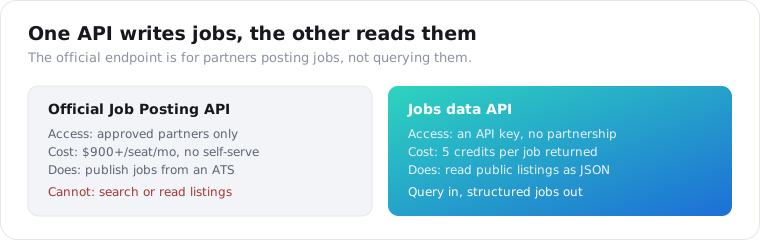
So the search “LinkedIn jobs API” almost always ends the same way: the thing you pictured, a clean public endpoint you query for listings, does not exist on LinkedIn’s own properties.
How do you get LinkedIn job postings as JSON?
Send a search query to a jobs data API and it returns the matching postings as a JSON array. On ScraperSocial you GET /v1/linkedin/job-search with a query like “python engineer remote,” and each result carries the title, company, location, posted date, employment type, salary when present, and an apply URL. It bills 1 credit per job returned, and there is no login or partner agreement.
Here is the whole call in a few lines of Python.
import requests
r = requests.get(    "https://api.scrapersocial.com/v1/linkedin/job-search",    params={"query": "python engineer remote", "limit": 25},    headers={"Authorization": "Bearer sk_live_..."},)for job in r.json()["data"]:    print(job["title"], "-", job["company"], "-", job["location"])
That is the shape every jobs use case starts from. Query in, structured listings out.
The query is where you shape the results. A search string plus filters for location, remote status, and how recently a job was posted narrows the pull to what you actually want, and a limit caps how many come back, which matters because you pay per job returned. Ask for 25 relevant roles, not 500 loose ones.
Each job in the array is a flat object. Alongside the headline fields you get the seniority level, the employment type, whether the role is remote or on-site, when it was posted, and a link to the company page. That is enough to filter, rank, and route a listing without a second call, which is the whole point of a structured endpoint over a raw HTML scrape.
The alternative is writing your own scraper against LinkedIn’s job pages, which I get into below. It works on your laptop and falls apart the moment you scale it.
What does a LinkedIn jobs API actually return?
A structured job object per posting, but the fields are only as complete as LinkedIn’s own listing. In one developer’s test of 90 pulled listings, the structured salary field was populated on just 20 percent, though 66.7 percent had some salary signal in the description text. 90 percent were full-time, and 67.8 percent returned an applicant count of zero. Expect title, company, and location to be reliable, and treat salary and applicants as best-effort.
This is the part most comparison posts skip, and it matters more than the vendor you pick.
A jobs API returns whatever LinkedIn shows on the listing. If the employer left salary out of the structured field and buried “$140k-$180k” in the description, the API gives you an empty salary field and a description string. No parser recovers a number that was never in a structured form.
Duplicates are the other surprise. In that same test, 13.3 percent of postings were the same company and title reposted across different cities. If you are counting openings, dedupe on company plus title before you trust the total.
Applicant count is the field to distrust most. It came back zero on more than two-thirds of listings, not because nobody applied but because LinkedIn does not expose the number consistently. If you are ranking roles by competition, do not lean on it. Use the posted date as your proxy instead, since a job that has been up for three days behaves very differently from one up for thirty.
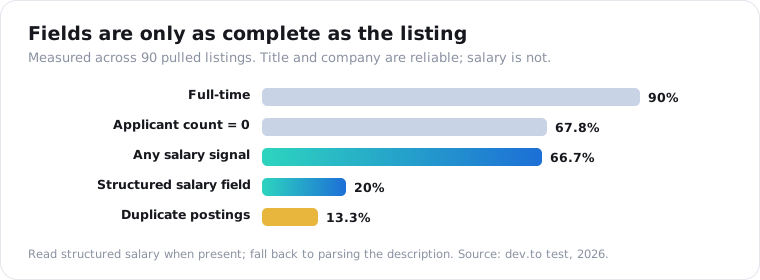
The practical move is to plan for missing fields. Read the structured salary when it is there, fall back to a regex over the description when it is not, and never assume every job carries every field.
The apply URL is the field that earns its keep. It is the one link that turns a listing from a row in a report into something a user can act on, so a job board or an alerting tool routes people straight to it. The description is the other workhorse, since it carries the requirements, the seniority, and the salary hints the structured fields miss.
Can you get a specific company’s open jobs?
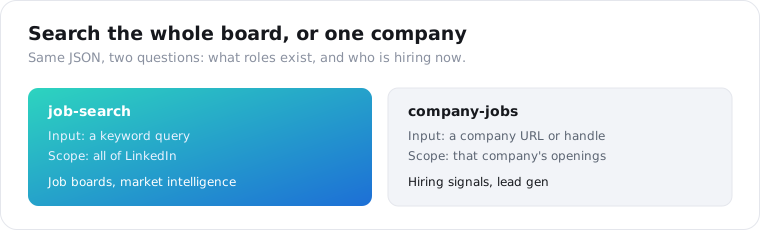
Yes, and that is a different endpoint. Pass a company URL or handle to /v1/linkedin/company-jobs and it returns that company’s current openings rather than a keyword search across all of LinkedIn. New roles at a company are a hiring signal: a team growing, budget moving, a competitor staffing up a product line. Sales and recruiting tools poll it to catch that the day it posts.
This is where jobs data turns into pipeline.
A company that just opened five sales roles is a company with a budget and a growth plan. B2B teams watch a list of target accounts and treat a burst of new openings as a reason to reach out.
Recruiters run it the other way, watching competitor headcount to know who is expanding and where. Either way, the company-jobs endpoint answers “who is this company hiring right now,” which keyword search cannot.
Here is one concrete loop. A sales team keeps a list of 200 target accounts, polls company-jobs for each one every morning, and flags any account that just opened a role tied to their product. A company hiring its first data engineer is a company about to buy data tooling. That signal, caught the day it posts, is worth more than the same news three weeks later in a newsletter.
The same two endpoints cover the other common jobs projects too. A niche job board fills itself from keyword searches run on a schedule. A salary or market-intelligence tool aggregates roles by title and region over time. A recruiting product maps who is hiring for what. All of it starts from the same JSON.
How fresh is LinkedIn jobs data, and how often should you pull?
As fresh as the moment you call, because the search reads live listings rather than a stale export. A job posted this morning shows up in this afternoon’s query. For a job board or an alerting tool that means polling on a schedule: run your saved searches every few hours, diff against what you already hold, and ingest only the new postings.
There is no historical archive to lean on.
Like LinkedIn’s own listings, the API shows what is live now, so a role that gets filled and taken down is gone. If you want a record of what a company posted over the past year, you have to have captured it yourself, day by day.
Identical repeat queries can return from cache in milliseconds, which keeps a busy poller fast. A cache hit bills the same credits as a fresh read, and when you need to force a live re-read, pass fresh=true on the call at the same price.
How often you poll is a cost-versus-freshness dial. A job board that wants near-real-time listings might pull its popular searches hourly, while a weekly market report runs the same searches once a day. Because you pay per job returned, the limit and the poll frequency are your two cost levers, so a tight search pulled a few times a day keeps the bill small while still catching new roles.
How much does LinkedIn jobs data cost?
A fraction of the official route. LinkedIn’s Recruiter and Jobs API asks $900 or more per seat a month, needs a partner agreement it is not handing out, and still only publishes jobs. ScraperSocial reads the public listings for 1 credit a job, roughly half a cent apiece, on a $5 monthly plan, and the signup credits cover a first test of 25 jobs and no charge when a call fails.
The rest of the bill is work you do not do. There is no parser to write, no proxy pool to rotate, and no selectors to patch when LinkedIn changes its job pages.
| Option | Billing | Way in | Output and upkeep |
|---|---|---|---|
| Official Jobs API | Partner seat, $900+/seat/mo | Partner approval, not open to new partners | Publish only, no search |
| ScraperSocial | 1 credit (about 0.5 cents) per job | 25 free credits, then $5/mo | Search and company jobs as clean JSON; nothing to run |
| Apify jobs actors | Per record, ~$1.50/1K PAYG | Free plan with monthly usage credit | You pick and run the actor |
| Bright Data | Per record, ~$2.50/1K records | Pay as you go | Large raw datasets |
| DIY scraper | Your time | Proxies + upkeep | 429 blocks and selector fixes |
Price your own loop before you pick. A sales team checking 20 target accounts once a week, at about two open roles each, pulls roughly 160 jobs a month, which is 160 credits and fits easily inside one $5 month. A job board ingesting 1,000 fresh roles a day is 1,000 credits daily, about 30,000 a month, or roughly $150 at $5 per 1,000 credits.
Pulling millions of job rows a month for a warehouse? Ask a bulk record vendor to quote that volume too.
Why do hand-rolled LinkedIn job scrapers break?
Because LinkedIn rate-limits aggressively, and job scraping runs straight into it. A single IP usually gets throttled around the tenth page of results, and past that you collect 429 blocks instead of jobs. The public guest endpoint helps a little, but at any real volume you are running proxy rotation, retries, and header spoofing, which is a maintenance job a data API absorbs for you.
Every open-source LinkedIn job scraper hits the same wall.
Tools like JobSpy work great for a few pages, then LinkedIn starts returning 429s and empty pages. The fix is proxies, and proxies are their own cost and their own code.
The guest endpoint some scrapers fall back to needs a real User-Agent and careful pagination offsets, and it still throttles once you push past a few pages. And every few weeks LinkedIn ships a markup change that quietly breaks your selectors, so the scraper is never finished. It is a thing you keep fixing for as long as you need the data.
That is the real trade. A DIY scraper is free until it is not, and the “not” is a rotating-proxy bill plus the hours you spend patching selectors every time LinkedIn changes its markup. A data API prices that maintenance into a per-job credit and moves on.
Is it legal to collect LinkedIn job data?
Job postings are public listings a logged-out visitor can see, and reading public pages has generally held up in US courts, which makes jobs lower-risk than profile data. But it is still automated access under LinkedIn’s terms, and a posting can name a recruiter. Keep a retention window, treat any personal fields under GDPR or CCPA, and get your own legal read before you build a permanent archive.
Do not take any of this as legal advice, though. That is a conversation for your own counsel, not a blog post.
Jobs are genuinely easier ground than profiles. A listing is content an employer published to be seen widely, which is a weaker privacy claim than a person’s profile carries.
Still, do the boring things. Store only what you need, drop recruiter names if you are doing aggregate market analysis, and honor deletion. Public does not mean consequence-free, and the safe posture is the same one we apply to LinkedIn profile data, where we cap retention at 30 days.
Pull one search to see the shape
Take a role and a location you care about. Send it to the LinkedIn job-search endpoint, read the JSON back, and check how many results carry a structured salary before you build on it. Spin up a key on the quickstart, see the per-job credit cost on the pricing page, and let 25 free credits cover the first real test. For the wider LinkedIn toolkit, the best LinkedIn scraping APIs post maps the rest.
Frequently asked questions
Is there a LinkedIn jobs API?
Not a self-serve one. LinkedIn’s official Job Posting API lives inside Talent Solutions and exists to publish jobs through approved ATS and distribution partners, and LinkedIn is not taking new partners. There is no public endpoint you can sign up for to search or read the job inventory. Developers who want to query LinkedIn jobs use a third-party data API that reads the public listings and returns them as JSON.
How do I get LinkedIn job postings as JSON?
Send a search query to a jobs data API and read the matching postings back as a JSON array. On ScraperSocial you GET /v1/linkedin/job-search with a query like ‘python engineer remote,’ and each result carries the title, company, location, posted date, employment type, salary when present, and an apply URL. It bills 1 credit per job returned, with no login and no partner agreement.
Does a LinkedIn jobs API include salary data?
Sometimes, and less often than you would hope. Salary is only as complete as the original listing. In one developer test of 90 pulled listings, the structured salary field was populated on just 20 percent, though about 67 percent had some salary hint in the free-text description. Treat title, company, and location as reliable, and salary as a best-effort field you may need to parse from the description yourself.
How do I get a specific company’s open jobs?
Use the company-jobs endpoint instead of keyword search. Pass a company URL or handle to /v1/linkedin/company-jobs and it returns that company’s current openings rather than a search across all of LinkedIn. New roles at a company are a hiring signal, so sales and recruiting tools poll it to catch when a team is growing or a competitor is staffing up. It bills the same 1 credit per job.
How much does a LinkedIn jobs API cost?
On ScraperSocial it is 1 credit per job returned, about half a cent, so one $5 month of 1,000 credits pulls about 1,000 jobs and 25 free credits test 25 first. Failed calls are not billed, and there is no partner agreement or parser to maintain. LinkedIn’s official Recruiter and Jobs API runs $900 or more per seat a month, only for approved partners, which is 180 times that $5 entry.
Is it legal to scrape LinkedIn job postings?
Job postings are public listings a logged-out visitor can see, and reading public pages has generally held up in US courts, which makes jobs lower-risk than profile data. But it is still automated access under LinkedIn’s terms, and a posting can name a recruiter. Keep a retention window, treat any personal fields under GDPR or CCPA, and get your own legal read before building a permanent archive. This is not legal advice.