By Nikhil Kumar. Last updated October 2026.
Almost everyone who searches “LinkedIn API pricing” is about to hit a wall the pricing page never mentions.
There is no public price list for the LinkedIn API, because access is gated by partnership approval, not a plan you can buy. The official APIs cover advertising, your own authenticated profile, and approved talent products. They do not sell general access to member profiles, company data, posts, or comments at any price. For that data you use a third-party data API, billed per record.
How much does the LinkedIn API cost?
The official LinkedIn API has no published price. It is not a paid plan you sign up for; it is an approval you apply for through the LinkedIn Developer Program, and most products (Marketing, Advertising, Talent Solutions) require becoming an approved partner. So the honest answer to “what does it cost” is: the barrier is access, not dollars. If your goal is pulling profile, company, or post data, the cost that matters is the third-party data API you will actually end up using.
That gap between what people search for and what exists is the whole story here. People type “LinkedIn API pricing” expecting a Stripe-style table. What they find is an application form.
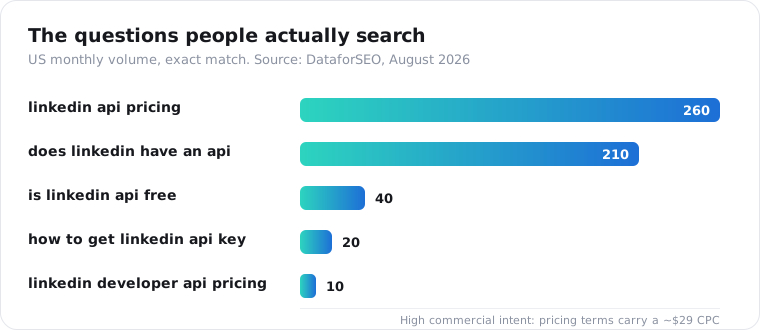
I find that mismatch telling. There are roughly 500 monthly searches in the US just for the pricing and “does this exist” questions, and the top results mostly rephrase LinkedIn’s docs without saying the quiet part: the API you want probably is not open to you.
Does LinkedIn have a public API?
Yes, but not the one most people are looking for. LinkedIn publishes several APIs through its Developer Program: Sign In with LinkedIn (OpenID Connect) for authenticating a user and reading their own basic profile, the Marketing API for managing ad campaigns, and partner-only programs like Talent Solutions and Sales Navigator. None of them let a third party pull arbitrary member profiles, company pages, posts, or comments. That capability simply is not offered.
Here is the practical line. Sign In with LinkedIn returns the profile of the person who just logged in, and nothing about anyone else. The Marketing API manages your advertising, not data retrieval. Everything richer sits behind partner approval that indie developers rarely get.
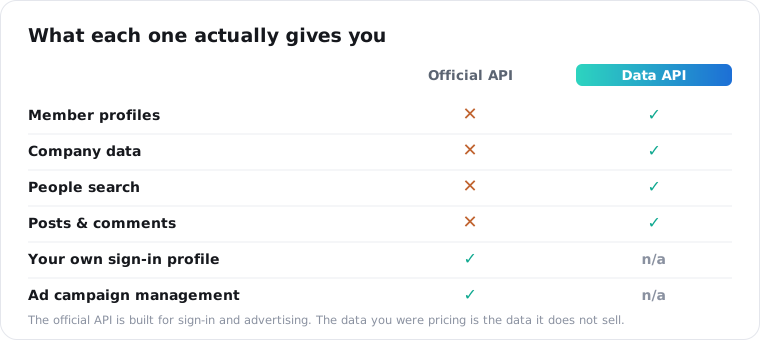
Read LinkedIn’s own developer documentation and this becomes clear fast. The products are built for advertisers, recruiters, and single-user sign-in, not for data collection.
Why can’t I just get LinkedIn data from the official API?
Because LinkedIn treats member data as the product, and it gates access to protect that. General profile and company data access requires partner-program approval, and applications framed around bulk data or scraping-style use are routinely declined. Even approved partners get scoped, purpose-limited access, not an open pipe to the graph. So the wall is by design, not a paperwork delay you can wait out.
The approval path looks straightforward on paper and rarely is in practice.
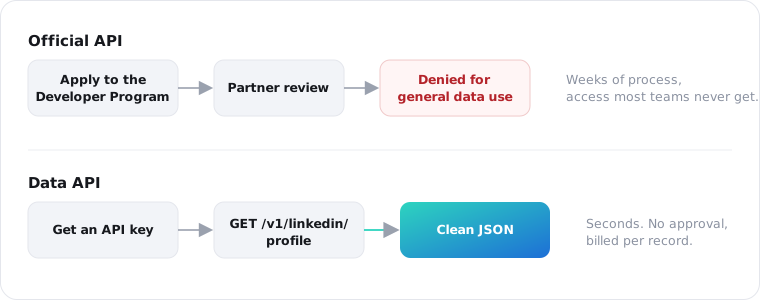
If you are building an internal tool, a CRM enrichment step, or a research dataset, this is where the official route ends for most teams. You are not doing anything exotic. You just want structured public data, and the first-party API was never built to hand it over.
What LinkedIn data can you actually get, and how?
You can get public profile, company, post, comment, and search data through a third-party data API, called with a URL or a handle. Instead of applying for partner access, you send one authenticated GET request and get clean JSON back. There is no login with your own account, so there is nothing to get your personal profile flagged. Public data only, read logged out.
import requests
resp = requests.get(    "https://api.scrapersocial.com/v1/linkedin/profile",    params={"url": "https://www.linkedin.com/in/some-public-profile/"},    headers={"Authorization": "Bearer sk_live_..."},    timeout=120,)print(resp.json()["data"])
The endpoints that map to what people ask the official API for:
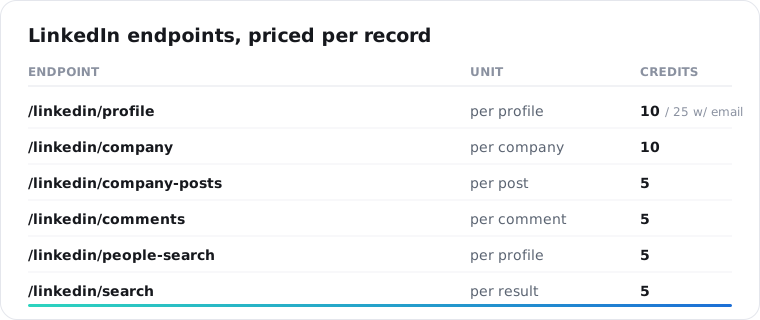
People search is the one worth calling out, because it is the request the official API answers with a flat no. You can query for people and get structured profiles back without a Sales Navigator seat, which is a workflow LinkedIn otherwise reserves for its paid sales product. Sales Navigator starts at $119.99 per seat per month (billed annually) and still does not hand you an export or an API.
How much does LinkedIn data cost through a data API?
You pay per record in credits, not a flat monthly platform fee. A profile is 2 credits, or 5 with a verified email appended. A company page is 2 credits, company posts are 1 credit each, comments are 1 credit each, and people-search results are 2 credits each, with a 45-credit minimum per search call. Credits cost $0.005 on the monthly plan and $0.0045 on annual, so a profile lookup is about one cent, and the 25 free signup credits cover twelve profiles before you pay anything.
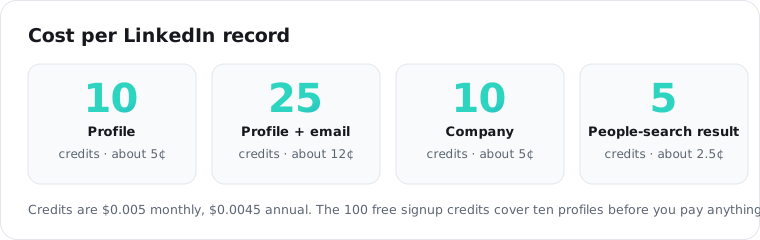
The pricing model is the real difference from the official route. There is no partner application, no minimum commitment, and no seat. You spend a cent or two per record and stop when you are done.
| Official LinkedIn API | Data API (ScraperSocial) | |
|---|---|---|
| Access | Apply, partner approval | API key, instant |
| Published price | None (partner-negotiated) | $0.0045 to $0.005 per credit |
| Profiles / companies | Not for third parties | Yes, per record |
| People search | No | Yes, per result |
| Posts / comments | No (general access) | Yes, per item |
| Best for | Ads, sign-in, approved partners | Enrichment, research, tools |
What can you build with LinkedIn data this way?
The three common builds are sales enrichment, recruiting research, and company monitoring. Enrichment takes a name or a profile URL from your CRM and fills in title, company, and location. Recruiting research runs a people search and pulls the matching profiles. Company monitoring watches a company page and its posts for hiring signals or announcements. All three are the same two or three calls, wired into your own tool.
The pattern that unlocks most of this is chaining people search into profile lookups. You search for the people who match a role or company, then pass each result’s URL to the profile endpoint for the full record.
hits = get("/v1/linkedin/people-search", {"query": "head of growth fintech"})for person in hits["data"]: full = get("/v1/linkedin/profile", {"url": person["url"], "include_email": "true"}) save(full["data"])That is a lead list with verified emails, built from a keyword, without a Sales Navigator seat or a partner application. The people search endpoint handles the query side and the profile endpoint fills in the detail. Company data works the same way: pull a company page, then its posts, on a schedule.
Is scraping LinkedIn data legal?
Public data collection sits in a contested but widely practiced area, and the safe posture is to stick to public data, avoid logging in with a personal account, and cap how long you retain personal information. In hiQ Labs v. LinkedIn, the Ninth Circuit reaffirmed in April 2022 that scraping publicly available data does not violate the Computer Fraud and Abuse Act, though LinkedIn later won on a breach-of-contract theory, so a platform’s terms are a separate question from that federal law. Treat it as a compliance decision, not a settled yes.
This is the part LinkedIn data buyers care about most, so it is worth being specific. ScraperSocial reads only public, logged-out data, and LinkedIn profile records are held under a 30-day retention cap rather than kept indefinitely. If someone requests deletion, there is a purge path keyed to the record. That is the posture that keeps a data workflow defensible.
None of this is legal advice. If your use case is high-volume or commercial, run it past counsel.
Official API or data API: which should you use?
Use the official LinkedIn API when you need to post ads, authenticate a user with Sign In with LinkedIn, or you are an approved Talent or Marketing partner. Use a data API when you need to read public profiles, companies, posts, comments, or search results, and you do not want to spend three weeks in an approval process for access you probably will not get. The two barely overlap, so the decision is really about which job you are doing.
For most developers who searched “LinkedIn API pricing,” the answer is the data API, because the thing they were pricing was never for sale.
Frequently asked questions
Is the LinkedIn API free?
There is a free tier for narrow, approved use cases like Sign In with LinkedIn, which reads the authenticated user’s own basic profile. There is no free, open API for pulling other members’ profiles, company data, or posts. That data is partner-gated regardless of price, so “free” is not really the blocker; access is.
How do I get a LinkedIn API key?
You apply through the LinkedIn Developer Program, create an app, and request the products you need. Sign In with LinkedIn and basic Marketing access are attainable; general profile and company data access requires partner approval that is often denied for data-collection use cases. A third-party data API issues a key instantly instead, with no approval step.
Does LinkedIn have an API for scraping profiles?
No. LinkedIn’s official APIs do not offer third-party access to arbitrary member profiles, and scraping-style use is against its terms. Developers who need public profile data at scale use a third-party data API that reads public pages and returns structured JSON, rather than the official developer platform.
How much does LinkedIn profile data cost?
Through a data API, a single LinkedIn profile is 2 credits, or 5 credits with a verified email attached. At $0.0045 to $0.005 per credit, that is about 1 cent for the profile, or about 2.5 cents with the email. The official API does not sell profile data at any listed price, so there is no first-party figure to compare against.
Can I get LinkedIn data without a Sales Navigator seat?
Yes. People search and profile lookups through a data API do not require a Sales Navigator subscription. You query by keyword or pass a profile URL, and get structured results back at 2 credits per record (a people search bills at least 45 credits a call). Sales Navigator is a paid LinkedIn product for its own interface, separate from any programmatic data access.
Is there a public price list for the LinkedIn API?
No. LinkedIn does not publish API pricing because access is negotiated through its partner programs rather than sold as tiers. This is exactly why the search term returns so little useful information. If you need a predictable per-call price for LinkedIn data, that comes from a third-party data API, not from LinkedIn.
Start with one profile
Pass a single public LinkedIn URL to the profile endpoint and see the shape for yourself. The 25 free signup credits are enough for twelve profiles, enough to decide whether the data covers what you need before you spend anything.