By Nikhil Kumar. Last updated October 2026.
Meta deleted the Facebook Groups API. Not restricted it. Deleted it.
To scrape a Facebook group in 2026, you send the public group’s URL to a data API that reads the page directly, because the official Groups API no longer exists. It returns each public post as JSON, with the text, the author, the reaction breakdown, and the comment and share counts. No Facebook app, no app review, no login for public groups.
Is there a Facebook Groups API?
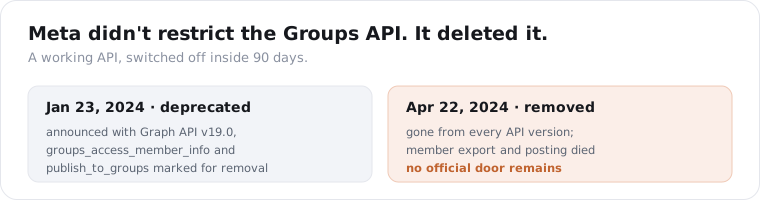
No, not since 2024. Meta deprecated the Facebook Groups API on January 23, 2024 alongside Graph API v19.0, and removed it from every API version on April 22, 2024, per Meta’s Graph API changelog. The permissions that let apps read group content, export members, and publish to groups went with it. There is no official door to knock on anymore.
This is different from most “no API” stories, and worse.
Facebook Marketplace never had an API, so nobody lost anything. Groups is different: there was a working API, tools were built on it, and then it was switched off. Meta also cut the ability for group admins to install apps on a group, so even the admin-consent workaround is gone.
Two permissions carried group access. groups_access_member_info returned member and content data. publish_to_groups handled posting. Both were retired in the April 2024 change, which is why every third-party scheduler and analytics tool that touched groups stopped working that month.
So the question is no longer “official API or third-party.” It is “third-party, or nothing.” For reading public group posts, a data API that reads the public page is the only route left.
There is one narrow exception, and it is not for most people. Meta runs a Content Library that serves public group and page data to approved academic and nonprofit researchers through a vetted application. If you are an accredited institution studying public discourse, that is a legitimate door. If you are a marketer or a developer, it is not an option, and the public-page route is what you have.
How do I scrape a Facebook group with an API?
Send the public group’s URL to a group-posts endpoint and read the JSON. One GET request with the group URL or handle returns the group’s recent public posts, each with the text, author, reaction counts, and comment and share counts. Grab a key from the quickstart, which hands you 25 free credits with no card, and the call is a few lines of Python.
import requests
resp = requests.get(    "https://api.scrapersocial.com/v1/facebook/group-posts",    params={"url": "https://www.facebook.com/groups/123456789", "limit": 50},    headers={"Authorization": "Bearer sk_live_..."},    timeout=300,)for post in resp.json()["data"]:    print(post["posted_at"], post["likes"], post["caption"][:80])
The endpoint takes the group as a full URL, a vanity name, or the numeric ID. You do not need to be a member of the group, and you do not need a Facebook account, because it reads the public group page the same way a logged-out visitor sees it.
Only public group pages are in reach. Private and closed groups never show up, which is how it should be.
For the comment threads under a post, you make a second call. The group-posts endpoint gives you the post and its comment count; to read the actual comments, pass the post URL to the Facebook page posts and comments endpoint, which handles group post comments the same way.
Who actually reaches for this? Community managers watching their niche’s groups for questions to answer. Market researchers tracking what a buying audience complains about. Lead-gen teams scanning local buy-and-sell or service-request groups for intent. Every one of them wants the post stream in their own system, not a browser tab they have to scroll.
You could try to scrape the group yourself with a headless browser. It rarely survives production. Facebook serves logged-out visitors a stripped page, rotates the GraphQL tokens the feed needs, and blocks datacenter IPs quickly, so a naive scraper gets a login wall or an empty result within a few requests. A managed API runs the proxies and the token handling so the post field is where you expect it.
What data can you get from a Facebook group?
The public post stream: text, author, reactions, comments count, shares, and the group’s own id and name. Each record is one post, and it carries the full reaction breakdown, not just a total. What you do not get is member data, because that access was removed in 2024.
{ "data": [ { "id": "122098765432", "url": "https://www.facebook.com/groups/123456789/posts/122098765432/", "caption": "Anyone have a recommendation for a reliable plumber in the north end?", "likes": 34, "comments": 28, "shares": 2, "posted_at": "2026-10-02T14:11:00Z", "author": { "handle": "100001234567", "name": "Jane D." }, "group": { "id": "123456789", "name": "North End Neighbors" }, "reactions": { "like": 30, "love": 4, "top": 34 } } ]}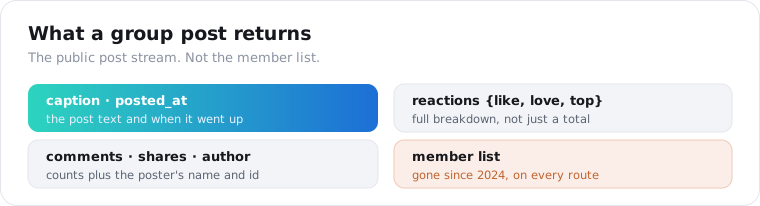
The reactions object is the part worth paying attention to. A post with 30 likes and 4 loves reads very differently from one with angry reactions, and the breakdown tells you sentiment the raw like count hides.
The author field is the person as shown on the post, the name and profile id attached to it. That is public post metadata, not a member export. You cannot enumerate everyone in the group, only the people who actually posted in the window you pulled.
Here is a concrete use of that shape. Pull a local services group’s last 500 posts, filter the captions for “recommendation” or “anyone know a,” and you have a ranked list of the exact services people are actively asking for in that community, with the engagement each request drew. That is market demand in people’s own words, and it falls straight out of the caption and reaction fields with no extra tooling.
One honest note on completeness. This endpoint’s field list comes from documented output, not a full live run, so treat the field list as the documented shape and verify against your real target group before you build on it.
Can I scrape a private Facebook group?
Not with a public data API. Private and closed groups show their posts only to members, so a logged-out reader, which is what a public-page scraper is, sees nothing. Reading a private group requires a logged-in session from an account that already belongs to it, usually passed as a session cookie, and that is a different risk category entirely.
Here is the line I draw.
A public group is readable because its posts are public. Anyone with the link sees them, so pulling them is low-risk in the same way reading any public page is.
A private group is members-only by design. To scrape it you have to act as a member, which means either using your own membership or joining specifically to collect data. The second one is the move that gets accounts banned and crosses into “joined under false pretenses,” which is where the real legal and account risk lives.
Our group-posts endpoint reads public groups only. If your target is private, no honest public API can hand it to you, and you should treat anyone who claims otherwise with suspicion.
Can I still export Facebook group members?
No. Member export died with the Groups API in April 2024, on every route. The groups_access_member_info permission that returned member lists and member profiles was retired in Meta’s v19.0 change, so neither the official API nor a third-party tool returns group membership data anymore. The post stream survives; the member directory does not.
This trips up a lot of old workflows.
Plenty of lead-gen pipelines used to pull every member of a niche group and work the list. Those stopped in 2024, and no tool has brought them back, because the data access itself was cut at the platform level, not just in one API.
What you can still do is read who posts. If someone publishes in a public group, their name and profile id come back on that post. So you can build a picture of the active participants in a group over time, which is often more useful than a raw member dump anyway, because it filters for people who actually engage.
If a tool today promises a full member export of an arbitrary group, be careful. Either it is reading a private group through someone’s logged-in session, or it is overstating what it returns.
How much does it cost to scrape a Facebook group?
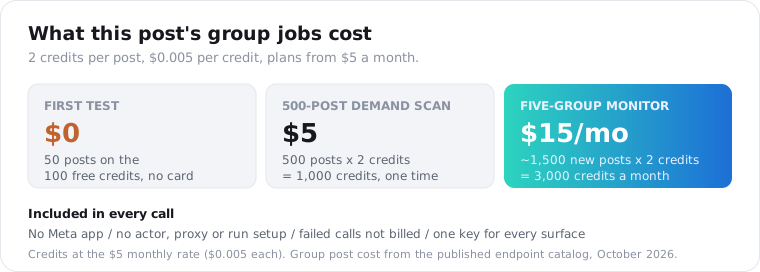
You can see real group data before paying anything, and the paid plan starts at $5 a month. A group post costs 2 credits (roughly 1 cent); the first 25 credits arrive free with no card, and if Facebook blocks a pull you are not charged for it. There is no Meta app to register, no actor to choose, and no run to configure: a group URL goes in and posts come back.
That same key also reads page posts, comment threads, events, and Marketplace listings, and each one answers in the { data, meta, request_id } envelope. A group monitor that later grows to pull the comments under its busiest posts stays on one balance and one parser.
The other routes are tools you operate. The Apify Facebook group actors list around $0.70 per 1,000 public posts, and with them you choose the actor, start each run, and map its output into your own schema. Bright Data’s collector is roughly $1.50 per 1,000 records.
Now price the jobs from this post. The 500-post demand scan of a local services group is 1,000 credits, or $5. Watching five neighborhood groups and pulling only what appeared since your last stored post id, roughly ten new posts a day in each, comes to about 1,500 posts a month: 3,000 credits, or $15 at the monthly rate.
If the plan is a daily harvest across hundreds of groups, price a bulk per-record provider alongside this one.
How do I pull a whole group or many posts?
Set resultsLimit and page through the group in chronological order. One call returns up to 1,000 posts, and the default CHRONOLOGICAL view gives a stable ordering you can paginate without duplicates. For more than one group, send the calls concurrently, since each group is independent.
from concurrent.futures import ThreadPoolExecutor
def pull(group_url):    r = requests.get("https://api.scrapersocial.com/v1/facebook/group-posts",                     params={"url": group_url, "limit": 200}, headers=H, timeout=300)    return r.json()["data"] if r.ok else []
with ThreadPoolExecutor(max_workers=6) as pool:    all_posts = [p for batch in pool.map(pull, group_urls) for p in batch]
The view option matters for what you get back. CHRONOLOGICAL is newest-first and stable, which is what you want for monitoring. TOP_POSTS returns the most-engaged posts instead, which is better for a one-time pull of a group’s greatest hits.
Keep the cadence sane. For monitoring a group, a daily pull of the latest posts beats hammering it hourly, because most groups do not post fast enough to justify it, and you pay per post either way.
Store the post id you last saw per group. On the next run, stop paging once you hit it, and you only process new posts instead of re-pulling the whole history.
Set expectations on depth, though. A logged-out reader does not get a group’s entire back catalog; the public feed exposes a recent window, so a 1,000-post pull means the latest 1,000, not every post since the group was founded. If you want long-run history, you build it forward by polling and storing, the same way you would track prices or reviews over time. There is no button that hands you five years of a group at once.
Is it legal to scrape a Facebook group?
Scraping public group posts is generally legal in the US, but it breaks Meta’s terms, so your exposure is contractual, not criminal. US courts have repeatedly held that reading a public web page is not a hacking offense, as the hiQ Labs v. LinkedIn case established, so pulling posts from a public group is low-risk in practice. Meta’s terms still prohibit it, which is a separate matter from the law.
The risk climbs fast when you cross two lines.
The first is private groups. Reading them means acting as a logged-in member, and joining a group to harvest it is where account bans and “unauthorized access” arguments start to bite.
The second is personal data. Group posts contain real people’s names and opinions, so GDPR and CCPA apply if you store or process that data for EU or California residents. A public post being readable does not make the person’s data free to warehouse.
My rule: read public groups only, pull the posts not the people, keep volume reasonable, and talk to a lawyer before you build a product on it. An API handles the fetching; it does not transfer Meta’s terms or your GDPR duties onto the vendor.
Frequently asked questions
Is there a Facebook Groups API?
No, not anymore. Meta deprecated the Facebook Groups API on January 23, 2024 and removed it from every API version on April 22, 2024, retiring the permissions that let apps read group posts, export members, or publish to groups. The only route to public group data now is a third-party data API that reads the public group page.
How do I scrape a Facebook group without the API?
Use a data API that reads the public group page directly. Send the group’s URL to a group-posts endpoint and it returns each public post as JSON, with the text, author, reaction counts, comment count, and shares. No Facebook account, app review, or login is required for public groups, because the endpoint reads what any logged-out visitor sees.
Can I scrape a private Facebook group?
Not through a public data API. Private and closed groups show posts only to members, so reading them requires a logged-in session of an account that already belongs to the group. That carries real account and legal risk, especially if you joined to collect data. A public-page reader only returns posts from public groups.
Can I still export Facebook group members?
No. The groups_access_member_info permission that powered member exports was retired with the Groups API in April 2024, so no official or third-party route returns member lists or member profiles anymore. What survives is the public post stream: the posts themselves, their authors as shown on the post, and engagement counts.
How much does it cost to scrape a Facebook group?
Testing it costs nothing: 25 free signup credits, no card, pull 12 group posts. After that a post is 2 credits, about 1 cent, on a $5 monthly plan with no contract, and errored requests cost nothing. Apify’s group actors list around $0.70 per 1,000 posts and Bright Data’s collector about $1.50 per 1,000 records.
Is it legal to scrape a Facebook group?
Scraping public group posts is generally legal in the US, where courts have treated collecting public data as lawful, but it breaks Meta’s terms, so the risk is contractual, not criminal. Private groups and any personal data pull in GDPR and CCPA obligations. Read only public posts, keep volume reasonable, and get legal advice before a commercial build.
Start with one public group
Pick one public group you care about, grab its URL, and run it through the group-posts endpoint with your first key. The 25 free credits pull 12 posts, enough to see the fields and the reaction breakdown before you pay anything. Want to see how the group surface stacks up against pages, ads, and Marketplace? The Best Facebook data APIs roundup ranks all four, and the Facebook Marketplace API guide covers the other surface Meta never gave a door.