By Nikhil Kumar. Last updated October 2026.
You find a competitor underpricing the exact item you flip, you go to script it, and you hit the wall: Facebook Marketplace has no API.
Facebook Marketplace has no official API, so the only way to pull listings at scale is a data API that reads the public Marketplace pages for you. You send a keyword, and you get back each listing’s price, location, and status as JSON, with no login and no proxies to run. This guide shows how to do that in a few lines, exactly what fields you get, and where the legal line sits.
“facebook marketplace api” draws about 720 US searches a month, according to DataforSEO keyword data pulled in September 2026. Almost everyone searching it is about to learn the API they want was never built.
Does Facebook Marketplace have an API?
No. Meta ships no official Marketplace API, and the Graph API does not touch Marketplace listings. The only routes to the data are unofficial: your own browser scraper, a fragile open-source library, or a managed data API that reads the public listing pages. Because there is no official option, the real question is not whether to use a third-party tool, but which one.
This is the part that surprises people.
Every other Facebook surface has some official door. Pages have the Graph API, ads have the Ad Library API. Marketplace has nothing. You can browse it logged out in a phone browser, but there is no endpoint behind it that Meta will hand you.
So a search for “Facebook Marketplace API” ends the way the Facebook Ad Library one does. The clean endpoint you pictured does not exist, and the public data is reachable only by reading the pages the way a visitor does.
Why is there no official Marketplace API?
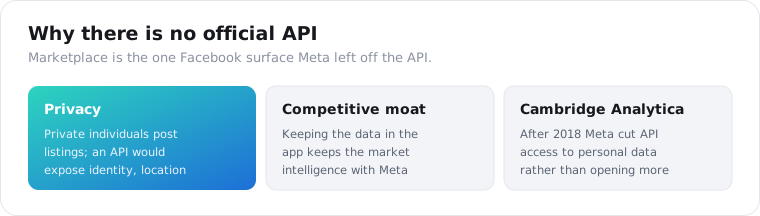
Because Marketplace is consumer-to-consumer data, and Meta has three reasons to keep it locked. The listings come from private individuals, so an open API raises real privacy questions about seller identity and location. An official feed would also let competitors build better price-comparison and market-intelligence tools on Meta’s data. And after Cambridge Analytica, Meta cut API access to personal data broadly rather than expanded it.
Put those together and an official Marketplace API is something Meta has no reason to build.
Privacy is the honest one. A car listing carries a person’s approximate location, their name, and a way to contact them. Meta exposing that through a queryable API, rather than a page you have to browse, is a liability it chose to avoid.
The competitive reason is the quieter one. Marketplace pricing data is valuable, and keeping it inside the app means the market intelligence stays with Facebook. An open API would hand that edge to anyone.
What are the ways to scrape Facebook Marketplace?
Three, and they trade effort against reliability. You can build your own browser scraper with proxies, run an open-source library, or call a managed data API. The first gives the most control and the most maintenance, the second is free until it breaks, and the third is a request-and-response with the infrastructure handled for you.
Here is the honest ranking by how much work each leaves you.
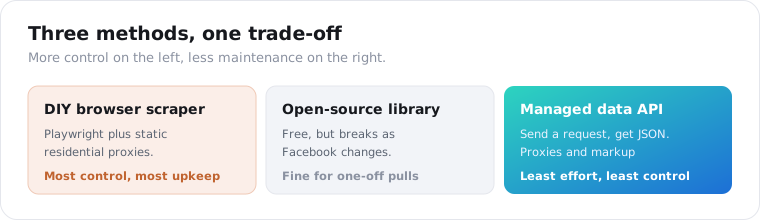
A DIY scraper with Playwright or Puppeteer is the maximum-control option. It is also a part-time job. Marketplace sits behind a login wall, and Facebook is the most aggressive anti-scraping platform in 2026: it blocks datacenter IPs within a request or two, so you need authenticated sessions on static residential proxies that build trust over weeks. You are maintaining a browser farm, not running a script.
Open-source libraries like kevinzg/facebook-scraper were strong from 2020 to 2022, and most of their functions now require a logged-in account as Facebook has tightened access. For a one-off pull where downtime is fine, they still have a place. For anything that has to stay up, they do not.
A managed data API is the request-and-response option. It reads the public Marketplace pages on its own residential infrastructure, so no login, no proxies, and no markup-chasing land on you. You give up per-request control and trust the provider’s uptime, which for most projects is the right trade.
How do you get Marketplace listings with an API?
You send a keyword to the search endpoint and read the matching listings back as a JSON array. The API queries Facebook’s public Marketplace search and returns each listing as a structured object, with no Facebook account and no proxy setup. On ScraperSocial you GET /v1/facebook/marketplace-search with a query, billed 3 credits per listing returned.
Here is the whole call in a few lines of Python.
import requests
r = requests.get(    "https://api.scrapersocial.com/v1/facebook/marketplace-search",    params={"query": "road bike", "limit": 25},    headers={"Authorization": "Bearer sk_live_..."},)for item in r.json()["data"]:    print(item["title"], item["price_formatted"], item["location"], item["is_sold"])
Keyword in, listings out. No token exchange, no login, no proxy pool.
One honest limit to design around: the search takes a keyword, not a location or radius. The query runs against Facebook’s general Marketplace search, so you filter by city or distance yourself after the results come back, using the location field on each listing. If you need one specific listing you already have a link to, /v1/facebook/marketplace-item takes the URL and returns that single listing as the same object.
Two mechanics matter here. The limit sets how many listings come back and is also your cost dial, so ask for what you need rather than a big round number. And there is no cursor, so a second call re-reads from the top of the search rather than paging deeper, which means this route is built for monitoring a category on a schedule, not for walking an entire category end to end in one run.
Getting started costs nothing: the 25 signup credits need no card and return about 8 listings, and after that it’s $5 a month, cancel anytime. After that, cost tracks what you pull. At 3 credits a listing, a 200-listing sweep of a category is 600 credits, about $3, and a blocked or failed call is not billed, which matters on a platform this hostile to scrapers.
What data can you get from a Marketplace listing?
The market data, not the seller’s life. Each listing returns its id, title, url, price as a number, a formatted price, the currency, a city-level location, a thumbnail image, whether it is sold, whether it is live, and the seller’s display name and id. What you do not get is the full description, exact GPS coordinates, or seller contact details, which keeps the output to market data rather than personal information.
That field set is deliberately aggregate, and it is the right shape for most jobs.
{ "id": "1234567890", "title": "Trek road bike, 56cm", "url": "https://www.facebook.com/marketplace/item/1234567890", "price": 450, "price_formatted": "$450", "currency": "USD", "location": "Austin, TX", "thumbnail": "https://.../photo.jpg", "is_sold": false, "is_live": true, "seller": { "handle": "100...", "name": "Example Seller" }}The price and status fields are what make this useful. A price you can average across a category, an is_sold flag that tells you what actually cleared, and an is_live flag that tells you what is still on the market. Those three turn a page of listings into a read on a local market.
What is missing is intentional. There is no description, no phone number, and no precise pin, because those are the seller-identifying details you do not need for price analysis and should not be bulk-collecting anyway.
What should you check before choosing a Marketplace scraper?
Three things the tool listings skip: how it handles location, how fresh the data is, and how it prices failed requests. Marketplace is local and fast-moving, so a scraper that cannot filter by area or hands you stale prices is worse than no data. These decide whether the pull is usable, and the sticker rate does not.
Location handling is the first gap. Marketplace is inherently local, but many APIs, including this one, search Facebook’s general Marketplace and return a city on each listing rather than letting you set a radius up front. That means you filter client-side, so check whether a tool gives you a real location field to filter on at all.
Freshness is the one that burns you. Prices change and items sell within hours, so a cached or slow-refreshing source shows you listings that are already gone. The is_sold and is_live flags exist for exactly this reason; if a tool does not tell you whether a listing is still active, its prices are a snapshot of the past.
Then billing on failures. Facebook blocks aggressively, so some share of requests will fail, and how a provider charges for those matters. Bright Data’s pay-per-success model and per-item APIs that only bill on returned results protect you from paying for blocks; a per-attempt tool does not. Match the billing unit to a platform that fights back.
What can you use Facebook Marketplace data for?
Mostly pricing intelligence and sourcing, done at scale instead of by hand. Resellers and flippers find underpriced inventory by pulling prices across a category, used-car dealers check what similar vehicles list for before they buy at auction, and market researchers track pricing and supply across regions. The data is prices, conditions, and locations, so the use cases are about markets, not individuals.
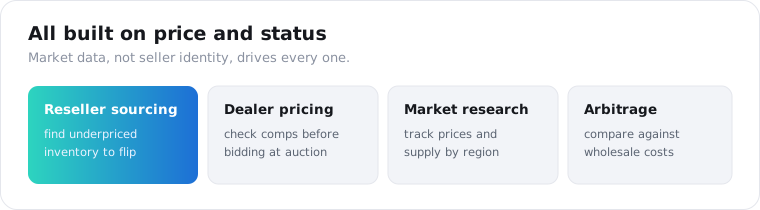
Reseller sourcing is the most common reason people build this.
Car flippers are the clearest example: pull a category, sort by price, and the listings sitting well under the local average are the sourcing candidates. Doing that by hand across a city is hours; doing it on a schedule is a query.
Dealer pricing is the next one. An independent used-car dealer pulls what comparable cars are listed at in their market before bidding at auction, so they know their resale ceiling going in. The is_sold flag shows which of those cars actually cleared, which is a sharper signal than asking prices alone.
Market research rounds it out. Analysts track pricing trends and inventory across categories and regions, watching how prices shift week to week and how fast listings clear. It is a live read on a local secondhand economy that no official dataset publishes.
One worked loop ties it together. A flipper picks a category and pulls marketplace-search on a morning schedule, filters the results to their metro by the location field, and flags anything priced under the category’s rolling median. New-and-underpriced is the sourcing signal, and days later the is_sold flag tells them whether that read on the market was right. The whole thing is a scheduled query and a median, not a team of people refreshing tabs. That is the difference the API makes: the same judgment a good flipper already has, applied to every listing in the category at once instead of the handful they can eyeball by hand.
Is it legal to scrape Facebook Marketplace?
Reading public listings is collecting public data, which US courts have generally treated leniently, but this is not legal advice and Facebook’s terms are a separate question from the law. The safer posture is to keep aggregate market data, prices, conditions, and locations, and to avoid bulk-harvesting seller PII or republishing raw listings as your own product. Study the market; do not build a directory of people.
The line is between market data and personal data.
Prices, categories, conditions, and how long an item stays live are market signals, and collecting them to understand a market is a well-trodden path. A seller’s name, precise location, and contact details are personal data under GDPR and CCPA the moment you store them, so keep only what your analysis needs and set a retention window.
The reuse rule matters too. Analyzing Marketplace prices to inform your own buying is fair game; scraping listings to repost them on another site is a different thing that copies both content and someone’s personal data. None of this is legal advice, so get your own read before you build on it commercially.
Which method should you choose?
Match the method to how long it has to run. For a one-time pull where breakage is fine, an open-source library or a quick browser script still works. For anything that has to stay reliable, a managed data API is the lower-effort, lower-risk path, because it absorbs the login wall, the proxy rotation, and the markup changes that make DIY Marketplace scraping a maintenance job. Decide whether you are running this once or running it forever, and the choice follows.
Frequently asked questions
Does Facebook Marketplace have an official API?
No. Meta publishes no official Facebook Marketplace API, and the Graph API does not cover Marketplace listings. Marketplace is consumer-to-consumer data posted by private individuals, so Meta keeps it off the API for privacy and competitive reasons. Every route to Marketplace data at scale is a third-party scraper or data API that reads the public listing pages, because there is no official option to choose instead.
How do I scrape Facebook Marketplace listings?
Send a keyword to a data API that reads the public Marketplace pages and get the listings back as JSON. On ScraperSocial that is a GET to /v1/facebook/marketplace-search with a query, 3 credits per listing returned. Each listing comes back with its title, price, location, thumbnail, and seller name, with no Facebook login and no proxy management on your side.
Can I scrape Facebook Marketplace without logging in or getting blocked?
Not reliably on your own. Marketplace sits behind a login wall, and Facebook is the most aggressive anti-scraping platform in 2026, blocking datacenter IPs within a request or two. A DIY scraper needs authenticated sessions and static residential proxies that build trust over weeks. A managed data API handles that infrastructure for you, so you send a request and get JSON without running any of it yourself.
What data can I get from a Facebook Marketplace listing?
The market data, not the seller’s identity. A search returns each listing’s id, title, url, price and formatted price, currency, city-level location, thumbnail image, sold and live status, and the seller’s display name and id. What you do not get is the full description, exact GPS coordinates, or seller contact details, which keeps the output to aggregate market data rather than personal information.
Is it legal to scrape Facebook Marketplace?
Reading public listings is collecting public data, which US courts have generally allowed, but this is not legal advice and Facebook’s terms are a separate question. The safer line is to keep aggregate market data such as prices, conditions, and locations, and to avoid bulk-harvesting seller PII or republishing raw listings. Collect what you need for analysis, set a retention window, and get your own legal read before building on it.
How much does a Facebook Marketplace scraper cost?
With no official Marketplace API, every route is a third-party tool. ScraperSocial gives 25 free credits with no card, about 8 listings, then $5 a month, cancel anytime; a listing is 3 credits, about 1.5 cents, and failed calls are not charged. Bright Data is around $1.50 per 1,000 records, Apify around $2.60 to $5 per 1,000 listings, and ScrapeCreators bills per request.
Pull a category and read the market
Pick a category you care about and pull it. Send a keyword to the Marketplace search endpoint, read the prices and the sold flags back, and you have a live read on a local market that no official dataset gives you. The Facebook API hub lists the rest of the surfaces, the quickstart issues a key in a minute, the pricing page has the per-listing credit math, and the 25 free credits return about 8 listings, enough to check the fields on one category before you spend anything. For the wider comparison, the best Facebook data APIs guide maps every provider.