By Nikhil Kumar. Last updated October 2026.
Reading your own Facebook page’s comments is easy. Reading anyone else’s is where the wall goes up.
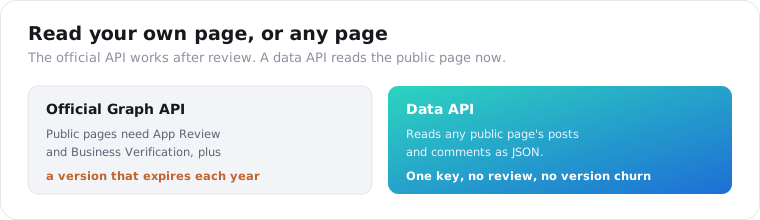
The Facebook Graph API can return a page’s posts and comments, but for any page you do not own it demands app review, business verification, and a version that expires every few months. For reading a public page’s posts and their comment threads without that, you send a URL to a data API. This guide shows both routes, the two-call posts-then-comments flow, and what each returns.
“facebook page api” is a low-volume search, about 50 a month per DataforSEO data pulled in September 2026, but the intent behind it is squarely social listening: people who want to read what a page posted and how its audience reacted.
Can you get Facebook page posts and comments from the official API?
Yes, but the gating is the story. Meta’s Graph API reads page posts and comments through the Pages API, and for your own pages it works with a page access token and the right permissions. For a page you do not own, reading public posts and comments requires the Page Public Content Access feature, which needs App Review and Business Verification before it returns real data.
That review is where most projects stall.
If your app has not been approved for Page Public Content Access, the Graph API quietly returns an empty data array rather than an error, so you can build the whole integration and only discover the wall when nothing comes back. Getting past it means submitting your app, your use case, and your business for Meta’s review, with no guarantee.
There is a second tax the official route charges: version churn. The Graph API is on v25.0 as of February 2026, and older versions expire on a schedule, with v18.0 and v19.0 both already sunset in 2026. An integration you ship this year needs maintenance next year just to keep working, before you have read a single new comment.
Why is the official Graph API hard for public page data?
Because Meta scoped it to page management, not public research. The Pages API is built for a page owner to post, moderate, and read insights on their own page. Reading other pages’ public content was bolted on as a reviewed feature, Page Public Content Access, precisely to keep bulk collection gated. So the tool assumes you are a page admin, and everything about reading a page you do not manage is an exception it makes you apply for.
This is the same pattern across Facebook’s surfaces.
Our best Facebook data APIs guide maps how every Facebook surface, pages, ads, marketplace, groups, sits behind a different wall. Pages are the one where the official API technically works but the approval and versioning overhead makes it a poor fit for anyone who just wants to read public posts and comments at scale.
A data API removes the review from the path entirely. It reads the public page a logged-out visitor sees, so page posts and their comments come back with only the provider’s key, no app, no verification, and no version to chase.
How do you get a page’s posts with an API?
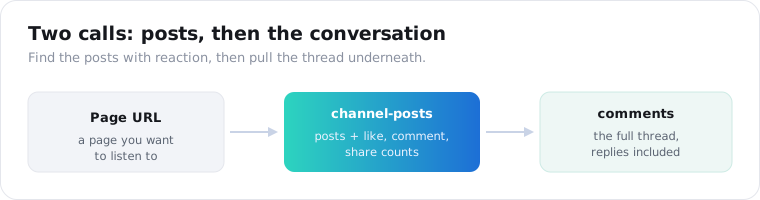
You send the page’s URL or handle to the posts endpoint and read its recent posts back as JSON. The API reads the public page, so there is no app review and no token. On ScraperSocial you GET /v1/facebook/channel-posts with a page URL, billed 2 credits per post returned.
Here is the whole call in a few lines of Python.
import requests
r = requests.get(    "https://api.scrapersocial.com/v1/facebook/channel-posts",    params={"handle": "https://www.facebook.com/nasa", "limit": 25},    headers={"Authorization": "Bearer sk_live_..."},)for post in r.json()["data"]:    print(post["posted_at"], post["likes"], post["caption"][:80])
Page in, posts out. No token exchange, no app review.
Each post is a flat object. It carries the post id and url, the caption text, the likes, comments, and shares counts, the posted_at date, the page author name and id, and a thumbnail. That is the content plus its reach signals, which is what a monitoring or research job actually needs from the feed.
The comments count on each post is the pointer to the next call. A post with hundreds of comments is where the audience is actually talking, so the count tells you which posts are worth pulling the full thread on.
The feed comes back mixed, which is what you want. A page’s posts include text updates, photos, and video posts, and video posts carry a views count and a thumbnail alongside the shared fields, so you can tell a quiet text update from a reel that pulled a million views without a second call. Reading the whole feed in one endpoint, rather than a separate call per post type, is the difference between one request and a stitching job.
How do you get the comments on a post?
You take a post URL and send it to the comments endpoint. It returns the post’s comment thread as JSON, including the nested replies underneath, so you get the whole conversation. On ScraperSocial you GET /v1/facebook/comments with a post URL, billed 1 credit per comment returned.
import requests
r = requests.get(    "https://api.scrapersocial.com/v1/facebook/comments",    params={"url": "https://www.facebook.com/nasa/posts/pfbid0abc123"},    headers={"Authorization": "Bearer sk_live_..."},)for c in r.json()["data"]:    print(c["author"], c["likes"], c["is_reply"], c["text"][:80])
Post URL in, the whole conversation out.
Each comment returns its id, the text, the author name, the likes count, the posted_at date, and two threading fields: is_reply and parent_comment_id. Those last two are what let you rebuild the thread. A top-level comment and a reply to it come back flat in the same array, and the parent_comment_id links each reply to the comment it answers.
That threading matters more than it sounds. A lot of the real sentiment on a post lives in the replies, where people argue back and forth, so a tool that returns only the top-level comments throws away half the conversation. Keeping is_reply and parent_comment_id means you can reconstruct who said what to whom.
One mechanic matters on a busy post. Comments paginate, so a viral post with thousands of replies comes back a page at a time, and you follow the cursor until there is no next page to pull the whole thread. The limit is your cost dial here: for a sentiment sample you rarely need every comment, so pulling the first few hundred of a huge thread is often enough signal at a fraction of the credits. At 1 credit a comment, a thousand-comment thread is 1,000 credits, about five dollars in full, while a 200-comment sample of the same thread is 200 credits, about a dollar, billed on the comments that actually return.
What data comes back from posts and comments?
Public content and engagement, not private analytics. A post gives you the caption, the like, comment, and share counts, the date, and the page. A comment gives you the text, the author name, the likes, the date, and its place in the thread. What no public reader returns is the page’s own analytics: reach, impressions, audience demographics, or the private insights only the page admin sees in Meta Business Suite.
That split is the honest ceiling, and it is the right one for listening.
The public engagement counts are enough to rank posts and gauge reaction, and the comment text is the actual voice of the audience. What you are missing, reach and demographics, was never public, so any tool claiming to return a competitor page’s impressions is estimating, not reading.
What can you build with page posts and comments?
Mostly social listening: sentiment, crisis detection, and competitor and campaign analysis. Teams pull the comments on a brand’s or competitor’s posts and run them through sentiment analysis, watch their own page for spikes in negative reaction, measure how a campaign post actually landed, and route support questions out of the comments into a ticketing system. The data is public posts and audience comments, so the products are about what people are saying.
Sentiment analysis is the most common build.
Pull the comments from a product-launch post, feed them into a classifier, and you get a read on how the launch actually landed, in the audience’s own words rather than a like count. Do it across a competitor’s posts and you learn what their customers complain about, which is a map of the market’s pain points.
Crisis detection is the time-sensitive one. Poll your own brand page’s recent posts on a schedule, watch the comment volume and tone, and a sudden spike in negative replies is an early warning that something is wrong while you still have time to respond.
Support triage rounds it out. A lot of customers ask questions in the comments rather than a support channel, so pulling comments from support-related posts and routing the questions into a queue catches the ones that would otherwise go unanswered.
One worked loop ties it together. A brand team pulls its own page’s recent posts every hour with channel-posts, and for any post whose comment count jumped since the last run, pulls the new comments and scores their tone. A rise in negative replies on a single post fires an alert with the post link and the comments attached, so the social team sees a brewing problem in minutes instead of the next morning. The whole thing is a scheduled pair of calls and a sentiment score, not someone refreshing the page all day.
What should you check before you pick a Facebook API?
Two things beyond price: whether it returns nested replies, and how fresh the data is. Facebook conversations are threaded and fast-moving, so a tool that flattens threads or serves stale comments misses the point. These decide whether the listening is real.
Reply threading is the first gap. A tool that returns only top-level comments looks complete until you realize the argument, and the sentiment, is in the replies underneath. Confirm a provider returns nested replies with parent links before you build sentiment analysis on it, because top-level-only data skews positive and shallow.
Freshness is the second. Crisis detection and campaign monitoring only work if the comments are current, so a cached source that lags hours behind hands you yesterday’s reaction. If your use is time-sensitive, check that the tool reads the post at request time.
Coverage is the quiet third. Some scrapers read posts but not comments, or public pages but not the busy ones behind aggressive rate limits. Match the endpoint list to the two things this job needs, a page’s posts and a post’s full comment thread, before you commit.
Is it legal to scrape Facebook pages?
Reading public page posts and comments is collecting public data, which US courts have generally treated leniently, but this is not legal advice and Facebook’s terms are a separate question from the law. A data API reads only what a logged-out visitor sees, which keeps you out of the account-authenticated space, but you still own compliance for what you store.
Comments are where the personal data lives.
A page’s posts are business content, but a comment carries a real person’s name and words, which are personal data under GDPR and CCPA the moment you keep them. So the compliance work is real: keep a short retention window, drop author identities you do not need for aggregate sentiment, and do not build a permanent archive of named individuals’ comments without a legal basis.
The safer posture is to treat comment text as the signal and the commenter as incidental. If you are measuring sentiment on a launch, you need the words, not a database of who said them, so aggregate and discard rather than store and profile.
Which route should you choose?
Match the route to whose page it is. If it is a page you manage and you need official, compliant access to post, moderate, and read your own insights, use the Graph API with a page token. If you are reading any other page’s public posts and comments, for listening, sentiment, or competitor research, a data API is the faster path, with no app review, no verification, and no version to maintain. Listening work is almost entirely the second case, because it lives on the pages you do not run.
Frequently asked questions
Can you get Facebook page posts and comments from the official API?
Yes, but with heavy gating. Meta’s Graph API reads a page’s posts and comments, but for any page you do not own it requires the Page Public Content Access feature, which needs App Review and Business Verification. Your own pages need a Page access token and permissions. On top of that, the Graph API deprecates versions every few months, so integrations need ongoing maintenance. To read any public page without that, developers use a data API.
How do I get a Facebook page’s posts with an API?
Send the page’s URL or handle to a data API’s posts endpoint. On ScraperSocial that is a GET to /v1/facebook/channel-posts, billed 2 credits per post returned. Each post comes back with its caption, like, comment, and share counts, the posted date, and the post URL, with no Facebook app, no OAuth, and no app review, because it reads the public page a logged-out visitor sees.
How do I get the comments on a Facebook post?
Send the post’s URL to a comments endpoint. On ScraperSocial that is a GET to /v1/facebook/comments, billed 1 credit per comment returned. Each comment includes its text, the author name, the like count, the posted date, and threading fields that mark whether it is a reply and to which parent comment, so you can rebuild the full thread with its nested replies, not a top-level slice of it.
What data does a Facebook page post return?
The public post content and its engagement. A post returns its id, url, caption text, the like, comment, and share counts, the posted date, the page’s name and id, and a thumbnail. What it does not return is anything private: audience demographics, reach, or the page’s own analytics, which live behind the page’s login. A public reader returns what any visitor sees on the page.
Is it legal to scrape Facebook pages?
Reading public page posts and comments is collecting public data, which US courts have generally treated leniently, but this is not legal advice and Facebook’s terms are a separate question. Comment authors are individuals, so their names and text are personal data under GDPR and CCPA once you store them. Read only public pages, keep a retention window, drop personal fields you do not need, and get your own legal read before building commercially.
How much does it cost to get Facebook page posts and comments?
Start free with 25 signup credits and no card, enough for 12 posts or 25 comments, then $5 a month with no contract. A post from channel-posts is 2 credits, about 1 cent, a comment from the comments endpoint is 1 credit, about half a cent, and a request that errors is free. There is no Graph app, review, or token to keep alive. Apify’s own comments scraper lists from $1.40 per 1,000 comments.
Read one page’s conversation
Take a page you want to listen to. Send it to the channel-posts endpoint for its recent posts, pick the one with the most comments, and send that post to the comments endpoint for the full thread. A key comes from the quickstart in a minute, the pricing page has the per-item credit cost, and the 25 free credits cover 12 posts or 25 comments, enough to see both response shapes before you spend anything. For the wider view of Facebook’s surfaces, the best Facebook data APIs guide maps them all.