By Nikhil Kumar. Last updated October 2026.
Pinterest has an official API. It just will not do the thing most people want.
The best Pinterest API in 2026 depends on whether you are writing or reading. Pinterest’s official v5 API is built to publish and manage your own pins, and its trial tier is a sandbox capped at 1,000 calls a day. To read public pins, search results, or save counts you do not own, you need a Pinterest data API that reads the public pages directly. This guide ranks the options for the reading half.
Searches for “pinterest api” run about 880 a month in the US, per DataforSEO data pulled in October 2026. Most of those searches end in the same surprise: the official API cannot read other people’s content.
Does Pinterest have an official API, and why isn’t it enough?
Pinterest has the v5 API, but it is a content-management tool, not a data-extraction one. It exists so you can create pins, schedule content, and manage your own boards and ads through code. Reading the public pins, boards, and search results you do not own is outside what it is built to do, and its access tiers make that limit concrete.
Start with the trial tier, which is where every app begins.
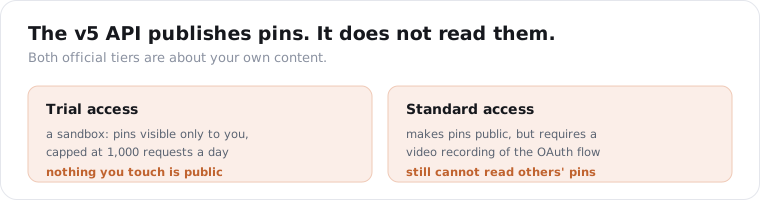
Trial access is a sandbox. Pins you create are visible only to you, and the whole app is capped at 1,000 requests a day across every endpoint, per Pinterest’s developer platform and its business community. You can test flows, but nothing you touch is public.
Standard access is the tier that makes pins public, and the gate is unusual. Pinterest requires you to submit a video recording of your app completing the full OAuth flow, the authorization screen, the token exchange, and an authenticated call, in one recording. It is mandatory even if you are the only user of your own app.
Both tiers are free. The cost is the review and the sandbox, not money.
There is a maintenance tax even after you are approved. Access tokens last 30 days and refresh tokens 60, so a long-running integration has to keep refreshing or it silently stops working. That is fine for an app you babysit and a real trap for a background data job.
Here is the part the other lists skip. None of that helps if your job is reading public Pinterest data. The official API acts on your account; it does not hand you a competitor’s pins, a keyword’s top results, or a URL’s save count. For that, you leave the official API entirely.
What are the best Pinterest data APIs?
Here are the six I see teams weigh, grouped by whether the job is writing to Pinterest or reading from it. The official API is the only one that can act on your account. The data APIs read the public pins, boards, and search results with one key and no app review.
- ScraperSocial. One normalized API for Pinterest and the rest of your social sources, with Pinterest pin, keyword search, and public save-count endpoints, from $5/mo. Best when you want Pinterest data in the same schema as your other social sources.
- Pinterest’s official v5 API. Free and authoritative, and the only route that can publish or manage your own pins, but trial is a sandbox, standard needs a video demo, and it does not read public data you do not own. Best for posting and managing your own content.
- Bright Data. An enterprise scraper with a prebuilt Pinterest dataset of 238M+ records, around $1.50 per 1,000 records, with 5,000 free a month. Best for bulk collection at real scale.
- Apify. A marketplace of Pinterest actors priced per result, roughly $1.99 to $10 per 1,000, with a free plan that includes $5 of monthly platform credit and a $19/mo Starter plan. Best for custom or per-actor scraping jobs.
- ScrapeCreators. Simple JSON for public pin, board, and search data with credits that do not expire. Best for pay-as-you-go pin and board pulls.
- Piloterr. A clean REST API at about $2.72 per 1,000 on a $49/mo plan with a free trial. Best for mid-volume without a sales call.
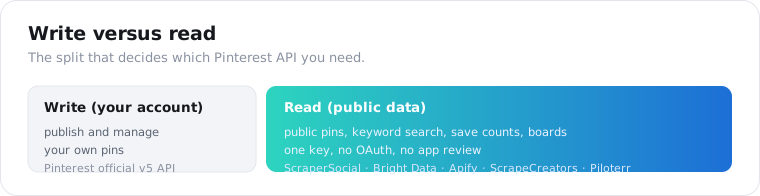
The field runs wider than six. ScrapeOps, Thunderbit, SociaVault, and the open-source PinScrape library all pull Pinterest data too. The six above are the ones that keep making the shortlist once you sort by write-versus-read instead of by raw record price.
How do I get Pinterest data without the official API?
Send a pin URL or a keyword to a data API and it returns the pin data as JSON. No OAuth, no app review, no sandbox. The API reads what a logged-out visitor sees on the public pin or search page and hands back the image, title, link, save count, and author. ScraperSocial’s pin endpoint is 2 credits, about a cent, and takes the pin URL directly.
import requests
resp = requests.get(    "https://api.scrapersocial.com/v1/pinterest/pin",    params={"url": "https://www.pinterest.com/pin/1234567890/"},    headers={"Authorization": "Bearer sk_live_..."},    timeout=120,)pin = resp.json()["data"][0]print(pin["title"], pin["image"], pin["saves"])
Two read paths cover most jobs. The pin endpoint takes one URL and returns one pin. The search endpoint takes a keyword and returns a page of pins, so you can pull the top results for “minimalist kitchen” without knowing any URLs in advance.
There is also a quieter third endpoint worth knowing. The save-count endpoint reads Pinterest’s own public counter for any web URL, so you can see how many times an article or product page has been pinned, which is a real distribution signal most tools ignore.
You could skip the API and scrape Pinterest yourself. Plenty of open-source libraries exist for it. The problem is production: Pinterest blocks datacenter IPs on sight, serves a login wall or a stripped page to bots, and renders pins through JavaScript, so a simple HTTP request gets you nothing and a headless browser gets you rate-limited. A managed data API runs the proxies and the rendering so the pin field is always where you expect it.
For a full field-by-field walkthrough of our endpoints, the Pinterest API guide has the detail. This post is about choosing between providers, and the broader market sits in the best social media APIs roundup.
What data can you actually get from a Pinterest pin?
The pin’s image, title, description, destination link, save count, and author, as a flat JSON record. A Pinterest data API reads the public pin page, so you get what any visitor sees: the full-resolution image URL, the outbound link and its domain, the repin or save count, the comment and share counts, and the creator’s handle and follower count.
{ "data": [ { "id": "1234567890", "title": "Minimalist kitchen shelf styling", "image": "https://i.pinimg.com/originals/...", "domain": "thespruce.com", "is_video": false, "saves": 4821, "author": { "handle": "thespruce", "name": "The Spruce", "followers": 2900000 } } ]}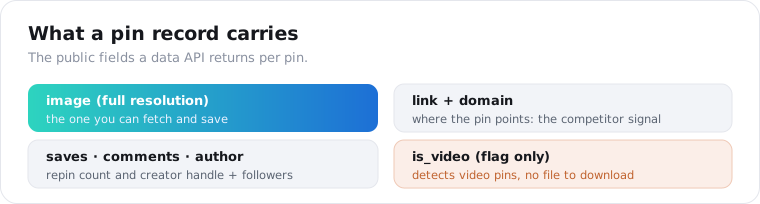
The domain field is the one marketers undervalue. Every pin points somewhere, so a page of search results is also a list of which sites are winning a keyword on Pinterest, ranked by saves.
That is a competitive-research query hiding in plain sight. Search a keyword you care about, group the results by domain, sort by total saves, and you have a ranked list of the competitors winning that term on Pinterest, plus the exact pins doing it. No official API gives you that; it falls out of the search endpoint for free.
Two honest limits apply across most providers, ours included. Board-level endpoints are the weak spot, because Pinterest publishes a clean output sample for pins but not for boards, so many APIs either gate board data or return thin records. And is_video tells you a pin is a video without handing you the video file, which matters for the next question.
Can I download Pinterest images and videos with an API?
Images, yes. Video, no, on almost every provider. A pin endpoint returns the full-resolution image URL, so downloading a pin’s image is a second fetch to a direct link. Video pins come back with is_video: true and the rest of the pin data, but not a playable video file URL, so you can detect and catalog video pins without pulling the clip itself.
This trips people up because “Pinterest downloader” is a huge consumer search, and a lot of that intent is video.
If your project is building image datasets, mood boards, or visual search, the image URL is exactly what you need and every pin carries it. Pull the pin, grab the image, store it.
If your project needs the actual video files, a general-purpose Pinterest API is the wrong tool, and you should say so up front rather than discover it mid-build. The honest version is: these APIs are pin-data readers, not video rippers.
How much do Pinterest data APIs cost in 2026?
Reading public Pinterest data can start at $0 and stay inside a $5 month for a small study. On ScraperSocial the first 25 credits are free and skip the card form, and the $5 monthly plan adds 1,000 credits with nothing to sign; a pin or a search result is 2 credits, a URL’s save count is 1, and a pin request that fails is not billed. The official API costs nothing in money but charges you in app review and a sandbox.
| Provider | How you pay | To start | What it reads |
|---|---|---|---|
| Pinterest official v5 | Free, paid for in review time | Sandbox, 1,000 calls/day, video demo for Standard | Your own pins only |
| ScraperSocial | Credits: 2 per pin or result, 1 per save count | 25 free credits, then $5/mo, no contract | Public pins, search, save counts on one key |
| Bright Data | Roughly $1.50 for each 1,000 records | 5,000 free monthly | Pins, boards, profiles |
| Apify | Per actor, ~$1.99-$10 / 1,000 | $5 monthly platform credit; Starter $19/mo | Per-actor: pins, boards, search |
| ScrapeCreators | Credits that never expire | Pay-as-you-go | Pins, boards, search |
| Piloterr | ~$2.72 / 1,000 | Free trial; $49/mo plan | Pins, profiles |
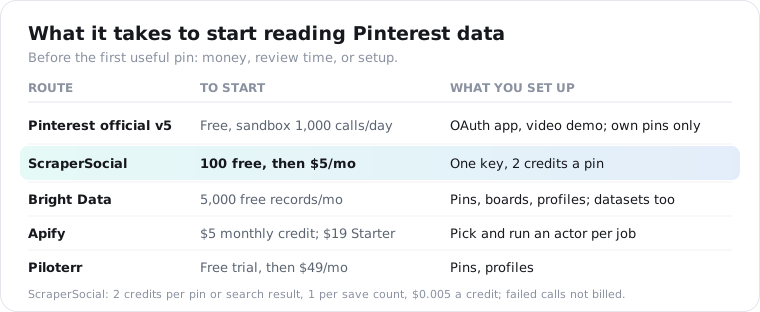
The billing unit deserves more attention than the sticker. Apify quotes a different rate per actor, so pulling pins from one actor and boards from another meters at two prices and two output shapes. Here pin lookups, keyword search, and save counts draw on one balance and answer with an identical { data, meta, request_id } response.
Price a real study. Pulling the top 100 pins for five keywords is 500 pins, 1,000 credits, which is the whole $5 plan, and checking the save counts on 200 of your own article URLs adds 200 credits, about $1. A steadier pipeline of 2,000 pins a month is 4,000 credits, about $20, with no actor to configure and no commitment.
If you are collecting millions of pins, Bright Data also sells a prebuilt 238M-record Pinterest dataset outright, per its Pinterest scraper pricing.
Is it legal to scrape Pinterest?
Reading public pins sits in the same contested-but-common space as most web scraping, and the risk is contractual, not criminal. Pinterest’s terms prohibit scraping without authorization, so your exposure is to Pinterest’s contract. US courts have generally treated collecting publicly accessible data as legal, as the hiQ Labs v. LinkedIn case established, so pulling a public pin’s image and title carries little real-world risk.
Where that changes is volume and intent.
Pinterest actively fights automated access. It flags and blocks datacenter IP ranges, VPNs, and cloud-provider traffic from the likes of EC2 and Google App Engine, and it applies temporary rate-limit blocks when it detects a pattern, which is documented across scraper guides like ScrapeOps’ Pinterest testing. That is a big reason teams use a managed data API instead of running their own scraper.
My rule is the usual one. Pull only public pin data, keep volume reasonable, and talk to a lawyer before building a commercial product on top of it. A data API handles the fetching; it does not transfer Pinterest’s terms onto the vendor.
How do I choose the right Pinterest API?
Decide write-versus-read first, then match the data you need to what each provider actually returns. If you are publishing pins, the official API is the only option and nothing here replaces it. If you are reading public pins, search, or save counts, pick a data API by the surface it covers and its billing unit, not its headline rate.
Three checks the comparison tables skip.
First, board coverage. If your project needs board-level data, test it before you commit, because this is where most Pinterest APIs are thin or gated, ours included. A provider that lists “boards” may return a stub.
Second, video. If you need video files and not just the image, confirm the provider returns a playable URL, because most, including us, return only the is_video flag and the image.
Third, freshness and blocking. Pinterest’s anti-bot measures mean a cheap provider with weak proxies returns errors and stale data under load. For monitoring, how reliably it reads matters more than the per-1,000 price. Run a small paid test before you commit a pipeline, and watch the error rate, not just the sample that comes back clean.
Frequently asked questions
What is the best Pinterest API in 2026?
It depends on what you need. To publish or manage your own pins, use Pinterest’s official v5 API, the only route that can act on your account. To read public pins, search results, or save counts you do not own, a data API like ScraperSocial, Bright Data, or Apify skips the official API’s sandbox and content-management limits. Pick by read-versus-write first, then by price.
Is the official Pinterest API enough to get public pin data?
No. The Pinterest v5 API is built to create and manage your own content, not to extract public data at scale. Trial access is sandbox-only and capped at 1,000 requests a day, with pins visible only to you. Standard access, which makes pins public, requires submitting a video recording of your app completing the full OAuth flow, even if you are the only user.
How does a Pinterest data API differ from the official one?
The official API writes to and reads your own account; a data API reads the public pins, boards, and search results anyone can see. The data API takes a URL or keyword and returns the image, title, link, save count, and author as JSON, with no OAuth, app review, or sandbox. Providers like ScraperSocial, Bright Data, and Apify cover the reading side the official API does not.
How much does a Pinterest API cost?
Pinterest’s official API is free in money but gated behind a sandbox and a video-demo review. ScraperSocial’s free tier is 25 credits with no card required, and its paid plan is $5 a month without a contract, at 2 credits per pin and 1 per save-count lookup. Bright Data runs about $1.50 per 1,000 records with 5,000 free a month, Apify roughly $1.99 to $10 per 1,000 results, and Piloterr about $2.72 per 1,000 on a $49 monthly plan.
Can I download Pinterest images and videos with an API?
Images, yes. A pin endpoint returns the full-resolution image URL, which you can fetch and save. Video is the gap: most Pinterest data APIs, including ScraperSocial, return an is_video flag and the pin’s data but not a direct video file URL, so you can detect video pins but not download the clip itself through the API.
Is scraping Pinterest allowed under its terms?
No, Pinterest’s terms prohibit scraping without authorization, so the risk is contractual rather than criminal. US courts have generally treated collecting public data as legal, and reading a public pin’s image and title is low-risk in practice. Pinterest actively blocks datacenter IPs and proxies, which is one reason teams use a managed data API instead of scraping it themselves.
Pick by write or read, then by price
Decide the one thing first: are you publishing pins or reading them? If you are publishing, start with Pinterest’s official v5 API and budget for the video-demo review. If you are reading public pins, search, or save counts, run a keyword through a data API’s search endpoint on the 25 free credits and check the fields against your project before you pay. For the same build on another platform, the Best Facebook data APIs guide uses the same write-versus-read split.