By Nikhil Kumar. Last updated September 2026.
You want to see what is winning on Pinterest for a keyword, so you open the official API, and its search endpoint only searches the pins you already posted yourself.
Pinterest has an official API, but it is built to manage your own account, not to research the platform. Its search only finds your own pins, it requires OAuth and an app review, and it bars you from even storing the data. To search public pins by keyword, see their engagement, and find which websites they drive traffic to, you use a data API that reads public Pinterest. On ScraperSocial that is one GET request, 2 credits per pin. This guide covers both routes.
Does Pinterest have a public API?
It has an official API, but it is scoped to your own account, not public discovery. The v5 API lets you manage your own pins and boards, run ads, and read analytics on content you own, after OAuth and an app review. Its search endpoint searches only within your own pins, not across the platform, and Pinterest’s terms bar you from storing most of the data you pull.
The search restriction catches almost everyone off guard.
You would reasonably assume a /search/pins endpoint searches Pinterest. It does not. It searches the pins on the authenticated account, which is useful for managing your own library and useless for discovering what anyone else is pinning.
So the official API is a genuine, free, well-documented API, and it answers a completely different question from the one most people arrive with. It is for publishing and measuring your own presence, not for reading the platform.
There is one genuinely public slice worth knowing. The Trends endpoint returns Pinterest’s own keyword trend data, which is handy for seeing what is rising. But it hands you aggregate keyword curves, not the pins behind them, so you still cannot pull the actual content winning a topic through the official API, only the shape of demand around it.
Why can’t the official API do public pin research?
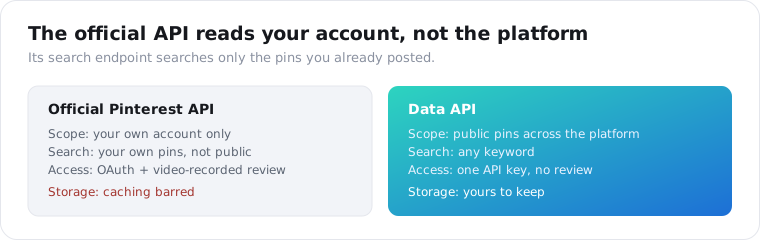
Because Pinterest scoped it to owned content and locked down the rest. The search endpoint only reaches your own pins, there is no endpoint for arbitrary public or competitor pins, and Standard access, the tier that unlocks full content, requires a video-recorded review of your OAuth flow that takes one to four weeks. Even then, you cannot store what you pull.
The no-storage rule is the quiet dealbreaker for research.
Pinterest’s developer terms say you cannot store information accessed through its APIs except for campaign analytics. A research pipeline exists to store and compare data over time, so a rule that forbids caching makes the official API a non-starter for trend tracking or competitor monitoring, even setting the own-account limit aside.
The rate ceilings add to it. Trial access allows 1,000 requests a day for the whole app, and test tokens expire every 24 hours, so you cannot do serious collection until you have cleared the Standard review. It is a well-run API for its purpose, and its purpose is not public research.
Here is the split in one view.
| Official Pinterest API | Data API | |
|---|---|---|
| Scope | Your own account only | Public pins across the platform |
| Search | Your own pins | Any keyword |
| Access | OAuth + video-recorded review | One API key |
| Approval | 1 to 4 weeks for Standard | None |
| Storage | Caching barred | Yours to keep |
| Best for | Publishing and your own analytics | Research and competitor discovery |
How do you get public Pinterest data with an API?
You send a keyword or a pin URL to a data API that reads public Pinterest and get the pins back as JSON. It needs no OAuth, no developer app, and no review, because it reads the public pin and search pages the way a logged-out visitor would. On ScraperSocial you GET /v1/pinterest/search with a query, or /v1/pinterest/pin with a pin URL, billed 2 credits per pin.
Here is a keyword search in a few lines of Python.
import requests
r = requests.get(    "https://api.scrapersocial.com/v1/pinterest/search",    params={"query": "minimalist kitchen", "limit": 40},    headers={"Authorization": "Bearer sk_live_..."},)for pin in r.json()["data"]:    print(pin["saves"], pin["domain"], pin["title"])
Keyword in, public pins out, ranked how Pinterest ranks them.
The difference from the official API is the whole point: this searches the platform, not your account, so you see what everyone is pinning on a topic. There is no OAuth handshake and no app to register, so a script is running against real data in minutes rather than after a multi-week review.
The pin endpoint does the same for a single pin you already have the URL for, and the url-stats endpoint is a lighter, 1-credit call when you only need a pin’s numbers rather than its full record.
Cost tracks what you pull. At 2 credits a pin, a 40-pin search is 80 credits, about 40 cents, and the lighter url-stats call is a single credit. $5 covers 500 pins, which is a real research run across several keywords rather than a rationed handful. Running a few related searches and deduping the results by pin id is the standard way to build a full picture of a niche without paying for the same pin twice.
Doing this yourself is possible but thankless. Pinterest serves its data through undocumented internal resource endpoints that return JSON, but they are rate-limited, they change without notice, and datacenter IPs get blocked quickly. A data API absorbs that maintenance and hands you a stable contract, which is the difference between a script that works today and a pipeline that still works next quarter.
What data do you get for a pin?
A rich object per pin, built for research rather than publishing. You get the title and description, the image URL, the destination domain the pin links to, whether it is a video or a promoted pin, the save, comment, and share counts, the author with their handle and follower count, and the board the pin lives on. That is enough to judge what a pin is, how it is performing, and where it sends people.
Saves are the number that matters on Pinterest.
A save, historically called a repin, is a user adding your pin to their own board, and it is the platform’s core signal of intent. A pin with ten thousand saves has proven pull in a way likes never quite capture, so ranking search results by saves surfaces the content actually working on a keyword.
The destination domain is the sleeper field on every pin.
Pinterest is a visual search engine that sends traffic to websites, so every pin carries the domain it links to. Aggregate that across a keyword and you see which sites are winning the topic on Pinterest, which is competitive and SEO intelligence you cannot get from a like count alone.
The two flags on each pin are quiet filters. is_video separates static pins from video, which increasingly wins the feed, and is_promoted marks paid pins, so you can strip ads out of an organic analysis or study them on purpose. Neither field is glamorous, but both save you from mistaking a promoted placement for genuine organic pull.
How do you research a niche or competitor on Pinterest?
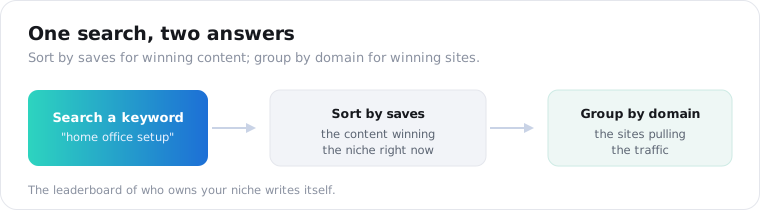
You run keyword searches and read the patterns in the results. Search a topic, sort the returned pins by saves, and you have the content winning that niche right now. Group those same pins by their destination domain and you see which sites are pulling the Pinterest traffic, and pull a competitor’s own pins by searching their domain to see exactly what they are publishing and how it performs.
This is where the domain field turns data into strategy.
A pin’s save count tells you a piece of content is working; its domain tells you who is benefiting. Run a search for your niche, tally the domains, and the leaderboard of who owns Pinterest attention in your space writes itself, without guessing.
A worked example makes it land. Search home office setup, sort by saves, and the top pins might link out to three or four blogs that keep reappearing, a furniture retailer, and one prolific creator. That distribution is the answer to who owns the niche: the blogs to study, the retailer to benchmark, and the creator to maybe partner with, all read off one search rather than a month of manual browsing.
You can go a level deeper with the board field. Every pin names the board it sits on, so the pins winning a niche also point you at the curated boards collecting that content, which are the follow-worthy accounts and the aggregators worth studying. A single search hands you the winning content, the winning sites, and the boards organizing both.
The visual side matters too. Because each pin carries its image URL, you can pull the actual creative that is winning, the image itself rather than a bare metric, which is how content teams study the look and framing that performs in a niche before making their own.
What can you build with Pinterest data?
Mostly trend research, competitor tracking, and content ideation, all keyed off search. The common builds are visual trend discovery in a niche, competitor monitoring by domain, affiliate and SEO research into which sites win a topic, and content ideation from the images and descriptions that perform. All of them run on the same search call, read differently.
Trend research is the most natural fit for the platform.
Pinterest is where people plan future purchases and projects, so what rises on a keyword there is a leading indicator of demand. Storing a keyword’s top pins on a schedule gives you a moving picture of a niche, and because you control the storage, you are not bound by the official API’s no-caching rule.
Affiliate and SEO research is the commercial one.
Marketers who live on Pinterest traffic use the domain field to reverse-engineer competitors: which posts of theirs get pinned, how much those pins are saved, and which pages are quietly pulling steady referral traffic. That is a map of a competitor’s Pinterest strategy built entirely from public pins.
Content ideation ties it together. Because the results carry both the image and the description, a team can see which topics win and how the winning pins are framed, the angle, the text overlay, the color palette, and brief their own creative against what already performs rather than guessing at it. On Pinterest, where the image is the product, that visual read is worth as much as the numbers.
Is it legal to get Pinterest data, and what are the limits?
Reading public Pinterest pages is generally lower-risk than reaching private data, and it is what a logged-out visitor could see, but this is not legal advice. The real limits are two: private boards never appear in public search results, because a data API reads only public content, and results are the pins Pinterest surfaces for a query, not a complete archive of everything ever pinned on a topic.
The compliance line is the familiar one.
Pins are public, but they show people’s work and sometimes their faces, so any personal data you store carries a GDPR and CCPA obligation: keep only what you need, set a retention window, honor deletion. Studying a niche and citing the creators is fair use of public data; downloading their images and reposting them as your own is a copyright question no API answers for you.
One clarification worth making, since it confuses people. Pinterest’s no-storage rule is a term of its own developer API, binding on apps that use official OAuth access. Reading public pages through a data API is a different relationship, so that specific clause does not bind you, though your general privacy and copyright duties still do.
There is also a freshness note. Public search returns what Pinterest is surfacing right now, which shifts as the platform re-ranks, so two searches a week apart can differ. For trend work, sample on a fixed schedule and store your own series rather than assuming a single pull is the whole truth about a niche.
Search one keyword to see the shape
Take a topic in your niche. Send it to the Pinterest search endpoint, sort the returned pins by saves, and tally their domains to see who owns the topic. The quickstart hands you a key with no review queue to sit in, the pricing page shows the 2-credit-per-pin cost, and 25 free credits cover a dozen pins before you pay anything. For a single pin you already have a link to, the pin endpoint takes the URL.
Frequently asked questions
Does Pinterest have a public API?
Pinterest has an official API, but it is scoped to your own account, not public discovery. It lets you manage your own pins, boards, ads, and analytics after OAuth and an app review, and its search endpoint only searches your own pins, not the platform. It also bars you from storing most of the data you pull. To search public pins by keyword or study competitors, you use a third-party data API that reads public Pinterest instead.
Can you search public pins with the Pinterest API?
Not with the official one. The v5 /search/pins endpoint searches only within the authenticated user’s own pins, so it cannot find public pins, competitor content, or trending pins across the platform. That is by design, because the official API is a publishing and analytics tool for accounts you own. Public keyword search across Pinterest comes from a data API that reads the public pages, like ScraperSocial’s /v1/pinterest/search.
How do I get Pinterest data without OAuth?
Use a data API that reads public Pinterest and returns JSON from a single API key. It needs no OAuth, no Pinterest developer app, and no approval review, because it reads what a pin or search page shows publicly. On ScraperSocial you send a keyword to /v1/pinterest/search or a pin URL to /v1/pinterest/pin, 2 credits per pin, and get the pin’s title, image, engagement, and destination domain back.
What data can you get from a Pinterest pin?
The pin’s title and description, the image URL, the website domain it links to, whether it is a video or a promoted pin, its save, comment, and share counts, the author with their handle and follower count, and the board it sits on. The destination domain is the field people underrate: it tells you which website a pin is driving traffic to, which is what makes Pinterest useful for content and SEO research.
Can I store Pinterest API data?
Not from the official API, mostly. Pinterest’s developer terms say you cannot store information accessed through its APIs except for campaign analytics, so a research pipeline that caches pins would violate the rules and you would have to re-call for every view. Reading public pages through a data API is a different relationship; you still owe GDPR and CCPA duties on any personal data, but you are not bound by Pinterest’s own no-caching developer clause.
Is it legal to scrape Pinterest?
Reading public Pinterest pages is generally lower-risk than accessing private data, but this is not legal advice. Pins are public content that can still name people and show their work, so treat stored personal data under GDPR and CCPA, keep a retention window, and do not repost creators’ images as your own. Private boards never appear in public results. Study a niche and cite creators; do not pass their pins off as yours.