By Nikhil Kumar. Last updated October 2026.
The Twitter search API you remember is gone. In its place is a pay-per-use meter, a 7-day window, and a $42,000 price tag for history.
To search Twitter (X) with an API in 2026, you send a query to a third-party data API that reads X’s public search, because X’s own API now charges per read, caps recent search at the last 7 days, and gates full history behind Enterprise. The data API returns matching public tweets with their text, author, and engagement counts as JSON, with no X developer account.
Is there a Twitter search API in 2026?
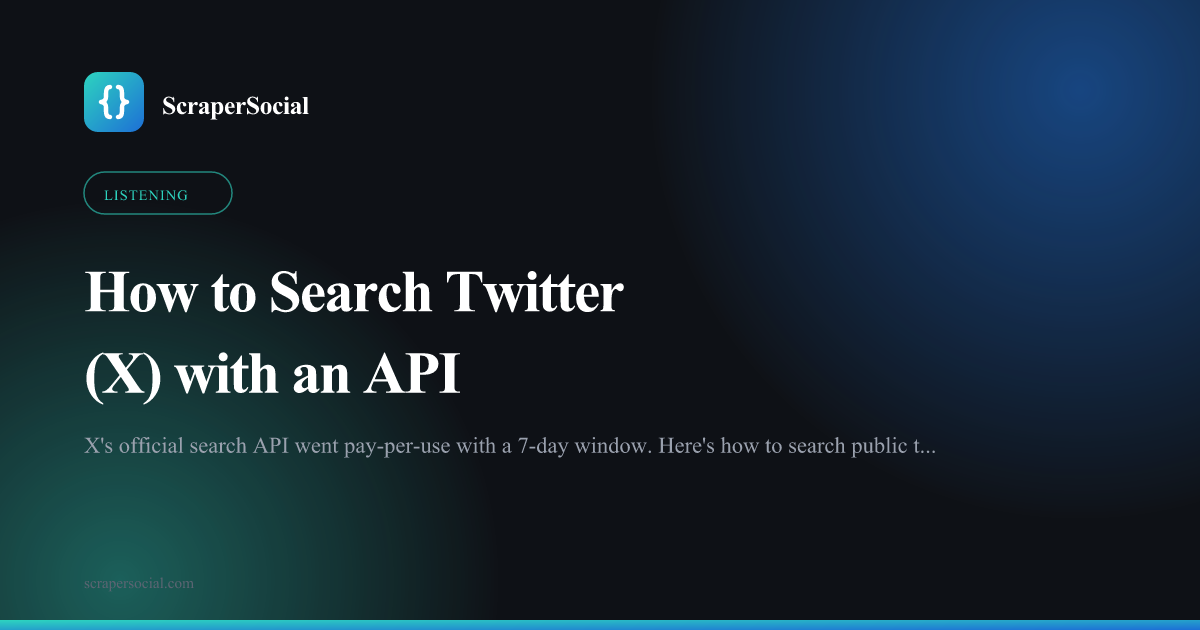
Yes, but the official one is expensive and narrow. X moved its API to pay-per-use in February 2026, closed the old Basic and Pro tiers to new signups, and left no free read tier, per the 2026 X API pricing guides. Reading a post runs about $0.005, recent search reaches back only 7 days, and full-archive search costs Enterprise money. So “is there an API” is really “can you afford it.”
The free routes that used to fill the gap are gone too.
Nitter, the privacy mirror that powered countless scrapers, went offline on August 25, 2026 after a cease-and-desist from X Corp, according to Scrapfly’s 2026 Twitter guide. snscrape stopped working for X back in 2023, and Twint was archived in March 2023.
So the DIY graveyard is full. What remains are third-party data APIs that read X’s public search and handle the access problem for you.
That is the route this guide covers. Send a query, get tweets back, skip the pay-per-use meter and the access application entirely.
How do I search Twitter (X) with an API?
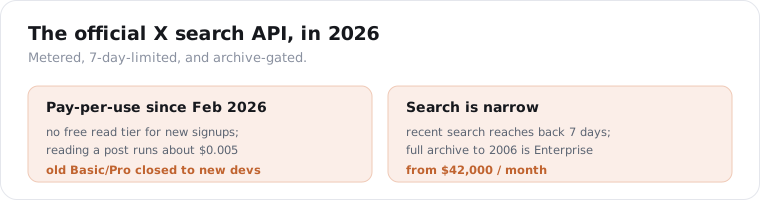
Send a search query to the search endpoint and read the JSON. One GET request with a keyword, hashtag, or phrase returns the matching public tweets, each with the text, author, and the full engagement set. Get a key from the quickstart, which comes with 25 free credits, then it is a few lines of Python.
import requests
resp = requests.get(    "https://api.scrapersocial.com/v1/twitter/search",    params={"query": "ai coding assistants", "limit": 50},    headers={"Authorization": "Bearer sk_live_..."},    timeout=180,)for tweet in resp.json()["data"]:    print(tweet["likes"], tweet["author"]["handle"], tweet["text"][:80])
The query is a plain search string, the same thing you would type into X’s search box. A keyword like “ai coding assistants”, a hashtag like “#blackfriday”, or a phrase in quotes all work.
Because it is X’s own search syntax, the operators you know carry over. Quotes force an exact phrase, OR widens the match, a leading minus excludes a term, and from:handle narrows to one account. So a query like "price increase" -refund from:yourcompetitor is a real monitoring filter, not just a keyword. The query does the filtering before you ever touch the results.
You do not touch X’s developer console, you do not pick an access level, and you do not set up pay-per-use billing. The provider reads X’s public search results and returns them as clean JSON.
You could write the scraper yourself against X’s internal search, and people do, but it is a treadmill. X.com is login-walled and rotates its internal tokens and response shapes often, so a scraper you build breaks within weeks, which is exactly why Nitter and snscrape are dead. A managed API absorbs that churn: the provider fixes the access when X changes it, and your query keeps returning tweets in the same shape.
If you want the same pull in a full Python workflow with retries and pagination, the patterns in the Twitter API in Python guide port straight over, since the search endpoint takes the same shape as the other Twitter endpoints.
What data does a tweet search return?
The tweet text, the author, the post time, and the full engagement set. Each matching tweet comes back as a flat record with likes, retweets, replies, quotes, bookmarks, and views, plus the author’s handle and name, the language, and flags for whether the tweet is a reply or a retweet.
{ "data": [ { "id": "1849000000000000000", "url": "https://x.com/user/status/1849000000000000000", "text": "Switched our whole pipeline to an AI pair programmer this week...", "likes": 1820, "comments": 143, "shares": 412, "quotes": 58, "bookmarks": 967, "views": 284000, "posted_at": "2026-10-06T15:22:00Z", "author": { "handle": "devbuilder", "name": "Alex N." }, "lang": "en", "is_reply": false, "is_retweet": false } ]}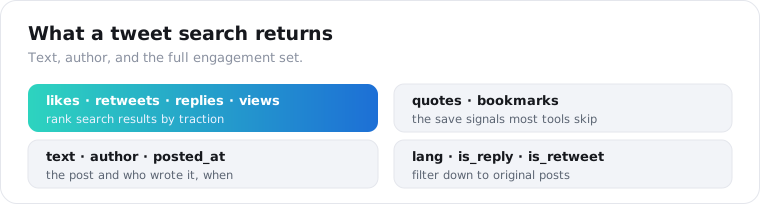
The bookmarks count is the field most people overlook. A bookmark is a stronger save signal than a like, because people bookmark tweets they intend to come back to, so a high bookmark-to-like ratio flags genuinely useful content.
The is_reply and is_retweet flags let you clean a search fast. A raw keyword search is full of replies and retweets, so filtering to original posts is how you find the actual authors talking about your term, not the people amplifying them.
One honest note on verification. Field availability on X data shifts as the platform changes its internals, so read the engagement fields as the documented shape and spot-check them against a live query before you build reporting on top.
How far back can I search tweets?
Recent tweets only, in practice. X’s recent search covers the last 7 days, and scraper-based search is weighted to live and recent results, not deep history. Full-archive search back to the first tweet in 2006 exists only through X’s Enterprise tier, which starts at $42,000 a month. No affordable route hands you years of history on demand.
This catches people out, so it is worth being blunt.
If your job is monitoring a keyword, a brand, or an event as it happens, recent search is exactly right, because the conversation you care about is happening now.
If your job is pulling five years of tweets about a topic for research, no cheap API does that, and anyone claiming a full historical archive at scraper prices is overpromising. That data sits behind Enterprise contracts or pre-collected academic datasets.
The practical move for history is to build it forward. Start searching your terms today, store every tweet you pull, and in a few months you have your own archive, dated from when you started. It is the same pattern as tracking prices or reviews over time.
One more honest limit: even within the 7-day window, a search returns what X surfaces, not a guaranteed census of every matching tweet. For trend direction and live monitoring that is plenty; for a legally complete record of everything said, it is not, and nothing at this price point is.
How much does a Twitter search API cost?
On ScraperSocial a search result is 1 credit, about half a cent, and you start on 25 free credits with no card, then $5 a month. What you skip matters more than the rate: no X developer account, no 2-million monthly read cap, and no 7-day cutoff from X’s recent-search endpoint, though results still lean recent. Other routes price per tweet and bring their own setup.
X’s own meter is $0.005 per post read, and X’s pricing documentation caps pay-per-use at 2 million reads a month. Below, each route sits next to the setup it hands you.
| Route | Pricing | Before the first call | Coverage and setup |
|---|---|---|---|
| X official API | Pay-per-use, about $0.005 per post read | Developer account and console billing, no free tier | Recent search back 7 days, 2M reads a month, full archive only on Enterprise |
| TwitterAPI.io | Per tweet, around $0.15 per 1,000 as published | Up to $1 of free credit, no minimum spend | X data only |
| Apify | Per result on X scraper actors, about $0.40 per 1,000 | Apify account, free plan with monthly platform credit | You pick and run an actor |
| Bright Data | Per record, roughly $1.50 per 1,000 | 5,000 free records a month | Its own record format |
| ScraperSocial | 1 credit per tweet returned | 25 credits free at signup, then $5 a month | One key and one response shape for X and every other platform, failed calls not billed |
Competitor rates as each vendor published them in October 2026. I confirmed TwitterAPI.io’s signup credit and its no-minimum-spend wording on October 16, 2026.
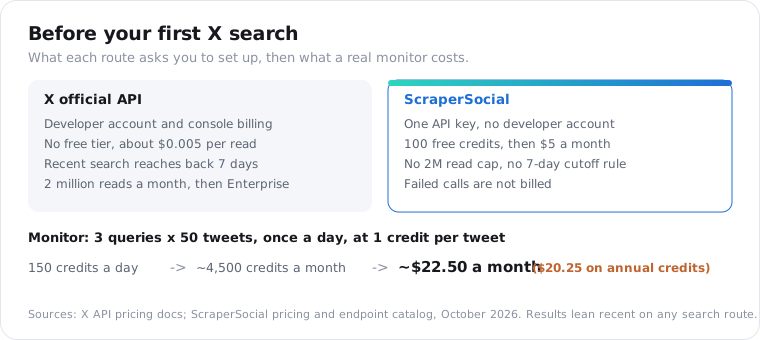
Put a real job on it. The three-query monitoring loop further down, at 50 tweets per query once a day, returns at most 150 tweets, or 150 credits, daily. Over a month that is about 4,500 credits, roughly $22.50 at the monthly rate or $20.25 on annual credits, with no developer account to apply for and no cap to plan around.
A search that errors out is not charged, so a bad query string or a slow moment on X costs you nothing to retry.
The key also carries past X. The same query run against Reddit, TikTok or Instagram search returns the identical { data, meta, request_id } shape, so your dedupe and alerting code is written once for every source.
If very high-volume X search is the entire project, price a dedicated X reader against this too.
What can you do with tweet search data?
Listen, track, and find. The engagement fields turn a keyword search into a feed of what people are saying about a topic, ranked by how much traction each take is getting, which powers brand monitoring, competitor tracking, lead discovery, and trend research. Pulling the same query over time turns a snapshot into a trend line.
Brand and reputation monitoring is the obvious one. Search your brand name, sort by views or bookmarks, and you see the posts shaping how people see you, the praise and the complaints, before they spread.
Lead and intent discovery is quieter but valuable. Search phrases like “looking for a tool that” or “anyone recommend” in your category, filter to original posts with is_reply false, and you have people actively asking for what you sell.
Trend research rounds it out. Track a hashtag or topic daily, watch the volume and the engagement climb or fade, and you can tell a real movement from a flash in the pan before committing to it.
All of it reads from public tweets, so none of it needs a logged-in X account.
How do I monitor a keyword or search at scale?
Run searches concurrently, store what you have seen, and dedupe on the tweet id. No one call hands you an endless feed, so you spread the work across your queries, fire them in parallel, and key every result on id to fold out duplicates. Each tweet is billed as it returns, so you only pay for what comes back.
from concurrent.futures import ThreadPoolExecutor
queries = ["our brand name", "our product", "#ourcampaign"]
def search(q):    r = requests.get("https://api.scrapersocial.com/v1/twitter/search",                     params={"query": q, "limit": 50}, headers=H, timeout=180)    return r.json()["data"] if r.ok else []
seen = {}with ThreadPoolExecutor(max_workers=6) as pool:    for batch in pool.map(search, queries):        for tw in batch:            seen[tw["id"]] = tw
For ongoing monitoring, store the newest tweet id you saw per query. On the next run, stop once you hit it, and you process only new tweets instead of re-pulling the same results.
Match the cadence to the conversation. A fast-moving campaign hashtag might justify an hourly pull; a slow brand term is fine once or twice a day. You pay per tweet either way, so over-polling a quiet term mostly wastes credits.
Store engagement counts with a timestamp on every pull. A tweet’s likes at the moment you found it is a snapshot; the same tweet’s likes tracked over a day is the growth curve that tells you something is going viral.
Alerting falls out of the same loop. Flag any new tweet about your brand that clears a view or bookmark threshold, post it to a Slack or Discord webhook, and your team sees a rising mention while it is still small enough to respond to. A complaint with 200 views is a conversation; the same complaint at 50,000 views is a fire, and the gap between those two is often a few hours.
For the broader market view, run the search alongside other platforms. A keyword on X, the same keyword on Reddit and TikTok, and you have a cross-platform read on a topic instead of a single-channel guess. That is where a shared schema earns its keep, and the social listening API guide covers that multi-source pattern in full.
Is it legal to scrape Twitter (X)?
Reading public tweets is lawful in the US but against X’s rules, so what you risk is a broken contract, not a criminal charge. The hiQ Labs v. LinkedIn rulings found that pulling data off a page open to the public does not trip computer-fraud law, and a public tweet is visible to anyone without a login. X’s user agreement bars automated collection anyway, and that ban lives in contract, not in statute.
What sets X apart is how hard it enforces, so go in aware.
The Nitter shutdown is the proof. X sent a cease-and-desist in August 2026 and took down the most popular free mirror, so this is not a company that ignores scraping.
That heat falls mostly on the tool, not the end user reading public data, which is why the free mirrors keep dying while the paid APIs keep standing. The providers take the access fight so you do not have to.
The usual cautions apply. Stick to public tweets, hold your request rate down, skip personal data you cannot defend under GDPR or CCPA, and run a commercial plan past a lawyer first. The API does the fetching; X’s terms stay your responsibility, not the vendor’s.
Frequently asked questions
Is there a free Twitter search API in 2026?
No. X moved its API to pay-per-use in February 2026 and closed the old Basic and Pro tiers to new signups, with no free read tier. Reading posts runs about $0.005 each, and recent search only reaches back 7 days. Free scraping tools like Nitter and snscrape are gone too, so the practical routes are third-party data APIs.
How do I search tweets without the official Twitter API?
Use a third-party data API that reads X’s public search. Send a keyword, hashtag, or phrase to a search endpoint and it returns matching public tweets with their text, author, and engagement counts as JSON. You skip X’s developer console, the pay-per-use billing, and the access application, because the provider handles the access to X.
How far back can I search tweets?
Only recent tweets, in practice. X’s own recent search covers the last 7 days, and scraper-based search is weighted to recent and live results, not deep history. Full-archive search back to 2006 exists only through X’s Enterprise tier, which starts at $42,000 a month. For history, you build it forward by searching and storing over time.
How much does a Twitter search API cost?
It depends on what comes with the tweets. X’s own pay-per-use is about $0.005 per post read, but it needs a developer account, caps reads at 2 million a month and keeps recent search to 7 days. TwitterAPI.io publishes roughly $0.15 per 1,000 tweets, with Apify near $0.40 and Bright Data near $1.50. ScraperSocial is 1 credit per tweet, about half a cent, with 25 free credits, then $5 a month, failed calls unbilled and one key for every platform.
What data can you get from a tweet search?
Each matching tweet returns its text, the author’s handle and name, the post time, and the full engagement set: likes, retweets, replies, quotes, bookmarks, and views. You also get the language and flags for whether the tweet is a reply or a retweet, so you can filter a search down to original posts in a given language.
Is it legal to scrape Twitter (X)?
Pulling public tweets is lawful in the US, where judges have so far treated gathering public data as legal, but it violates X’s user agreement, so the risk is a contract breach, not a crime. X enforces hard: its cease-and-desist took Nitter offline in August 2026. Stick to public tweets, keep request volume down, and run a commercial build past a lawyer first.
Start with one query
Pick a keyword or brand term you care about and run it through the search endpoint with your first key. The 25 free credits cover 25 tweets, enough to see the engagement fields before you pay. If X search is your only source, compare the dedicated options in the Best Twitter (X) data APIs guide, and for the full Python build, see the Twitter API in Python walkthrough.