By Nikhil Kumar. Last updated October 2026.
The Twitter API still exists in 2026. It just priced out almost everyone who used to read from it.
The best Twitter (X) data API in 2026 is the one whose risk and setup match your project, whatever its per-tweet rate. X now meters every read with no free tier, free scrapers put your account on the line, and managed APIs read public data without either problem. This guide ranks six options by the thing the other lists skip: what each one actually costs you in money and in risk.
“twitter api” still draws about 2,400 US searches a month, according to DataforSEO keyword data pulled in September 2026. Most of those searches now end at a pricing page that did not exist a year ago.
What changed for the Twitter (X) API in 2026?
X made pay-per-use the default and deleted the free tier. On February 6, 2026, X replaced its old subscription tiers with metered pricing for new developers: $0.005 per post read, $0.015 per post created, $0.010 per user lookup, capped at 2 million reads a month, per the X API pricing docs. There is no free allowance anymore, and the old plans are closing behind it.
That single change is what the whole third-party market is reacting to.
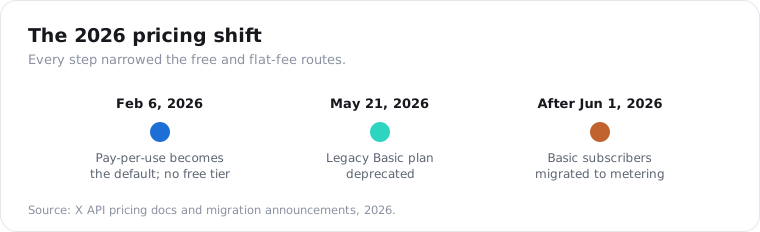
The legacy Basic ($200/mo) and Pro ($5,000/mo) plans are shut to new signups, and on May 21, 2026, X announced it would migrate existing Basic subscribers onto pay-per-use too, starting after June 1. Teams that budgeted a flat monthly fee now meter every call.
The free ways in closed earlier and stayed closed. snscrape, Twint, and Nitter all broke when X locked out anonymous guest access in 2023, and none of them came back. The tools that still work log in with a real account, which moves the risk rather than removing it.
The metered tier throttles, too. X allows roughly 3,500 post reads and 450 search requests per 15-minute window per app before it makes you wait, so even inside the 2-million cap you cannot pull fast. Rate limits and the cap are two separate ceilings, and busy projects hit both.
So the 2026 decision is no longer “which plan.” It is a three-way split between paying X per read, risking an account on a free scraper, or handing the reading to a managed API.
What are the best Twitter (X) data APIs?
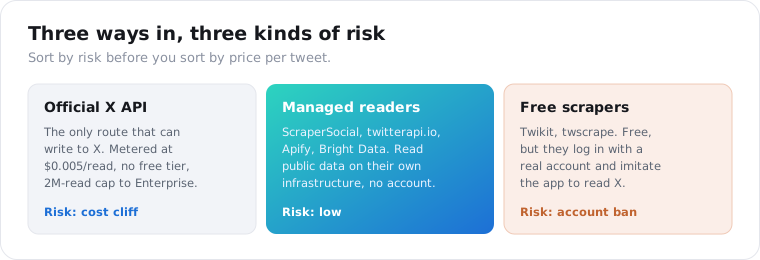
The six that most teams actually shortlist, grouped by how much account risk they carry. The official API is the only one that can write to X. The managed readers skip the developer account and the ban risk. The free library is cheapest and riskiest. I have named the real trade on each, not the marketing line.
- ScraperSocial. Seven X endpoints, part of a single normalized API for 30+ platforms, including tweets, search, profile, stats, and transcript, from $5/mo. Best when you want X data in the same schema as your other social sources, with no account risk.
- Official X API. The only route that can post, reply, or take authenticated actions, at $0.005 per read behind a 2-million-read cap. Best for writing to X and compliant bots, not for reading at scale.
- twitterapi.io. A dedicated X reader at about $0.15 per 1,000 tweets, roughly one-thirty-third of the official read price, with a $1 trial and no account. Best for cheap, high-volume tweet reads.
- Apify. A marketplace of X scraper actors billed around $0.40 per 1,000 tweets, with scheduling and exports. Best for custom or scheduled scraping jobs.
- Bright Data. Enterprise proxy infrastructure and datasets around $1.50 per 1,000 records. Best for bulk historical collection at real scale.
- Twikit (open-source). A free Python library that logs in with a real account to read X. Best for zero-budget research you can babysit, worst for anything that must stay up.
The category runs wider than six. SocialCrawl, ScrapeCreators, Oxylabs, ScrapingDog, and SociaVault all sell X data too. The six above are the ones I see teams put on a real shortlist once they sort by risk instead of by sticker price.
What does reading tweets at scale really cost?
The meter matters less than the ceiling. The official API is $5 per 1,000 reads with a hard monthly ceiling at 2 million, and one 2026 analysis put 100,000 tweets plus profile data near $1,500 a month on it. Managed readers bill per tweet or record, and none of them needs an X developer account or sits under X’s read cap.
On the managed side, twitterapi.io lists about $0.15 per 1,000 tweets, Apify about $0.40 per 1,000, and Bright Data about $1.50 per 1,000 records. ScraperSocial bills 1 credit per tweet and starts with 25 free credits.
Steady volume is where the official route breaks. Brand sentiment monitoring, real-time event and PR tracking, competitive intelligence, and financial-signal modeling all run on recent public tweets every day, and a cap that forces an Enterprise contract mid-month is what stops them.
Price per read also isn’t price per finished job. An X-only response with its own field names still has to be normalized before it sits next to your other sources, and a shared schema does that step for you.
Will a free Twitter scraper get your account banned?
It can, and that is the hidden cost the price-per-tweet lists ignore. Free libraries like Twikit and twscrape read X by logging in with a real account and imitating the app, so X can rate-limit or suspend that account the moment it flags the automation. The tools that needed no login, snscrape, Twint, and Nitter, all died when X cut anonymous guest access in 2023.
This is where “free” gets expensive.
A banned account is a bigger problem than a broken script. If it is the account your brand posts from, or a researcher’s real identity, the recovery is worse than any API bill you were avoiding.
Building your own browser scraper trades the ban risk for a maintenance one. X binds guest tokens to an IP and expires them in hours, rotates its internal query ids every two to four weeks, and blocks datacenter IPs within a request or two, so a DIY scraper means residential proxies and constant upkeep. One scraping guide put that at ten to fifteen hours of maintenance a month.
A managed data API sidesteps both problems. It reads public pages on its own infrastructure, so no account of yours is exposed and no proxy rotation is yours to maintain. You give up some control in exchange for not betting an account on it.
How much do Twitter (X) data APIs cost in 2026?
Most of the field lets you start free, and X’s own API is the one route with no free allowance at all. ScraperSocial starts on 25 free credits, then $5 a month for 1,000 tweet reads, and you aren’t charged for a request that errors. Official reads are $0.005 each behind a 2-million monthly cap, and the managed readers bill per tweet or per record.
| Provider | Pricing | Getting in | Covers, and what you run | Account risk |
|---|---|---|---|---|
| Official X API | $0.005 per read, pay-per-use | Developer account, no free tier | Reads and writes; 2M reads/mo cap, 7-day search | None (metered) |
| twitterapi.io | Per tweet, ~$0.15 / 1,000 | $1 signup credit, no minimum spend | Reads X only | None |
| Apify | Per result, ~$0.40 / 1,000 tweets | $5 free/mo | You pick, schedule and run X actors | None |
| Bright Data | Per record, ~$1.50 / 1,000 | Free tier | Proxy infrastructure and datasets | None |
| ScraperSocial | 1 credit per tweet ($0.005, or $0.0045 annual) | 25 free credits, then $5/mo | Seven X endpoints plus other platforms on one key; failed calls not billed | None |
| Twikit | Free (open-source) | Your own X login | You maintain it when X changes | Account ban risk |
Competitor prices as published; twitterapi.io’s signup credit and no-minimum terms checked on its site on October 16, 2026.
Take a watchlist job. Twenty accounts at about 25 new tweets each per day is 500 reads, or 500 credits, daily and about 15,000 a month. That comes to $75 on monthly credits, or $67.50 if you buy the year up front; the same reads on X’s meter also come to $75, but each one needs the developer account and counts toward the 2-million cap.
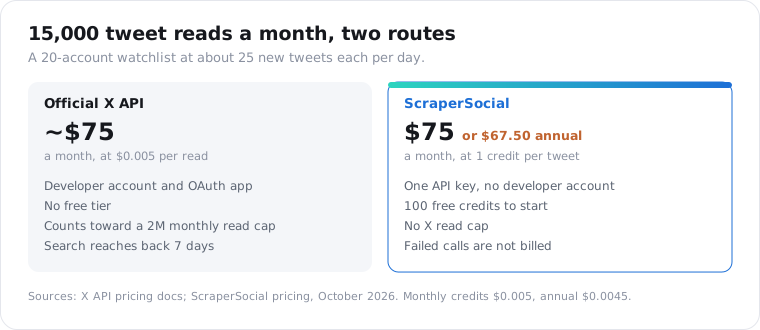
The official rate also carries a cliff. Pay-per-use is fine for a few thousand reads, but the 2-million monthly cap has only one door past it: Enterprise, which starts around $42,000 a month. Our Twitter API in Python guide walks the full pricing table.
That cliff is why raw price per tweet matters less than where your volume lands. A project that reads steadily hits the cap and jumps five figures; the same volume through a per-read reader just keeps metering.
Official X API vs a third-party data API: which should you use?
Use the official API to write, a data API to read. Only the official X API can post tweets, send DMs, or take authenticated actions on an account, so anything that writes to X runs on it. For reading public tweets, profiles, and search, a third-party data API is simpler, has no 2-million-read cap, and needs no developer account or OAuth app. Most teams end up running both.
The split is cleaner here than on most platforms.
Writing is genuinely official-only. There is no compliant way to post to X through a scraper, and you should not try; that is the side where account risk is real and deserved.
Reading is where you have a choice, and the official API is rarely the best one for it. You pay for every read with no free allowance, inherit the 2-million cap, and manage OAuth, all to read data a logged-out visitor can already see.
I keep giving the same advice. If your app posts and reads, use X’s API for the posting and a data API for the reading, and let each side play to its strength.
What can you pull from X, and how far back?
Recent public tweets and profiles, not a deep archive. From a tweet you get the text, engagement counters, timestamp, language, and reply or retweet flags. From a profile you get the display name, bio, follower and following counts, and verification. What no affordable route reaches is a protected account, DMs, or years of history: the official cheap search stops at 7 days, and full-archive is Enterprise-only.
Freshness and depth are where the other lists go quiet.
Two honest limits live in the tweet fields. View counts are null on posts from before late 2022, because X did not display them then, so treat null as “not published,” not zero. And timelines include replies and retweets, so filter client-side when you only want original posts.
The historical wall catches people last. There is no cheap path to a deep archive of a public account anywhere: the free scrapers never reached far back, and a logged-out reader sees only what X shows on a public timeline. If your project depends on 2019’s tweets, budget for Enterprise or reframe it. If it depends on this month, any read route handles it.
How do you pull X data without a developer account?
You send one request to a managed endpoint and get structured tweets back, with no OAuth app and no metered X quota. The API reads public X pages on its own infrastructure and bills per item returned. That removes the developer account, the 2-million cap, and the 7-day search wall in one step.
On ScraperSocial, the seven X endpoints cover what people actually pull: a handle’s tweets, a keyword search, a profile’s numbers, account stats, and a video’s transcript.
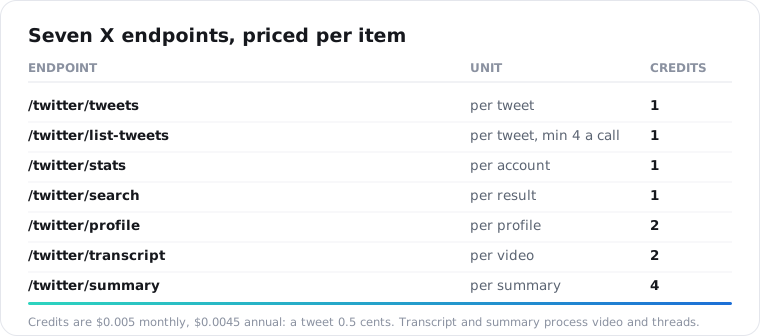
Two of those endpoints are unusual. Most X APIs stop at tweets and profiles, but /v1/twitter/transcript pulls the spoken text out of a video post and /v1/twitter/summary returns an AI summary of a thread or account, so a video tweet becomes searchable text without a separate transcription step. If your pipeline feeds an LLM, that saves a stage.
Credits are $0.005 each monthly and $0.0045 annual, so a tweet is half a cent and a profile lookup, at 2 credits, is 1 cent. You send a handle to /v1/twitter/tweets, a query to /v1/twitter/search, or a URL to /v1/twitter/transcript, and every response arrives in the same envelope.
import requests
r = requests.get(    "https://api.scrapersocial.com/v1/twitter/tweets",    params={"handle": "nasa", "limit": 100},    headers={"Authorization": "Bearer sk_live_..."},)for t in r.json()["data"]:    print(t["text"], t["likes"], t["posted_at"])
The 25 free signup credits pull 25 tweets, five a call on the free plan, enough to check the fields against your use case before you add a card.
Which Twitter (X) data API should you pick?
Sort by what you are doing and what you can risk, not by price per tweet. Writing to X or running a compliant bot means the official API, full stop. Reading public tweets at scale means a managed data API: twitterapi.io for X-only bulk reads, ScraperSocial for one schema across platforms and built-in transcripts, Bright Data for enterprise bulk. A free library like Twikit is fine for throwaway research if you can afford to lose the account it runs on. Answer write-or-read first, then match the risk to the job.
Frequently asked questions
What is the best Twitter (X) data API in 2026?
There is no single best one, because the right choice depends on your risk tolerance and volume. For posting and compliant bots, the official X API is the only option. For reading tweets at scale without an account, twitterapi.io is a low-cost X-only reader, and ScraperSocial gives you X in one schema alongside 31 other platforms, starting on 25 free credits. Free scrapers like Twikit work but put your account at ban risk. Pick by whether you are writing or reading, then by volume.
Is there a free Twitter API in 2026?
No, not from X. On February 6, 2026, X made pay-per-use the default and gave new developers no free tier at all. Reading a tweet costs $0.005 and there is a 2-million-read monthly cap before Enterprise. The closest things to free are a third-party API’s trial credits, such as twitterapi.io’s $1 signup credit or ScraperSocial’s 25 free credits, or the open-source library Twikit, which works but risks the account it logs in with.
How much does it cost to read tweets through an API?
X’s own API charges $0.005 per read, with no free tier and a 2-million monthly cap. Managed readers bill per tweet or record: twitterapi.io lists about $0.15 per 1,000 tweets, Apify about $0.40 and Bright Data about $1.50 per 1,000 records. ScraperSocial bills 1 credit per tweet, $5 per 1,000 monthly or $4.50 on annual credits, with 25 free credits, no developer account and no read cap.
Will a free Twitter scraper get my account banned?
It can. Free libraries like Twikit and twscrape work by logging in with a real X account and imitating the app, so X can rate-limit or suspend that account when it detects the automation. snscrape, Twint, and Nitter, the older tools that needed no login, all broke when X locked out anonymous guest access in 2023. For anything that must stay up, a managed API that reads public data without your account is the lower-risk path.
How far back can a Twitter API pull tweets?
Not far on any affordable route. The official X API’s pay-per-use search reaches back only 7 days, and full-archive access to 2006 requires Enterprise at around $42,000 a month. Third-party readers see what a logged-out visitor sees on a public profile, which is recent posts, not a deep archive. If you need one specific old tweet, fetch it by its URL; years of history in bulk is expensive on every route.
Official X API or a third-party API, which is better?
It depends on whether you write or read. Only the official X API can post tweets, send DMs, or take authenticated actions, so anything that writes to X uses it. For reading public tweets, profiles, and search results, a third-party data API is usually simpler and has no 2-million-read cap, no OAuth app, and no developer-account approval. Most teams end up using the official API to write and a data API to read.
Match the tool to the risk, then the volume
Before you compare a single per-tweet rate, decide two things: are you writing or reading, and can you afford to lose an account. Writing is official-API-only. Reading public data at scale points to a managed API, and the fastest way to judge one is to run a real call. Drop a handle into the X tweets endpoint and see whether the fields match what your project needs. Getting a key from the quickstart takes about a minute, the pricing page spells out the per-tweet credit cost, and your first 25 credits are on the house, enough for 25 tweets before you decide.