By Nikhil Kumar. Last updated October 2026.
You can post to LinkedIn through its API all day. You just cannot read anyone else’s posts through it.
LinkedIn’s official API is built to publish, not to read the feed. It lets you post as yourself and read your own company’s posts after approval, but it will not return a competitor’s or any public member’s posts at any tier. To pull public LinkedIn posts, a person’s or a company’s, you send a URL to a data API that reads the public page. This guide shows how, what each post returns, and where the legal line sits.
“linkedin posts api” draws about 110 US searches a month, according to DataforSEO keyword data pulled in September 2026, and it carries one of the highest advertiser costs-per-click on the platform, because the people searching it are building real B2B products.
Can you get LinkedIn posts from the official API?
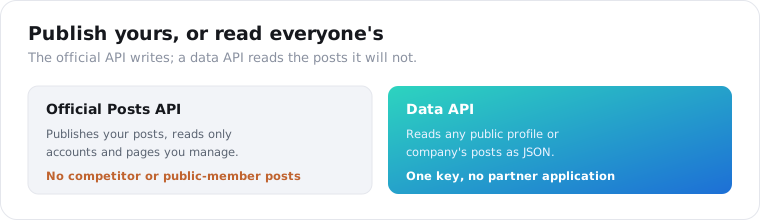
Only your own. LinkedIn’s Posts API is part of the Marketing Developer Platform, and it publishes organic and sponsored posts and reads posts from an organization you manage. It cannot read a competitor’s page or any public member’s posts. All of it runs through the LinkedIn Partner Program, and reading arbitrary public posts is not on the menu.
This is the asymmetry that trips people up.
Publishing is the easy part. The w_member_social permission is an open permission any developer gets instantly, so posting, commenting, and liking as the authenticated member needs no approval. That is why a hundred scheduling tools can post to LinkedIn.
Reading is the gated part. To read an organization’s posts you need the r_organization_social permission and a company-page role on that org, and to read a member’s own posts you need r_member_social, which LinkedIn marks restricted and grants to approved users only. Both return posts you own or manage, never a stranger’s. There is no permission, at any partner tier, that hands you a public member’s posts.
So the search “LinkedIn posts API” splits in two. If you want to write, the official API is right there. If you want to read what other people posted, it was never built for you, and the LinkedIn API pricing reality is that no tier unlocks it.
Why can’t the official API read a competitor’s posts?
Because LinkedIn treats member and company content as its own asset, and gates every read behind ownership or partnership. The Partner Program has governed all API access since 2015, approval takes one to four weeks, and the Development tier starts capped at 500 calls a day. Even approved, the read permissions cover your account and your managed pages, never arbitrary public profiles or competitor companies.
LinkedIn has spent real money defending that line.
The clearest signal was Proxycurl, once the biggest LinkedIn data API, which LinkedIn sued and forced to shut down on July 4, 2025. Our best LinkedIn scraping APIs post covers that story, and its lesson is that LinkedIn guards its data hard and the collection method you choose matters as much as the price.
So competitor and market research, the exact reasons most people want LinkedIn posts, are precisely the uses the official API is designed to prevent. That is not an oversight. It is the product.
How do you pull a person’s LinkedIn posts with an API?
You send their profile URL or handle to the posts endpoint and read their recent public posts back as JSON. The API reads the public profile page, so there is no OAuth and no partner application. On ScraperSocial you GET /v1/linkedin/profile-posts with a profile URL, billed 1 credit per post returned.
Here is the whole call in a few lines of Python.
import requests
r = requests.get(    "https://api.scrapersocial.com/v1/linkedin/profile-posts",    params={"handle": "https://www.linkedin.com/in/williamhgates", "limit": 20},    headers={"Authorization": "Bearer sk_live_..."},)for post in r.json()["data"]:    print(post["posted_at"], post["likes"], post["text"][:80])
URL in, posts out. No token exchange, no application, no login.
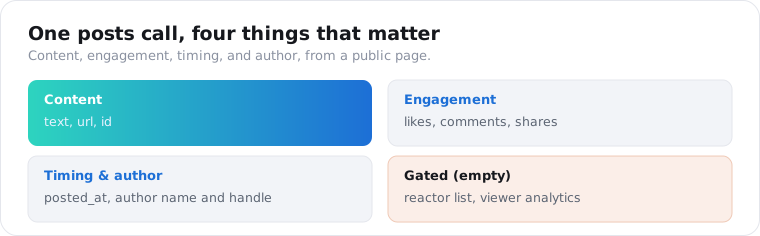
Each post is a flat object built for analysis. It carries the post id and url, the text, the likes, comments, and shares counts, the posted_at date, and the author name and handle. That is the content plus its engagement, which is what content research and social selling actually run on.
The engagement counts are the useful part. Text tells you what someone posted; likes, comments, and shares tell you whether it landed, and sorting a person’s posts by engagement surfaces the ideas their audience actually responded to.
How do you pull a company’s posts?
The same way, through a different endpoint. Send a company page URL or handle to /v1/linkedin/company-posts and get the organization’s recent public posts back in the identical shape, billed the same 1 credit per post. That is the competitor-tracking half of the job, and it is the read the official API blocks for any page you do not manage.
import requests
r = requests.get(    "https://api.scrapersocial.com/v1/linkedin/company-posts",    params={"handle": "https://www.linkedin.com/company/microsoft", "limit": 20},    headers={"Authorization": "Bearer sk_live_..."},)for post in r.json()["data"]:    print(post["posted_at"], post["likes"], post["comments"], post["text"][:80])
Company page in, its posts out, in the same shape you already parse for people.
Because the shape matches profile posts, one parser handles both. A monitoring job can poll a mix of people and companies on a schedule, diff against what it stored, and treat any new post as an alert that a competitor or a target account just published. The company-posts endpoint is the same call whether you point it at a brand, a competitor, or an account you are selling into.
One mechanic matters for monitoring. The limit sets how many recent posts come back and is also your cost dial, so a daily job that only needs new posts can ask for the latest handful rather than paging deep. These endpoints return recent posts, not a person’s entire history, so they are built for tracking a set of profiles on a schedule rather than reconstructing years of someone’s feed in one run.
What data comes back from a LinkedIn post?
The public content and its engagement, not the private layer behind it. A post returns its id, url, text, the like, comment, and share counts, the posted date, and the author’s name and handle. What no public-page reader returns is the gated data: the full list of who reacted, viewer analytics, or the private engagement LinkedIn shows only the post owner. Those come back empty rather than guessed.
That honesty about the gaps matters more on LinkedIn than anywhere else.
Much of a LinkedIn profile sits behind a login, so a public reader sees the post, its counts, and its author, but not the reactor list or the impression numbers only the author can see in their own analytics. A tool that claims to return those for a stranger’s post is inventing them.
What you do get is enough for most jobs. The text is the message, the counts are the response, the date is the timing, and the author ties a post back to a person or company. Content strategy, competitor benchmarking, and buyer-intent signals are all built from exactly those four things, and none of them needs the private analytics a public reader cannot see.
What should you check before you pull LinkedIn posts?
One thing matters more on LinkedIn than on any other platform: how the tool collects. LinkedIn sues over data, so a provider’s method decides your legal and continuity risk as much as its price does. Also check freshness and whether it returns real engagement counts. These three settle whether the data is safe and usable.
Collection method comes first, because it is the whole Proxycurl lesson. A tool that reads genuinely public pages logged out sits on the ground courts have protected; a tool that runs logged-in accounts or fake profiles to reach gated data is on the ground LinkedIn wins in court. Ask a provider how it collects before you build on it, because if its method gets it shut down, your pipeline dies with it. Bright Data’s approach, for instance, is public-data collection priced per record rather than account automation.
Then freshness. LinkedIn posts are timely, and a stale source that shows a week-old post as the latest breaks any social-selling or monitoring use, so confirm the tool reads the profile at request time rather than serving a cached snapshot.
Last, real engagement. Some scrapers return post text but zero out the like and comment counts, which strips the signal that tells a winning post from an ignored one. Verify the counts come back populated on a public post before you commit, because the engagement is half the value.
What can you build with LinkedIn post data?
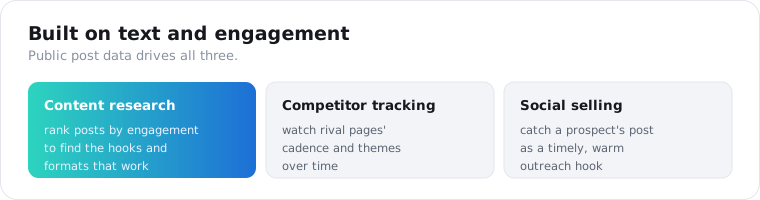
Mostly content research, competitor benchmarking, and social selling. Marketing teams track which posts and formats perform in their niche, competitive teams watch rival companies’ messaging and engagement over time, and sales teams catch a prospect’s post as a timely outreach hook. The data is public text and engagement, so the products are about content and timing, not private contacts.
Content research is the most common build.
Pull the posts of the top voices in a niche, rank them by engagement, and the patterns show: which topics, hooks, and formats their audience rewards. That is a content calendar built from evidence instead of guesswork, and SEO teams mine the same post text for the phrases customers and competitors actually use.
Competitor benchmarking is the next one. Poll a set of rival company pages on a schedule and you have a running record of their posting cadence, their themes, and how each post performed, which is how you spot a competitor’s campaign the week it launches rather than the quarter after.
Social selling closes the loop. A prospect posting about a problem you solve is a warm opening, and a job that watches a list of target accounts’ posts surfaces those moments while they are still fresh, which is the difference between a relevant reply and a cold pitch.
One worked loop ties it together. A sales team keeps a list of target contacts and accounts, pulls their profile and company posts every morning, and flags any new post that mentions a trigger keyword, a hiring push, a tooling change, a pain point. The rep gets a short daily list of warm openings with the post text attached, so the outreach references something real the prospect just said instead of a generic template. The whole thing is a scheduled set of posts calls and a keyword filter, not a rep scrolling the feed for an hour.
Is it legal to scrape LinkedIn posts?
It is genuinely contested, and this is not legal advice. US courts have generally held that scraping public data does not violate the Computer Fraud and Abuse Act, as in hiQ Labs v. LinkedIn, but LinkedIn’s User Agreement separately prohibits scraping, and that contract question is distinct from the federal-law one. LinkedIn enforces its terms aggressively.
The Proxycurl shutdown is the cautionary tale here.
LinkedIn sued Proxycurl’s parent for running fake accounts to scrape non-public data at scale, and the service died. The line that case draws is between reading genuinely public pages logged out, which courts have protected, and logging into accounts to reach gated data, which is where the legal and account risk lives.
So the safe posture is narrow. Read only public posts, never log in with an account to bypass limits, keep a short retention window, and treat post text and author identity as personal data under GDPR and CCPA the moment you store it. If your use is commercial, get your own legal read before you build on it.
Which route should you choose?
Match the route to whether you are writing or reading. If you are publishing posts, scheduling content, or acting on your own account, use LinkedIn’s official API, because only it can post as you. If you are reading public posts from people or companies you do not manage, for content research, competitor tracking, or social selling, a data API is the only route that returns them, and it needs no partner application. Plenty of teams run both: LinkedIn’s own API to publish their content, and a data API to read everyone else’s. Almost everyone searching for a “posts API” to read the feed lands in the second group.
Frequently asked questions
Can you get LinkedIn posts from the official API?
Only your own. LinkedIn’s official Posts API publishes content and reads posts from an organization you manage after Community Management approval, but it cannot read a competitor’s or any public member’s posts. All access runs through the LinkedIn Partner Program, and reading arbitrary public posts is not an approved use case. To read public profile or company posts, developers use a third-party data API that reads the public page instead.
How do I pull a person’s LinkedIn posts with an API?
Send their profile URL or handle to a data API’s posts endpoint and read the posts back as JSON. On ScraperSocial that is a GET to /v1/linkedin/profile-posts, billed 1 credit per post returned. Each post comes back with its text, like, comment, and share counts, the posted date, and the author, with no LinkedIn login, no OAuth, and no partner application.
Can I read a company’s LinkedIn posts?
Yes, through the company-posts endpoint. Send a company page URL or handle to /v1/linkedin/company-posts and get the organization’s recent public posts back in the same shape as profile posts: text, engagement counts, date, and author. That covers competitor content tracking and brand monitoring, which the official API blocks for pages you do not manage.
What data does a LinkedIn post return?
The public post content and its engagement. A post returns its id, url, text, the like, comment, and share counts, the posted date, and the author’s name and handle. What it does not return is anything behind the login: full reaction lists, viewer analytics, or private engagement data. A public-page reader returns what a logged-out visitor sees, and leaves gated fields empty rather than guessing them.
Is it legal to scrape LinkedIn posts?
It is contested, and this is not legal advice. US courts have generally held that scraping public data does not violate the CFAA, but LinkedIn’s User Agreement separately prohibits scraping, and LinkedIn enforces it aggressively, as the Proxycurl shutdown showed. Read only public posts, avoid logging in with an account to bypass limits, keep a short retention window, and get your own legal read before building anything commercial on it.
How much does it cost to pull LinkedIn posts?
On ScraperSocial it is 1 credit per post from the profile-posts and company-posts endpoints, about half a cent at $0.005 a credit. Tracking 10 competitor pages and their 5 newest posts every week is 200 posts a month, or 200 credits, a fifth of the $5 monthly plan, and 25 free credits read 25 posts before you pay. Failed calls are not charged. LinkedIn’s own API has no tier, at any price, that reads someone else’s posts.
Pull a profile’s posts
Take a creator or a competitor you want to track. Send their profile or company URL to the posts endpoint, read the text and engagement back, and you have the raw material for content research or competitor monitoring in one call. The quickstart issues a key in a minute, the pricing page has the per-post credit cost, and 25 free credits cover a handful of profiles before you spend anything. For the full field guide to the providers, the best LinkedIn scraping APIs comparison maps the market.