By Nikhil Kumar. Last updated October 2026.
Instagram scraper pages love the word “everything.” But Instagram doesn’t show a follower list or a story to anyone who isn’t logged in, and a scraper that stays logged out sees what they see.
An Instagram scraper can pull a lot without logging in: profiles, posts, reels, comments, hashtags, locations, mentions, paid partnerships, ads and even reel transcripts, all from public data. It can’t reach follower lists, stories, private accounts or DMs. This guide maps every piece of public Instagram data to what it costs per item, so you can plan a project around what’s actually available.
Can you scrape Instagram without logging in?
Yes, for anything Instagram shows the public. Profiles, posts, reels and comments on public accounts are visible without an account, so a logged-out scraper can read them. Doing it by hand in a browser runs into a wall fast: an Instagram spokesperson told Adweek that logged-out visitors only see a limited number of posts before being asked to log in.
That wall is why DIY scripts struggle. A scraper API handles access on its side and hands you JSON.
There’s a lot to read, too. Meta CEO Mark Zuckerberg said in September 2025 that Instagram had passed 3 billion monthly active users, as Reuters reported.
Logging in also changes who carries the risk. A scraper that logs in acts as your account, and Instagram can block or ban that account. A logged-out scraper has no account to lose.
What can an Instagram scraper pull without login?
Almost everything a logged-out visitor can see, item by item. That covers profiles and account details, posts and reels with their counts, comments, hashtag and location feeds, keyword search, mentions and tagged posts, similar accounts, paid partnerships, Meta Ad Library ads, and transcripts of reels. Each is a separate call. Most cost 1 credit per item, and a few cost more because they do more work.
Here’s the full map, as the API stood at the end of October 2026:
| Data | Endpoint | Credits | What you get |
|---|---|---|---|
| Profile | channel-stats | 1 per profile | Followers, following, posts, bio, verified, is_private |
| Profile + recent posts | profile-full | 1 per profile | Profile, recent posts and suggested accounts |
| Account details | profile-about | 4 per profile | Account age, country, username history |
| Recent posts | channel-posts | 1 per post | Caption, likes, comments, date, hashtags |
| Recent reels | channel-reels | 1 per reel | Views, likes, comments, duration_sec, caption |
| One post or reel | stats | 1 per post | Counts and caption for a URL you have |
| Comments | comments | 1 per comment | Text, author, likes, date |
| Comments across a profile | profile-comments | 1 per comment | Recent comments with the post they’re on |
| Hashtag posts and reels | hashtag-posts, hashtag-reels | 1 per item | Posts or reels carrying a tag |
| Keyword search | keyword-search | 1 per result | Posts matching a word, tagged or not |
| Locations | location-search, location-posts | 1 per item | Places and the posts tagged there |
| Mentions and tags | mentions, tagged | 1 per post | Posts by others that tag or @-mention a profile |
| Similar accounts | similar | 1 per call | Instagram’s own “suggested” accounts |
| Paid partnerships | collaborations | 3 per row | Creator and brand partners on labelled posts |
| Ads | ads-search, ads-by-page | 3 per ad | Meta Ad Library ads with the advertiser’s handle |
| Reel transcript | transcript | 1, plus 20 for each started minute | Spoken words as plain text |
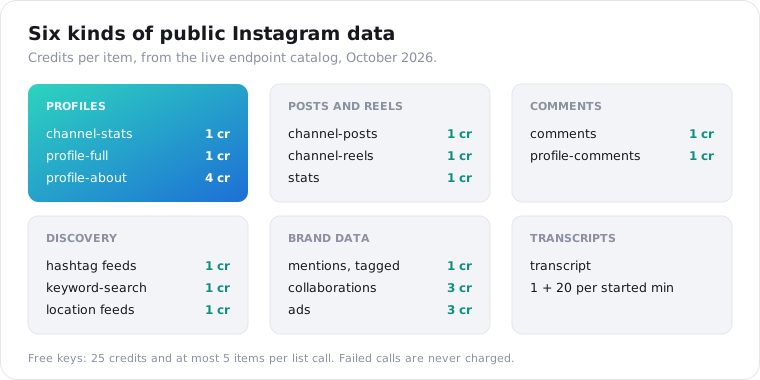
Every row in that table is a plain GET request with a handle, a URL or a search term, so mixing them in one project takes no extra setup.
What does Instagram data look like when you pull it?
Plain JSON, one object per item, with the same fields every time. A reel comes back with its id, URL, caption, views, likes, comments, duration in seconds, publish time and author. Fields Instagram doesn’t show come back as null instead of a guess: hidden like counts are null, and share counts are always null because public reel pages don’t carry them.
Here’s one reel from the channel-reels endpoint, with example values:
{ "id": "C8xQvZ2sVAb", "url": "https://www.instagram.com/reel/C8xQvZ2sVAb/", "type": "clips", "caption": "Three standing desks, one winner #desksetup", "views": 184200, "likes": 9310, "comments": 412, "shares": null, "duration_sec": 47, "posted_at": "2026-10-21T16:02:00Z", "author": { "handle": "deskreviews", "name": "Desk Reviews" }, "hashtags": ["desksetup"]}Counts are snapshots. A reel posted this morning will read very differently in a week, so store the time you pulled it next to the numbers.
The duration_sec field matters more than it used to. Since Instagram doubled the maximum reel length to three minutes at the start of 2025, per Social Media Today, one creator’s feed can mix seven-second loops with long explainers. Compare engagement within similar lengths.
The order matters too. Lists come newest first, but pinned posts can sit at the top regardless of age, so sort on posted_at yourself before you compare.
How do you scrape Instagram hashtags, locations and keyword search?
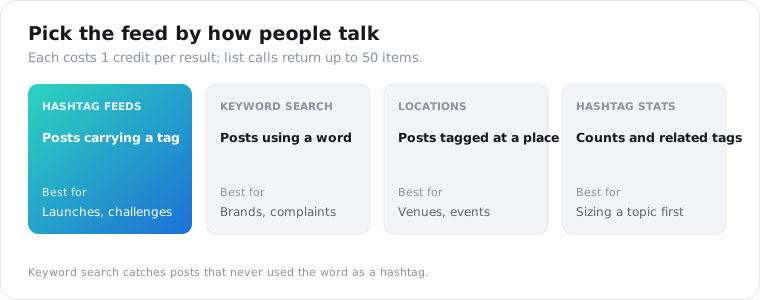
Each is its own feed, priced per item. Hashtag posts and hashtag reels return what carries a tag. Keyword search finds posts that use a word even when it was never a hashtag, which catches a lot that tag feeds miss. Location search finds places by name, and location posts returns what was tagged at a place. All of them cost 1 credit per result, and list calls return up to 50 items at a time.
Pick by how people actually talk about your topic:
- Use hashtags when the community has settled on a tag, like a product launch or a challenge.
- Use keyword search for brands, product names and complaints, which people rarely tag.
- Use locations for venues, events and local businesses.
- Use hashtag stats or hashtag search first if you need post counts and related tags, not the posts themselves.
The hashtag guide covers tag feeds in detail, including what Instagram’s official API allows there.
Can you scrape Instagram mentions, partnerships and ads?
Yes, and this is where logged-out data gets useful for brands. Mentions returns posts by other accounts that tag or @-mention a profile, at 1 credit per post. Collaborations lists paid-partnership posts between creators and brands, at 3 credits per row. Ads search reads the Meta Ad Library and attaches the advertiser’s Instagram handle, at 3 credits per ad.
A brand team can answer three questions with these:
- Who is talking about us, or about a competitor? That’s mentions.
- Which creators does a rival already pay? That’s collaborations on the rival’s handle.
- What are they advertising right now? That’s ads search or ads by page.
Profile-about adds a vetting layer at 4 credits: when an account was created, its country and its past usernames. A two-month-old account with 80,000 followers is worth a second look before a brand deal.
None of this needs an Instagram account. All of it is limited to what’s public, so unlabelled sponsorships and story mentions won’t show up.
What can’t you get from Instagram without logging in?
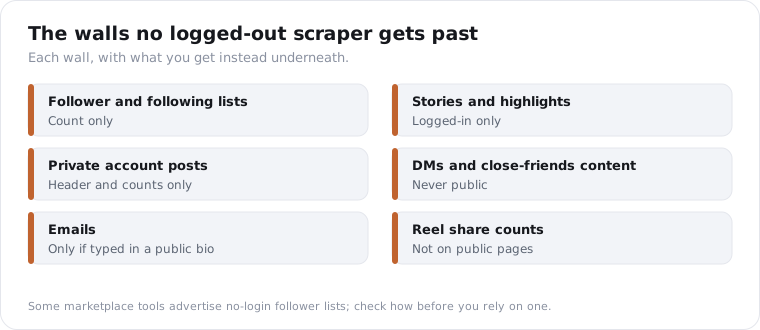
Follower and following lists, stories, private accounts and DMs. Instagram doesn’t show any of them to a logged-out visitor, so a logged-out scraper can’t see them either. Private accounts still return their header, the name, bio and counts, with an is_private flag. Their posts stay hidden. Plan around these walls from day one rather than discovering them mid-project.
The follower list is the one people ask about most. Instagram’s own official API returns a follower count for business accounts, not who the followers are, and this API returns the count too.
Some marketplace tools advertise no-login follower lists anyway. Before you build on one, find out how it gets them, because a method Instagram doesn’t sanction can stop working without warning.
The full list of walls:
- Follower and following lists: count only.
- Stories and highlights: logged-in only; the stories endpoint here is switched off.
- Private accounts: header only.
- DMs and close-friends content: never public.
- Emails: only if someone typed one into their public bio.
- Reel share counts: not exposed on public pages.
Comments have limits of their own. One call returns one batch, up to the limit you set, with no second page to fetch.
They arrive in Instagram’s own ranking, so popular comments come first rather than the newest. Replies come back as separate rows with no link to the comment they answer, so you can’t rebuild a thread.
For most analysis that’s fine. The first 20 to 50 comments on a post usually carry the signal, and pulling thousands rarely changes the picture.
If follower growth is what you’re after, track the count over time instead. Pull channel-stats daily and store the number; the change between snapshots is the growth.
Which Instagram scraper do you need: profile, post, reel or comment?
Pick by the question you’re answering. A profile scraper vets accounts: size, bio, verification. A post or reels scraper studies content: what a creator publishes and what performs. A comment scraper reads the audience: what people ask, praise and complain about. Most real projects chain two or three of these, starting with the profile and narrowing down.
Here’s how the common jobs map:
| Job | Calls, in order | Cost for 20 accounts |
|---|---|---|
| Vet influencers | channel-stats, then channel-reels (12) | 20 + 240 = 260 credits |
| Track competitors’ content | channel-posts (12) per account | 240 credits |
| Mine audience feedback | channel-reels (5), then comments (50 each) on the top reel | 100 + 1,000 = 1,100 credits |
| Find creators in a niche | hashtag-posts (50), then channel-stats per author | 50 + 20 = 70 credits |
I’d start every project with the channel-stats endpoint. It costs 1 credit, tells you if the account is private, and saves you paying for calls that return nothing useful.
The comments guide goes deeper on the audience case.
If you’re building an AI agent rather than a script, the same calls are available as tools through the MCP server. The agent picks the endpoint itself, so a prompt like “compare the last 12 reels from these three accounts” turns into channel-reels calls without any code from you.
That’s the setup I’d pick for research questions that change every week. Each tool description states its price, so the agent can weigh the cost of a call before making it.
How do you scrape Instagram without login in Python?
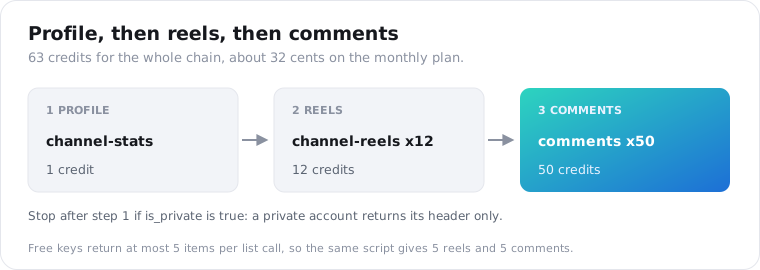
With plain HTTP calls and an API key. No Instagram account, browser or proxy is involved. You send a handle or a post URL, you get JSON back with a data array or object, and each item is billed as it’s returned. The example below pulls a profile, its latest reels, and the comments on the most-viewed reel, which is the most common chain.
import requests
API = "https://api.scrapersocial.com/v1/instagram"H = {"Authorization": "Bearer sk_live_..."}
def get(path, **params):    r = requests.get(f"{API}/{path}", params=params, headers=H, timeout=60)    r.raise_for_status()    return r.json()["data"]
profile = get("channel-stats", handle="natgeo")print(profile["followers"], profile["verified"], profile["is_private"])
if not profile["is_private"]:    reels = get("channel-reels", handle="natgeo", limit=12)    top = max(reels, key=lambda r: r["views"] or 0)    comments = get("comments", url=top["url"], limit=50)    for c in comments[:5]:        print(c["author"], c["text"])
That run costs 1 + 12 + 50 = 63 credits, about 32 cents. Free keys are capped at 5 items per list call, so the same script on a free key returns 5 reels and 5 comments.
A private account still returns its profile, so the is_private check is what stops you paying for empty post lists. A handle that doesn’t exist returns an error, and errors cost nothing.
Errors come back with a code and a request id. The rate limit docs cover what a 429 looks like and how to back off.
How much does it cost to scrape Instagram?
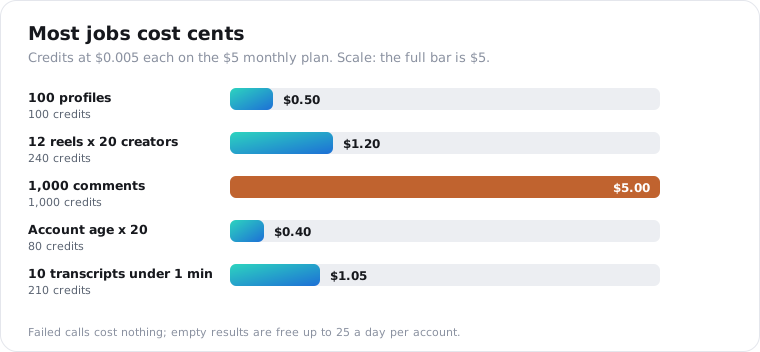
Most Instagram data costs 1 credit per item, and $5 buys 1,000 credits on the monthly plan, so most jobs land at half a cent per profile, post, reel or comment. Account details cost 4 credits, ads and paid partnerships 3, and a reel transcript is priced by length: 1 credit, plus 20 for every minute of video it starts. Failed calls are never charged, and a call that finds nothing is free up to a daily limit.
Some worked examples:
| Job | Credits | Cost |
|---|---|---|
| 100 profiles | 100 | $0.50 |
| Latest 12 reels from 20 creators | 240 | $1.20 |
| 1,000 comments | 1,000 | $5.00 |
| Account age for 20 creators | 80 | $0.40 |
| 10 reel transcripts, each under a minute | 210 | $1.05 |
Signing up gives you 25 credits to test with. That covers a profile, a handful of reels and some comments before you pay anything.
Repeat calls cost the same as the first, even when served from cache. Store what you pull so you don’t pay twice for data you already have.
Two habits keep the bill predictable. Set limit to what you’ll actually read, since list calls bill per item returned. And check is_private before pulling posts, so you don’t pay to learn an account is locked.
A call that comes back empty, like a hashtag with no posts, is free up to 25 times a day per account. After that an empty result costs 1 credit, and errors never cost anything.
Is it legal to scrape Instagram without logging in?
Logged-out scraping of public data has one notable US ruling on its side. In January 2024, Judge Edward Chen of the Northern District of California found that Bright Data’s logged-out scraping of public Instagram and Facebook data didn’t breach Meta’s terms. Meta dropped the lawsuit a month later. The ruling is narrow, so treat it as context, not permission.
The stakes in that case were large. Meta said in court papers that Bright Data had offered an Instagram dataset of 615 million records for $860,000, according to TechCrunch’s report.
Two limits matter for your own project. The ruling says nothing about scraping while logged in, and it doesn’t touch privacy law.
If you store data about people in the EU or UK, GDPR applies whatever the scraping method. Keep only the fields you need and delete what you don’t use. And get legal advice for anything commercial or sensitive; this isn’t it.
A few practical rules keep a project defensible:
- Collect public data only, and never log in to reach more.
- Store the fields your question needs, not whole profiles by default.
- Keep handles separate from analysis when you don’t need to know who said what.
- Delete data you no longer use, and honour removal requests.
- Don’t republish people’s posts or comments wholesale; quote briefly and link back.
Why do DIY Instagram scrapers keep breaking?
Because Instagram limits logged-out visitors hard and keeps changing the internal requests scrapers copy. Free tools work until they don’t: anonymous requests get throttled, logged-in sessions get challenged, and a script that ran last month starts returning errors. Instaloader, the most popular open-source option, is still maintained, and its own troubleshooting docs say anonymous access gets much stricter limits.
Instaloader is a good tool for small, personal jobs. Scrapfly’s October 2026 review counted 13,100 GitHub stars and commits as recent as July 2026, which is more upkeep than most alternatives get.
The common failure is a 401 with “please wait” after a burst of anonymous requests. Instaloader’s troubleshooting page suggests logging in to get past it, which works, but now your account is the one taking the risk.
For anything a business depends on, I’d rather pay half a cent per item than maintain proxies, sessions and patches. Our Instagram data API comparison covers the other managed options if you want to shop around.
Frequently asked questions
Can you scrape Instagram without logging in?
Yes, for public data. Profiles, posts, reels, comments, hashtags, locations, mentions and ads can all be read without an Instagram account through a data API. What you can’t get logged out is anything Instagram hides from visitors: follower lists, stories, private accounts and DMs. Doing it yourself in a browser hits Instagram’s logged-out post limit quickly.
Can an Instagram scraper get a follower list?
Not from this API, and not from Instagram’s official API either, which returns a follower count but no follower identities. Some marketplace tools advertise no-login follower lists; check how they get them before you rely on one. For most projects the count, its growth and the people who comment are what you actually need.
Is it legal to scrape Instagram?
In January 2024 a US federal judge ruled that Bright Data’s logged-out scraping of public Instagram and Facebook data did not breach Meta’s terms, and Meta dropped the case a month later. That ruling is narrow and is not legal advice. Privacy laws such as GDPR still apply to personal data you store, so collect only what you need.
How much does it cost to scrape Instagram?
With this API most Instagram data costs 1 credit per item, so 1,000 posts, reels or comments cost 1,000 credits, which is $5 on the monthly plan. Account details from profile-about cost 4 credits, ads and paid partnerships 3, and transcripts 1 credit plus 20 per started minute. Failed calls are never charged.
Can you scrape Instagram stories without logging in?
No. Stories are only shown to logged-in viewers, so a logged-out scraper can’t see them, and the stories endpoint in this API is switched off. Tools that offer stories log in with an account, which carries the account risk that logged-out scraping avoids. Highlights and archived stories have the same limit.
Do I need proxies to scrape Instagram?
Not with a scraper API, which handles access for you and returns JSON. You only need proxies if you run your own scraper, because Instagram limits logged-out visitors hard and blocks repeated requests from one address. Instaloader users often see a 401 ‘please wait’ message once those limits kick in.
Pull your first Instagram profile in five minutes
Copy the Python snippet, swap in a handle you care about, and run it with a free key. You’ll see exactly what the public data looks like before you plan anything bigger. Get your API key, then map your project to the table above.