By Nikhil Kumar. Last updated October 2026.
The comments are where the real signal is. The caption is the brand talking; the comments are everyone else. Instagram passed 3 billion monthly active users in 2026, so the threads under those posts are the biggest running focus group you will find.
To scrape Instagram comments, send a GET request to a comments API with the post or reel URL and an API key. You get back a clean JSON array of comments, each with its text, author, like count, and timestamp. No Instagram developer account, no login, no browser automation. Public posts only, read logged out.
How do you scrape Instagram comments?
You call a comments endpoint with the post URL, and it returns the comments as structured data. The old way, driving a headless browser against Instagram’s login wall, breaks constantly and risks the account you run it from. A comments API does the collection on its side and hands you JSON, so you skip the part that fails. It draws a small but zero-competition slice of search demand: “instagram comments api” and “instagram api comments” together pull about 30 searches a month at keyword difficulty 0.
That difficulty-zero number is the interesting part. Almost nobody has written a straight answer for this, even though “instagram scraper” as a category pulls roughly 880 searches a month. The comments niche is wide open.
Why can’t you just use Instagram’s official API?
Because Instagram’s Graph API only returns comments on media your own account owns or manages. Meta’s own documentation is explicit that it returns data only for media owned by the connected professional account, not other users’ posts. It is built for a business or creator account to read and reply to engagement on its own posts, behind app review and a connected account. There is no path in it to read the comments on a public post you did not create, which is exactly what most scraping tasks need.
So the official API is the right tool for managing your own community, and the wrong tool for research, competitor analysis, or monitoring. Those need comments on posts you have no control over. That is the gap a third-party data API fills: it reads public comments on any public post, no ownership or app review required.
If you have ever opened the Graph API docs hoping to pull comments off a viral post and found only endpoints scoped to your own media, this is why. The capability is not gated behind a higher tier; it does not exist there.
What’s the fastest way to pull Instagram comments with an API?
Send one authenticated GET request with the post or reel URL. Get a key from the quickstart, which comes with 25 trial credits and no card, then it is about five lines of Python. Share-sheet links work too; the /p/, /reel/, and /tv/ URL forms all resolve to the same post.
import requests
resp = requests.get(    "https://api.scrapersocial.com/v1/instagram/comments",    params={"url": "https://www.instagram.com/p/CxYzExAmPle/", "limit": 50},    headers={"Authorization": "Bearer sk_live_..."},    timeout=120,)comments = resp.json()["data"]print(len(comments), "comments")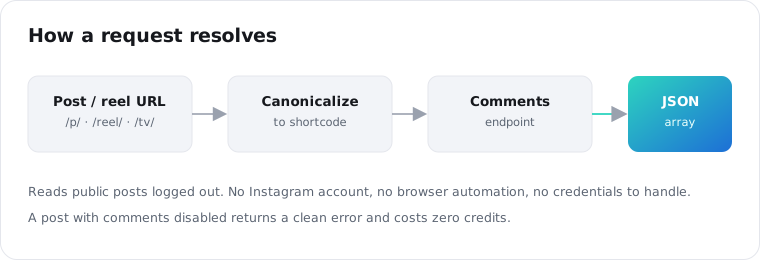
One URL per call. There is no batch parameter, and you do not clean the link first.
What does an Instagram comment response look like?
Every endpoint returns the same envelope: a data array, a meta object with the count and pagination cursor, and a request_id. Each comment is a flat object with five fields, and the shape never changes between posts.
{ "data": [ { "id": "17901234567890123", "text": "where do you get the settings for this?", "author": "someusername", "likes": 12, "posted_at": "2026-07-28T14:03:11Z" } ], "meta": { "count": 50, "limit": 50, "next_cursor": "QVF..." }, "request_id": "req_01JZX4M8Q2TE9W"}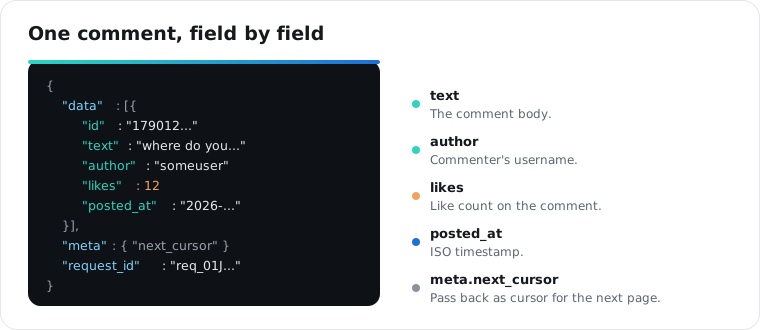
The fields are what you would expect: text is the comment body, author is the commenter’s username, likes is the like count, and posted_at is an ISO timestamp. Log the request_id; if a result looks off, quoting it lets support trace the exact call.
How do you paginate through all the comments on a post?
You page with limit and the next_cursor from meta. Set limit to the page size you want, and when the response includes a next_cursor, pass it back as cursor to get the next page. Keep going until there is no cursor left. The default page is 20 comments. Keep each page at 50 or fewer, and let the cursor carry you through the rest of the thread.
def all_comments(url): out, cursor = [], None while True: params = {"url": url, "limit": 50} if cursor: params["cursor"] = cursor page = requests.get(f"{BASE}/instagram/comments", params=params, headers=H).json() out.extend(page["data"]) cursor = page["meta"].get("next_cursor") if not cursor: return out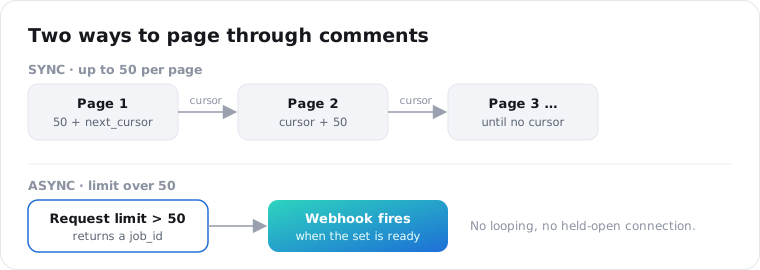
For a post with thousands of comments, the loop above is the whole answer: pages of 50, one short request each, until the cursor runs out. Each page is its own call, so a dropped connection costs you one page, not the whole pull.
How many comments can you pull, and how fast?
You can pull up to 50 comments per request and as many requests as your rate limit allows, run in parallel. Each call is independent, so a thread pool gets you through a batch of posts quickly. Rate limits are per account, in requests per minute: 20 on the free trial, 200 on monthly, 300 on annual. The limits count requests, not comments, so a handful of concurrent workers sits well inside every tier.
One honest limit worth stating up front: the endpoint returns top-level comments, not threaded replies. Each object is a flat comment with no nested reply tree. If your analysis depends on reply chains, that is a gap to plan around, not a setting to flip.
How much does it cost to scrape Instagram comments?
Each comment is 1 credit, and you are charged per comment returned. Credits cost $0.005 on the monthly plan and $0.0045 on annual, so 100 comments is 100 credits, about fifty cents. The 25 free signup credits cover 25 comments to test with, and $5 buys enough for 1,000.
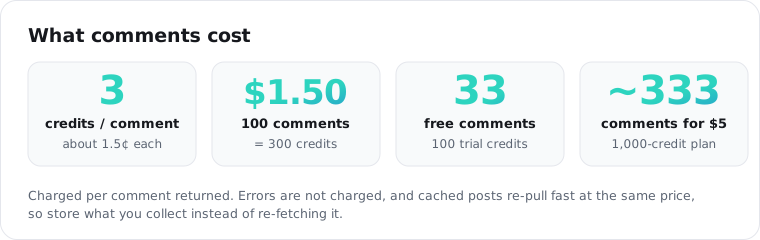
Two things keep the bill honest. Errors are not charged, so a post with comments disabled costs you a request and zero credits. And comments are cached, so re-pulling a post you already fetched returns fast, though a cache hit bills the same as a fresh call, so store what you collect instead of re-fetching it.
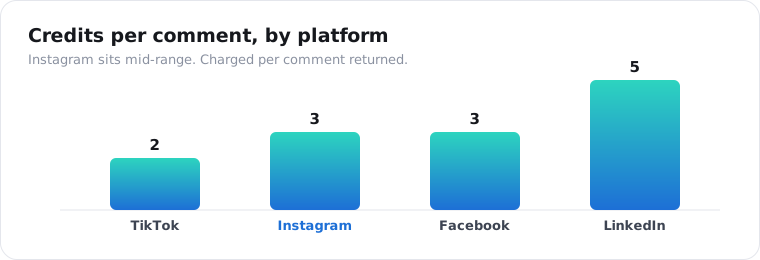
Per-comment pricing is the same across these platforms, which keeps the math simple if you collect from several. Here is where Instagram sits.
Is it legal to scrape Instagram comments?
Scraping public data sits in a contested but widely practiced area, and the safe posture is to read only public posts, never log in with a personal account, and keep only what you need. Comments on a public Instagram post are public content. In hiQ Labs v. LinkedIn, the Ninth Circuit reaffirmed in April 2022 that scraping publicly available data does not violate the Computer Fraud and Abuse Act, though a platform’s own terms are a separate question from that federal law. The API reads comments logged out, so there is no account of yours to flag and no private data in the response. Treat the retention of any personal data, including usernames, as a compliance decision for your side.
None of this is legal advice. If your use is high-volume or commercial, run it past counsel first.
Frequently asked questions
How do I scrape Instagram comments?
Send a GET request to an Instagram comments API with the post or reel URL and an API key. It returns the comments as a JSON array, each with text, author, like count, and timestamp. There is no Instagram developer account and no login involved, because the API reads public posts on its side and hands you structured data.
Is there an Instagram comments API?
Yes. A third-party data API exposes an Instagram comments endpoint you call with a post URL. Instagram’s own Graph API only returns comments on media you own or manage, so for public posts you did not create, a data API is the practical route. You get a flat list of top-level comments with author, likes, and timestamp.
How much does an Instagram comments API cost?
You pay per comment returned, at 1 credit each. Credits are $0.005 on the monthly plan and $0.0045 on annual, so 100 comments run about fifty cents. Signup includes 25 free credits, enough for 25 comments, and errors like a comments-disabled post are not charged.
Can I get Instagram comments without logging in?
Yes, and you should not log in. The API reads public posts logged out, so no personal account is used and none gets flagged for reading too much. You never handle Instagram credentials at all; you send a post URL and an API key and receive the comments back.
How many Instagram comments can I pull at once?
Up to 50 per request, with cursor pagination to page through the rest of the thread. Each page is a short call, so large posts do not time out. Rate limits are per account and count requests, not comments: 20 per minute on the free trial, 200 on monthly, 300 on annual.
Does the API include replies to comments?
No. The endpoint returns top-level comments as flat objects, without the nested reply threads under them. Each comment carries its own text, author, likes, and timestamp, but not its replies. If reply chains matter for your analysis, plan around that limit rather than expecting a nesting parameter.
Start with one post
Paste a public Instagram post URL into the comments endpoint and pull the first page. The 25 trial credits are enough to run a real post through it and see the exact shape before you wire anything up.