By Nikhil Kumar. Last updated September 2026.
You want every post under a hashtag, so you open Instagram’s API docs and find a 30-hashtag limit, a Business-account requirement, and an app review standing between you and a single query.
To scrape Instagram hashtags with an API, you send a tag to a data API that reads the public hashtag pages and get the posts, reels, and stats back as JSON. Instagram’s official Graph API can also do it, but only from a Business account, after app review, and capped at 30 unique hashtags per 7 days, which rules it out for real research. A data API has no such cap. This guide covers both routes and what each returns.
Can the official Instagram API search hashtags?
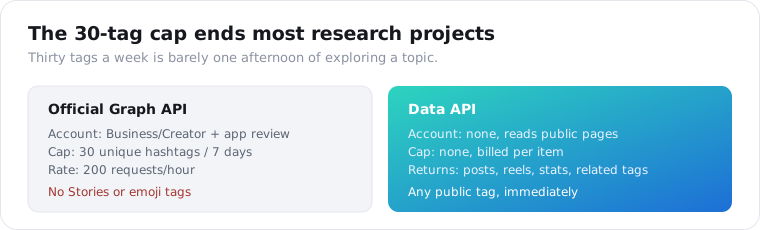
Yes, but the limits make it impractical for research. The Graph API can search hashtags only from an Instagram Business or Creator account, your app has to pass Meta App Review for the Instagram Public Content Access feature, and per Meta’s own documentation an account “can query a maximum of 30 unique hashtags within a rolling, 7 day period.” You first call ig_hashtag_search for the hashtag’s node id, then top_media or recent_media for the posts.
The 30-tag cap is the one that ends most projects.
Once you query a hashtag it counts against your limit for a full 7 days, even if you stop using it, though re-querying the same tag inside the window is free. So a hashtag research job that wants to explore fifty candidate tags cannot even start; you run out of quota at thirty.
There are more walls behind it. The API will not return hashtags used in Stories, will not accept emoji in a hashtag query, will not let you comment on discovered media, and returns a generic error on tags it deems sensitive. It is built for a brand monitoring one or two of its own campaign tags, not for exploring a topic.
Here is the contrast that pushes people off the official route.
| Official Graph API | Data API | |
|---|---|---|
| Account | Business/Creator + app review | None |
| Hashtag cap | 30 unique per 7 days | No cap |
| Rate | 200 requests/hour | Per-item credits |
| Returns | Top/recent media for your 30 | Posts, reels, stats, related tags |
| Emoji / Stories tags | Not supported | Reads what the page shows |
| Best for | Monitoring your own campaign tag | Research and discovery at scale |
Read the cap as a research budget and it becomes obvious. Thirty tags a week is barely a single afternoon of exploring one topic, and the moment you query a tag to check it, you have spent one of your thirty for a full week whether it turned out useful or not. The official API effectively punishes exploration, which is the opposite of what hashtag research is.
How do you scrape Instagram hashtags with an API?
You send the tag to a data API that reads Instagram’s public hashtag pages, with no Business account and no weekly cap. It reaches the same public posts a hashtag page shows anyone, and returns them as structured JSON. On ScraperSocial there are separate endpoints for the two things people want: the posts under a tag, and the tag’s own numbers.
The split matters because they answer different questions.
The hashtag-posts endpoint takes a tag and returns the recent posts carrying it, each as a full object. The hashtag-reels endpoint does the same for video. And the hashtag-stats endpoint returns the tag’s post volume and its related tags, which is the research half rather than the content half.
None of them needs an Instagram login. They read the public hashtag page the way a logged-out visitor would, so any public tag works immediately, billed per item returned rather than against a weekly quota.
Cost tracks what you pull. At 1 credit an item, a 50-post pull on a tag is 50 credits, about 25 cents, and a stats call is a flat 1 credit for the whole adjacency picture. $5 covers 1,000 posts or 1,000 stats lookups, which is a full research session rather than the rationed handful the official API’s thirty tags allow in a week.
What data do you get for a hashtag?
Two shapes, depending on the endpoint. The posts endpoints return full post objects: the caption, like and comment counts, media URLs, the author’s handle, the post type, the timestamp, any location and music, and the other hashtags on the post. The stats endpoint returns the tag itself: its total post count, posts per day, and a list of related hashtags grouped by how commonly they appear together.
That second shape is the one hashtag tools are built on.
A post object is what you use to see what content is winning on a tag, who is posting it, and how much engagement it gets. Pulling a batch of recent posts for a tag gives you a live read on a topic, sortable by likes or recency on your side.
The stats object is what you use to plan. Knowing a tag has millions of posts versus a few thousand tells you whether it is a crowded broadcast tag or a reachable niche one, and the related-tag list hands you adjacent tags to consider without brainstorming them by hand.
Posts per day is the underused number in that object. A tag with a million posts but only a handful added daily is coasting on history, while a smaller tag gaining hundreds of posts a day is alive right now. That velocity, not the raw total, is what tells you a topic is worth entering today rather than one that peaked a year ago.
The post fields are rich enough to save a second call. Each post carries more than the caption and counts: the location, the music, the tagged users, and the full list of hashtags it was posted with. For a UGC or trend job that is everything you need in one object, and the extra hashtags on each returned post are free fuel for expanding your tag set.
How do you find and research related hashtags?
You read a tag’s adjacency data. The hashtag-stats endpoint returns, alongside the post count, a set of related hashtags bucketed by how often they co-occur with your tag: frequent, average, and rare. That is the heart of hashtag research. It surfaces tags you would not list manually and signals which are broad and which are niche, so you can assemble a balanced set instead of guessing.
Good hashtag strategy is about volume mix, not volume alone.
The common guidance is to blend tiers rather than chasing only the biggest tags: a portion of high-volume tags for reach, more mid-volume tags where you can actually rank in a feed, and some niche tags that describe the content precisely. The related-tag buckets map onto exactly that decision, because “frequent” and “rare” are volume signals in disguise.
A worked example makes it concrete. Say you run a coffee brand and start from a broad tag like specialty coffee. The stats call returns it as a large tag, lists coffeelover and coffeetime in the frequent bucket, both broadcast tags you will drown in, and coffeeroastery and singleorigin in the rarer buckets, where a strong post can actually surface. You would have guessed the first two yourself; the API hands you the second two, and those are the ones worth targeting.
The hashtag-analytics endpoint goes a step further, returning the same stats plus the top posts currently winning on the tag, so you can see the volume and the content that is beating it in one call.
How do you pull posts under a hashtag in Python?
You send the tag to the posts endpoint with your API key and read the JSON array. There is no OAuth, no hashtag-id lookup step, and no Business account; you pass the plain tag and get posts back.
import requests
r = requests.get(    "https://api.scrapersocial.com/v1/instagram/hashtag-posts",    params={"query": "streetphotography", "limit": 50},    headers={"Authorization": "Bearer sk_live_..."},)for post in r.json()["data"]:    print(post["likes"], post["comments"], post["url"])
Query in, posts out, in one call.
Billing follows what comes back, so the limit parameter is your cost dial: ask for the 50 you will use, not 500 to display 20. And because the response includes each post’s own hashtags, you can mine the returned posts for more tags to explore, which is a cheaper way to expand a tag set than querying stats on every candidate.
There is no hashtag-id lookup and no pagination token to babysit. You pass the plain tag and a limit, and that limit is the only lever for depth, so decide how many posts you actually need up front rather than trying to page deeper after the call. For a live monitor, a modest limit on a schedule beats one giant pull.
The best Instagram data APIs post covers the wider set of Instagram endpoints if you need profiles or comments alongside the hashtag data.
What can you build with hashtag data?
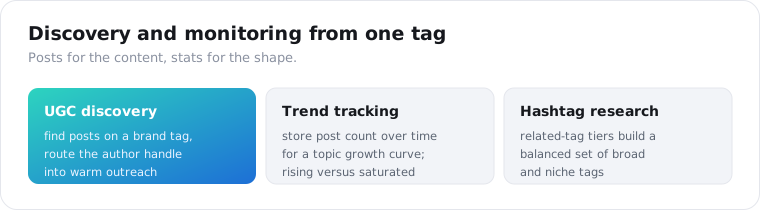
Mostly discovery and monitoring. The common builds are user-generated-content discovery for a brand tag, trend tracking on a topic over time, competitor and campaign monitoring, and hashtag research for your own posting. All of them run on the same two calls: posts for the content, stats for the shape of the tag.
UGC discovery is the most common commercial use.
A brand pulls its own campaign or product tag on a schedule, finds the posts customers are making, and surfaces the best ones for reposting or outreach. Because the posts come back with the author handle attached, you can route from a great post to the creator who made it.
That handle-to-creator path is what turns discovery into outreach. A brand finds the best posts on its tag, pulls the creators behind them, and has a warm list of people already posting about the product, which is a far better starting point than a cold influencer database of strangers.
Trend tracking is the other big one. Store a tag’s post count on a schedule and you get a growth curve for a topic, which is how you tell a rising trend from a saturated one before you commit content to it. Pair that with the top posts from the analytics endpoint and you see both the size of the wave and what is riding it.
Competitor monitoring sits between the two. Pull the tags a rival brand runs, watch which of their campaign hashtags gain posts, and you see their marketing pushes form in near real time. A hashtag is a public campaign marker, so tracking a competitor’s tags is one of the few genuinely public windows into where they are putting attention.
Is it legal to scrape Instagram hashtags, and what are the limits?
Reading public hashtag pages is generally lower-risk than reaching private data, and it is what a logged-out visitor could see, but this is not legal advice. The real limits are two. Private accounts never appear in hashtag results, because a data API reads only public posts, and the results are recent posts on a tag, not its complete history, since Instagram itself does not expose an entire tag’s archive to anyone.
The compliance line is the same as any people-data.
Hashtag results are public posts, but they still show identifiable people, their faces, and their captions. If you store them, that storage carries a GDPR and CCPA obligation, so keep only the fields you need, set a retention window, and honor deletion. Reposting someone’s content is a separate permission question from reading it.
There is a narrower point on the data itself. A hashtag result is a snapshot of recent public posts, not a surveillance feed, so treat it as sampling a topic rather than tracking a person. If your use drifts toward profiling specific individuals from their hashtag activity over time, that is a heavier obligation than reading what is trending on a tag, and worth pausing on before you build it.
One platform change worth noting for context: Instagram rolled out a five-hashtag cap on new posts in December 2025. That limits how many tags creators put on a post going forward, which over time thins the tag soup on newer content, but it does not change how you read the hashtag pages that already exist.
Pull one hashtag to see the shape
Take a tag in your niche. Send it to the hashtag-stats endpoint for its post count and related tags, then the hashtag-posts endpoint for the content winning on it right now. Get set up on the quickstart in a minute, check the 1-credit-per-item cost on the pricing page, and let 25 free credits cover a first look at one tag before you pay anything. For reels specifically, the hashtag-reels endpoint returns video under the same tag.
Frequently asked questions
Can you scrape Instagram hashtags with an API?
Yes, through a data API that reads the public hashtag pages. You send a hashtag to an endpoint and get the posts, reels, and stats back as JSON, with no Instagram Business account and no 30-tag weekly cap. On ScraperSocial that is a GET to /v1/instagram/hashtag-posts for posts under a tag, or /v1/instagram/hashtag-stats for its post volume and related tags, 1 credit per item. The official Graph API can also search hashtags, but only from a Business account after app review.
Does the Instagram API let you search hashtags?
The official Instagram Graph API can, but with heavy limits. You need a Business or Creator account, your app must pass Meta App Review for the Instagram Public Content Access feature, and you can query a maximum of 30 unique hashtags in a rolling 7-day period. You first call ig_hashtag_search for the hashtag’s node id, then top_media or recent_media for posts. Stories hashtags and emoji hashtags are not supported.
What is the 30 hashtag limit on the Instagram API?
The official Graph API lets a Business account collect from at most 30 unique hashtags within a rolling 7-day window. Once you query a hashtag it counts against the limit for a full 7 days, even if you stop using it, though re-querying the same hashtag inside the window is free. That cap makes broad hashtag research impractical on the official API, which is why teams use a data API that reads the public pages instead.
How do I get posts for a hashtag without a Business account?
Use a data API that reads Instagram’s public hashtag pages. It needs no Instagram login, no Business account, and no Meta app review, because it reads what a hashtag page shows publicly rather than going through the Graph API. On ScraperSocial you send the tag to /v1/instagram/hashtag-posts and get back post objects with caption, likes, comments, media URLs, author, and timestamp, billed 1 credit per post returned.
How do I find related hashtags for research?
Send a hashtag to a stats endpoint that returns its adjacency data. On ScraperSocial /v1/instagram/hashtag-stats returns the tag’s total post count, posts per day, and related hashtags bucketed by how often they co-occur, frequent, average, and rare. That is the core of hashtag research: it surfaces the tags you would not think of manually and shows whether each is high-volume, mid-volume, or niche, so you can build a balanced set rather than guessing.
Is it legal to scrape Instagram hashtags?
Reading public hashtag pages is generally lower-risk than accessing private data, but this is not legal advice. Hashtag results contain public posts that still show identifiable people and their captions, so treat any personal data you store under GDPR and CCPA, keep a retention window, and do not build a permanent profile database out of it. Private accounts never appear in hashtag results, because a data API reads only what is public.