By Nikhil Kumar. Last updated November 2026.
You search “Instagram API,” land on Meta’s docs, and an hour later you still don’t know if you can pull one creator’s posts.
Short answer: yes, Instagram has an API, and it’s probably not the one you need. Meta’s Instagram Platform works for Business and Creator accounts that log in to your app. It publishes, reads insights and handles comments and DMs for them. For anyone else, you get a thin slice: follower and media counts for other professional accounts, plus 30 hashtags a week. Everything else public takes a data API.
I’ll walk through what Meta offers in November 2026, what it can and can’t read, and where a data API fits. I’ll lead with limits, ours included.
Does Instagram have an official API in 2026?
Yes. Meta’s Instagram Platform is the official Instagram API, and it now comes in three setups: Unified Login, Instagram Login and Facebook Login. Meta’s own Instagram Platform docs call Unified Login “the recommended setup for new integrations.” All three serve only professional accounts, meaning Business or Creator, and the account owner has to sign in to your app first.
The differences come down to the Facebook Page and hashtag search.
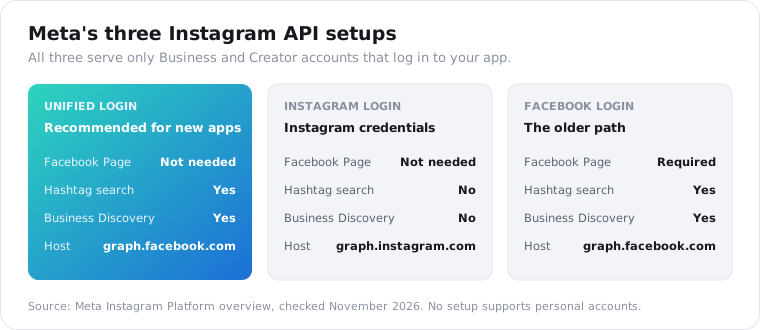
Unified Login lets a business sign in with either its Instagram or Facebook credentials, with no Facebook Page needed. Meta lists messaging, publishing, comment moderation and ads for it.
Instagram Login also skips the Page, and runs on graph.instagram.com. Meta’s overview table marks hashtag search “Not supported” on this setup.
Facebook Login is the older path, and the Instagram account has to be linked to a Facebook Page. It and Unified Login are the two setups that include hashtag search and Business Discovery.
None of the three is a public data feed. Every call runs on behalf of an account that said yes to your app.
That’s a small slice of a big network. Instagram crossed 3 billion monthly users in September 2025, according to Thurrott’s report. Only accounts that log in to your app are ever in scope.
What about the name “Graph API”? You’ll see “Instagram Graph API” all over older posts. Most of those posts mean what Meta now calls the Instagram API with Facebook Login, on graph.facebook.com, and Unified Login runs on that host too. The Instagram Login setup runs on graph.instagram.com and uses its own permission names, the instagram_business_* family. When two guides disagree, check which setup each one was written for.
One more thing trips people up: the version number. Meta’s current examples use Graph API v26.0, and older tutorials pinned to earlier versions may call fields or hosts that have since moved. Check the version in any snippet you copy.
What happened to the Instagram Basic Display API?
It’s gone. Meta announced the end of the Basic Display API on September 4, 2024, and from December 4, 2024 every request to it returns an error, per Meta’s Basic Display overview. Basic Display was the only official way to read a personal account’s own photos. Meta told developers to move to the Instagram API, which has no personal-account support.
That change broke a lot of things overnight. Zapier’s help center warned that any Zap using its Instagram app would stop on that date.
The usual fix was converting to a Creator or Business account, which is free.
That works for your own feed widget. It does nothing if the account you care about belongs to someone else.
What can the official Instagram API read about other accounts?
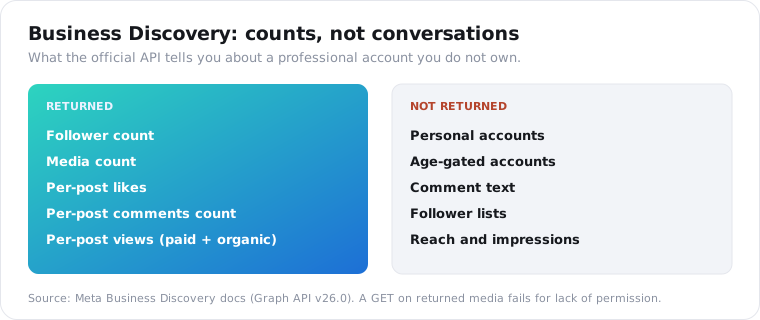
Very little. Business Discovery returns basic metadata and metrics for other professional accounts by username: follower count, media count, and per-post likes, comments count and views. Hashtag search returns top and recent media for up to 30 unique hashtags per account in 7 days. Nothing reads personal accounts, comment text on other people’s posts, or follower lists.
A Business Discovery call, shaped the way Meta’s Business Discovery guide shows it:
curl -G "https://graph.facebook.com/v26.0/<YOUR_IG_USER_ID>" \ --data-urlencode "fields=business_discovery.username(bluebottle){followers_count,media_count,media{comments_count,like_count,view_count}}" \ --data-urlencode "access_token=<TOKEN>"Notice the first path segment. It’s your own account’s ID, not the target’s. You always query through an account you control.
The docs add three catches worth knowing before you build on it:
- Age-gated professional accounts return no data.
- A GET on any media it returns “will fail due to insufficient permissions.”
view_countmixes paid and organic views, so ads inflate it.
Hashtag search is narrower still. Meta has to approve your app for a feature called Instagram Public Content Access first. Then, per Meta’s hashtag search docs, every account you query through gets 30 unique hashtags in any rolling 7-day window.
Asking for the same tag again inside that week is free, but it doesn’t reset the clock. Stories hashtags and emoji hashtags aren’t supported at all.
I went deeper on that cap in the Instagram hashtag guide.
Can you get public Instagram profile data by username?
Only for professional accounts, and only through your own approved app. Business Discovery takes a username, but if that username is a personal account it returns nothing. A data API takes any public username and returns the profile a logged-out visitor sees, personal or professional, as JSON with one key.
This is the exact question a developer posted on dev.to in November 2023: is there an Instagram API that returns a public profile when you send the username? It got zero replies. The honest answer hasn’t changed.
Meta’s route exists, with strings attached. Your app needs Advanced Access, which per Meta’s Instagram Platform overview “requires App Review and Business Verification,” before it can serve accounts that hold no role on it.
The data API version is one GET for any public handle:
import requests
r = requests.get(    "https://api.scrapersocial.com/v1/instagram/channel-stats",    params={"handle": "instagram", "fields": "handle,followers,posts,is_business,is_private"},    headers={"Authorization": "Bearer YOUR_API_KEY"},    timeout=60,)print(r.json())
A trimmed response looks like this:
{ "data": { "handle": "instagram", "followers": 698000000, "posts": 8100, "is_business": true, "is_private": false }, "request_id": "req_01JZX4M8Q2TE9W"}The numbers above are illustrative. The is_business flag is the interesting one: it’s false for a personal account, and the call still works.
The channel-stats endpoint page lists every field, and fields= trims the response to what you need. That saves tokens, not credits.
Is the Instagram API free, and what are the rate limits?
Meta charges nothing per call. You pay in access and quota instead: a developer app, a professional account, App Review and Business Verification for accounts you don’t own, and limits that move with usage. Most Instagram endpoints get 4,800 calls per 24 hours multiplied by the connected account’s impressions. Business Discovery and hashtag search use a separate hourly limit.
Both formulas are in Meta’s rate limiting docs.
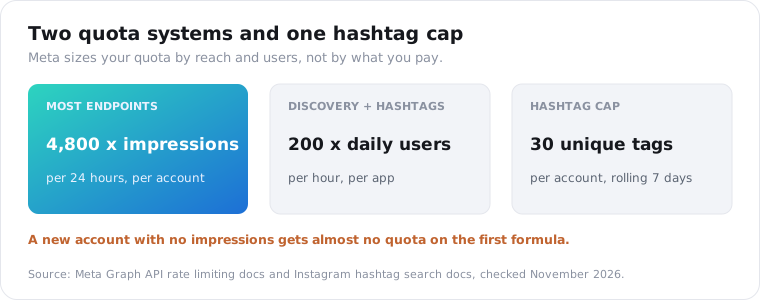
The impressions formula has a strange side effect. A brand-new account with no reach gets almost no quota, because 4,800 times zero is zero.
The flat “200 calls an hour” number you’ll see in older guides matches the Platform formula for a single user. It doesn’t describe most endpoints anymore.
A data API flips the model. You pay per item, and your quota is your credit balance.
On ScraperSocial most Instagram data is 1 credit an item, a credit is half a cent on the $5 plan, and you get 25 free credits at signup. Pricing has the full table, and rate limits covers our own per-key caps.
That 25-credit trial is small on purpose. It’s enough to pull a few profiles and a batch of comments and see the real response shapes before you spend anything.
Official Instagram API vs a data API: which do you need?
Pick by job. Use Meta’s API when you act for accounts you own or manage: publishing, insights, DMs and comment moderation. Reach for a data API to read accounts that will never log in to your app: competitors, creators, personal accounts, comment text, hashtag and keyword feeds. Many teams run both, since neither covers the other’s half.
| Job | Official Instagram API | Data API (ScraperSocial) |
|---|---|---|
| Publish posts and reels | Yes, for accounts that authorized you | No |
| Reach, impressions, audience insights | Yes, own accounts only | No |
| DMs and comment moderation | Yes, own accounts only | No |
| Profile of another professional account | Counts only, via Business Discovery | Yes, full public profile |
| Profile of a personal account | No | Yes, if public |
| Comment text on someone else’s post | No | Yes, one batch per call |
| Posts under a hashtag | 30 unique tags per 7 days | Yes, per item |
| Keyword search across posts | No | Yes |
| Reel transcript | No | Yes, priced per minute of audio |
| Follower lists of other accounts | No | No |
| Private accounts | No | No |
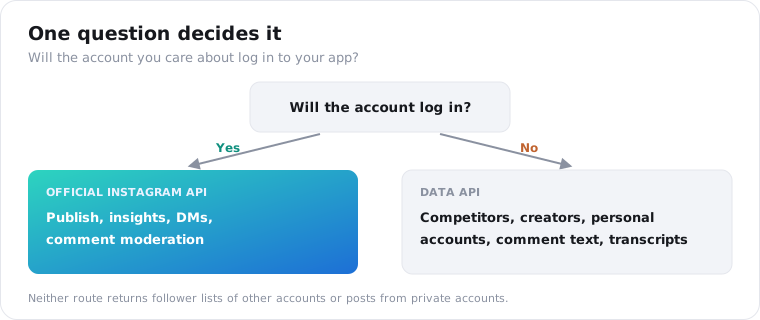
The last two rows matter. No honest provider, official or not, gives you another account’s follower list or a private account’s posts.
The middle rows are where most projects live. Say a brand tracks 40 creators and half of them are personal accounts. Business Discovery gives it counts for 20 and nothing for the rest. The same job on a data API is 40 profile calls, or 40 credits.
If you’re comparing data providers on price and coverage, the best Instagram data APIs roundup lines up seven of them.
Can the Instagram API search posts by keyword or read reels?
No. Meta’s API has no keyword search across captions, no search for accounts by name or topic, and no way to fetch the spoken words in a reel. Hashtag search is the only discovery tool, and it’s capped at 30 tags a week. Reels you can read through Business Discovery come back as counts, not content, and only for professional accounts.
This is where most research projects stall on the official route.
People rarely tag the things you care about. A complaint about a product, a brand mention in a caption, a creator explaining a tool out loud in a reel: none of it shows up in a hashtag feed.
A data API covers that gap with separate feeds:
- Keyword search matches words inside captions, tagged or not.
- Reels search does the same for reels.
- Profile search finds accounts by name.
- The comments endpoint returns comment text for any public post.
- The transcript endpoint turns a reel’s audio into plain text.
Keyword, reels and profile search cost 1 credit per result. Transcripts cost more, billed per started minute of audio, and stop at 10 minutes per reel.
If spoken content is the part you need, the transcripts post for Instagram, Facebook and X covers what comes back and what doesn’t.
What can’t a data API do on Instagram?
Everything a data API returns is what a signed-out browser would show, so it can’t post, send DMs, open private accounts, or return reach and impressions. On ScraperSocial, Stories are off, reel share counts come back null, and comments come in one batch per call in Instagram’s own order with replies flattened. Free keys cap list calls at 5 items, and paid keys go up to 50.
Those are real walls. I’d rather you hit them in this paragraph than in production.
A few more, so nothing surprises you:
- Counts are snapshots. Store the time you pulled them next to the numbers.
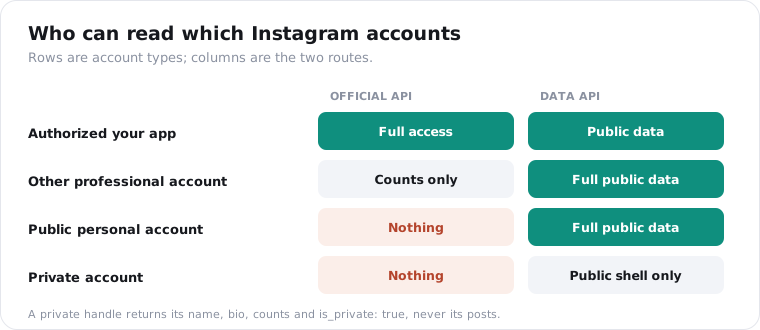
- A private handle returns its public shell and
is_private: true, never the posts. - Failed calls cost nothing, and you can read
X-Credits-Chargedon every response.
Errors come back as a code plus a plain sentence, so your code can tell a handle that doesn’t exist from a temporary failure.
This map puts the whole thing on one page.
Is it allowed to read public Instagram data without Meta’s API?
Reading public pages that anyone can open signed out is low-risk for most research and monitoring, but it’s not the same as Meta’s blessing, and this isn’t legal advice. The risk sits in what you store. Bios, names and comments describe real people, so GDPR and CCPA still apply once that data lands in your database.
Meta’s API gives you a contract: the account owner said yes, and Meta’s platform terms tell you what you may do with the data.
A data API gives you public pages without that consent step. That’s why it can see more, and why you should be careful with it.
Three habits keep that risk small:
- Collect only the fields you use, and
fields=makes that easy. - Set a retention window and delete old pulls on schedule.
- Don’t turn scraped bios and comments into a contact list for outreach.
How do you start with each Instagram API?
For the official API, create a Meta developer app, pick the Unified Login setup, connect a Business or Creator account, then submit for App Review once you serve accounts beyond your own. For a data API, sign up, copy one key, and send a GET with a handle or post URL. The first route takes days to weeks of review. The second takes minutes.
Here are the official steps in order:
- Create an app in the Meta developer dashboard.
- Add the Instagram product and choose the Unified Login setup.
- Connect a Business or Creator account you own and test in Standard Access.
- Request the permissions you need, then submit for App Review.
- Complete Business Verification to get Advanced Access.
The data API steps are shorter:
- Sign up and copy your key.
- Send a GET with a handle or post URL.
- Read
X-Credits-Remainingon the response to watch your balance.
Meta’s route makes sense if you’re building a scheduler, an inbox, or an analytics tool for clients who’ll connect their own accounts. The review is worth it there, because nothing else can post for them.
For research, monitoring or vetting creators, the review buys you very little. You’d still get counts and 30 hashtags a week.
The quickstart gets you from signup to a first Instagram response.
Frequently asked questions
Does Instagram have an API?
Yes. Meta runs the Instagram Platform, an official API with three setups: Unified Login, Instagram Login and Facebook Login. All three work only for Business and Creator accounts that sign in to your app. You can publish, read insights, moderate comments and answer DMs for those accounts. Reading other people’s accounts is limited to Business Discovery and hashtag search, and personal accounts have no official API at all.
Is the Instagram API free?
Meta charges nothing per call. The cost is access: you need a Meta developer app, a professional Instagram account, and App Review plus Business Verification before the app can serve accounts you do not own. Calls are also rate limited per account. Third-party data APIs charge per item instead; ScraperSocial bills most Instagram data at 1 credit an item, and a credit is half a cent on the $5 plan.
Can I access a personal Instagram account through an API?
Not through Meta. The Basic Display API, the last official route for personal accounts, returned errors from December 4, 2024, and the current Instagram Platform serves only Business and Creator accounts. Business Discovery cannot look up personal accounts either. A data API can read a personal account’s public profile, posts, reels and comments, because it reads what a logged-out visitor sees. Private accounts stay locked to everyone.
Can the Instagram Graph API get comments from another account’s posts?
No. Business Discovery returns a comments_count for another professional account’s media, but not the comment text, and Meta’s docs say a direct request for media it returns fails for lack of permission. You can read and moderate comments only on media owned by accounts that authorized your app. To read the comment text on any public post, use a data API comments endpoint, which returns one batch of comments per call.
What are the Instagram API rate limits?
There are two systems. Most Instagram endpoints use Meta’s Business Use Case limit: 4,800 calls in 24 hours multiplied by the impressions the connected account earned in that window. Business Discovery and hashtag search use the Platform limit of 200 calls an hour multiplied by the app’s daily users. Hashtag search also caps each account at 30 unique hashtags in a rolling 7-day period.
Is there an alternative to the official Instagram API?
Yes. Third-party data APIs read public Instagram pages and return them as JSON with one API key, no Meta app and no account login. They cover personal and professional accounts, comment text, hashtag and keyword feeds, and reel transcripts. They cannot post, send DMs, show private accounts, or give you an account’s reach and impressions, which only the owner can authorize through Meta.
Check one Instagram account in five minutes
Pick a creator you’d normally look up by hand, ideally a personal account, and pull their profile with the call above. If is_business comes back false, you’ve just read an account Meta’s API can’t see. Get your API key and try it on your 25 free credits.