By Nikhil Kumar. Last updated October 2026.
To search Instagram by keyword with an API, send your term to a keyword-search endpoint and it returns public posts whose captions mention that word, as JSON. It finds posts that talk about a topic even when they never used a matching hashtag, which is the gap Instagram’s official API leaves wide open. One GET request, no Instagram developer app, no App Review.
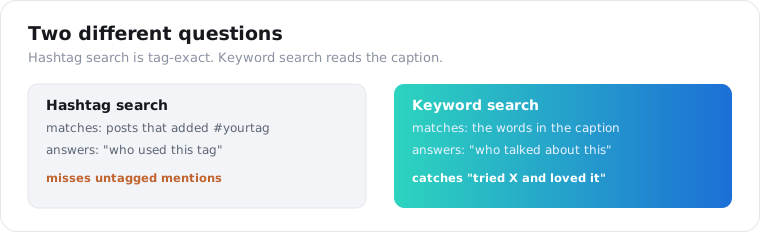
Hashtag search tells you who tagged #coffee. Keyword search tells you who talked about coffee. Those are different questions, and most tools only answer the first.
How do I search Instagram by keyword with an API?
Point one GET at the search endpoint with your term, and parse the posts that come back. Each result is a public post whose caption contains the word, carrying the caption text, its like and comment counts, and the author who wrote it. Grab a key on the quickstart page first; new accounts open with 25 free credits and no card on file, which is enough to read the shape before you commit.
import requests
resp = requests.get(    "https://api.scrapersocial.com/v1/instagram/keyword-search",    params={"query": "cold brew recipe", "limit": 30},    headers={"Authorization": "Bearer sk_live_..."},    timeout=180,)for post in resp.json()["data"]:    print(post["likes"], post["author"]["handle"], post["caption"][:80])
The query is a plain keyword or phrase, the same thing you would type into Instagram’s search bar. You do not need a Business account, an app, or the App Review process the official route demands.
Every response uses the same envelope: a data array of posts, an optional meta, and a request_id. Keep that request_id in your own logs. When a search returns fewer posts than you expected, or a field looks wrong, that value is what lets support pull up the one call you are asking about instead of guessing.
Keyword search vs hashtag search: what is the difference?
Hashtag search matches a tag; keyword search matches the caption text. Hashtag search returns only posts that added #yourtag, so it answers “who used this tag.” Keyword search reads the words in the caption, so it finds posts that discuss a topic without ever tagging it, which is usually the larger and more representative set.
Think about how people actually post. A customer writes “finally tried your cold brew and it’s incredible” and never adds a single hashtag.
Hashtag search misses that post completely. Keyword search catches it, because the word is right there in the caption.
That is the whole reason this endpoint exists separately from our Instagram hashtag API. One is “who used #x,” this is “who talked about x.” For brand monitoring, the second is the honest question, because most people mentioning you will not tag you.
Use hashtag search when you care about a campaign tag or want a tag’s post volume. Use keyword search when you care about a topic or a brand name in plain language.
Does Instagram’s official API support keyword search?
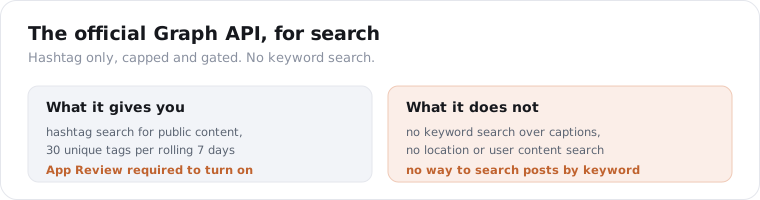
No. Instagram’s Graph API offers only hashtag search for public content, and even that is heavily gated. Per developer references compiled in 2026, hashtag search is capped at 30 unique hashtags per rolling 7-day window per Business or Creator account, and it needs App Review for Instagram Public Content Access, which one 2026 guide notes can take more than a week. Keyword, location, and user content search are simply unavailable.
So the official route does not do what this post is about.
The Graph API can return top and recent posts for a hashtag you look up, and only that hashtag. It cannot search captions, it caps you at 30 tags a week, and it only works once Meta approves your app and you connect a Business account. Sources even disagree on exactly what remains available, which tells you how unstable this surface is.
There is a second, lighter option: Instagram’s own in-app keyword search, added a few years ago, which does read captions. But it has no API, no export, and no filters. You cannot build on a search box.
That leaves a data API that reads the public keyword results as the practical way to get them into your code.
Can I just scrape Instagram keyword results myself?
You can, but it breaks often, and the breakage is the whole cost. Instagram retired logged-out keyword search, so a do-it-yourself build either drives a logged-in session through a headless browser or calls Instagram’s private GraphQL endpoints directly, and both move underneath you. The practitioners at Scrapfly document the failure modes plainly.
Three of them bite every DIY scraper. The public web_profile_info endpoint increasingly returns a 400 with a “log in” message on profiles that used to load fine. The GraphQL calls need a doc_id that Instagram rotates every few weeks, so your query silently stops matching and you are back to reverse-engineering the app. And unauthenticated requests are throttled hard, on the order of a couple of hundred per hour per IP, which pushes you into rotating residential proxies and a login pool the moment you want real volume.
None of that is impossible. It is just a maintenance project that competes with whatever you were actually trying to build, which is the honest case for paying for a managed layer instead of owning the cat-and-mouse yourself.
What data does an Instagram keyword search return?
The post itself: caption, engagement, author, and the tags inside it. Each matching public post comes back with its caption, like count, comment count, view count for video, the author’s handle and name, the timestamp, the media type, and the hashtags, mentions, and tagged users embedded in the post.
{ "data": [ { "id": "C9xAbCdEfGh", "url": "https://www.instagram.com/p/C9xAbCdEfGh/", "type": "Image", "caption": "Finally nailed my cold brew recipe after 20 tries ☕", "likes": 1840, "comments": 97, "views": null, "posted_at": "2026-10-05T13:40:00Z", "author": { "handle": "brewathome", "name": "Sam K." }, "hashtags": ["coldbrew", "coffeeathome"], "mentions": ["somebrand"] } ], "request_id": "req_01JZX9Q2TE"}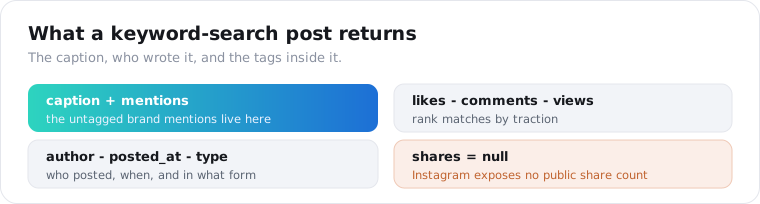
The mentions array is the field worth watching. A post that mentions @yourbrand in the caption without tagging a branded hashtag is exactly the content hashtag tracking misses, and it comes back on every record.
Two honest gaps. shares is always null, because Instagram does not expose a public share count. And you get the post and its author handle, not the author’s full profile or follower count, so if you need the poster’s audience size you pass their handle to the Instagram channel-stats API as a second call.
What are the real limits of Instagram keyword search?
It is a strong recent sample, not a complete archive. Instagram’s keyword results are public-only, popularity-weighted, and not exhaustive, so a search returns the posts Instagram surfaces for that term, not every post ever written about it. This is true of Instagram’s own search too, where two people running the same query see different results.
I would rather say this plainly than oversell it.
You will reliably catch active, public, reasonably-engaged posts about your term. You will not catch private accounts, deleted posts, or low-reach posts Instagram chose not to rank. No keyword tool on any platform gets all of those.
For monitoring and trend-spotting, that sample is exactly what you want, because the posts that matter are the public, visible ones. For a legally complete record of every mention, no affordable API delivers that, and you should budget for the gap rather than assume it away.
One more: keyword search reads the caption, so a term shown only in the image or spoken in a Reel without being written will not match. It is text search, not vision. If Reels are your focus specifically, the Instagram Reels search API runs the same keyword match scoped to reels.
What can you do with Instagram keyword data?
Monitor, listen, and find. A keyword search over time turns into a feed of what people publicly say about a topic or brand, ranked by the engagement each post pulls, which is the raw material for brand monitoring, social listening, UGC discovery, and trend research. The mentions and captions are the signal.
Brand monitoring is the first thing people reach for, and the keyword angle is what makes it work. Searching the plain brand name instead of only the branded hashtag catches the untagged mentions, the quiet “tried X and loved it” captions that tag tracking never surfaces, which on most accounts are the majority of what gets said about you.
UGC discovery follows directly. The same search surfaces customers already posting about you, which is a shortlist for reposts, testimonials, and outreach, with the handle and engagement attached.
Trend research rounds it out. Track a topic keyword weekly, watch which posts and creators gain traction, and you spot a rising theme in your niche before it is everywhere. For a multi-platform version of this, our social listening API guide covers running the same keyword across networks in one shape.
How do I search at scale or monitor a keyword?
Fan your keywords out in parallel, keep a set of post ids you have already processed, and drop anything you have seen before. No single request hands you an endless feed, so scale comes from running many terms at once and merging the results on id. You are charged per post that actually comes back, which means an empty or near-empty keyword costs almost nothing.
from concurrent.futures import ThreadPoolExecutor
keywords = ["our brand", "our product name", "cold brew recipe"]
def search(q):    r = requests.get("https://api.scrapersocial.com/v1/instagram/keyword-search",                     params={"query": q, "limit": 40}, headers=H, timeout=180)    return r.json()["data"] if r.ok else []
seen = {}with ThreadPoolExecutor(max_workers=6) as pool:    for batch in pool.map(search, keywords):        for post in batch:            seen[post["id"]] = post
For ongoing monitoring, remember the newest post id per keyword between runs. The next time a keyword runs, walk the results until you reach that marker and halt, so each cycle only touches posts you have never handled before. That one habit is the difference between a monitor that scales and one that re-reads its whole history every hour.
Keep the cadence sane. A brand term is fine checked a few times a day, since Instagram posts do not move as fast as a live X feed. Over-polling a quiet keyword mostly spends credits for nothing.
Results are cached briefly on our side, so a repeated identical search can return instantly. The caching and freshness docs explain which calls hit cache and how to force a fresh pull when you need one.
How much does an Instagram keyword search cost?
Each post that comes back costs 1 credit, and credits run half a cent each, so a returned post is half a US cent. A search asking for 40 posts that fills completely is roughly 20 cents; one that only finds 11 matching posts bills for 11, because you pay per record returned, not per request attempted.
The 25 free credits on signup therefore cover 25 posts, enough to point a couple of keywords at the endpoint and see the caption and mention fields before any money changes hands.
Two things keep the bill honest at scale. The cache means a repeated identical search inside its freshness window does not re-bill, so a monitor polling the same term does not pay twice for the same window. And the since-id habit from the last section means each cycle only pulls new posts, so a quiet keyword costs almost nothing on most runs. Price a monitor by the posts you expect to be new per day, not by how often you poll.
Is it legal to scrape Instagram?
Collecting public Instagram posts sits in a familiar grey zone: lawful to read in the US, but against Meta’s own rules, so the risk you carry is a broken contract rather than a crime. The well-known line of US cases around public-data scraping found that reaching openly accessible pages is not computer fraud, and a public post needs no login at all. That does not touch Instagram’s terms, which forbid automated collection as a matter of their agreement with you, not statute.
The part people underweight is that every post is somebody’s personal data.
A caption, a handle, a face in the thumbnail, a location tagged in the text all describe a real person. The moment you store that for someone in the EU or California, GDPR and CCPA apply whether or not the post was public, and “it was on the open internet” is not a defence either regime recognises.
So the honest working rule is narrow. Pull public post fields only, keep your request rate unremarkable, resist assembling dossiers on named individuals without a reason you could defend out loud, and get real legal advice before anything commercial ships. Using a managed endpoint changes who runs the scrapers; it does not transfer Instagram’s terms or your own data-protection duties onto the vendor.
Frequently asked questions
How do I search Instagram posts by keyword?
Send your term to an Instagram keyword-search API and it returns public posts whose captions mention that word, as JSON. Unlike hashtag search, it finds posts that talk about a topic without using a matching tag. There is no Instagram developer app or App Review involved, because the endpoint reads Instagram’s public keyword results directly.
What is the difference between Instagram keyword search and hashtag search?
Hashtag search finds posts that used a specific tag, so it answers “who posted with #coffee.” Keyword search reads the caption text, so it answers “who talked about coffee,” including posts that never added the hashtag. Hashtag search is tag-exact; keyword search matches the words people actually wrote, which is usually the wider and more honest net.
Does Instagram’s official API support keyword search?
No. Instagram’s Graph API offers only hashtag search for public content, capped at 30 unique hashtags per rolling 7 days and gated behind App Review for a Business or Creator account. Keyword, location, and user content search are not available on the official API, so there is no sanctioned way to search posts by keyword at scale.
What data do you get from an Instagram keyword search?
Each matching public post returns its caption, like count, comment count, the author’s handle and name, the post timestamp, the media type, and the hashtags, mentions, and tagged users inside it. Share counts are not exposed by Instagram, so that field comes back null. You get the post, not the author’s full profile or follower count.
Is it legal to scrape Instagram?
Reading public Instagram posts is generally legal in the US, where courts treat collecting public data as lawful, but it breaks Instagram’s terms, so the risk is contractual, not criminal. Pull only public post data, keep request volume reasonable, mind GDPR and CCPA for any personal data, and get legal advice before a commercial build.
How many Instagram posts can I get for one keyword?
You set a limit per request, and the search returns recent public posts that match. It is not an exhaustive census of every post ever written on the topic, and Instagram’s own results are popularity-weighted, so treat it as a strong recent sample for monitoring rather than a complete archive. For history, you poll on a schedule and store what you pull.
Start with one keyword
Pick a brand name or topic you care about and run it through the keyword-search endpoint with your first key. The 25 free credits cover 25 posts, enough to see the caption and mention fields before you pay. If you want the tag-exact view instead, the Instagram hashtag API guide covers that side, and the Best Instagram data APIs roundup maps where each endpoint fits.