By Nikhil Kumar. Last updated October 2026.
You can see every public event on Facebook in a browser. Getting them into your code is the part Meta made hard.
To find Facebook events with an API, you send a search query like “concerts in Austin” to a data API that reads the public event pages, because Meta’s official Graph API returns almost no event data. It hands back each matching event with its name, date, address, and the going and interested counts as JSON. No Facebook app, no review, no login.
Is there a Facebook Events API?
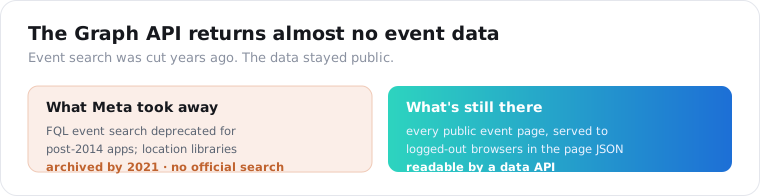
Not a usable one. Meta’s Graph API returns almost no public event data, and the ability to search events was cut years ago. Facebook deprecated FQL for apps built after 2014, which killed event search, and the location-based workarounds that developers rallied around were abandoned by 2021, with the most popular facebook-events-by-location library archived in December 2021. There is no official door left.
This is the same story as Facebook Groups and Marketplace, and it is worth being blunt about.
Facebook has the richest event data of any platform, with a whole “Events Near Me” section built for local discovery. The data is public and sitting right there in the app.
But the API that once let you query it is gone. Scrapfly’s 2026 Facebook guide puts it plainly: Meta’s Graph API covers almost no event data, and Facebook instead serves the event details to logged-out browsers, buried in the page JSON.
So the only practical way to get public event data at scale is a third-party API that reads those public pages. Not because it is a clever hack, but because Meta left no other route.
You could read that page JSON yourself. The data is there for a logged-out browser, so a script can reach it. The catch is production: Facebook blocks datacenter IP ranges fast, rotates the structure of the embedded JSON, and serves bots a stripped page or a login wall, so a scraper you wrote last month breaks this month. A managed API absorbs the proxies and the parsing changes so the event fields stay in the same place.
How do I find Facebook events with an API?
Send a search query to an events endpoint and read the JSON. One GET request with a query like “concerts in Austin” returns the matching public events, each with the name, start time, address, and attendance counts. The place goes inside the query string, which is how you search a city. Get a key from the quickstart, which comes with 25 free credits, then it is a few lines of Python.
import requests
resp = requests.get(    "https://api.scrapersocial.com/v1/facebook/events-search",    params={"query": "live music in Austin", "limit": 25},    headers={"Authorization": "Bearer sk_live_..."},    timeout=300,)for ev in resp.json()["data"]:    print(ev["starts_at"], ev["going"], ev["name"])
There is no separate city or radius parameter, and that is on purpose. The endpoint searches the same way the Facebook events search box does, so a query like “yoga in Chicago” or “startup meetup London” carries both the topic and the place in one string.
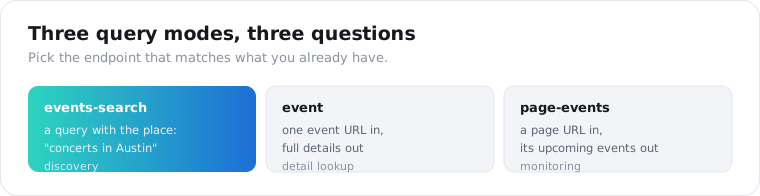
There are three endpoints, and they map to three questions. /v1/facebook/events-search answers “what events match this topic and place.” /v1/facebook/event answers “what are the details of this one event URL.” /v1/facebook/page-events answers “what is this venue or promoter hosting next.” Each is 5 credits per event.
What data can you get from a Facebook event?
The public event details plus the three attendance counts Facebook shows. Each record carries the name, description, start time, address, whether it is online, the organizer, and the going, interested, and responded numbers. Flags for canceled and past events come back too, so you can filter a search down to live, upcoming ones.
{ "data": [ { "id": "1234567890", "name": "Friday Night Live: Local Bands", "url": "https://www.facebook.com/events/1234567890/", "starts_at": "2026-10-16T19:00:00Z", "address": "The Mohawk, 912 Red River St, Austin, TX", "is_online": false, "is_canceled": false, "is_past": false, "going": 214, "interested": 1130, "responded": 1344, "organizer": "The Mohawk", "category": "MUSIC_EVENT" } ]}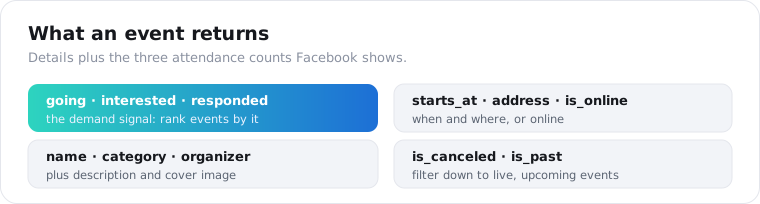
The going and interested split is the field people underuse. A thousand interested with forty going is a very different event from forty interested with a thousand going, and the gap tells you whether an event has real commitment behind it or just curiosity.
The is_canceled and is_past flags save you a cleanup pass. A raw events search returns a mix of live, finished, and canceled events, so filtering on those two booleans is how you get down to a list worth acting on.
A word on dates and duration. starts_at comes back as an ISO timestamp, and duration_sec is only populated for some events, so do not assume every record has an end time. Multi-day festivals and recurring weekly events can each surface as their own records, which is usually what you want, but it means a single “event” in your head may be several rows in the response.
One honest note on verification. The grading on these endpoints comes from the actor’s published output sample, not a full live run, so read the field list as documented rather than guaranteed and spot-check it on a real event of your own first.
How do I find events by keyword, page, or URL?
Pick the endpoint that matches what you already have. If you have a topic and a place, use events-search. If you have one event’s URL, use the event endpoint. If you have a page, promoter, or venue, use page-events to pull its whole upcoming schedule.
The page route is the one worth calling out. /v1/facebook/page-events reads a page’s upcoming hosted events, so pointing it at a venue, a festival organizer, or a competitor returns their calendar without you having to guess search terms.
resp = requests.get( "https://api.scrapersocial.com/v1/facebook/page-events", params={"url": "https://www.facebook.com/themohawkaustin", "limit": 50}, headers={"Authorization": "Bearer sk_live_..."}, timeout=300,)events = resp.json()["data"]Search is for discovery, when you do not know which events exist yet. The page endpoint is for monitoring, when you know whose events you want to track. Most real projects use both: search to find the relevant pages, then page-events to watch them going forward.
The single-event endpoint is the detail lookup. You already have a URL, maybe pulled from a search result or a post, and you want the full record for just that one.
A note on the page route’s scope. It returns a page’s upcoming hosted events, not every event the page has ever run, so it is built for watching what is next rather than reconstructing a venue’s full history. For past events, you store what you pull over time and let the archive build itself.
What can you do with Facebook event attendance data?
Rank and track demand. The going and interested counts turn a list of events into a ranked signal of what a local audience actually cares about, and pulling the same events over time shows which ones are gaining momentum before they happen. That is useful for event marketers, venues, sponsors, and anyone doing local market research.
Here is the move I keep coming back to. Search your category and city, sort by interested, and the top of that list is a map of unmet local demand, the events people are drawn to right now.
For a venue or promoter, tracking a competitor’s page-events over a few weeks shows which of their events are selling and which are flopping, by watching the going count climb or stall.
Sponsors use it the other way. Pull the upcoming events in a category, filter for high interest, and you have a shortlist of events worth sponsoring, ranked by the audience they are already pulling.
There is a simple output worth building too. Because every record has a name, a start time, an address, and a URL, you can turn a search straight into a calendar feed, writing each event to an ICS file or a spreadsheet your team already lives in. A “what’s on in our city this week” digest is a dozen lines of code once the events land as JSON.
None of this needs a single login, because every number comes off the public event page.
One caveat to stay honest about. The attendance counts are what Facebook displays, which is a soft signal, not a ticket count. People mark “interested” and never show, and some events sell through a separate ticketing site the counts never see. Treat going and interested as relative demand between events, not an attendance forecast.
How much does a Facebook events scraper cost?
Nothing to start, and $5 a month once you go past the trial. Every event is 5 credits, about 2.5 cents, signup brings 25 credits without a card, and a search that errors out is not billed. One key runs events-search, the single-event lookup, and page-events, so a city-plus-venues project never needs a second vendor or a second parser.
Apify’s own Facebook Events Scraper lists $13 per 1,000 events on its free plan and $10 per 1,000 on the $19/month Starter plan. Third-party Apify actors go as low as $0.90 per 1,000. Bright Data’s events scraper is about $1.50 per 1,000 delivered records with 5,000 free a month, and it bills only for successful records, while Apify bills for the events a run produces.
What differs is the work around the rate. An actor is one tool per surface that you start, watch, and reshape; here a venue’s schedule, a city search, and the page or group posts around them all come back inside one { data, meta, request_id } shape.
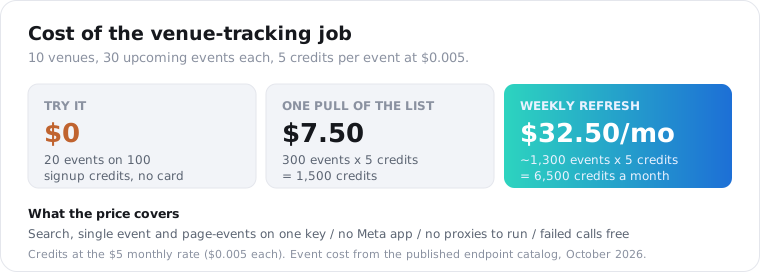
Price the venue job from earlier. Ten venues with 30 upcoming events each is 300 events per pull, 1,500 credits, or $7.50. Refresh that watchlist weekly and a month runs about 1,300 events, 6,500 credits, or $32.50; a daily refresh is about 9,000 events and $225, so set the cadence by how fast the counts you track actually move.
If the goal is every event in a region pulled daily, compare a bulk per-record provider as well, and our Best Facebook data APIs roundup lays out where each one fits.
How do I monitor many events or a whole city?
Run several searches concurrently and store what you have seen. There is no single call that returns an entire city, so you fan out across your category-and-place queries and your tracked pages, send them in parallel, and dedupe on the event id. Each event is billed as it returns, so you only pay for what comes back.
from concurrent.futures import ThreadPoolExecutor
queries = ["live music in Austin", "comedy in Austin", "food festival in Austin"]
def search(q):    r = requests.get("https://api.scrapersocial.com/v1/facebook/events-search",                     params={"query": q, "limit": 50}, headers=H, timeout=300)    return r.json()["data"] if r.ok else []
seen = {}with ThreadPoolExecutor(max_workers=6) as pool:    for batch in pool.map(search, queries):        for ev in batch:            seen[ev["id"]] = ev
The dedupe matters because overlapping queries return the same event more than once. Keying on the event id collapses “live music in Austin” and “concerts in Austin” into one clean list.
For monitoring, store each event’s going and interested counts with a timestamp on every run. The counts by themselves are a snapshot; the counts over time are the trend, and the trend is what tells you an event is taking off.
Keep the cadence matched to the goal. For tracking demand on upcoming events, a daily pull is plenty, since attendance counts move over days and weeks, not minutes.
Is it legal to scrape Facebook events?
Scraping public event data is generally legal in the US, but it breaks Meta’s terms, so the exposure is contractual, not criminal. US courts have repeatedly held that reading a public web page is not a hacking offense, as the hiQ Labs v. LinkedIn case established, and event pages are public and need no login. What Meta’s rules forbid and what the law forbids are two different questions, and only the first one is in play here.
The risk here is lower than most Facebook surfaces, for one reason.
Event data is the least personal of the lot. An event’s name, time, venue, and attendance counts are facts about a public gathering, not private profiles, so the privacy exposure is smaller than scraping people.
That said, the organizer and any named attendees are still people, so if you store personal data about EU or California residents, GDPR and CCPA apply. Pull the event facts, not the attendee identities, keep volume reasonable, and talk to a lawyer before building a commercial product on it. An API handles the fetching; it does not move Meta’s terms onto the vendor.
Frequently asked questions
Is there a Facebook Events API?
Not a usable one. Meta’s Graph API returns almost no public event data, and the event-search capability was cut years ago when Facebook deprecated FQL and locked down the Events edge. There is no official way to search public events at scale anymore. A third-party data API that reads the public event pages is the practical route.
How do I find Facebook events by location?
Put the place inside your search query. A Facebook events API searches by a text query like “concerts in Austin” or “yoga classes in Chicago”, so the city goes in the query string rather than a separate location filter. The endpoint returns matching public events with their dates, addresses, and attendance counts as JSON.
What data can you get from a Facebook event?
The public event details: name, description, start time, address, whether it is online, and the organizer. You also get the three attendance counts Facebook shows: how many users are going, interested, and responded. Flags for canceled and past events come back too, so you can filter a search down to live, upcoming ones.
How do I get the events for a Facebook page?
Send the page URL to a page-events endpoint. It reads the page’s upcoming hosted events and returns each one with the same fields as a search result: name, date, address, and the going and interested counts. This is the clean way to monitor a venue, promoter, or competitor’s event schedule without searching.
How much does a Facebook events scraper cost?
You can try it free: 25 signup credits, no card, cover 5 events. Paid use starts at $5 a month with no contract, each event is 5 credits or about 2.5 cents, and failed calls cost nothing. Apify’s own events actor lists $13 per 1,000 on its free plan and $10 on its $19 Starter plan, third-party actors go as low as $0.90, and Bright Data is about $1.50 per 1,000 delivered records with 5,000 free a month.
Is it legal to scrape Facebook events?
Scraping public event data is generally legal in the US, where courts treat collecting public data as lawful, but it breaks Meta’s terms, so the risk is contractual, not criminal. Event pages are public and need no login. Pull only public event fields, keep volume reasonable, and get legal advice before a commercial build.
Start with one city and one page
Pick a category and city you care about, like “live music in your town,” and run it through the events-search endpoint with your first key. Then grab a venue’s page URL and pull its schedule with page-events. The 25 free credits cover 5 events, enough to see the attendance fields before you pay. For the other Facebook surfaces, the Best Facebook data APIs guide ranks them, and the Facebook Group API guide covers another surface Meta closed the official door on.