By Nikhil Kumar. Last updated September 2026.
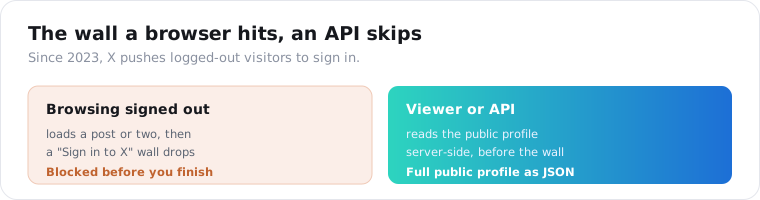
Try to check an X profile without logging in and you get a couple of posts before a “Sign in to X” wall drops over the page. That wall is the whole reason profile viewers exist.
An X profile viewer shows a public account, its bio, follower and following counts, join date, and verification, without you logging in or hitting that wall. A viewer site does one profile by hand; an API does thousands as JSON. What no viewer can reach is a protected account, your DMs, or a list of who looked at you, because X exposes none of those to anyone. This guide is straight about what actually works and what is bait.
“twitter profile viewer” draws about 5,400 US searches a month and “x profile viewer” another 1,900, per DataforSEO data pulled in September 2026. A lot of that traffic is people who just got bounced by the login wall and are looking for a way around it.
How do you view an X profile without an account?
You read the public profile without signing in, but on X that is harder than it sounds, because the platform actively pushes logged-out visitors toward an account. Since 2023, X gates most content: browse a profile signed out and it usually loads a post or two, then throws up a sign-in prompt. Three routes get you the profile anyway: land on it from a direct link or a search result, paste the handle into a viewer site, or call an API that reads it server-side.
The login wall is the difference between X and every other platform here.
On Instagram or TikTok, a logged-out browser sees a public profile fine, so “anonymous viewing” is just viewing. On X, the same act runs into a wall built specifically to make casual signed-out browsing painful, which pushed the whole viewer-tool category into existence.
That changes what “viewer” even means on X. Here the value is access more than privacy. A viewer site or an API reads the public profile before the wall can interrupt, which is something a plain browser tab increasingly cannot do reliably on its own.
The plain routes still work in narrow cases. A direct profile link from a Google result, or an embedded post, tends to load more than browsing around x.com natively while signed out. But those are fragile, and the moment you need more than one profile or a stable result, you are past what the wall will let a browser do.
What can you see on an X profile without logging in?
The public identity and the counts. Any anonymous read returns the display name, the @handle, the bio, the follower count, the following count, the post count, the join date, the location if the account set one, the verification badge, and the avatar. What is never public, and so out of reach for any viewer or API, is a protected account’s posts, DMs, the list of who liked something, or who viewed the profile. You get who the account is and how big, not the private layer.
One badge is worth reading carefully: the blue checkmark.
Since X made verification a paid feature, a blue check means the account pays for X Premium, not that X confirmed a real identity. So verified: true on a modern X profile tells you the account subscribes, which is a weaker signal than the old identity badge. Read it as “pays for reach,” not “confirmed who they say they are.”
The rest of the object is stable, descriptive data. The handle, display name, bio exactly as written, join date, location, and avatar are enough to render an account card from a single call, which is why monitoring and research tools start here before pulling anything heavier.
The one number people misread is the post count. It is the running total of everything the account has ever tweeted, including replies, so a high number means prolific, not active. For recency you read the dates on recent posts, not the lifetime tally on the profile.
How do you view X profiles at scale with an API?
You send a handle to the profile endpoint and get the account as JSON, then the tweets endpoint for its recent posts. On ScraperSocial that is a GET to /v1/twitter/profile for the counts, bio, join date, and verification, and /v1/twitter/tweets for recent posts, at 2 and 1 credits. No X developer account and no OAuth, and no login wall to fight, because it reads the public profile the same way a viewer site does, only structured and repeatable.
Here is the profile lookup in a few lines of Python.
import requests
r = requests.get(    "https://api.scrapersocial.com/v1/twitter/profile",    params={"handle": "nasa"},    headers={"Authorization": "Bearer sk_live_..."},)p = r.json()["data"]print(p["followers"], p["posts"], p["verified"], p["created_at"])
A handle goes in, one clean object comes back, and the login wall never enters the picture.
The advantage over a viewer site is scale and structure. A viewer renders one profile per page; the API lets you look up hundreds of handles at once and drop them into a table. For a watchlist, a competitor set, or a nightly refresh, that is the entire reason to use an endpoint instead of a website.
The tweets endpoint is the second half. It returns a batch of the account’s recent posts with their view, like, reply, and repost counts, which is where real per-post engagement lives, since the profile object only carries the lifetime post count. Read the two together and you see both the account’s size and whether it is actually posting.
One cost note. The profile call is 2 credits, more than a plain stats read on other platforms, because X profile data costs more to resolve past the wall. It is still about a cent a profile, and failed calls are not charged, so a shortlist of a few hundred accounts is a few dollars.
Here is how the two ways to view an X profile compare.
| Browser viewer site | Data API | |
|---|---|---|
| Scope | One profile per page | Any number, concurrently |
| Login wall | Worked around per visit | Never hit |
| Output | A rendered page | Structured JSON |
| Safety | Varies, many are scams | Authenticate to the provider |
| Best for | A quick one-off look | Dashboards, vetting, monitoring |
Can you see who viewed your X profile?
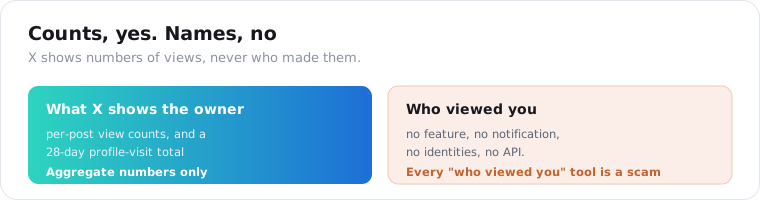
No, and this one has a twist worth getting right. X keeps no list of who viewed your profile and will not tell you, so any tool claiming to name your visitors is a scam. What X does show you, and what fuels the confusion, is an aggregate profile-visit count: your own analytics report a 28-day total of profile visits, a number with no names attached. You learn that visits happened, never who made them.
This is the search that splits the topic cleanly.
Viewing someone else’s public profile is one thing, and it is doable. Seeing who viewed yours is another, and it does not exist. X has never built a profile-visitors list, the way it never built one for likes-you-can’t-see or DMs-you-can’t-read; the platform’s whole posture is anonymous reading.
The nuance that trips people up is that X does surface numbers. Post view counts sit under every tweet, and X Premium and the analytics dashboard show a 28-day profile-visit total. Those are real, and they are counts. None of them, at any tier, resolves to a name, because X does not collect viewer identity to hand out.
Can you view a private (protected) X account?
No, and every tool that says otherwise is a scam. A protected account, X’s term for private, exposes only its header to non-followers: the display name, handle, bio, avatar, and follower and following counts. The posts, likes, and media sit behind an approval wall that only the owner can open by accepting your follow. An API reads the same public data a logged-out visitor sees, so a protected handle returns that header and nothing more.
The rule holds for every reader, human or machine.
If a signed-out visitor cannot see the posts, no legitimate viewer or API can either, because they are all reading the one public surface. Protected means the owner has to approve you, and no tool short of that approval reaches the tweets. Anything promising to “unlock” a protected timeline is selling something X does not expose to anyone.
What those sites are really selling is the risk. The “view private Twitter” category runs on credential theft and malware, and the classic move is a fake survey or verification step that installs something or captures a login. There is nothing behind the wall to hand over, so the product is the scam.
A well-built API is honest about this. A protected, suspended, or deleted handle returns the public header and a clean signal, and the call is not charged for pretending to reach what it cannot. The right move on a protected account is to log the header and move on, not to chase a shadier site that claims to crack it.
How do you use X profile data to spot bots and bought accounts?
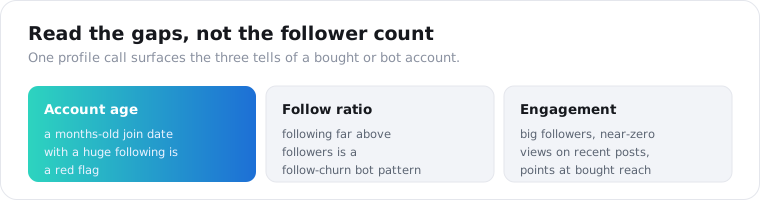
You read the ratios, because a raw follower count on X is especially easy to fake. Weigh followers against following and against the engagement on recent posts: an account following tens of thousands while barely posting is a follow-churn bot pattern, and a big follower count with almost no views or replies points at bought reach. The join date matters here too, a huge following on a months-old account is a red flag on its own.
Account vetting is the main commercial reason to read X profiles in bulk.
The signal is never one number. It is followers against following, followers against real engagement on recent tweets, and the account age from the join date. A month-old account with 200,000 followers and 40 views a post is not a real audience; it is inflation, and the profile call plus a few recent posts exposes it.
The bot problem on X is large enough that this matters. Independent estimates have long put automated accounts at a meaningful share of activity, so anyone paying an X account for reach, or building a dataset from X, needs a cheap filter. One profile call, read against recent posts and the join date, is that filter.
Is it anonymous, safe, and legal?
Reading a public profile logged out is anonymous and low-risk, and an API is the safe version, with no sketchy site asking for your X login. But public does not mean unowned. A handle, bio, and avatar describe a real person, and many accounts put a website or an email in the bio, so treat stored profile data under GDPR and CCPA, keep a retention window, and do not turn scraped bios into a contact list. This is not legal advice.
The safety point is worth stating flatly, because the X viewer space is a minefield.
Most free “X viewer” and “view private Twitter” sites exist to run ads, harvest data, or push malware, and a legitimate service never asks for your X password. An API removes that risk entirely: you authenticate to the data provider you chose, not to X and not to an anonymous site, and your login never leaves your hands.
That is the quiet win over consumer viewer pages. A random site asks you to trust it with a login or a download; an API asks you to trust one vendor you picked and can check. For anything you are building rather than idly browsing, that alone decides it.
On compliance, treat it like any people-data. Store the fields you use, drop the bios you do not, and honor deletion. Reading a public profile is a routine, defensible act; assembling a permanent, queryable record of individuals’ details is a separate risk to weigh before you start, not after.
Look up one account
Take a handle you already know, so you can check the API’s numbers against what the app shows. Send it to the profile endpoint for the follower and post counts, the bio, the join date, and the verification badge, then the tweets endpoint for its recent posts, and you have the whole public picture with no login and no wall. A key comes from the quickstart in a minute, the pricing page shows the 2-credit cost, and 25 free credits cover a real look first. For the same idea on other platforms, see the Instagram profile viewer and TikTok profile viewer. For pulling X data in code more broadly, the Twitter API in Python guide covers the rest.
Frequently asked questions
How do I view a Twitter (X) profile without an account?
Read the public profile without logging in. The catch is that X now bounces logged-out visitors to a sign-in wall after a post or two, so a viewer site or an API that reads the profile server-side is the reliable route, not browsing x.com yourself. On ScraperSocial a GET to /v1/twitter/profile returns the handle, display name, follower and following counts, post count, bio, join date, and verification for any public account, no X login required.
Can someone see if I viewed their X profile?
No. X has no profile-visitor feature and sends no notification when someone opens your profile, whether you are logged in or out. Reading a public profile through a browser, a viewer site, or an API leaves no trace the owner can tie to you. The only view data X surfaces is aggregate: post view counts everyone sees, and a 28-day profile-visit count in your own analytics that shows a number, never identities.
Can I see who viewed my X profile?
No, and no app or extension can either. X has never exposed viewer identities to account owners, so every “see who viewed your X profile” tool is a credential-harvesting scam with no exceptions. What you can see is your own analytics: a 28-day count of profile visits, plus per-post view counts and deeper audience data on X Premium. All of it is aggregate numbers, and none of it names a single visitor.
Can you view a private (protected) X account?
No, and any tool that claims to is a scam. A protected X account shows only its public header to non-followers, the display name, handle, bio, avatar, and follower and following counts, while its posts, likes, and media stay locked behind an approval wall. An API reads the same public data a logged-out visitor would, so a protected handle returns the header, never the hidden posts. Sites promising to unlock protected accounts are after your login or your money.
How do I get an X account’s data with an API?
Send a GET to /v1/twitter/profile with the handle and your API key. The response includes the follower, following, and post counts, the display name, bio, location, join date, verification badge, and avatar as JSON, 2 credits per profile. There is no X developer account or OAuth, because it reads the public profile page. For the account’s actual posts, /v1/twitter/tweets returns a batch of recent tweets with per-post numbers.
Is it legal to view X profiles without an account?
Reading a public profile logged out is generally low-risk, and it is what every anonymous viewer does, but this is not legal advice. A handle, bio, and avatar describe a real person, and many accounts list a website or contact in the bio, so treat stored profile data under GDPR and CCPA, keep a retention window, and do not turn scraped bios into a contact database. Public to read is not the same as free to keep forever.