By Nikhil Kumar. Last updated September 2026.
Type an Instagram handle into a “profile viewer” and you get one of two things: the public profile you could already see, or a scam. There is no third option.
An Instagram profile viewer shows any public account, its follower count, post count, bio, and grid, without you logging in, so the owner never knows you looked. A browser tool does one profile by hand; an API does thousands as JSON. What no viewer can do is open a private account or tell you who viewed yours, because Instagram exposes neither to anyone. This guide is honest about both the real capability and the scam edge around it.
“instagram profile viewer” draws about 110,000 US searches a month, according to DataforSEO data pulled in September 2026. A lot of that traffic is chasing something that does not exist, so it is worth separating what works from what is bait.
How do you view an Instagram profile anonymously?
You open the public profile logged out, which is anonymous by default, because Instagram has no feature that tells anyone you looked. Three routes get you there: load instagram.com/username in a private browser window, drop the handle into a viewer site, or call an API that hands back the profile as JSON. Every one of them reads the identical public page. The API is just the version you can automate.
“Anonymous” sounds like a trick, but there is nothing to trick.
A public Instagram profile is already visible to the entire internet without an account, so viewing it “anonymously” means nothing more than viewing it while signed out. The viewer sites take a page anyone can load and dress the ordinary act of loading it up as a feature.
That is the real limit worth naming up front. Whatever a profile viewer shows you is something you could pull up yourself by opening the page in an incognito tab. The genuine value is doing it fast and doing it repeatedly, not seeing anything a logged-out browser cannot.
For a single lookup, the plain routes are enough. Open instagram.com/username signed out, or search Google for the handle, and the public profile loads without the app. Both are free and leave no trace. The reason to reach for anything more is count: one profile is a quick glance, and five hundred is a job for code.
What can you see on an Instagram profile without an account?
The public counts and the profile text. Any logged-out viewer sees the follower count, the following count, the number of posts, the display name, the bio, the verification badge, and the profile photo, plus the post grid on a public account. What is never on a public profile, and so reachable by no viewer or API, is the follower list, audience demographics, or who has viewed it. You learn who the account is and how big, not who is behind the audience.
The field that decides everything else is one flag: public or private.
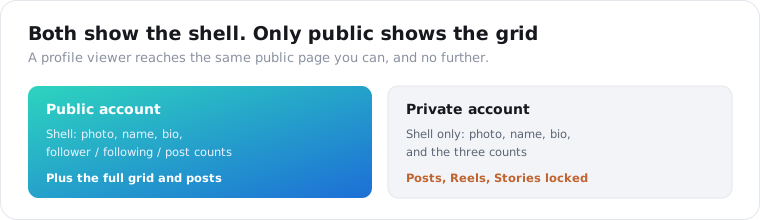
On a public account, the grid and its posts are all there to read. On a private one, the same call returns only the shell, the photo, name, bio, and the three counts, with the posts, Reels, Stories, and Highlights sealed off. A good tool hands back that shell plus an is_private marker so your code knows which case it is looking at, instead of pretending a locked grid is empty.
Everything else on the object is descriptive and stable. The name, the bio exactly as typed, the verified badge, the avatar, and the canonical profile link are enough to render a creator card from one call, which is why influencer and research tools start with this endpoint before pulling anything heavier.
One number people overread is the post count. It is the running total of everything the account has published, so it climbs over years and drops when a creator prunes old posts; it says how prolific an account is, not how active it is right now. For recency you read the dates on the grid, not the lifetime tally.
How do you view Instagram profiles at scale with an API?
You send a handle to the profile-stats endpoint and get the account as JSON, then the posts endpoint for its grid. On ScraperSocial that is a GET to /v1/instagram/channel-stats for the counts, bio, verification, and privacy flag, and /v1/instagram/channel-posts for recent posts, at 1 credit per profile and 1 per post. No Instagram developer app and no OAuth, because it reads the public page the same way a signed-out browser does, only structured and repeatable.
Here is the profile lookup in a few lines of Python.
import requests
r = requests.get(    "https://api.scrapersocial.com/v1/instagram/channel-stats",    params={"handle": "nasa"},    headers={"Authorization": "Bearer sk_live_..."},)p = r.json()["data"]print(p["followers"], p["posts"], p["is_private"])
A handle goes in, a clean object comes back, and no login happens anywhere.
What a browser viewer cannot match is volume. A viewer site renders one profile per page load; the API lets you run a few hundred handles at once and land them in a table or a database. For a campaign shortlist, a competitor set, or a nightly refresh, that gap is the whole reason to use an endpoint over a website.
The channel-posts endpoint is the second half. It returns a batch of the account’s recent posts with their engagement, which is where real per-post activity lives, since the profile object only carries the cumulative post count. Read the two together and you see both the account’s size and whether it is actually posting.
Two practical notes. Profile numbers drift slowly, so the endpoint caches for hours; pass fresh=true at the start of a monitoring run when you want a guaranteed live read. And the avatar link points at Instagram’s CDN and expires, so if you are keeping profile pictures, download the image bytes when you ingest rather than storing the URL.
Here is how the two ways to view a profile compare.
| Browser viewer site | Data API | |
|---|---|---|
| Scope | One profile per page | Any number, concurrently |
| Output | A rendered page | Structured JSON |
| Login | None | API key only |
| Safety | Varies, many are scams | Authenticate to the provider |
| Best for | A quick one-off look | Dashboards, vetting, monitoring |
Can you see who viewed your Instagram profile?
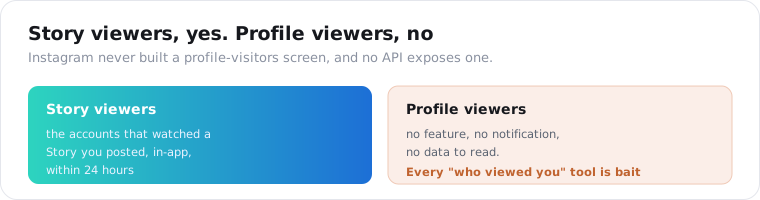
No, and this is the cleaner answer than most platforms give: Instagram has no profile-visitor feature at all. It keeps no list of who opened your profile and sends no notification, so there is nothing for any app or API to read. Every “see who viewed your Instagram” tool is either guessing from your own followers or fishing for your login, because the data they claim to show does not exist on Instagram’s side.
This is the search that splits the whole topic in two.
Viewing someone else’s public profile is trivial and untraceable. Seeing who viewed yours is not gated or rare; it is simply not a thing Instagram offers. The company has never shipped a profile-visitors screen, and repeated rumors of one have never been real.
The single exception people conflate with it is Stories. When you post a Story, Instagram does show you the accounts that watched it, a real per-Story viewer list inside the app. That is Story views, not profile views, and it only covers your own Stories for 24 hours. It tells you who saw a specific Story, never who browsed your profile.
Can you view a private Instagram account?
No, and every tool that says otherwise is a scam. A private account exposes only its shell to non-followers, the photo, name, bio, and the follower, following, and post counts, while the posts, Reels, Stories, and Highlights sit behind an approval wall. An API reads the same public page a signed-out visitor does, so a private handle returns that shell and an is_private flag, never the locked content.
The rule is fixed and it does not bend for anyone.
If a logged-out browser cannot load it, no legitimate viewer or API can either, because they are all reading the one public page. Private means the owner has to approve you, and nothing short of that approval reaches the posts. A tool promising to “unlock” a private grid is selling something Instagram does not hand out to anyone.
What those sites are actually selling is the risk. The “private Instagram viewer” category runs on ad fraud, malware, and credential theft, and a common pattern is a fake “human verification” step that installs something or harvests a login. There is nothing behind the wall to deliver, so the product is the scam itself.
A well-built API is honest here: a private or deleted or suspended handle returns the public shell and a clean flag, and the call is not charged for pretending to reach what it cannot. The right move on a private account is to record the shell and move on, not to hunt for a shadier site that claims to crack it.
How do you vet an influencer with profile data?
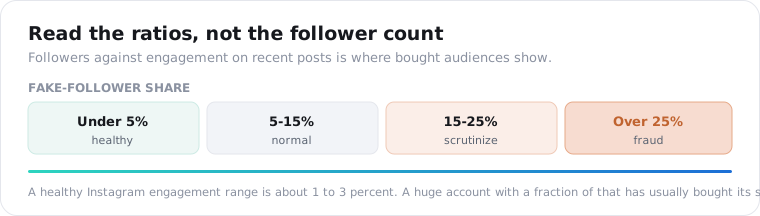
You read the relationships between the numbers, not any single one. A follower count is cheap to buy, so on its own it means little; the signal is followers against posts and, more tellingly, followers against the engagement on recent posts. A huge account that barely gets likes has usually paid for its size. Industry guidance treats under 5 percent fake followers as healthy and a quarter or more as fraud.
Creator vetting is the main commercial reason to read profiles in bulk.
The math starts at the profile and finishes at the grid. Channel-stats gives you the follower count and the post count, and channel-posts gives you the last batch of posts so you can compute a real engagement rate on recent content instead of trusting a follower number anyone can inflate. Run both across a shortlist and the bought audiences separate from the real ones.
The stakes are not small. A 2025 study cited across the industry put the annual waste from fake-influencer partnerships at roughly $1.3 billion, and marketers rank audience authenticity as a top vetting challenge. A single profile call, read against recent engagement, is the cheapest guard against paying a creator whose followers never show up.
Is it anonymous, safe, and legal?
Reading a public profile logged out is anonymous and low-risk, and an API is the safe version, with no sketchy website asking for your Instagram login. But public does not mean unowned. A bio, name, and avatar describe a real person, and many creators list an email or a link in the bio, so treat stored profile data under GDPR and CCPA, keep a retention window, and do not turn scraped bios into a contact list. This is not legal advice.
The safety point deserves plain language, because the consumer viewer space is genuinely hazardous.
Most free “Instagram viewer” and “private account unlocker” sites exist to harvest data, run ads, or push malware, and a legitimate service never asks for your Instagram password. An API removes that whole risk: you authenticate to the data provider you chose, not to Instagram and not to a random site, and you never hand your login to anyone.
That is the quiet advantage. A consumer viewer page asks you to trust an anonymous site with a login or a download; an API asks you to trust one vendor you picked and can vet. For anything you are building rather than idly checking, that alone settles which to use.
On compliance, the discipline is the same as any people-data. Store the fields you use, drop the bios you do not, and honor deletion requests. Looking at a public profile is ordinary and defensible; keeping a searchable index of real people’s details is a separate risk to weigh carefully before you build it, not after.
Look up one account
Take a handle you already know, so you can check the API’s numbers against what the app shows. Send it to the channel-stats endpoint for the follower and post counts, the bio, and the verified and private flags, then the channel-posts endpoint for the grid, and you have the whole public picture without logging in. A key comes from the quickstart in a minute, the pricing page shows the 1-credit cost, and 25 free credits cover a real look first. To track a creator’s follower count over time instead of a one-off view, the Instagram follower tracker post covers that. For the same idea on another platform, see the TikTok profile viewer.
Frequently asked questions
How do I view an Instagram profile anonymously?
Open the public profile without logging in. View it on instagram.com in a private browser tab, paste the handle into a viewer site, or call an API that returns the profile as JSON. All three read the same public page, and since you are logged out, Instagram records nothing and sends no notification. The API is the scriptable version: a GET to /v1/instagram/channel-stats returns followers, following, post count, bio, and verification for any public handle.
Can someone tell if I viewed their Instagram profile?
No. Instagram has no profile-visitor feature and sends no alert when someone opens your profile, whether you are logged in or out. The one place Instagram does show viewers is Stories, where the owner sees a list of accounts that watched, but that is Stories only and never the profile itself. Browsing a public profile, in a browser or through an API, leaves no trace the owner can see.
Can I see who viewed my Instagram profile?
No, and no app or API can either. Instagram does not track or publish profile-view data to anyone, so every “see who viewed your profile” tool is guessing or lying, usually to get your login. The only viewer data Instagram exposes is the per-Story viewer list inside the app, which shows who watched a Story you posted, not who looked at your profile. There is no profile-visitor list to read.
Can you view a private Instagram account?
No, and any tool that claims to is a scam. A private account shows only its public shell to non-followers: the profile photo, name, bio, and follower, following, and post counts. The posts, Reels, Stories, and Highlights stay locked. An API reads exactly what a logged-out visitor sees, so a private handle returns the shell and an is_private flag, never the hidden posts. Sites promising to unlock private accounts are after your data, money, or password.
How do I get an Instagram account’s data with an API?
Send a GET to /v1/instagram/channel-stats with the handle and your API key. The response includes the follower, following, and post counts, the display name, bio, verification, avatar, and an is_private flag as JSON, 1 credit per profile. There is no Instagram developer app or OAuth, because it reads the public profile page. For the account’s actual grid, /v1/instagram/channel-posts returns a batch of recent posts.
Is it legal to view Instagram profiles without an account?
Reading a public profile logged out is generally low-risk, and it is what every anonymous viewer already does, but this is not legal advice. A bio, name, and avatar describe a real person, and creators often put an email or a link in the bio, so treat stored profile data under GDPR and CCPA, keep a retention window, and do not turn scraped bios into a contact database. Public to read is not the same as free to keep forever.