By Nikhil Kumar. Last updated September 2026.
You want a Twitch channel’s follower count in a script, you open the docs, and the first thing they hand you is an OAuth flow.
Twitch has an official API, Helix, and it is free, but it wraps even public data in OAuth: a registered app, a client ID and secret, and rate-limit buckets to manage. For read-only public data like a channel’s stats, videos, and clips, a data API skips all of that and returns the same data from one request. This guide shows both routes, what a channel actually returns, and where each one fits.
“twitch api” draws about 880 US searches a month, according to DataforSEO keyword data pulled in September 2026. Most of those searches want a channel’s public numbers, not an OAuth integration.
Does Twitch have an API?
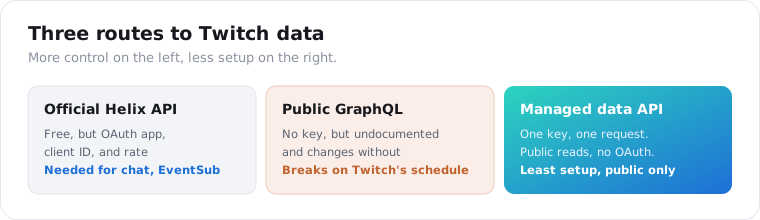
Yes, two kinds. The official one is Helix, Twitch’s free REST API covering streams, users, channels, clips, and videos, gated behind OAuth. The unofficial route is Twitch’s public GraphQL endpoint, which powers the site and can be read without a key but changes without notice. A third option sits on top of the second: a managed data API that reads the public data for you and returns clean JSON.
The official API is the one everyone finds first.
Helix is genuinely free and well-documented, and for building a Twitch-native app, a chatbot, or anything with user permissions, it is the right and only tool. Its cost is not money. It is the OAuth setup and the rate-limit accounting that come before your first useful call.
The unofficial GraphQL route is what most no-key scrapers actually use under the hood. It reads the same public catalog the website shows, but Twitch has been deprecating endpoints and tightening access since 2023, so a hand-rolled GraphQL scraper breaks on Twitch’s schedule, not yours.
Why use a data API instead of the official Twitch API?
Because for read-only public data, OAuth is overhead you do not need. The Helix API makes you register an application, obtain a client ID and secret, run a client-credentials flow, and stay inside token-bucket rate limits that return a 429 when your points run out. A data API replaces all of that with one API key and one GET request, because it reads the public channel page rather than authenticating into Twitch.
The difference is setup time and maintenance, not the data.
With Helix, before you read a single follower count you are managing an app registration, a token exchange, token refresh, and the rate-limit headers that tell you how many points you have left. That is correct and worth it when OAuth is a product feature, like a chatbot acting on a user’s behalf.
With a data API, you send a channel login and read JSON back. There is no app, no token, and no bucket to watch. You give up the account-authenticated features, chat, subscriptions, EventSub, and you keep only public reads, which for analytics and creator research is all you needed.
How do you get a Twitch channel’s data with an API?
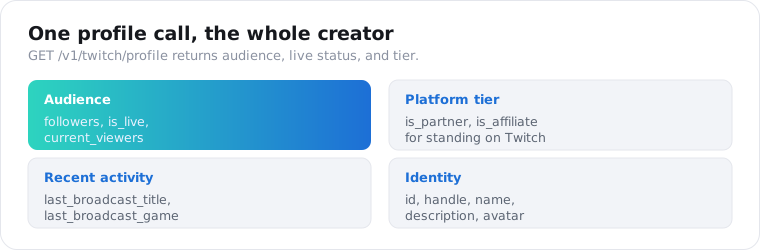
You send a channel login to the profile endpoint and read the channel’s public stats back as JSON. The API reads the public Twitch page, so there is no OAuth app and no client ID. On ScraperSocial you GET /v1/twitch/profile with a handle, billed 4 credits per profile, and the response carries the numbers creator research runs on.
Here is the whole call in a few lines of Python.
import requests
r = requests.get(    "https://api.scrapersocial.com/v1/twitch/profile",    params={"handle": "pokimane"},    headers={"Authorization": "Bearer sk_live_..."},)c = r.json()["data"]print(c["name"], c["followers"], c["is_live"], c["is_partner"])
Handle in, channel out. No token exchange, no app review.
The profile response is built for vetting a creator. It returns the channel id and handle, the display name and description, the avatar, the followers count, whether the channel is_live with the current_viewers when it is, the is_partner and is_affiliate flags for its Twitch tier, and the last_broadcast_title and last_broadcast_game. That is audience size, live cadence, and platform standing in one object.
Those flags are the useful part. A high follower count with is_partner true and a recent last broadcast is an active, established channel; the same follower count with no recent broadcast is a dormant one, and the profile tells them apart in a single call.
How do you get a channel’s videos and clips?
Two more endpoints, keyed off the same handle. The videos endpoint returns a channel’s recent VODs, and the clips endpoint returns its clips, each with the metadata you need to rank content. Send the login to /v1/twitch/user-videos for the archive, at 2 credits per video with a 4-credit minimum, and /v1/twitch/clip for clips, at 4 credits.
The two cover the two halves of a channel’s content.
The videos endpoint returns the channel’s recent broadcasts as a list, each with an id, title, views, duration_sec, and the game played. That is the record of what a streamer has been doing lately and how each session performed, which is how you read a channel’s direction over weeks.
import requests
r = requests.get(    "https://api.scrapersocial.com/v1/twitch/clip",    params={"handle": "pokimane", "limit": 20},    headers={"Authorization": "Bearer sk_live_..."},)for clip in r.json()["data"]:    print(clip["title"], clip["views"], clip["game"])
Clips carry a title, url, views, duration_sec, game, the author who created the clip, and the posted_at date. Sorting a channel’s clips by views surfaces its viral moments, which is the content-research half of the job: the profile tells you how big a creator is, and the clips tell you what actually landed.
Two mechanics matter here. The limit on the clips call sets how many come back and is also your cost dial, so ask for the top handful when you only want the winners. And these endpoints return a channel’s recent and top content, not its entire history, so they are built for monitoring a set of channels on a schedule rather than reconstructing a streamer’s full archive. For a running shortlist, a weekly pull of profile plus clips per channel keeps the numbers current without paying to re-read years of VODs.
What can you get from Twitch, and what can’t you?
Public channel and content data, not account or chat data. You get a channel’s stats, its recent videos, and its clips, all read from public pages. What no data API reaches is anything behind Twitch’s login: live chat, subscriber lists, private messages, revenue, or actions taken on behalf of a user. Those live on the official Helix API with OAuth, by design.
The line is the same one every platform draws.
Public means what a logged-out visitor can see: a channel’s follower count, whether it is live, its videos, and its clips. That covers analytics, discovery, and creator vetting, which is the bulk of why teams want Twitch data.
Account-authenticated means acting as a Twitch user: reading a chat you are in, managing a subscription, running a bot that responds to commands. That is not scraping, it is authorization, and only Helix and OAuth provide it. If your project needs that, no data API substitutes for the official one, and mixing the two, a data API for public reads and Helix for the authenticated actions, is a common and sensible split.
What should you check before you pick a Twitch API?
Three things the tool pages skip: whether it covers the surface you need, how fresh the live data is, and how it handles Twitch’s changes. Twitch splits cleanly into public data and account-authenticated data, so a tool that reads public pages cannot do chat or subscriptions no matter what you pay. Match the tool to the surface before anything else.
Start with the public-versus-authenticated line, because it is absolute. If your project needs live chat, EventSub webhooks, or actions on a user’s account, only Helix and OAuth deliver it, and no scraper or data API will. If it needs public stats, videos, and clips, a data API is simpler. Deciding which side you are on settles most of the choice.
Then freshness on live signals. The is_live and current_viewers fields are only useful if they reflect this moment, so a cached source that reports a channel as offline when it just went live is worse than no signal. If real-time live status matters to your product, confirm the source reads the page at request time.
Last, resilience to change. Twitch has been deprecating endpoints and reshaping its public GraphQL since 2023, so a thin wrapper over a hand-rolled scraper breaks often. A maintained data API absorbs those changes and prices the upkeep into a per-call fee, which is the reason to rent the collection rather than build it.
What can you build with Twitch data?
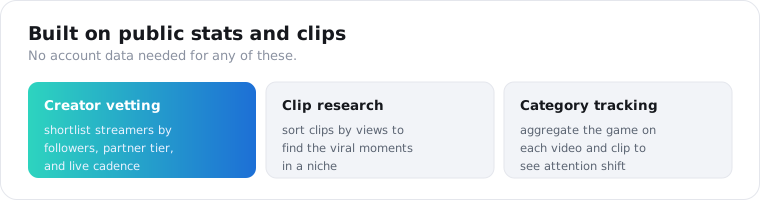
Mostly creator vetting, clip research, and category tracking. Sponsorship and talent teams shortlist streamers by follower count, partner status, and how recently they broadcast; content teams surface a channel’s top clips to study what performs; and market researchers track which games are drawing streams and viewers. The data is public stats and content, so the products are about the platform, not private accounts.
Creator vetting is the most common build.
Before a brand sponsors a streamer, it pulls that channel’s follower count, partner tier, live cadence, and recent games to qualify the audience, instead of eyeballing the channel page. Run that across a list of candidates and you have a ranked shortlist by audience size and activity, built from profile calls.
Clip research is the content half. A channel’s clips, sorted by view count, show its standout moments, which is raw material for a highlights feed, a trend read, or a study of what a niche’s audience actually clips and shares.
Category tracking rounds it out. Because each video and clip carries the game it came from, aggregating them shows which titles a creator or a niche is playing and how that shifts over time, a live read on where attention is moving in streaming.
One worked loop ties it together. A talent team keeps a list of candidate channels in a game, pulls each channel’s profile on a weekly schedule, and ranks them by follower count filtered to those that broadcast in the last week. Adding the top clip’s view count gives a rough engagement read alongside raw audience size, so the shortlist sorts by both reach and recent traction. The whole thing is a scheduled set of profile and clip calls and a sort, not an analyst watching streams all day, and it stays current because each run re-reads the live numbers.
Is it legal to scrape Twitch?
Reading public Twitch data is collecting public data, which US courts have generally treated leniently, but this is not legal advice and Twitch’s terms are a separate question from the law. A data API reads only what a logged-out visitor sees, which keeps you out of the account-authenticated space Helix governs, but you still own compliance for whatever you store.
Public and permissioned are different words.
A streamer’s handle, avatar, and channel are public, but they are still personal data under GDPR and CCPA once you keep them, so store the fields your analysis needs and drop the rest. If you are building an aggregate view of a category, you rarely need to retain individual channel identities at all.
Twitch’s terms discourage automated collection, which is part of why the public GraphQL route is undocumented. Treat the data as what it is, other people’s public content, and set a retention window before you build a permanent archive.
Which route should you choose?
Match the route to whether you need authorization. If you are building a Twitch app, a chatbot, or anything that acts on a user’s behalf, use the official Helix API and pay the OAuth setup, because only it can do that. If you are reading public data, followers, live status, videos, clips, for analytics or creator research, a data API is the faster path, with no app and no token to maintain. Most analytics work falls in the second group.
One honest note on scope. A data API’s Twitch coverage here is focused: a channel’s profile, its recent videos, and its clips. That is enough for creator vetting, sponsorship shortlists, and content research, and it is not built for a full historical archive or real-time chat. Name what you actually need, and the route follows from it.
Frequently asked questions
Does Twitch have an official API?
Yes. Twitch’s Helix API is the official, free API, and it covers streams, users, channels, clips, videos, and more. The catch is access: it uses OAuth 2.0, so you register an app, get a client ID and secret, run a client-credentials flow, and manage token-bucket rate limits. For read-only public data with none of that setup, many developers use a third-party data API that reads public Twitch pages instead.
Is the Twitch API free?
The official Helix API is free to use, but free in dollars, not effort. You still register a developer application, run an OAuth flow, and stay within token-bucket rate limits that return 429 when your points run out. Third-party data APIs charge per item but remove the OAuth setup entirely. So the real trade is free-with-OAuth versus paid-and-instant, not free versus paid data.
How do I get Twitch data without OAuth or a developer app?
Use a data API that reads Twitch’s public pages for you. You send a channel login to a profile endpoint with your API key and get the channel’s followers, live status, and partner tier back as JSON, with no Twitch app, no client ID, and no token refresh. It reads what a logged-out visitor sees, so it covers public data only, not chat or account actions.
What data can I get from a Twitch channel?
Public channel and content data. A profile call returns the channel’s id, handle, display name, description, avatar, follower count, live status, current viewers, partner and affiliate status, and the last broadcast’s title and game. Separate calls return the channel’s recent videos and its clips, each with a title, view count, duration, and game. What you cannot get without the official API and OAuth is chat, subscriptions, or private account data.
Can I get a Twitch streamer’s follower count and live status?
Yes, from one profile call. The profile endpoint returns the follower count, whether the channel is live right now, the current viewer count when live, and whether the channel is a Twitch partner or affiliate. That is the core of creator vetting: audience size, live cadence, and platform tier in a single response, without watching the channel or logging in.
Is it legal to scrape Twitch?
Reading public Twitch data is collecting public data, which US courts have generally treated leniently, but this is not legal advice and Twitch’s terms are a separate question. Keep to public channel and content data, avoid harvesting personal information you do not need, and set a retention window. A data API reads only what a logged-out visitor sees, which keeps you out of the account-authenticated space the official API governs.
Pull a channel’s numbers
Take a streamer you care about. Send their handle to the Twitch profile endpoint, read the follower count, live status, and partner tier, and you have the core of a creator profile in one call. The quickstart issues a key in a minute, the pricing page has the per-call credit cost, and 25 free credits cover a first look, enough to run profile, videos, and clips on two channels, before you spend anything. For the wider picture across platforms, the best social media APIs guide maps the field.