By Nikhil Kumar. Last updated August 2026.
You found LinkedIn’s Ad Library, searched a competitor, and then realized you cannot export a single thing. Screenshots are the ceiling.
The LinkedIn Ad Library API most people want does not exist. LinkedIn runs a public Ad Library website, but it ships no usable API for competitor research: no CSV, no JSON, no bulk download. To pull competitor LinkedIn ads as structured data you send a keyword to a data API’s ads-search endpoint and read the matching ads back as JSON. With ScraperSocial that is one GET request, 1 credit per ad returned.
Does LinkedIn have an Ad Library API?
Not a usable one. LinkedIn launched its Ad Library in mid-2023 to meet the EU’s Digital Services Act, but it is a browser tool, not a data feed. There is no official Ad Library API for competitor research, the Marketing API only manages your own campaigns, and the unofficial ad-library endpoint in the developer portal is messy enough that its own docs 404 and the official client fails on the call.
So the search “LinkedIn Ad Library API” almost always ends in disappointment on LinkedIn’s own properties.
That is the gap. The library is public and searchable, but the moment you want the data in a spreadsheet or a script, you hit a wall the website never mentions.
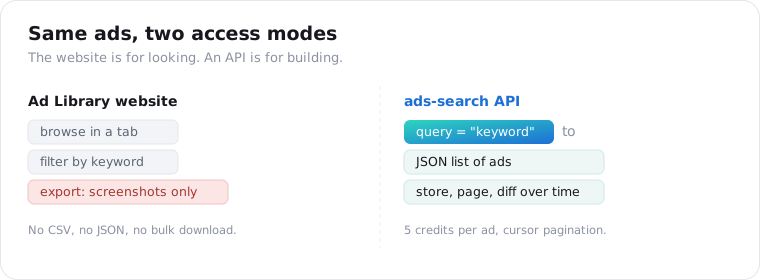
The Marketing API is the part that confuses people. It is a real, official API, but it reports on ads you run, not ads your competitors run. For competitor intelligence it returns nothing.
What does the LinkedIn Ad Library actually show?
The advertiser, the creative, and the dates, plus extra detail for EU ads. The public Ad Library displays the advertiser identity, the ad copy and images, and lets you filter by company name, keyword, country, and date range. For ads that targeted EU member states, it also shows bucketed impression ranges and the disclosed targeting parameters, the transparency the DSA requires.
Outside the EU, you get the creative and the advertiser, and not much else.
What it withholds matters as much as what it shows. There is no spend data anywhere, so any dollar figure you see is modeled rather than reported.
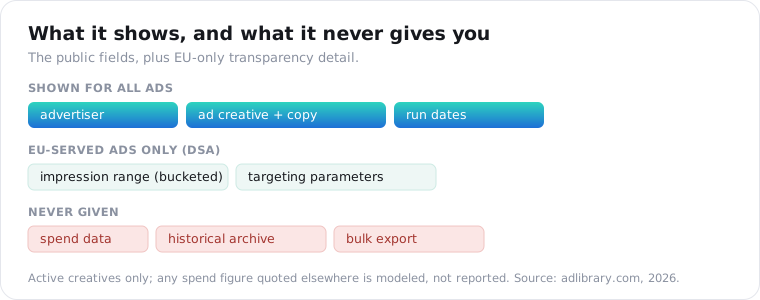
And it is active-only. The library shows creatives that are running now and keeps no historical archive, so an ad that stops disappears. If you want a competitor’s ad history, you capture it yourself over time.
That combination, no export and no history, is exactly why a keyword-searchable API is worth having.
How do you pull LinkedIn ads as JSON with an API?
Send a query to an ads-search endpoint and read the ads back. A LinkedIn ads-search API takes a keyword or company term, searches the public Ad Library, and returns the matching ads as structured JSON, with no browser and no screenshots. On ScraperSocial the call is GET /v1/linkedin/ads-search?query=..., billed at 1 credit per ad returned, and it paginates with a cursor for large result sets.
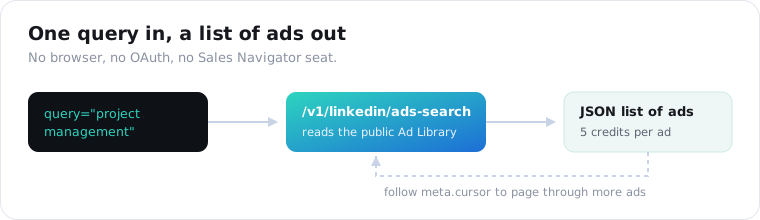
Here is the whole request.
import requests
r = requests.get(    "https://api.scrapersocial.com/v1/linkedin/ads-search",    params={"query": "project management", "limit": 25},    headers={"Authorization": "Bearer sk_live_..."},)data = r.json()for ad in data["data"]:    print(ad.get("advertiser"), "|", ad.get("headline"))
# more results? pass the cursor backcursor = data.get("meta", {}).get("cursor")
No OAuth, no app review, no Sales Navigator seat. You pass a query and get ads.
The query is the only required parameter. limit controls how many ads come back, cursor pages through more, and fresh=true bypasses the cache when you need the current set rather than a recent one.
What does the ads-search response look like?
The standard envelope, with an array of ad objects. Every ScraperSocial response is { data, meta, request_id }, so an ads call parses the same way a profile or comments call does. data is the list of ads, meta carries the pagination cursor and count, and request_id is what support traces if something looks off.
{ "data": [ { "advertiser": "Acme Inc.", "headline": "Ship faster with Acme", "ad_copy": "The project tool teams actually use...", "creative_url": "https://.../creative.png", "first_seen": "2026-07-02", "impressions_range": "10K-50K", "targeting": ["European Union"] } ], "meta": { "count": 25, "cursor": "eyJ...", "has_more": true }, "request_id": "a18e4ef88ad4b00b"}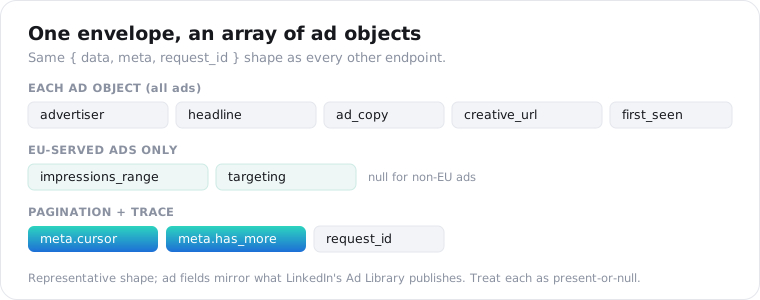
The ad fields mirror what LinkedIn’s Ad Library publishes, so impressions_range and targeting populate for EU-served ads and are absent otherwise. Treat any single field as present-or-null rather than guaranteed, the same discipline every scraped endpoint needs.
Because results are the public library, pagination is your depth control: pull a page, follow the cursor, stop when has_more is false.
What can you use LinkedIn ad data for?
Competitor intelligence that the Ad Library makes visible but not usable. Pulling ads as JSON turns a browse-only page into a dataset you can diff over time: which competitors are advertising, what angles and offers they lead with, when campaigns start, and, for EU ads, roughly how big they are. That is the raw material for creative teardowns, positioning maps, and account-based target lists.
The highest-value use is the one the website blocks: tracking change.
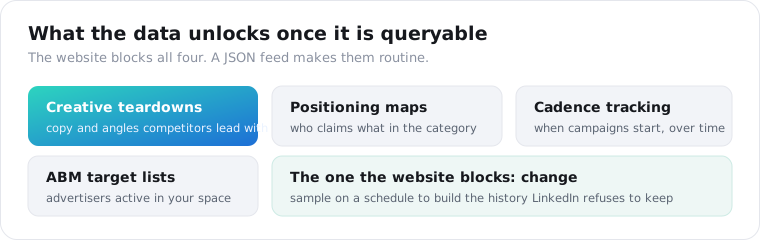
Sample a competitor’s ads on a schedule and you build the history LinkedIn refuses to keep, which is how you catch a repositioning or a new offer the week it launches.
For a broader view of what else LinkedIn exposes, the best LinkedIn scraping APIs post covers profiles, companies, and jobs alongside ads.
What are the limits and the compliance notes?
Active ads, EU-only impressions, and personal data discipline. The API returns what the Ad Library holds, so you get active creatives, no historical archive, and no spend figures anywhere. Impression ranges and targeting appear only for EU-served ads. None of that is a scraper limitation; it is the boundary of what LinkedIn publishes.
Repeat calls hit the documented cache and return fast; add fresh=true for the live set. Calls that fail are never charged.
The compliance line is the same one that governs the rest of our LinkedIn coverage. Ad creatives can name identifiable people, so treat what you store as personal data, keep a retention window, and get your own advice before building a permanent archive. This is not legal advice.
The short version
LinkedIn’s Ad Library is a public website with no usable API, no export, no history, and no spend data. To pull competitor LinkedIn ads as JSON you send a keyword to an ads-search endpoint and page through the results, at 1 credit per ad. The data mirrors the public library, so it is active ads plus EU impression ranges, which is enough to track competitors over time if you sample on a schedule.
Frequently asked questions
Does LinkedIn have an Ad Library API?
Not a usable one. LinkedIn runs a public Ad Library website, launched in 2023 for EU transparency rules, but it has no official API for competitor research. The unofficial ad-library endpoint in the developer portal is unreliable: its own docs 404 and the official client fails on the call. The Marketing API only manages your own campaigns, so programmatic competitor ad data comes from a third-party API.
Is the LinkedIn Ad Library free?
Yes. The LinkedIn Ad Library at linkedin.com/ad-library is free to browse in a browser, with keyword, advertiser, country, and date filters. What it does not give you is export: no CSV, no JSON, no bulk download, and no API for competitor research. To get the same ads as structured data you use a data API, billed per ad returned.
Can I see LinkedIn ad spend or impressions?
No spend, and impressions only for EU-served ads. LinkedIn’s Ad Library does not publish spend figures for any ad, and any dollar number you see elsewhere is modeled, not reported. Ads that targeted EU member states carry bucketed impression ranges and disclosed targeting parameters under the Digital Services Act; ads outside the EU show only the creative and advertiser.
How do I get LinkedIn competitor ads programmatically?
Send a keyword or company query to a LinkedIn ads-search API and read the matching ads back as JSON. With ScraperSocial that is one GET to /v1/linkedin/ads-search with your query, 1 credit per ad returned, paginated with a cursor. There is no Meta-style official endpoint to call, so a data API that reads the public Ad Library is the practical route.
Does the LinkedIn Ad Library show old or inactive ads?
No. The Ad Library shows active creatives only and keeps no historical archive, so an ad that stopped running disappears. If you want a record of what a competitor ran over time, you have to capture it yourself on a schedule, because neither the website nor any API backfills ads that are no longer live.
Is it legal to pull LinkedIn ad data?
The Ad Library is public transparency data LinkedIn publishes on purpose, and reading public pages has generally held up in US courts, but this is not legal advice. Ad creatives can name identifiable people, so treat any personal data you keep under GDPR or CCPA, set a retention window, and check your own obligations before building a permanent archive.
Pull a competitor’s ads
Start with one competitor keyword you already searched in the Ad Library. Send it to the LinkedIn ads-search endpoint, read the ads back as JSON, and follow the cursor for the full set. The quickstart issues a key in a minute, and 25 free credits are enough to pull a sample of a real competitor’s active ads and see the shape before you commit.