By Nikhil Kumar. Last updated September 2026.
You want to watch an Instagram account’s followers move, so you go looking for the API that returns the follower list. It does not exist. Not from Instagram, not from anyone.
An Instagram follower tracker built on an API tracks the follower count over time. You snapshot a public account’s count on a schedule, store it with a date, and diff the series into a growth chart, for your own account or any competitor’s. What no API hands you, official or otherwise, is the list of who follows or who unfollowed. Count and growth, yes; follower identities, no. This guide draws that line clearly and shows what you can actually build.
Can you track Instagram followers with an API?
Yes, if you mean the count. A follower-count endpoint takes a public handle and returns the current number, and by storing that number with a timestamp on a schedule you get follower growth over time. On ScraperSocial that is a GET to /v1/instagram/followers-count at 2 credits, or channel-stats at 1 credit if you also want the following and post counts. Both read the public profile logged out.
That is the good news, and it covers most of what people actually want.
A tracker is not one feature. It is a number you can fetch now, and a history you build up by fetching it again tomorrow. The API gives you the first part. Your own storage gives you the second.
So the question “is there an Instagram follower tracker API” has a slightly annoying answer: there is an API for the number, and the tracker is the thing you build around it. The good part is that building it is short.
The two endpoints differ only in how much they return. Followers-count is the lean one: a handle in, the follower number out, 2 credits. Channel-stats is actually the cheaper call at 1 credit, and it adds the following count, the post count, the bio, the verified badge, and whether the account is private, which is worth it the first time you meet a handle and want to know what you are dealing with before you commit a daily job to it.
Follower count, growth, or the list: which do you actually need?
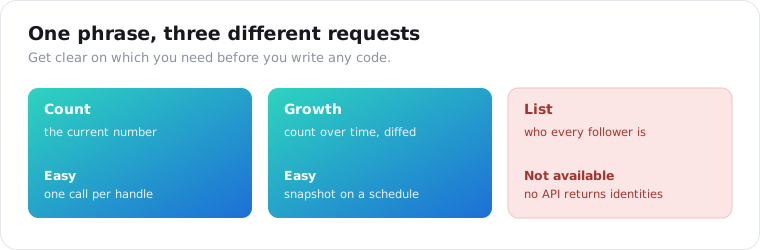
These are three different requests, and conflating them is why most follower projects stall. A count is the current number. Growth is that number sampled over time and diffed. A list is the identities of every follower. The first two are straightforward from a public profile. The third, per keyapi’s 2026 analysis, is “usually no” from any API. Most teams need reporting data, not the raw social graph.
Sit with that distinction before you write a line of code.
When someone says “Instagram followers API,” they usually picture the list: every account that follows a profile, exported to a spreadsheet. That is the one thing that is genuinely hard to get, and chasing it burns weeks.
When you ask what the project actually needs, it is almost always the trend. How fast is this account growing? Did that campaign move the number? Which competitor is pulling ahead? None of those need identities. They need a count, sampled on a clock.
Get clear on which of the three you are after, and the rest of the build falls out of it. Count and growth are a weekend. The list is a wall.
How do you build an Instagram follower tracker with an API?
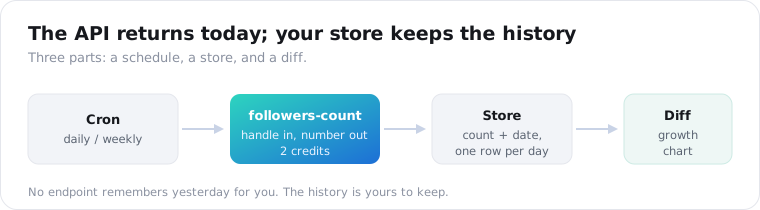
Three moving parts: a scheduled job, a store, and a diff. A cron calls the follower-count endpoint for each handle you track, writes the number and the date to a table, and a query diffs today against yesterday to produce the change. That is the whole tracker. The API supplies the number; your database supplies the history, because no endpoint remembers yesterday for you.
Here is the fetch-and-store half in a few lines of Python.
import requests, datetime, sqlite3
def snapshot(handle, db):    r = requests.get(        "https://api.scrapersocial.com/v1/instagram/followers-count",        params={"handle": handle, "fresh": "true"},        headers={"Authorization": "Bearer sk_live_..."},    )    count = r.json()["data"]["followers"]    db.execute("INSERT INTO snapshots VALUES (?,?,?)",               (handle, datetime.date.today().isoformat(), count))    db.commit()
Run that on a schedule, one row per handle per day, and you have the raw series.
The diff is a query, not another API call. Sort a handle’s rows by date and subtract each from the one before, and you have daily change, which you can roll up into weekly or monthly growth. A follow spike after a campaign shows up as a step in that series.
Keep the raw snapshots, not just the diffs. Storage is cheap, and a full daily series lets you recompute any window later: a seven-day trailing average, month-over-month growth, the change around one launch date. Throw the raw rows away and you are stuck with whatever roll-up you happened to pick on day one. The table is tiny, one integer and a date per account per day, so there is no reason to prune it.
One detail that saves you a confusing afternoon: pass fresh=true on the call. Profile data is cached in hours, not minutes, so a daily monitor without that flag can hand you back the same number twice and flatten your chart.
Can you get the list of who follows or unfollowed an account?
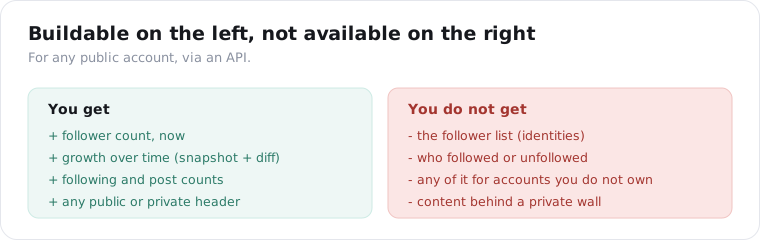
No, and not because of the vendor. Instagram does not expose a public account’s follower list to logged-out visitors, and the official Graph API returns a follower count but no follower identities, even for accounts you own. So “who unfollowed me” apps work only on your own account through your own login, and no API reliably hands you the roster of a competitor’s followers. Plan for the number, not the names.
This is the expectation that breaks most often, so here is the precise version.
The consumer apps that promise to show “who recently unfollowed you” run on your account. You log into them, they read your own follower list through your session, and they diff it. That is a real feature, but it is scoped to you, and it needs your credentials.
Point the same idea at an account you do not own and it falls apart, because the follower list of a stranger’s account was never public to begin with. Instagram shows you the count on a public profile. It does not show you the names, and neither the Graph API nor a public-page reader can conjure what the platform never publishes.
So if your plan depends on the identities of a competitor’s followers, there is no clean API path, and the honest move is to redesign around the count instead.
Can you track a competitor’s follower growth?
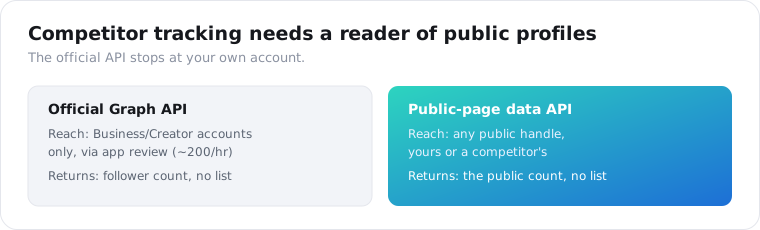
Yes, and it is the strongest reason to reach for an API here. The official route, Business Discovery, reads another account’s public follower count only if it is a Business or Creator profile, only through your own approved Business app, and within roughly 200 calls an hour. A public-page reader drops all three limits: pass any public handle, personal accounts included, and you get its count with no app review, which you snapshot and chart exactly like your own.
This is where a follower tracker earns its keep.
Your own follower count you can read inside the Instagram app. A competitor’s you can technically reach through Business Discovery, but only if they run a Business or Creator account and you have cleared app review, and the official API only ever hands back a current snapshot. As keyapi puts it, to build a historical trend you have to store the counts yourself. A public-page reader gets you to the same number for any public handle without the app-review gate, which is why most teams end up here.
The pattern scales cleanly. Keep a list of handles, your own plus a set of rivals, and run the same snapshot job across all of them. Now a weekly report shows not just whether you grew, but whether you grew faster than the field, which is the number that actually settles arguments in a marketing meeting.
Plenty of teams wire this straight into a spreadsheet: a scheduled job appends each account’s daily count to a Google Sheet, and a chart on top of it does the rest. The API is the only part you cannot build yourself.
Put numbers on the cost, because at scale it decides the design. Tracking one account daily is 2 credits a day, about 60 a month, which barely registers. Tracking a competitive set of fifty accounts daily is 100 credits a day, roughly 3,000 a month, still comfortably inside the entry plan. The per-check price stays low precisely because a follower count is a cheap read, so a broad watchlist is affordable in a way that pulling everyone’s posts every day would never be.
Here is how the routes to a follower number compare.
| Method | Reach | Gives you | Best for |
|---|---|---|---|
| Official Graph API | Your own account | Count only, no list | Your own analytics |
| Consumer tracker app | Your own account (login) | Count + “unfollowers” | Checking your own account by hand |
| Data API | Any public handle | Count, snapshot for growth | Building a tracker or dashboard |
| DIY scraper | Any public handle | Count, you maintain it | One-off scripts |
How accurate is the follower count, and how often should you sample?
Accurate enough for trends, not for contracts. Instagram rounds the public follower count once an account passes roughly 10,000 and updates it on its own schedule, not in real time. For a large account, daily sampling shows noise the rounding invented, so weekly sampling gives a cleaner growth line. For smaller accounts the raw number is exact enough to chart daily.
The rounding is the part that trips people up.
Above ten thousand, Instagram shows “10.2K,” not “10,214,” to logged-out visitors. So a big account that gained forty followers overnight can show no change at all, and then jump by a hundred when the rounding tips over. Chart that daily and you get a staircase that looks like the account grows in bursts, when really your sampling is just colliding with the rounding.
Weekly sampling smooths that out. The account still rounds, but a week’s growth is usually large enough to clear the rounding step, so the line reflects real movement instead of display artifacts.
There is a second reason to prefer scheduled sampling over ad-hoc checks. Because the number updates on Instagram’s clock, two calls minutes apart return the same value, and the cache reflects that by holding profile data for hours. Sampling on a fixed daily or weekly cadence, with fresh=true, gives you one clean, comparable point per period instead of a scatter of near-duplicate reads that spend credits and tell you nothing new.
Match your cadence to the account size and the decision. A creator with 3,000 followers can be tracked daily and precisely. A brand with two million should be tracked weekly, and you should quote the number as “about 2.0M,” the way Instagram itself does, rather than pretending to a precision the platform does not publish.
Is it legal, and what about private accounts?
Follower counts are public numbers Instagram prints on every profile, and reading them logged out is low-risk, but this is not legal advice. A private account still returns its header and counts, just nothing behind the wall. The catch is bios: people put emails and phone numbers in them, and that is personal data under GDPR and CCPA the moment you store it, so keep only what you need.
The public-versus-private line is clean here.
Instagram publishes the header of every account, private or not, to anyone. So a private account comes back with its handle, name, bio, avatar, and the three counters, and an is_private flag set to true. You can track its follower count over time exactly like a public one. What you never get is anything past the header, and no endpoint changes that.
The compliance work is small but real. A follower count is not personal data. A bio that reads “reach me at name@email.com” very much is. If you are storing profile records at scale, strip the fields you do not need, keep a retention window, and honor deletion. Public does not mean consequence-free, and treating other people’s contact details with care is the cheapest insurance you will ever buy.
One more practical note on private accounts. Because a private profile still reports its counters, you can legitimately chart the follower growth of a private account you are, say, negotiating a sponsorship with, without ever seeing a single post. The header is public. The content is not. That is a narrow but genuinely useful capability, and it stays clean precisely because it reads only what Instagram already shows everyone who visits.
Start tracking one account
Pick one public handle, your own or a rival’s. Send it to the followers-count endpoint, store the number with today’s date, and run it again tomorrow. That two-row table is a follower tracker, and everything else is charting on top of it. Get a key from the quickstart, check the 2-credit cost on the pricing page, and let 25 free credits cover twelve days of daily snapshots before you pay anything. For the fuller profile picture, channel-stats adds following and post counts in the same call.
Frequently asked questions
Can you track Instagram followers with an API?
Yes, if you mean the count. A follower-count endpoint takes a public handle and returns the current number, and by storing that number with a timestamp on a schedule you build follower growth over time. On ScraperSocial that is a GET to /v1/instagram/followers-count at 2 credits, or channel-stats at 1 credit if you also want the following and post counts. Both read the public profile logged out, so any public account works.
Can I get a list of who follows or unfollowed an Instagram account?
No, and not because of the vendor. Instagram does not expose a public account’s follower list to logged-out visitors, and the official Graph API returns a follower count but no follower identities, even for accounts you own. So “who unfollowed me” apps only work on your own account through your own login, and no API reliably hands you the roster of a competitor’s followers. Plan for the number, not the names.
How do I track a competitor’s Instagram follower growth?
Snapshot their public follower count on a schedule and diff it. Instagram’s Graph API only reports on accounts you own, so competitor follower data is impossible through official channels, but a public-profile reader has no such limit. Pass any public handle to a follower-count API, store the number daily or weekly, and chart the series. Benchmarking a set of rivals is the same loop run over more handles.
Can the official Instagram API get followers?
Only the count, never the identities. For your own Business or Creator account you read the followers_count field directly; for another account you can use Business Discovery, but only if it is also a Business or Creator profile and you have an approved Business app, capped near 200 calls an hour. Neither path returns a follower list, and neither reaches personal accounts the way a public-page reader does.
How accurate is the Instagram follower count from an API?
Accurate enough for trends, not for contracts. Instagram rounds the public follower count once an account passes roughly 10,000 and updates it on its own schedule rather than in real time. For a large account, daily sampling shows noise the rounding invented, so weekly sampling gives a cleaner growth line. For smaller accounts the raw number is exact enough to chart daily. Use the owner’s own analytics for anything a payment depends on.
Can you track private Instagram accounts?
Only their header. A private account still returns its handle, display name, bio, avatar, and the three counters, with is_private set to true, because Instagram publishes that header to logged-out visitors. Nothing behind the wall is available: no posts, no reels, and no follower identities, and no endpoint on any API reaches them. You can chart a private account’s follower count over time, but that is all.