By Nikhil Kumar. Last updated October 2026.
Keepa and CamelCamelCamel already track Amazon prices. So why build your own?
Because the moment you want custom alert logic, your own price history, or tracking wired into your app, the ready-made tools stop fitting. To build an Amazon price tracker, you poll a product API for the current price on a schedule, store each snapshot in your own database, and fire an alert when the price drops. The API gives you the live number; the history and the rules are yours.

Why build your own Amazon price tracker?
Because the off-the-shelf tools own your data and your logic. CamelCamelCamel is free and tracks about 6 million products, and Keepa holds price history for roughly 2 billion products across 11 marketplaces. Both are great for checking one product. Neither lets you wire price drops into your own app, set rules they don’t support, or keep the raw numbers in your own database.
Think about what you actually want to do. Alert a Slack channel when a competitor drops under your price. Re-run your margin math the instant a supplier cost shifts. Feed price history into a model.
None of that is a feature you toggle in a browser extension. It is code, and code needs an API that hands you the current price cleanly.
The people who build their own tend to fall into a few camps. FBA and marketplace sellers tracking competitors to feed a repricer. Deal-site and affiliate operators who want drop alerts across thousands of products on their own schedule. Procurement and finance teams watching supplier list prices. All of them need the raw number in their own system, not a chart on someone else’s site.
That is the whole reason to build your own. You trade a bit of setup for data you own and logic nobody else limits.
How do I build an Amazon price tracker?
Poll a product API on a schedule, store every price with a timestamp, and compare each new pull to the last one. When the price falls below your target or the previous value, send an alert. The API returns one current snapshot per call; the history table, the thresholds, and the notifications are code you write and own.
Here is the core loop in Python. Get a key from the quickstart, which comes with 25 free credits and no card.
import requests, sqlite3, time
API_KEY = "sk_live_..."ASIN = "B08N5WRWNW"URL = f"https://www.amazon.com/dp/{ASIN}"
def current_price():    r = requests.get(        "https://api.scrapersocial.com/v1/amazon/product",        params={"url": URL},        headers={"Authorization": f"Bearer {API_KEY}"},        timeout=180,    )    r.raise_for_status()    d = r.json()["data"][0]    return d["price"], d["currency"], d["in_stock"]
price, currency, in_stock = current_price()print(price, currency, in_stock)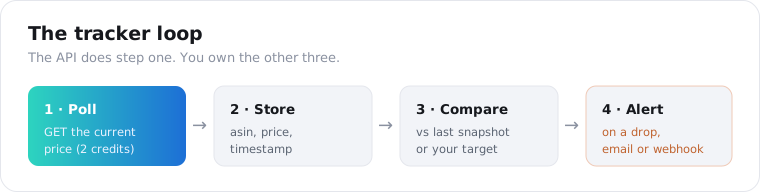
The job splits into four steps: pull the price, store it, compare it, alert on a drop. The API does the pull. You handle the store, compare, and alert, which is where your actual product lives anyway.
Storing is a two-column insert: ASIN, price, timestamp. Comparing is one query for the last row. Alerting is an email or a webhook. For the HTTP patterns like retries and concurrency, the Apify alternatives guide covers the same request shape.
You could skip the API and scrape the product page yourself with requests and BeautifulSoup. People do, and the tutorials are everywhere. The problem shows up in production: Amazon blocks datacenter IP ranges, serves a CAPTCHA or a stripped-down page to bots, and changes its HTML often enough that your price selector breaks every few weeks. A product API absorbs the proxies, the retries, and the parsing, so the price field is always in the same place. That is the part you are paying 2 credits to not maintain.
Is there an API that just gives me the Amazon price?
Yes. Send an Amazon product URL to the product endpoint and it returns the current price, the list price, the currency, and the stock status as plain JSON. One call is 2 credits, roughly 1 cent, and the input is the /dp/ASIN URL. No Amazon developer account and no affiliate tag required.
The /v1/amazon/product endpoint takes a URL and gives back one product record. The fields that matter for tracking are price, list_price, currency, and in_stock.
{ "data": [ { "asin": "B08N5WRWNW", "title": "Echo Dot (4th Gen)", "brand": "Amazon", "price": 34.99, "list_price": 49.99, "currency": "USD", "in_stock": true, "availability": "In Stock", "rating": 4.7, "reviews_count": 318402 } ]}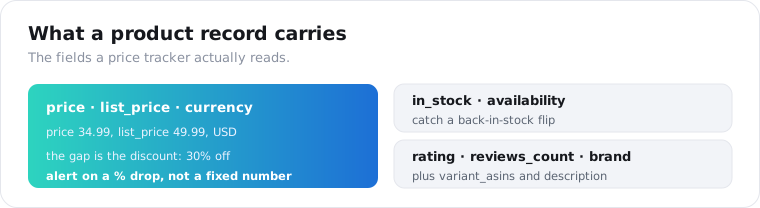
list_price is the field people forget. The gap between price and list_price is the discount, so you can alert on “20% off or more” without hardcoding a dollar figure. in_stock catches the other event worth knowing: an out-of-stock item coming back.
The record carries more if you want it: rating, reviews_count, brand, variant_asins for other sizes and colors, and description. You start the tracker from a URL, but you can also find products first with /v1/amazon/product-search by keyword.
Why can’t I use Amazon’s official Product Advertising API?
Because PA-API is locked behind the affiliate program. Amazon’s Product Advertising API requires an active Associates account, and your request rate is tied to the sales your referral links drive: it starts at 1 request per second and climbs by 1 per second for every $4,600 of shipped revenue in a trailing 30-day window, capped at 10. No sales, almost no API.
It gets stricter. Amazon has tightened eligibility so you need qualifying sales just to keep the keys. Reporting through 2026 puts it at roughly three sales to qualify and about ten in a trailing 30-day window to stay active, as the developer guide at DEV Community lays out.
So the official API is built for affiliates promoting products, not for someone building a tracker. If you are not already driving Amazon sales, you cannot get in, and if your sales dip, you get kicked out.
A third-party product API skips all of that. No affiliate tag, no sales floor, no revenue-gated rate limit. You send a URL and get the price.
How much does an Amazon price tracker API cost?
Less to start than the dedicated price-history services. A flat-credit product API charges 2 credits per pull at $0.005 a credit, about 1 cent, and gives you 25 free credits at signup. Keepa, the main price-history API, runs €49 to €11,099 a month on a token system and has no free tier, per RevenueGeeks’ 2026 breakdown.
Here is the honest trade-off. Keepa’s price is high because it hands you years of stored history for roughly 2 billion products in a single call. A snapshot API gives you today’s price; you build the history by polling and saving.
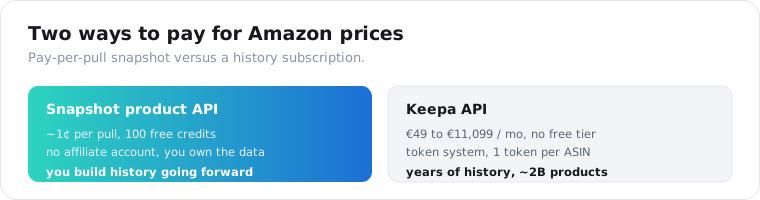
So the math depends on what you need. If you want the full past history of a product right now, Keepa is worth the subscription and a snapshot API cannot match it. If you are tracking prices going forward from today, polling a cheap endpoint and storing the results costs cents and the history grows itself.
For 100 products checked once a day, that is 200 credits a day, about $1, or roughly $30 a month that you fully control. The 25 free signup credits are about 12 pulls, enough to wire the loop before you pay anything.
How do I track price drops and get alerts?
Store each pull, then compare the newest price against the last stored one and against your target. Fire an alert when either test passes. Because the endpoint returns list_price alongside price, you can also alert on percentage discount, not just an absolute number.
The comparison logic is short.
def check(asin, new_price, list_price, target): discount = (list_price - new_price) / list_price if list_price else 0 last = last_stored_price(asin) # your DB lookup store(asin, new_price) # your DB insert if new_price <= target or discount >= 0.20 or (last and new_price < last): send_alert(asin, new_price, discount)Three triggers cover most cases: under a target price, a discount past a threshold, or any drop from the last check. Pick the ones your use case needs.
Watch the stock flips too. An item going from out of stock to in_stock: true is often a better alert than a price change, especially for hard-to-get products. That signal is already in the response.
One habit that saves money: only store a row when the price actually changed. If the price is the same as the last snapshot, you still paid for the pull, but you do not need a duplicate history row cluttering your deltas.
Debounce your alerts too, or you will annoy yourself. A product that flickers a few cents up and down should not email you ten times a day. A simple rule works: only alert when the move clears a threshold, like a dollar or a few percent, and never send a second alert for the same price within a day. Store the last-alerted price next to the last-seen price and compare against both.
For delivery, a webhook beats email once you have more than a handful of products. Post the ASIN, the old and new price, and the discount to a Slack or Discord endpoint, and you get a scannable feed instead of an inbox full of one-line messages.
How do I track many products at once?
Send the product calls concurrently and keep a list of ASINs, not URLs, as your source of truth. There is no batch parameter, so a thread pool is the pattern, and each pull is billed independently. Build the URL from each ASIN on the way into the call.
from concurrent.futures import ThreadPoolExecutor
def pull(asin):    url = f"https://www.amazon.com/dp/{asin}"    r = requests.get("https://api.scrapersocial.com/v1/amazon/product",                     params={"url": url}, headers=H, timeout=180)    return r.json()["data"][0] if r.ok else None
with ThreadPoolExecutor(max_workers=8) as pool:    rows = [r for r in pool.map(pull, asins) if r]
Size the pool to stay inside your plan’s requests-per-minute ceiling, and wrap each call in a short retry for the odd failure. Eight workers clears a daily run over a few hundred products comfortably, and a higher tier lets you push it. Rate limits count requests, not credits, so running wider only makes the batch finish sooner, it does not change the bill.
If you do not have ASINs yet, start with /v1/amazon/product-search, which takes a keyword query and returns a page of products with the same fields. Pull the ASINs out of that once, then track them by ASIN from there.
You do not need a server running all day for this. A scheduled job is enough: a cron entry on a small box, a GitHub Actions workflow on a schedule, or a serverless function on a timer. The job wakes up, pulls your list of ASINs, writes the changed rows, sends any alerts, and exits. For a few hundred products once a day, that is a job that runs for under a minute and costs a few dollars a day in credits.
Keep the cadence matched to the goal. Amazon reprices algorithmically and often, which the research on Amazon marketplace pricing by Chen and colleagues documented in detail, so competitive sellers poll hourly. A personal deal watch is fine once or twice a day.
Is it legal to scrape Amazon prices?
Reading public product prices is common, and the risk here is contractual rather than criminal. The hiQ Labs v. LinkedIn rulings found that collecting data from a page open to the public does not trip computer-fraud law. Amazon’s user terms do restrict automated access, though, so what you are exposed to is Amazon’s contract, not a statute.
Here is how I treat it. Prices and titles on a public product page are facts, visible to anyone. Pulling them is low-risk in practice.
What raises risk is volume and intent. Hammering the site, pulling behind a login, or reselling a bulk dataset is a different thing from checking prices on products you care about.
So keep your request rate modest, take only the public listing fields, and loop in a lawyer before you put a commercial product on top of it. Using an API to do the fetching does not move Amazon’s terms onto the vendor; the responsibility stays with you.
Price tracker API or Keepa: which should you use?
Use Keepa when you need deep historical data right now; use a snapshot API when you are tracking forward and want to own the pipeline. Keepa’s strength is 2 billion products of stored history in one call. A product API’s strength is cheap, affiliate-free current pulls you store yourself, with no monthly floor.
| Snapshot product API | Keepa API | |
|---|---|---|
| Past price history | No, you build it going forward | Yes, years, 2B products |
| Entry cost | ~1 cent/pull, 25 free credits | €49–€11,099/mo, no free tier |
| Affiliate account needed | No | No |
| Own the raw data | Yes, in your database | Via their API only |
| Best for | Custom trackers, repricing, apps | Historical research, deal analysis |
If your project is “watch these products from now on and do something custom when prices move,” the snapshot route is cheaper and more flexible. If it is “show me what this product cost last Black Friday,” pay Keepa.
Build the loop with one product first
Grab one ASIN you actually care about, build the product URL, and run it through the product endpoint with your first key. Store three days of daily pulls and you will see the shape of your tracker before you spend a cent past the 25 free credits. For the same build on local-business data instead of products, see the Google Maps API guide.
Frequently asked questions
How do I build an Amazon price tracker?
Call a product API with an Amazon URL on a schedule, store each price with a timestamp in your own database, and compare every new pull to the last one. When the price drops below your target or the previous value, fire an alert. The API returns the current price snapshot; the history, the thresholds, and the alerts are code you own.
Is there an API that just gives me the current Amazon price?
Yes. Send an Amazon product URL to a product endpoint and it returns the current price, the list price, the currency, and whether the item is in stock, as JSON. One call is 2 credits, about 1 cent. You do not need an Amazon developer account or an affiliate tag, and the input is just the /dp/ASIN product URL.
Why can’t I use Amazon’s official Product Advertising API?
Because PA-API is gated behind the Amazon Associates affiliate program. You need qualifying sales to get and keep access, and your request rate scales with the revenue your referral links generate, starting at one request per second. A price tracker you are just building has no sales yet, so you cannot get in.
How much does an Amazon price tracker API cost?
On a flat-credit API, one product pull is 2 credits at $0.005 each, so about 1 cent, and signup includes 25 free credits. Keepa’s API, the main price-history service, runs €49 to €11,099 a month on a token system with no free tier. The trade-off is that Keepa stores years of history and a snapshot API does not.
Is it legal to scrape Amazon prices?
Reading public product prices is widely practiced, and US courts have generally treated scraping publicly accessible data as legal. Amazon’s own terms restrict automated access, so the risk is contractual, not criminal. Pull only public listing data, keep request volume reasonable, and get legal advice before you build a commercial product on it.
How often should I check an Amazon product’s price?
Match the cadence to why you are tracking. For a personal deal alert, once or twice a day is plenty. For competitive repricing, hourly is common because Amazon’s algorithmic pricing moves products often. Polling every few minutes mostly wastes credits, since you pay per pull and most products do not change that fast.
Can I get the price history of an Amazon product from an API?
Not from a snapshot API, which returns the current price only. You build history forward by polling and storing each result. If you need past history that already exists, Keepa’s API holds years of it for about 2 billion products, which is the one thing a snapshot endpoint cannot give you after the fact.
Start tracking today
Pick one product, pull its price through the Amazon product API, and write the first row to a table. Do that on a daily cron and you have a working price tracker by the end of the week, built on data you own and logic no extension can limit. The 25 free credits are enough to prove the loop before you pay.