By Nikhil Kumar. Last updated October 2026.
You want business data out of Google Maps. Google would really rather you didn’t take it.
The Google Maps API you reach for depends on what you’re doing. The official Places API is built to show a map on your site, and its terms forbid storing the data. A third-party Google Maps API reads the same public listings and lets you keep them, which is what you need for lead lists, review monitoring, or market research. This post covers the second kind, with real fields and honest pricing.
Why is the official Google Maps API the wrong tool for most data jobs?
The official Places API is a display API, not a data API. Its policies state you “must not pre-fetch, cache, or store Places API content,” with only the place_id exempt from that rule. You request names, ratings, and reviews live, show them on a Google map with attribution, and throw them away. Keeping a local database of businesses breaks the terms.
That rule exists for a reason. Google’s whole business is being the place you go to look things up. An API that let you copy the map into your own product would undercut that.
There is one narrow exception worth knowing. You can cache a place’s coordinates for up to 30 days, and you can keep the place_id forever as a pointer to re-fetch. Everything else, the name, rating, reviews, and photos, has to be requested fresh and shown on a Google map with Google’s attribution. A plain table of businesses in your own app, with no map and no logo, is not a permitted use.
So if your goal is a lead list, a reviews dashboard, or a dataset you analyze over time, the official API is the wrong fit before you even look at the price.
And the price got worse. On March 1, 2025, Google scrapped the flat $200 monthly credit that used to cover mixed Maps usage and replaced it with per-SKU free caps: 10,000 calls for Essentials, 5,000 for Pro, 1,000 for Enterprise. Free usage stopped pooling across APIs, so a typical app that calls Places, Geocoding, and Maps now drains three small caps instead of one shared pot.
How do I get Google Maps data with an API?
Send one GET request to the search endpoint with a query like “coffee shops in Denver” and your key. You get back a list of places, each with the name, category, star rating, review count, address, phone, and website as plain JSON. Get a key from the quickstart, which comes with 25 free credits and no card, then it is a few lines of Python.
import requests
API_KEY = "sk_live_..."
resp = requests.get(    "https://api.scrapersocial.com/v1/google_maps/search",    params={"query": "coffee shops in Denver", "limit": 20},    headers={"Authorization": f"Bearer {API_KEY}"},    timeout=180,)resp.raise_for_status()
for place in resp.json()["data"]:    print(place["name"], place["rating"], place["phone"])
The query takes a search term and a location in one string, split on the word “in”. So “plumbers in Austin, TX” searches plumbers around Austin. There is no Google Cloud project to set up and no billing account to attach.
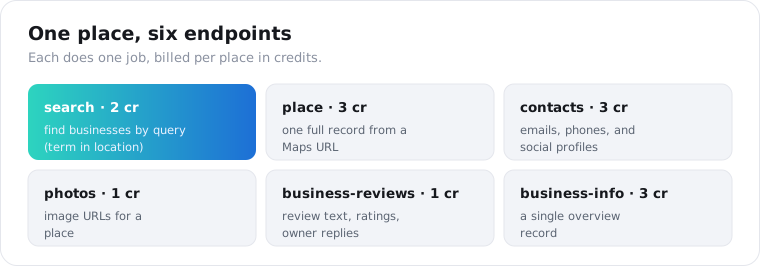
There are six endpoints, and they split by job. /v1/google_maps/search finds businesses by query (2 credits each). /v1/google_maps/place returns one full record from a Maps URL (3 credits). /v1/google_maps/contacts adds emails and social links (3 credits). /v1/google_maps/photos returns image URLs (1 credit). /v1/google/business-reviews pulls review text (1 credit). /v1/google/business-info returns a single overview record (3 credits).
Is it legal to scrape Google Maps data?
Scraping public Google Maps listings sits in a contested but widely practiced gray area, and you should go in clear-eyed. The official Places API flatly forbids it in its terms. Separately, courts have generally treated scraping public data as legal in the US, but Google is pushing back: it filed a DMCA suit against the scraping provider SerpApi in December 2025, with a hearing set for 2026.
Here is how I’d think about it. The data on a Maps listing is public, the same facts any visitor sees. Reading it is different from hacking it.
US courts have leaned that way too. In the long-running hiQ Labs v. LinkedIn case, the Ninth Circuit repeatedly held that scraping publicly accessible data does not violate the Computer Fraud and Abuse Act, since there is no computer you were “unauthorized” to access when the page is open to everyone. That is not a blanket green light, and it says nothing about contract terms, but it is why public-data scraping is so widely practiced.
What matters is what you pull and what you do with it. Public listing facts like name, address, phone, rating, and published reviews are low-risk. Scraping behind a login, ignoring rate limits, or hammering a service is not.
My rule: pull only public listing data, keep request volume reasonable, respect a site’s robots file, and never collect personal data you can’t justify. For anything regulated, like how you then contact those leads under GDPR or CAN-SPAM, talk to a lawyer. An API endpoint is not legal cover.
How much does the Google Maps API cost?
It depends on whether you need to keep the data. Google’s official Places API pricing bills per request: Text Search is $32 to $40 per 1,000 requests, each returning up to 20 places, and Place Details runs $5 to $25 per 1,000 places. This API charges 2 credits per place from search and 3 for a full record, about 1 to 1.5 cents each, with no limit on storing it.
Where the two meet head to head is the full record. Google’s Place Details is $17 per 1,000 places at Pro, $20 at Enterprise and $25 with reviews and other Atmosphere fields. A full detail record here is 3 credits, $15 per 1,000, so a 500-place lead list with phone, website and rating on every row is 1,500 credits, or $7.50.
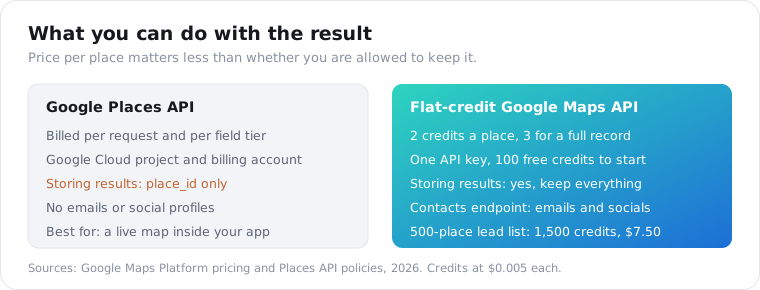
The bigger saving is that you can store the result. Google makes you re-fetch every time because you can’t cache. Here, you pull a place once, write it to your database, and serve it from there forever. For a dataset that does not change hourly, that is the whole ballgame.
Setup is lighter as well. There is no Cloud project or billing account to open, the 25 signup credits pull 12 places, and $5 a month buys 1,000 credits, which is 500 places from search with phone and website on each.
You also skip the scraper side of the job. There is no actor to configure, no proxy pool, no retry logic and no output parser, and a call that fails is never billed.
For a national-scale place dump, run the numbers on a self-run scraper too: the use-apify benchmark puts Apify’s Google Maps actors around $2.10 per 1,000 places at their Business tier, with the runs, proxies, retries and parsing left to you.
How do I get business emails and phone numbers from Google Maps?
Use the contacts endpoint. It runs a Maps search, then visits each business’s own website to pull emails, extra phone numbers, and social profiles. It costs 3 credits per place because of that second website fetch, and it is the endpoint built for lead generation.
resp = requests.get( "https://api.scrapersocial.com/v1/google_maps/contacts", params={"query": "dentists in Austin, TX", "limit": 10}, headers={"Authorization": f"Bearer {API_KEY}"}, timeout=300,)for biz in resp.json()["data"]: print(biz["name"], biz["emails"], biz["socials"]["instagram"])Each record carries the full place data plus an emails array, a phones array, and a socials object with Instagram, Facebook, LinkedIn, Twitter, and YouTube links where the website lists them.
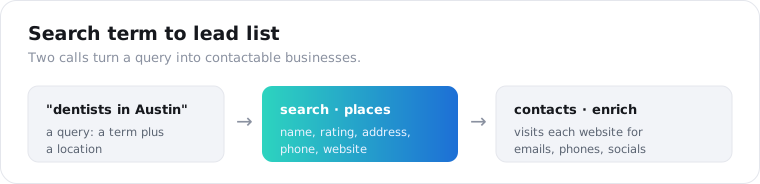
A reality check on coverage. Emails come from the business website, so a place with no site, or a site that hides its address behind a form, returns an empty emails array. Phone numbers are far more reliable because they sit on the listing itself. Treat email as a bonus, not a guarantee.
Two habits make the output usable as a real lead list. First, dedupe on place_id, not on name, because the same chain shows up once per location and you want each branch kept, not merged. Second, filter before you enrich: run the cheap 2-credit search first, drop the places with no website, and only send the survivors to the 3-credit contacts endpoint. Paying the website-fetch premium on places that have no site to fetch is the fastest way to waste credits here.
How do I pull Google reviews for a business?
Send the business’s Maps URL to the reviews endpoint with a limit. It returns review records sorted newest-first, each with the star rating, the text, the author name, the post date, the like count, and the owner’s reply when there is one. Reviews pull from multiple sources, not Google alone, so you see more than the listing’s own tab shows.
resp = requests.get( "https://api.scrapersocial.com/v1/google/business-reviews", params={"url": "https://maps.google.com/?cid=1234567890", "limit": 50}, headers={"Authorization": f"Bearer {API_KEY}"}, timeout=180,)for r in resp.json()["data"]: print(r["rating"], r["author"], r["text"][:80])The owner_response field is the one people overlook. If you are building a reputation tool, whether a business actually replies to reviews is a strong signal, and it comes back on every record that has one.
Reviews are 1 credit each, so pulling 50 reviews for one place is 50 credits, about 25 cents. The rating_breakdown on the place record gives you the one-to-five-star histogram separately if you only need the shape, not the text.
Two signals in that data do most of the work. The ratio of owner responses to total reviews tells you how engaged a business is, and a sudden run of one-star reviews with recent posted_at dates is an early warning the listing’s average score will not show for weeks. Pull newest-first, store the id of the last review you saw, and on the next run you only process what is new.
What fields does a Google Maps place return?
Every place record carries the same shape whether it came from search or a direct lookup. Name, category, rating, review count, the full address broken into parts, coordinates, phone, website, and an open-or-closed status.
{ "data": [ { "name": "Little Owl Coffee", "category": "Coffee shop", "rating": 4.6, "reviews_count": 812, "rating_breakdown": { "one": 12, "two": 8, "three": 30, "four": 150, "five": 612 }, "address": "1555 Blake St #150, Denver, CO 80202", "location": { "lat": 39.7489, "lng": -104.9992 }, "phone": "+1 720-287-4943", "website": "https://littleowlcoffee.com", "status": "open" } ]}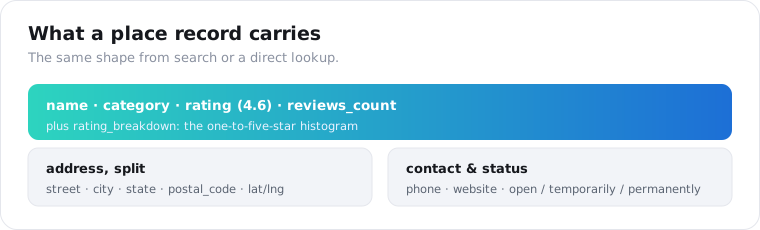
The address comes split into street, city, state, postal_code, and country_code, so you do not have to parse one string. status folds Google’s two close flags into one value: open, temporarily_closed, or permanently_closed. The place lookup adds a description, price level, and menu URL on top.
How many results can I get, and how do I search by city or radius?
Set the limit and phrase the query as “term in location”. The search endpoint defaults to 20 places and you raise it with limit. Google itself serves results in pages of about 20 and tops out near 120 per query, so for a whole city you run several narrower searches rather than one giant one.
The location half of the query is flexible. “law firms in Chicago”, “law firms in 60601”, and “law firms in River North, Chicago” all work, because the search splits on “in” and passes the location through to Google.
For a dense area, narrow by neighborhood or postal code and loop. One search for “cafes in Brooklyn” caps out fast; eleven searches, one per Brooklyn zip, gets you real coverage.
zips = ["11201", "11205", "11211", "11215", "11217", "11222"]seen = {}for z in zips: r = requests.get(f"{BASE}/google_maps/search", params={"query": f"cafes in {z}", "limit": 60}, headers=H, timeout=180) for p in r.json()["data"]: seen[p["id"]] = p # dedupe across overlapping zipsprint(len(seen), "unique cafes")The seen dict keyed on place id handles the overlap, since searches on adjacent zips return some of the same places near a border. This grid approach is how the scraping tools that advertise “every business in a city” actually do it under the hood.
Each place is billed as it comes back, so a search that returns 18 results costs 36 credits, not a flat rate for the call. A search that finds nothing is free, up to 25 empty results a day per account.
Google Maps API or scraper: which should you use?
Use the official API when you are drawing a live map in a product and showing current data with Google’s attribution. Use a scraping API when you need to keep the data: lead lists, review tracking, competitor research, or any dataset you analyze later. The split is about ownership, not features.
| Official Places API | Scraping API | |
|---|---|---|
| Store the data | No, place_id only | Yes, keep everything |
| Setup | Google Cloud project + billing | One API key |
| How you pay | Per request and field tier: $32 to $40 per 1,000 searches, $5 to $25 per 1,000 Place Details | Flat 2 credits per place from search, 3 per full record |
| Best for | Live maps in your app | Lead gen, review tracking, research |
| Attribution required | Yes, on a Google map | No |
If you ever do need a live map widget, the official API is the right call and nothing here replaces it. For everything that ends in a spreadsheet or a database, the scraping route is the one that lets you keep the data.
Pull your first 12 places free
Pick a search you actually care about, like “your service in your city”, and run it through the search endpoint with your first key. The 25 free credits cover 12 places, enough to see the real fields before you commit. For how this compares to running the raw Apify actor yourself, see the Apify alternatives guide.
Frequently asked questions
How do I get business data from Google Maps with an API?
Send a GET request to a Google Maps API with a search query like “coffee shops in Denver” and your key, and it returns a list of places with name, rating, address, phone, and website as JSON. No Google Cloud project, no billing account, and no per-SKU setup. Add the contacts endpoint for emails and the reviews endpoint for review text.
Is it legal to scrape Google Maps data?
Scraping public business listings sits in a contested but widely practiced area, and the official Google Places API forbids it: its policies ban pre-fetching, caching, or storing content, with only the place_id exempt. Third-party APIs read the same public data and let you keep it. Pull only public listing facts, respect robots and rate limits, and get legal advice for anything regulated.
How much does the Google Maps API cost?
Google bills its Places API per request and per field tier: Text Search is $32 to $40 per 1,000 requests of up to 20 places, and Place Details runs from $5 to $25 per 1,000 places, with reviews at the top tier. This API charges flat credits, 2 per place from search and 3 per full record, about 1 to 1.5 cents, and you can keep what you pull.
How do I get business emails and phone numbers from Google Maps?
Use the contacts endpoint. It runs a Google Maps search, then visits each business website to pull emails, extra phone numbers, and social profiles on Instagram, Facebook, LinkedIn, Twitter, and YouTube. It costs 3 credits per place because of the extra website fetch. Phone numbers also come back on the cheaper search endpoint.
How do I pull Google reviews for a business with an API?
Send the business URL to the reviews endpoint with a limit. It returns review records with the star rating, text, author, post date, like count, and the owner’s response when there is one. Reviews come sorted newest-first and pull from multiple sources, not Google alone, so you see a fuller picture than the listing’s own tab.
Why did the Google Maps API get more expensive in 2025?
On March 1, 2025, Google replaced the flat $200 monthly credit that covered all Maps usage with per-SKU free caps: 10,000 calls for Essentials, 5,000 for Pro, 1,000 for Enterprise. Free usage no longer pools across APIs, so a project calling Places plus Geocoding plus Maps burns through three separate small caps instead of one shared pool.
How many businesses can I pull from one Google Maps search?
Google serves results in pages of about 20 and caps a single query near 120 places, so you cannot pull an entire city in one call. The fix is to narrow by neighborhood or postal code and loop: one search per zip code gives real coverage. Each place is billed as it returns, so you only pay for what you get.
Start with one search
Run one real search through the Google Maps API today, like your own trade and town. The 25 free credits pull 12 places, enough to check the fields and the email coverage before you build a lead pipeline on top of it.