By Nikhil Kumar. Last updated October 2026.
YouTube already knows what was said in the video. Getting it out of YouTube and into your code is the hard part.
To get a YouTube transcript with an API, send a GET request to a transcript endpoint with the video URL and your API key. It reads the caption track YouTube already publishes and hands you back the full text, the language, and timestamped segments in one small JSON object. No OAuth, no YouTube developer project, and it works on videos you do not own.
Why is getting a YouTube transcript harder than it should be?
The words are right there. Open almost any video, click the three dots, and choose Show transcript, and YouTube shows you the whole caption track with timestamps. So the data exists and it is public. The problem starts the moment you want it for more than one video, or inside a program instead of a browser tab.
There is no copy-all button that scales. The built-in panel is a reading feature, not a pipeline. It shows one video, it has no stable markup to target, and selecting the text by hand across a thousand videos is not a plan. And the two obvious automated routes both have a wall you hit fast.
The first is Google’s own YouTube Data API. The second is the popular free Python library. I will cover why each one stops you, and then the path that does not.
“youtube transcript” pulls about 110,000 US searches a month, with “youtube transcript api” adding roughly 880 more, according to DataforSEO keyword data pulled in September 2026. The volume is there because the job looks trivial and turns out not to be.
How do I get a YouTube transcript with an API?
Send one GET request to the transcript endpoint with the video URL and your key. The response is a small JSON object: the transcript as one text string, the detected language, and a segments array of timestamped cues. Get a key from the quickstart, which comes with 25 free credits and no card, then it is about six lines of Python.
import requests
API_KEY = "sk_live_..."VIDEO_URL = "https://www.youtube.com/watch?v=dQw4w9WgXcQ"
resp = requests.get(    "https://api.scrapersocial.com/v1/youtube/transcript",    params={"url": VIDEO_URL},    headers={"Authorization": f"Bearer {API_KEY}"},    timeout=120,)resp.raise_for_status()
data = resp.json()["data"]print(data["language"], data["text"][:200])
One URL per call. Any public watch URL works, and you do not need to strip the &list= or &t= junk off a link you copied mid-playlist.
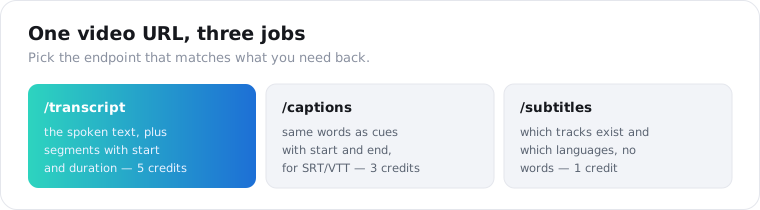
There are three related endpoints, and picking the right one saves you work. /v1/youtube/transcript is the one you want most of the time: it gives you the spoken text plus per-line timings. /v1/youtube/captions returns the same words as cues with an explicit start and end, which is the shape you need to write an SRT or WebVTT file. /v1/youtube/subtitles does not return words at all; it lists which caption tracks a video publishes and which languages they translate into, so you can check before you pull.
For the deeper Python version with retries and batching, the patterns in how to get a TikTok transcript in Python port over directly, since every transcript endpoint takes the same single-URL shape.
Why can’t I just use the official YouTube Data API?
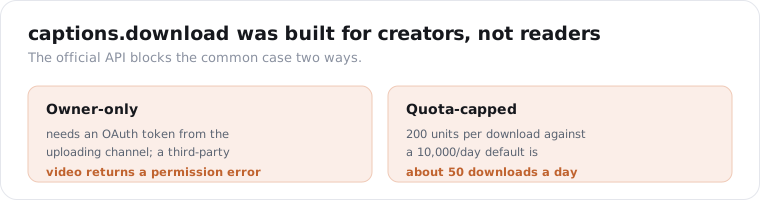
Because its caption download is owner-only. Google’s YouTube Data API v3 exposes a captions.download method, but the official caption guide says the request must be authorized with OAuth 2.0, and in practice that token has to come from the channel that uploaded the video. Call it on someone else’s public video and you get a permission error. It was built for creators managing subtitles on their own uploads, not for reading third-party content.
The quota makes it worse even when you do own the videos. A captions.download call costs 200 units, and every project starts with a default 10,000 units per day. That is about 50 caption downloads a day before you are locked out until the quota resets.
So the official API is the wrong tool for the common case, which is reading transcripts from videos you did not make. A transcript API sidesteps both problems: no OAuth handshake, no per-video ownership check, and the quota is just your credit balance.
Why does youtube-transcript-api stop working when I deploy it?
Because YouTube blocks cloud IP ranges, and your production server lives on one. The free youtube-transcript-api library works perfectly on your laptop, then starts throwing IpBlocked and RequestBlocked the moment it runs on AWS, GCP, Azure, or DigitalOcean. Those providers’ address ranges are easy to identify by ASN, and YouTube throttles them hard because most traffic from them is automated.
This is the single most common production failure in this space, and the library’s own maintainer documents it. The youtube-transcript-api project recommends routing calls through rotating residential proxies to get around the block. That means you are now running a proxy budget, proxy rotation logic, and retry handling around a library that was supposed to be the simple part.
A hosted transcript API absorbs all of that. The proxy pool, the rotation, the retries on a blocked request, the caching so you do not re-fetch, all of it sits on the API’s side. You send a URL and get text back. The library is still a fine choice for a script that runs on your own machine. It is the deploy step where it turns into a maintenance job.
Here is the honest comparison of the three routes, so you can pick by what you are actually building.
| Route | Works on others’ videos | Runs on a cloud server | Setup cost |
|---|---|---|---|
YouTube Data API captions.download | No, owner-only | Yes, but ~50/day at 200 units each | OAuth per channel |
youtube-transcript-api (free) | Yes | Not without residential proxies | Free locally, proxy bill in prod |
| Hosted transcript API | Yes | Yes | One key, one GET request |
The free library wins for a one-off script on your laptop. The hosted API wins the moment the code has to live on a server and keep running.
Can I get a YouTube transcript with timestamps?
Yes, and this is where YouTube behaves better than most platforms. The transcript endpoint returns a segments array where each cue carries a start time and a duration in seconds alongside its text. So you can link straight to the 90-second mark, chunk a long talk into timed sections, or align the transcript with the video on a page.
This is a real difference from some other platforms. A TikTok transcript comes back as flat text with segments null, because its caption track reaches the pipeline with the per-cue timings already stripped. YouTube’s does not; the timings survive. If you have wondered why a video transcript has no timestamps on one platform and full timings on another, that is the reason, and YouTube is on the good side of it.
That distinction is the whole reason people care about timings. Flat text tells you what was said; timed segments tell you where, and every feature that sends a user back into the video depends on the where. Lose the timings and you are left with a block of prose that points nowhere.
If you specifically want subtitle-file output, use the captions endpoint instead. It returns each cue with a start and an end, which is exactly what an SRT or WebVTT writer expects, plus a cue_count so you can sanity-check the length.
What does the response actually look like?
All three endpoints wrap their result the same way: a data object with the payload and a request_id next to it. For a transcript, data carries the text, the language code, and the timestamped segments.
{ "data": { "text": "In this video I'm going to walk through the three settings that actually matter...", "language": "en", "segments": [ { "start": 0.0, "duration": 3.2, "text": "In this video I'm going to walk through" }, { "start": 3.2, "duration": 2.7, "text": "the three settings that actually matter" } ] }, "request_id": "req_01JZX4M8Q2TE9W"}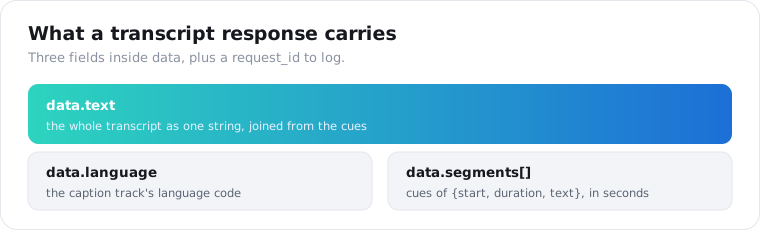
The text field is the whole transcript as one string, joined from the cues. language is the caption track’s language code. segments is the list of cues; each one is { start, duration, text }, with times in seconds. Log the request_id on your side. If a result ever looks wrong, quoting it lets support trace the exact call.
The captions endpoint swaps the segment shape for { start, end, text } cues and adds a cue_count. Same words, different math: the transcript endpoint tells you how long a line lasts, the captions endpoint tells you when it ends.
How do I get transcripts in other languages or as subtitle tracks?
Start with the subtitles endpoint, which is the cheap discovery step. /v1/youtube/subtitles returns the caption tracks a video actually publishes, each with a language, a name, a track url, and an is_translatable flag, plus the list of translations YouTube can auto-generate. It costs 1 credit, so you can check what exists before spending 5 on the wrong language.
tracks = requests.get(    "https://api.scrapersocial.com/v1/youtube/subtitles",    params={"url": VIDEO_URL},    headers={"Authorization": f"Bearer {API_KEY}"},    timeout=120,).json()["data"]
for t in tracks["tracks"]:    print(t["language"], t["name"], t["is_translatable"])
The transcript endpoint defaults to English when a video carries multiple tracks. The subtitles response is how you find out whether the language you want is a real published track or only an on-the-fly translation, which matters because machine translation of an already-machine-generated caption compounds two layers of error.
The is_translatable flag on each track is the useful signal here. A track marked translatable can be turned into other languages by YouTube on request; one that is not is only available as authored. If you need Spanish and the only Spanish on offer is a translation of an auto-generated English track, you are two machine steps removed from what was actually said, and the error rate shows it.
One caveat the response says out loud: the track URLs are short-lived signed links. Fetch them promptly rather than storing them for later.
What is the cheapest way to transcribe a lot of YouTube videos?
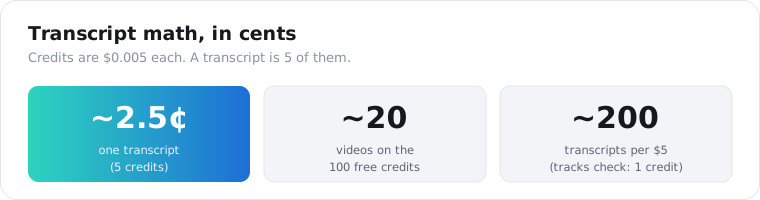
Read captions, do not re-transcribe audio, and never pull the same video twice. A transcript is 5 credits and a credit is $0.005, so one video is about 2.5 cents and $5 of credits covers roughly 200 transcripts. The 25 free signup credits are 5 videos, enough to run a small sample before you decide anything. If you do not need the language guarantee, /v1/youtube/captions returns the same caption text with start and end times for 3 credits, the cheaper of the two.
The bigger savings is architectural. Reading a caption track is cheap and instant. Running speech-to-text on the audio is neither, and for a corpus of hundreds of videos it is slow, costs real money, and adds a second source of error that disagrees with the captions every viewer already sees. Captions first, audio only when there is no caption track, is the rule that keeps a dataset cheap.
This matters most for the people building LLM and retrieval datasets, which is where a lot of the demand now comes from. A 1,000-video corpus is 5,000 credits, or $25, and a video with no caption track returns a 404 that costs nothing, so the bill only counts text you actually received.
Set that against the official route. At 200 units per captions.download and 10,000 units a day, the same 1,000 videos would take 20 days of default quota, and only if your own channel uploaded every one.
If your plan was to download every video and run Whisper over all of it, check how many already have captions first. Most spoken-word content does, and you only pay the expensive path for the videos that truly need it.
Two habits keep the bill down at volume:
- Store the
textafter the first call. If your pipeline loops over the same videos, cache on your side. Paying twice for a string you already have is the easiest waste here. - Send requests concurrently, not one at a time. There is no batch parameter, so a small thread pool is the pattern. Keep the worker count under your plan’s per-minute rate limit and a short retry absorbs the occasional 429.
from concurrent.futures import ThreadPoolExecutor
def get_transcript(url):    r = requests.get("https://api.scrapersocial.com/v1/youtube/transcript",                     params={"url": url}, headers=H, timeout=120)    return r.json()["data"] if r.ok else None
with ThreadPoolExecutor(max_workers=8) as pool:    results = list(pool.map(get_transcript, urls))
For pricing across plans and the exact per-minute limits, the pricing page has the current numbers. Errors are enumerated in the errors reference, and the two worth branching on are 404 not_found for a video with no caption track and 429 rate_limited when you push past your limit.
What should you know about transcript quality?
Auto-generated captions are good, not perfect. They arrive in whatever language was spoken, with no cleanup pass, so expect the usual auto-caption tells: a name guessed wrong, no marker for who is speaking, an acronym written out phonetically, punctuation that wanders. Where a creator has uploaded a human-authored track instead, and the big channels often have, the text reads a lot cleaner.
Even the best models get this wrong some of the time. OpenAI’s Whisper, trained on 680,000 hours of audio, sits around a 5 to 6 percent word error rate on clean English and climbs higher across many of its 99 languages. Pulling YouTube’s own caption track skips the cost and wait of running that yourself, but an auto-caption still carries those same slips.
For search, tagging, summaries, and feeding a model, that is good enough. If the words are going out verbatim under your name, put a human on the edit. And no transcript, whoever produced it, belongs in evidence. Read it as a strong draft of what was said, not a certified record.
Frequently asked questions
How do I get the transcript of a YouTube video?
Send a GET request to a transcript API with the video URL and an API key, and it returns the spoken text as JSON in seconds. The API reads the caption track YouTube already publishes, so there is no download step, no OAuth, and no YouTube developer project required. For a single video you can also open it, click the three dots, and choose Show transcript.
Is there a YouTube transcript API that works without owning the video?
Yes. A third-party transcript API reads the public caption track and returns it for any public video, regardless of who owns it. The official YouTube Data API is the one with the ownership wall: its captions.download method needs an OAuth token from the video’s own channel, so it fails with a permission error on videos you did not upload.
Can I get a YouTube transcript with timestamps?
Yes. The transcript endpoint returns a segments array where each cue carries a start time and a duration alongside its text, so you can jump to any line. The captions endpoint returns the same cues with an explicit start and end instead, which maps directly to SRT or WebVTT subtitle files.
Why does youtube-transcript-api stop working when I deploy it?
Because YouTube blocks requests from cloud provider IP ranges. The free library works on your laptop and then returns IpBlocked or RequestBlocked once it runs on AWS, GCP, Azure, or DigitalOcean, whose address ranges are easy to identify and are routinely throttled. Fixing it yourself means routing every call through rotating residential proxies. A hosted API does that on its side.
How much does a YouTube transcript API cost?
One transcript is 5 credits. Credits are $0.005 each on the monthly plan, so a transcript is about 2.5 cents and $5 covers roughly 200 videos. The available-tracks endpoint is 1 credit. Signup includes 25 free credits with no card, which is 5 transcripts to test with before you pay anything.
What happens when a YouTube video has no captions?
The transcript endpoint returns a 404 not_found rather than a guess, and a failed call costs zero credits. Coverage is wide because YouTube auto-generates captions for most spoken-word video, so the common misses are music videos and clips with no speech. When you need those transcribed, that is the case for a speech-to-text pass on the audio.
Can I get transcripts for a whole channel or playlist?
Yes, but in two steps. First list the channel or playlist videos to collect their URLs, then send each URL to the transcript endpoint concurrently. There is no single call that takes a channel and returns every transcript, so the pattern is enumerate, then transcribe with a thread pool kept under your rate limit.
Start with one video
Grab a single YouTube link and run it through the transcript endpoint with your first key. The 25 free credits are enough to transcribe 5 videos, so you can check the text and the timestamps on your real content before you pay for anything. If you are working across platforms, the TikTok transcript guide covers the same job on short video.