By Nikhil Kumar. Last updated August 2026.
Most TikToks make their point out loud, not in the caption. So when you actually need the words, there is no button for it.
To get a TikTok transcript, paste the video URL into a free transcript tool for a one-off, or send a GET request to a transcript API to do it in bulk. Both read the caption track TikTok already publishes and hand you back plain text in seconds. No TikTok developer account, no login, no download step.
Why do so many people search for a TikTok transcript?
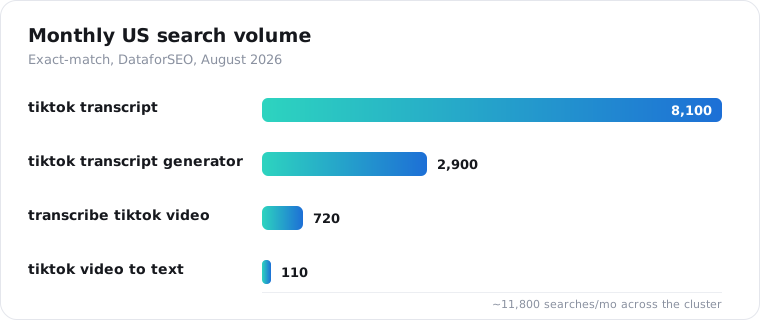
Because the demand is real and mostly unmet. “tiktok transcript” draws about 8,100 searches a month in the US, and “tiktok transcript generator” adds another 2,900, according to DataforSEO keyword data pulled in August 2026. Add the phrase variants and it clears 11,000 monthly searches. Most of the tools that rank for it are vague about how transcription actually works, so people keep looking.
Here is what gets me about this space. People do not want a video downloader or a summariser. They want the exact words, in a format they can paste into a prompt, a spreadsheet, or a search index. That is a narrow, boring, useful job, and it is worth doing well.
What is the fastest way to get a TikTok transcript without code?
Paste the URL into a free TikTok transcript generator. It runs in the browser, gives you the first transcript with no signup, and returns the text in a few seconds. Copy it out and you are done. This is the right path when you have one video, or when you just want to check whether a specific clip has a usable caption track before you build anything.
Try it here: the free TikTok transcript generator takes any public TikTok link, including the short vm.tiktok.com and vt.tiktok.com links the share sheet hands you.
The catch with any free tool is volume. It is rate-limited per visitor, so it is great for a handful of videos and wrong for a thousand. That is where the API comes in.
How do I get a TikTok transcript with an API?
Send one GET request to the transcript endpoint with the video URL and your API key. The response is a small JSON object with the transcript as one string, the detected language, and a source field. Get a key from the quickstart, which gives you 25 trial credits with no card, then it is about six lines of Python.
import requests
API_KEY = "sk_live_..."VIDEO_URL = "https://www.tiktok.com/@tiktok/video/7231338487075638570"
resp = requests.get(    "https://api.scrapersocial.com/v1/tiktok/transcript",    params={"url": VIDEO_URL},    headers={"Authorization": f"Bearer {API_KEY}"},    timeout=120,)resp.raise_for_status()
data = resp.json()["data"]print(data["language"], data["text"])
One URL per call. There is no batch parameter, and you do not need to clean the link first. Share-sheet short links resolve on our side.
If you want the same call in Node, cURL, or a full field walkthrough, the TikTok Transcript API page has the field explorer. For the deeper Python version with retries, see how to get a TikTok transcript in Python.
What does the response actually look like?
Every endpoint returns the same envelope: a data object and a request_id. For a transcript, data holds four fields, and the shape never changes between videos.
{ "data": { "text": "Today I want to show you the three settings everyone ignores...", "segments": null, "language": "en", "source": "upstream" }, "request_id": "req_01JZX4M8Q2TE9W"}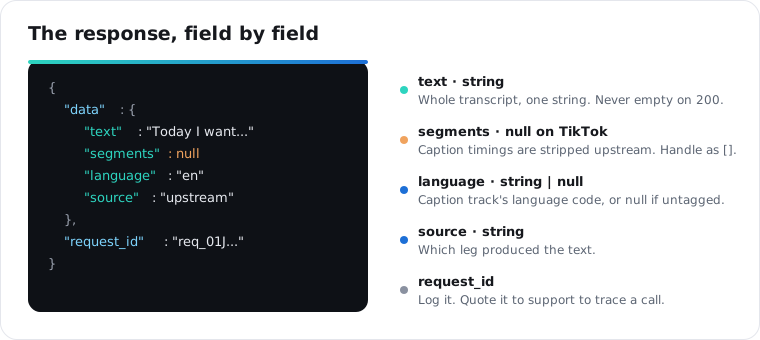
The text field is the whole transcript as one string, punctuation and casing as the caption track had them. It is never empty on a 200. language is the caption track’s language code, or null when the track carries no tag. source tells you which leg produced the text. Log request_id; if a result looks wrong, quoting it lets support trace the exact call.
Why is segments null in my TikTok transcript?
Because TikTok transcripts come from the published caption track, and those tracks reach the pipeline as flat text with the per-cue timings already stripped out. The segments field exists in the schema and is typed as an array of { start, end, text }, but on TikTok it comes back null every time. If your feature needs to jump to the 14-second mark, this endpoint will not get you there today.
Write your code to treat null as an empty list and nothing breaks if that changes later:
segments = data.get("segments") or []There is a longer explanation in why your video transcript has no timestamps. The short version: reading captions is cheap and instant, running speech-to-text on the audio is neither, so the default path reads captions.
What happens when a TikTok video has no transcript?
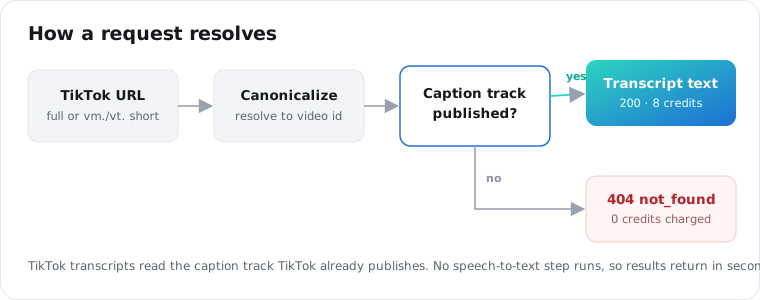
You get a 404 with code not_found, not a blank string and not a guess. Captions-only means captions-or-nothing. If TikTok never generated a caption track for the video, there is nothing to read, and the API tells you so plainly.
Coverage is good in practice, because TikTok has auto-generated captions for spoken-word video since it introduced automatic subtitles in 2021. Music-led and wordless clips are where you should expect misses. The useful part: errors are not charged. Credits come off your balance only when data comes back, so a 404 costs you a request and zero credits.
The codes worth branching on:
404 not_found: no caption track, or the video is private, deleted, or region-locked.422 unprocessable: the URL parsed but the content is not transcribable, like an image post.402 out_of_credits: your balance is too low.429 rate_limited: you are over your plan’s per-minute limit, so back off and retry.
The full list lives in the errors reference.
Is a TikTok transcript API free, and what does it cost?
The free browser tool gives you one transcript with no account. The API is credit-based: a TikTok transcript is 2 credits, and you start with 25 trial credits on signup, which is 12 transcripts to test with. After that, credits cost $0.005 each on the monthly plan and $0.0045 on annual, so one transcript is about one cent and $5 covers roughly 500 videos.
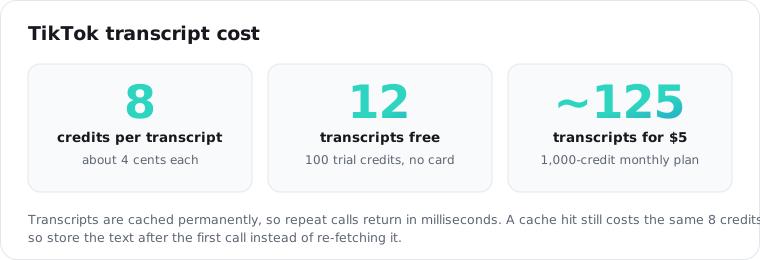
Repeat calls for the same video are the part people get wrong. Transcripts sit in an immutable cache, so once a video is transcribed it is stored permanently and served back in milliseconds. That is faster, but it is not cheaper: a cache hit costs the same 2 credits as a fresh pull. Check the header to see which you got.
print(resp.headers["x-cache"]) # hit | missprint(resp.headers["X-Credits-Remaining"]) # balance after this callSo if you loop over the same videos, store text on your side after the first call. Paying to be handed back a string you already have is the easiest way to waste credits here.
How do I transcribe a lot of TikToks at once?
Send the calls concurrently. Each request is independent, and the API is built for parallel traffic. There is no batch endpoint, so a thread pool is the pattern. Keep your worker count under your plan’s per-minute rate limit and a simple retry absorbs the occasional 429.
from concurrent.futures import ThreadPoolExecutor
def get_transcript(url):    r = requests.get(f"{BASE}/tiktok/transcript",                     params={"url": url}, headers=H, timeout=120)    return r.json()["data"] if r.ok else None
with ThreadPoolExecutor(max_workers=8) as pool:    results = list(pool.map(get_transcript, urls))
Rate limits are per account, in requests per minute: 20 on the free trial, 200 on monthly, 300 on annual. Limits count requests, not credits, so eight workers sit comfortably inside every tier. If you are starting from a creator handle instead of a list of URLs, the transcribe-a-channel recipe has the enumerate-then-transcribe loop worked out.
Free tool or API: which should you use?
Use the free tool for a single video or a quick check. Use the API when transcripts feed something else: a dataset, a search index, an LLM prompt, a content pipeline. The line is volume and automation, not features, because both return the same text from the same source.
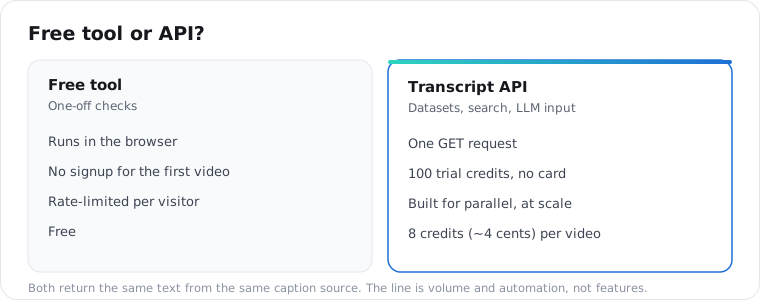
| Free tool | Transcript API | |
|---|---|---|
| Setup | None, runs in the browser | API key, one GET request |
| Signup | Not for the first video | 25 trial credits, no card |
| Best for | One-off checks | Datasets, search, LLM input |
| Volume | Rate-limited per visitor | Per-account, built for parallel |
| Cost | Free | 2 credits (~1 cent) per video |
What should you know about transcript quality?
The text comes back in whatever language was spoken, with no translation and no cleanup pass. Auto-generated captions carry the usual artifacts: mis-heard proper nouns, no speaker labels, brand names spelled the way they sound. It reads like a machine heard it, because one did.
Machine transcription is imperfect even at the frontier. OpenAI’s Whisper, trained on 680,000 hours of audio, posts roughly a 5 to 6 percent word error rate on clean English and far higher on many of its 99 languages, per its model card. Reading TikTok’s own caption track sidesteps some of that, but the artifacts above still show up.
That is fine for search, classification, and feeding a model. If you are publishing the words verbatim, budget for a human edit.
I would not trust any transcript, from any source, as a legal record. Treat it as a very good first draft of what was said.
Frequently asked questions
How do I get the transcript of a TikTok video?
Paste the video URL into a free TikTok transcript generator for a single transcript, or call a transcript API with the URL and a key to do it at scale. Both read TikTok’s published caption track and return the spoken text as plain JSON in a few seconds. No TikTok developer account is required.
Is there a free TikTok transcript generator?
Yes. A free browser tool gives you your first transcript with no signup and no card. It is rate-limited per visitor, so it is built for one-off use. For steady or bulk transcription you move to an API, which starts with 25 free trial credits, enough for 12 videos.
Can I get a TikTok transcript without captions on the video?
Not on the captions-only path. If TikTok never generated a caption track for the clip, the API returns a 404 not_found rather than guessing. Coverage is still good because TikTok auto-captions most spoken-word video. Music-only and wordless clips are the common misses.
Why does my TikTok transcript have no timestamps?
TikTok’s caption track reaches the pipeline as flat text with per-cue timings already removed, so the segments field returns null. The text is complete; only the per-line start and end times are missing. Handle segments as an empty list in your code and your logic stays safe if timestamped output ships later.
How much does a TikTok transcript API cost?
One transcript is 2 credits. Credits are $0.005 each on the monthly plan and $0.0045 on annual, so a transcript is about one cent and $5 covers roughly 500 videos. Signup includes 25 trial credits with no card. Cache hits on already-transcribed videos return instantly but still cost the same 2 credits.
Can I transcribe many TikToks at once?
Yes, by sending requests concurrently. There is no batch parameter, so a thread pool of 8 workers is the usual pattern. Rate limits are per account and count requests, not credits: 20 per minute on the free trial, 200 on monthly, 300 on annual. A short retry with backoff handles the occasional 429.
Start with one URL
Grab a single TikTok link and run it through the free tool right now. If the text is what you need, the 25 trial credits are enough to run a dozen of your real videos through the API before you decide anything.