By Nikhil Kumar. Last updated October 2026.
Ask Claude what people really think about standing desks, and it will happily guess.
Give it a search tool and a comments tool, and it stops guessing. To build a social media research agent with Claude, connect it to social data through the MCP connector, the Tool Runner or the Claude Agent SDK, and let it pick searches, read threads and write a cited report. Most tutorials skip two parts: a credit budget it can’t exceed, and a check that every cited link came from a real tool call.
What is a social media research agent?
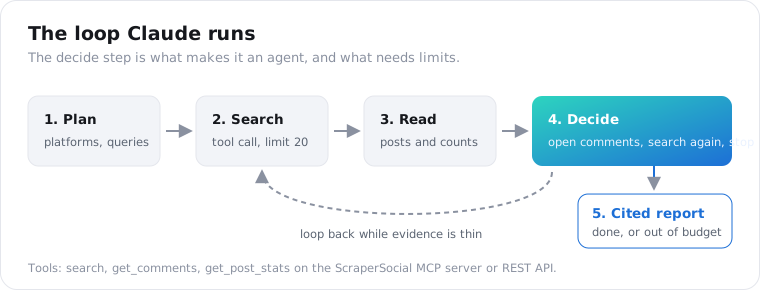
A social media research agent is a loop where Claude decides what to search, reads the results, picks which comment threads to open, and stops once it has enough evidence to answer a question. A script runs fixed steps; an agent picks its next step from what it just read. That suits open questions like “what do buyers dislike about our competitor” and not fixed jobs like pulling yesterday’s mentions.
You can see it in the second search. A script searches “standing desk” and stops. An agent reads the results, notices half the complaints mention wobble at full height, and goes looking for “standing desk wobble” threads on its own.
That follow-up search is the whole point, and it’s also where cost and accuracy go wrong. Most of this guide is about keeping it on a leash.
Before you build one, ask whether the task really needs judgment. If you can write the steps down in advance, write a plain script instead. It’ll cost less and break in more obvious ways.
Which way should you build a social media research agent with Claude?
There are three routes. The MCP connector runs the whole loop on Anthropic’s side from one Messages API call. The Tool Runner in the Python SDK runs the loop in your code over tools you write. The Claude Agent SDK packages Claude Code’s agent loop as a library, with MCP support built in. All three can reach the same social data; they differ in how much you control between steps.
| MCP connector | Tool Runner | Claude Agent SDK | |
|---|---|---|---|
| Code you write | One API call | Tool functions | A prompt and options |
| Who runs the loop | Anthropic, server-side | The SDK, in your process | The SDK, in your process |
| Step between tool calls | No | Yes | Through hooks |
| Credit cap in code | No | Yes | Partial, via tool allowlist and max turns |
| Where it works | Claude API, Claude Platform on AWS, Microsoft Foundry | Anywhere the SDK runs | Anywhere you host it |
Those platform limits come from Anthropic’s MCP connector documentation, which also notes the connector is in beta, supports only tool calls from the MCP spec, and isn’t eligible for zero data retention.
Prototype with the connector and ship with the Tool Runner. That’s my take, anyway.
Nothing beats the connector for finding out whether your question is answerable at all. Once the agent runs every week, though, you’ll want to stop it when the budget is gone and check its sources before anyone reads the report, and both of those need your code in the loop.
Every example below shares one system prompt, so you can swap routes without retuning anything:
SYSTEM_PROMPT = """You research what people say about a topic on social media.Plan first: pick 2 to 4 platforms and the exact search queries.Search each platform once with limit 20, then read comments on up to5 posts with the most engagement. Never make more than 12 tool calls.Every claim in your report must cite the url of a post or comment youactually retrieved. If the data does not support a claim, leave it out.Report: top themes with how many posts mention each, 3 representativequotes with links, and what you could not check."""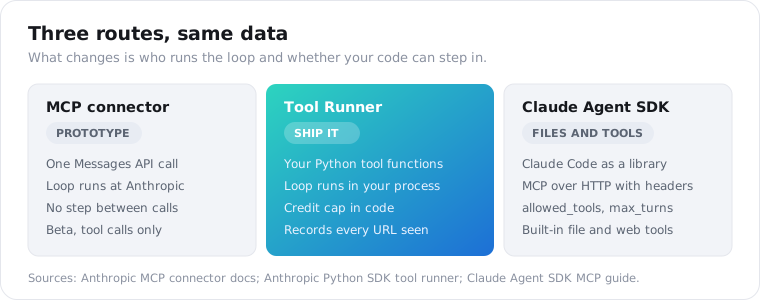
How do you build the agent with the MCP connector?
Add ScraperSocial’s MCP server to a Messages API request with mcp_servers, then enable it with an mcp_toolset entry under tools. Anthropic connects to https://mcp.scrapersocial.com, Claude calls the tools it needs, and the final report comes back in the same response. It’s one call, with the beta header mcp-client-2025-11-20 and your ScraperSocial key as the authorization token.
The ScraperSocial MCP server exposes 14 tools. A research agent needs three of them, so allowlist those and switch the rest off:
import osimport anthropic
client = anthropic.Anthropic()
response = client.beta.messages.create(    model="claude-opus-5-5",    max_tokens=16000,    output_config={"effort": "high"},    # Fallbacks re-run the request on another model if a safety    # classifier declines it.    betas=["mcp-client-2025-11-20", "server-side-fallback-2026-07-01"],    fallbacks="default",    system=SYSTEM_PROMPT,    mcp_servers=[{        "type": "url",        "url": "https://mcp.scrapersocial.com",        "name": "scrapersocial",        "authorization_token": os.environ["SCRAPERSOCIAL_API_KEY"],    }],    tools=[{        "type": "mcp_toolset",        "mcp_server_name": "scrapersocial",        "default_config": {"enabled": False},        "configs": {            "search": {"enabled": True},            "get_comments": {"enabled": True},            "get_post_stats": {"enabled": True},        },    }],    messages=[{"role": "user", "content":        "What do people complain about with standing desks? "        "Use Reddit, YouTube and TikTok."}],)
if response.stop_reason == "refusal":    print("Declined:", response.stop_details)else:    for block in response.content:        if block.type == "text":            print(block.text)
Each tool call shows up in response.content as an mcp_tool_use block, followed by an mcp_tool_result block with the data. While you test, print them; they show exactly which searches Claude picked.
The default_config line matters more than it looks. Without it, every tool on the server is available, including ones your research question has no use for.
If your question only covers one platform, the server also answers on narrower URLs such as https://mcp.scrapersocial.com/reddit. The tool names stay the same; they just cover that one platform, which keeps the tool definitions Claude has to read shorter.
Here’s what this route costs you. The loop runs on Anthropic’s side, so there’s no point between tool calls where your code can look at a result, count credits or stop the run early. You find out what the agent did after it’s done.
For a prototype that’s fine, and it’s the reason I wouldn’t put this version on a schedule unattended.
How do you build the agent with the Tool Runner?
Write each tool as a Python function with the @beta_tool decorator, pass the functions to client.beta.messages.tool_runner, and iterate until Claude stops calling tools. The SDK builds the tool schemas from your type hints and docstrings, runs your functions, and feeds the results back. Because the functions are yours, you can enforce a credit budget and record every URL the agent sees.
It’s the route I’d ship, mostly because of what happens when money runs low. Your tools call the ScraperSocial REST API directly. Every response carries an X-Credits-Charged header, so a few lines give you a hard spending cap:
import jsonimport osimport reimport anthropicimport requestsfrom anthropic import beta_tool
API = "https://api.scrapersocial.com/v1"HEADERS = {"Authorization": f"Bearer {os.environ['SCRAPERSOCIAL_API_KEY']}"}COMMENT_PATHS = {"reddit": "reddit/post-comments",                 "youtube": "youtube/comments", "tiktok": "tiktok/comments"}budget = {"credits_left": 400}seen_urls = set()
def call(path, **params):    if budget["credits_left"] <= 0:        return {"error": "Credit budget used up. Write the report now."}    r = requests.get(f"{API}/{path}", params=params, headers=HEADERS, timeout=120)    budget["credits_left"] -= int(r.headers.get("X-Credits-Charged", 0))    body = r.json()    seen_urls.update(re.findall(r"https?://[^\s\"']+", json.dumps(body)))    return body
@beta_tooldef search_posts(platform: str, query: str, limit: int = 20) -> str:    """Keyword search over one platform's public posts.
    Args:        platform: One of reddit, youtube, tiktok, twitter.        query: Search keywords.        limit: Number of results, 1 to 50.    """    return json.dumps(call(f"{platform}/search", query=query, limit=min(limit, 50)))
@beta_tooldef get_comments(platform: str, url: str, limit: int = 20) -> str:    """Public comments on one post or video.
    Args:        platform: One of reddit, youtube, tiktok.        url: The post or video URL from a search result.        limit: Number of comments, 1 to 50.    """    return json.dumps(call(COMMENT_PATHS[platform], url=url, limit=min(limit, 50)))
client = anthropic.Anthropic()runner = client.beta.messages.tool_runner(    model="claude-opus-5-5",    max_tokens=16000,    system=SYSTEM_PROMPT,    tools=[search_posts, get_comments],    messages=[{"role": "user", "content":        "What do people complain about with standing desks? "        "Use Reddit, YouTube and TikTok."}],)final = Nonefor message in runner:    final = messagereport = "".join(b.text for b in final.content if b.type == "text")print(report)
Once the budget is gone, the tool hands back an error message instead of data, and Claude writes the report from what it already has. Killing the process would leave you with nothing.
The same trick handles API errors. If a search fails, return the error text as the tool result rather than raising. Claude reads it, tries another query or another platform, and keeps going, where an exception would end the run with nothing.
The search tool covers TikTok too. If you’d rather point readers at the endpoint behind it, the TikTok search API page shows the response shape each result comes back in.
Keep the limit at 50 or under on every call, so each request returns in one response. The rate limits page has the per-plan request ceilings if you plan to run several agents at once.
How do you build the agent with the Claude Agent SDK?
Pass the MCP server to ClaudeAgentOptions as an HTTP server with your key in the headers, list the tools Claude may use in allowed_tools, and iterate over query() until a ResultMessage arrives. The Agent SDK is Claude Code as a library, so it runs the loop and reconnects to the server for you. Tool names follow the mcp__<server>__<tool> pattern.
This mirrors the HTTP server example in Anthropic’s Agent SDK MCP guide:
import asyncioimport osfrom claude_agent_sdk import query, ClaudeAgentOptions, ResultMessage
options = ClaudeAgentOptions(    system_prompt=SYSTEM_PROMPT,    max_turns=15,    mcp_servers={        "scrapersocial": {            "type": "http",            "url": "https://mcp.scrapersocial.com",            "headers": {"Authorization":                        f"Bearer {os.environ['SCRAPERSOCIAL_API_KEY']}"},        }    },    allowed_tools=[        "mcp__scrapersocial__search",        "mcp__scrapersocial__get_comments",        "mcp__scrapersocial__get_post_stats",    ],)
async def main():    async for message in query(        prompt="What do people complain about with standing desks? "               "Use Reddit, YouTube and TikTok.",        options=options,    ):        if isinstance(message, ResultMessage) and message.subtype == "success":            print(message.result)
asyncio.run(main())
Two limits from the SDK docs are worth knowing before you hit them. MCP connections time out after 30 seconds by default. And a tool result larger than 25,000 tokens gets saved to a file, with Claude reading it back in pieces, so keep each limit modest.
I’d pick this route when the agent also needs to write files, such as saving each week’s report next to last week’s. I’m less sure it’s worth it for pure research; you’re carrying a lot of capability you won’t use. For a plain question-and-report job, the Tool Runner is still the simpler thing to own.
How do you stop the agent from going off on tangents?
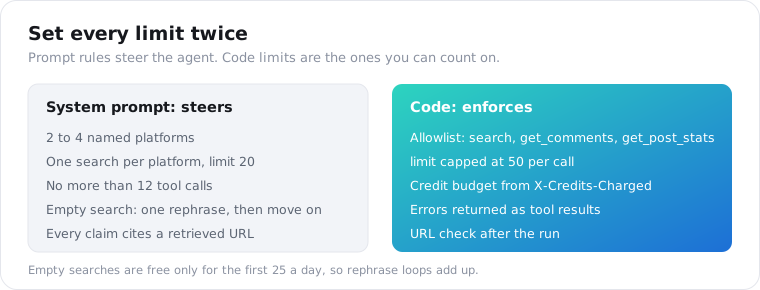
Set the plan and the limits twice: once in the system prompt, where they steer Claude, and once in code, where they’re guaranteed. The prompt names the platforms, the number of searches and the tool-call cap. The code allowlists only the tools the job needs, keeps every limit at 50 or less, and stops the agent when its credit budget is spent.
Don’t underrate the prompt. A vague question (“research standing desks”) invites a vague run: a dozen searches, three platforms you didn’t need, and a report that hedges everything. A specific one (“what do Reddit and YouTube users complain about with standing desks under $400”) gets a tight run.
On long runs, though, Claude sometimes drifts past a rule it read 30 tool calls ago. A credit counter in your tool function has no such memory problem.
One cost detail catches people out: a search that finds nothing is free only for the first 25 empty results a day, then costs 1 credit. If Claude keeps rephrasing a query that returns empty, those charges add up. A line in the prompt (“if a search returns nothing, try one rephrase, then move on”) fixes it.
How do you make the agent cite its sources?
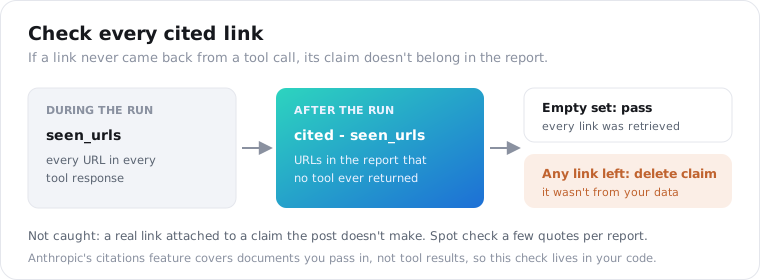
Require a URL for every claim in the system prompt, then check the report against what the tools actually returned. In the Tool Runner version, seen_urls already holds every link from every response, so after the run you extract the URLs from the report and flag any that aren’t in that set. A flagged link means a claim Claude didn’t get from your data.
After the run, three lines do it:
cited = set(re.findall(r"https?://[^\s)\]]+", report))unbacked = cited - seen_urlsif unbacked: print("Links the agent never retrieved:", unbacked)What this catches is the worse kind of citation: a link that was never fetched.
The subtler kind slips through, where a real link sits next to a claim the post doesn’t make. For that, sample a few quotes per report and open the posts. On a weekly run, five spot checks take a couple of minutes and tell you whether to trust the rest.
Anthropic’s citations feature does this automatically, but only for documents you pass into the request. Tool results don’t get it, which is why the check above lives in your code.
What is a social media research agent bad at?
A research agent reads samples, not the whole internet, so treat its counts as directional. Each search returns a limited set of public posts, the order is the platform’s own, and private accounts never show up. It’s good at spotting the themes people repeat and pulling quotes that show them. It’s bad at exact percentages, sentiment across a whole platform, and anything that needs data older than what search returns.
So say it in the report. The system prompt above already asks for “what you could not check.” Keep that section, because it’s the one readers skip and the one that saves you from overclaiming.
Watch for confident numbers built on tiny samples. “62% of users dislike the wobble” sounds like a finding until you notice it came from 13 comments, which means 8 people. Ask the agent to report raw counts (“8 of 13 comments”) instead of percentages, and the problem mostly goes away.
And don’t ask it to judge individuals. Researching what people say about a product is topic research. Building a file on what specific named people posted is a different job, with privacy rules attached.
How do you run a research agent every week?
Run the Tool Runner version on a schedule, store each week’s tool results, and only pay for posts you haven’t seen. Save the post and comment ids from every run, skip those ids the next week, and ask Claude to compare this week’s themes with last week’s. A weekly run on one topic stays close to the 340 credits of a single pass, because most of the cost is fresh searches.
“Wobble complaints went from 8 to 15 this week” tells a product team something. A fresh report every Monday that says roughly the same thing doesn’t, and after the third one nobody opens it.
Keep the questions fixed between runs. Change the prompt and you change what gets searched, at which point week-over-week comparisons stop meaning anything.
For the bigger picture of building a listening pipeline around this, the social listening API guide covers where to store results and when to alert someone.
What does a social media research agent cost to run?
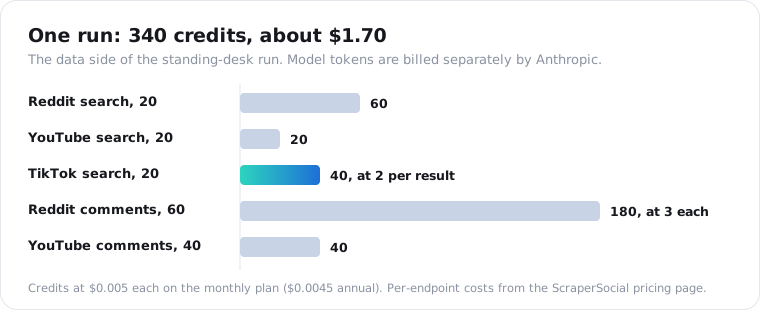
Two meters run: Claude tokens and data credits. On the data side, a typical run of three searches and five comment threads costs about 340 ScraperSocial credits, roughly $1.70 on the monthly plan. On the model side, Claude Opus 5.5 costs $4 per million input tokens and $20 per million output, per Anthropic’s pricing page, and tool results count as input.
Credits are listed per item, which makes the data side easy to predict. Here’s the standing-desk run from the examples:
| Step | Endpoint | Items | Credits |
|---|---|---|---|
| Search Reddit | reddit/search, 3 per result | 20 | 60 |
| Search YouTube | youtube/search, 1 per result | 20 | 20 |
| Search TikTok | tiktok/search, 2 per result | 20 | 40 |
| Reddit comments, 3 threads | reddit/post-comments, 3 each | 60 | 180 |
| YouTube comments, 2 videos | youtube/comments, 1 each | 40 | 40 |
| Total | 160 | 340 |
At $0.005 per credit that’s $1.70, or about $1.53 on the annual plan. The pricing page lists every endpoint’s cost if you swap in other platforms. Reddit is the expensive line, at 3 credits per result or comment with a 25-credit minimum per call.
How big the token side gets depends on how much text the tool results carry. Measure it instead of guessing.
Every response reports usage.input_tokens and usage.output_tokens. Log them for your first few runs and multiply.
Two things keep the token bill down. Smaller limit values mean shorter tool results. And the field projection docs show how to ask the REST API for only the fields you need, which matters most in the Tool Runner version where you control each request.
If cost matters more than depth, Claude Haiku 5.5 runs at $0.10 per million input tokens. It handles tagging posts well; I’d still use Opus for the final write-up.
Run one research question before you schedule anything
Start your social media research agent on the MCP connector with one narrow question, like the standing-desk example. Read the mcp_tool_use blocks to see which searches Claude chose, then move the same prompt to the Tool Runner version once the answers look useful. Get a key from the quickstart; the 25 free signup credits cover a single test search, and the full 340-credit run above fits in the $5 plan.
Frequently asked questions
Do I need to know MCP to build this?
No. With the MCP connector you paste a server URL and an API key into one Messages API request, and Anthropic handles the MCP connection server-side. You never write MCP client code. You only need MCP knowledge if you build your own server or connect a local stdio server, which the connector does not support. For the Tool Runner route you skip MCP entirely and wrap REST endpoints as Python functions.
Which is cheaper to run, the connector or the manual loop?
The data cost is identical, because both routes call the same endpoints at the same credit prices. Token cost is close too, since Claude reads the same tool results either way. The manual loop and Tool Runner win on control: you can trim results, enforce a credit budget and stop early, which is where real savings come from on long research runs.
How do I stop the agent from going off on tangents?
Give it a plan and a budget in the system prompt: which platforms, how many searches, and a hard cap on tool calls. Then enforce the same limits in code: allowlist only the tools the job needs, keep each call’s limit at 50 or less, and cut the agent off when its credit budget runs out. The prompt is a request; the code is the actual fence.
Can I use a bigger model for deeper analysis?
Yes. Claude Opus 5.5 is the model I’d default to for research agents, at $4 per million input tokens, and raising effort to high gives it more room to reason over messy comment threads. For cheap first passes, Claude Haiku 5.5 costs $0.10 per million input tokens. A common split is Haiku to sort and tag posts, then Opus to write the final synthesis.
Do I need the official platform APIs to build one?
No. A social data API gives the agent public posts, comments and stats from many platforms behind one key, so you skip separate developer approvals for each network. The official APIs are still worth knowing for your own accounts, but for research across platforms they add an application process and a different schema per network, which is exactly what an agent struggles with.
Can I get the same report without writing code?
Yes. Add https://mcp.scrapersocial.com as a custom connector in Claude Desktop or Claude Code, sign in, and ask your research question in plain English. You lose the code-level budget cap and the URL check, so watch the tool calls and keep questions narrow. The code routes in this guide matter once you want the same research to run every week.