By Nikhil Kumar. Last updated October 2026.
You can scrape TikTok in n8n without installing a single community node.
All it takes is the HTTP Request node that ships with every n8n instance. For n8n social media scraping, save one API key as a Header Auth credential, point an HTTP Request node at a social data endpoint, split the data array into items, and drop repeats before you store them. This guide builds two working workflows, a keyword watch and a creator watch with transcripts, and prices both to the credit.
Can you scrape social media in n8n without a community node?
Yes. n8n’s HTTP Request node can call any REST API, so a social data API with one key covers TikTok, Instagram, Reddit, LinkedIn and more from the same node. Community nodes mostly wrap that same HTTP call in a dropdown. The trade is that a community node installs per instance and needs someone to maintain it, while the HTTP node keeps working on n8n Cloud and self-hosted alike.
n8n is a big enough platform that this matters. It raised a $180 million Series C at a $2.5 billion valuation in October 2025, and its GitHub repository passed 207,000 stars this month. Lots of people are building scrapers on it.
Most of the tutorials they find push one of four routes:
| Route | What you set up | What breaks or costs extra |
|---|---|---|
| HTTP Request node + a data API | One credential, one node per endpoint | You type the URL and query parameters yourself |
| A vendor’s community node | Install the node, add its credential | Install rules differ between Cloud and self-hosted, and updates depend on the vendor |
| Apify node (Run Actor) | Pick an actor per platform, pass JSON input, enable wait for finish | Each actor has its own input and output shape |
| Your own scraper behind a webhook | Write, host and maintain the script | Logins, blocks and layout changes land on you |
I’d pick the first one. It’s the only route where adding a new platform means changing a URL, not learning a new tool.
One honest limit before you build: every route above reads public data only. Private accounts, DMs and logged-in feeds are off the table, whichever tool you pick.
What do you need before you build an n8n social media scraper?
You need three things: an n8n instance (Cloud or self-hosted, either works), an API key, and a Header Auth credential that stores the key once so every HTTP Request node can reuse it. New accounts come loaded with 25 free credits, no card required, enough to test each workflow in this guide once before you pay anything.
Grab the key from the quickstart. Then, in n8n:
- Open Credentials and create a new Header Auth credential.
- Set Name to
Authorization. - Set Value to
Bearer sk_live_...with your real key.
That’s the whole auth story. If you share workflows with a team, give each person their own key so you can revoke one without breaking the rest.
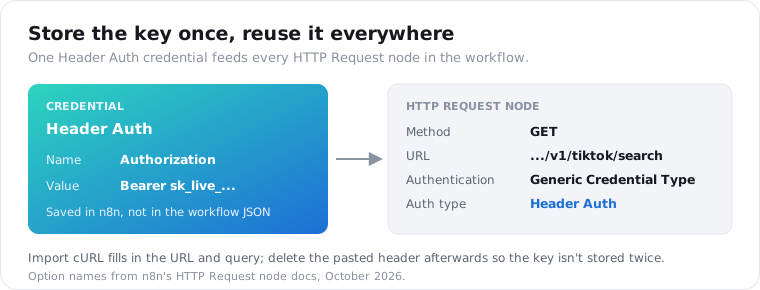
The fastest way to set up the node itself is the HTTP Request node’s Import cURL button. Paste this, and n8n fills in the method, URL and query parameters for you:
curl "https://api.scrapersocial.com/v1/tiktok/search?query=standing%20desk&limit=5" \ -H "Authorization: Bearer sk_live_..."After the import, switch Authentication to Generic Credential Type, pick Header Auth, and choose the credential you just made. Then delete the pasted header, so your key isn’t sitting in plain text inside the workflow JSON.
How do you search TikTok by keyword in n8n?
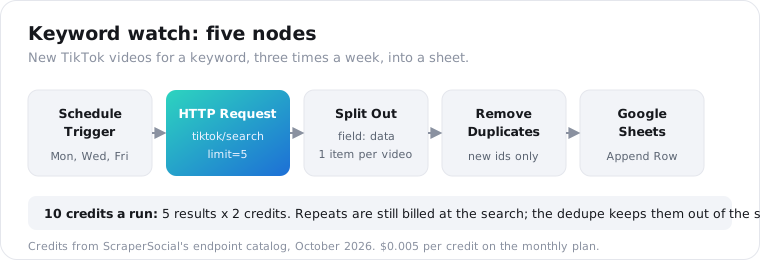
Chain four nodes: a trigger, an HTTP Request node that calls GET /v1/tiktok/search with a query and a limit, a Split Out node on the data field, and a Google Sheets node set to Append Row. Each result costs 2 credits, so a search capped at 5 results costs 10 credits, about 5 cents on the monthly plan.
Here is what the HTTP Request node gets back:
{ "data": [ { "id": "7431562201857826091", "url": "https://www.tiktok.com/@deskdad/video/7431562201857826091", "caption": "my standing desk wobbles at full height #standingdesk", "views": 48210, "likes": 3104, "comments": 211, "shares": 96, "saves": 418, "duration_sec": 31, "posted_at": "2026-10-14T18:22:05Z", "author": { "handle": "deskdad", "name": "Desk Dad" }, "music": null, "hashtags": ["standingdesk"] } ], "meta": { "count": 5, "limit": 5 }, "request_id": "req_01JZX4M8Q2TE9W"}n8n treats that whole response as one item. Split Out turns it into five.
Set Split Out’s Field To Split Out to data and Include to No Other Fields. Now every video is its own row, with views, likes and posted_at ready to map straight into sheet columns.
Two things the TikTok search endpoint won’t do. It has no date filter, so filter on posted_at after the rows land. And results follow TikTok’s own ranking, which mixes relevance with recency and engagement, so sort the sheet yourself if order matters.
Start with a Manual Trigger while you test. Swap it for a Schedule Trigger once the rows look right.
Here’s a tip that saves real credits while you build: after one good run, pin the HTTP Request node’s output. n8n then reuses that saved response on every test execution instead of calling the API again, so tweaking your Split Out and sheet mapping costs nothing. Data pinning only applies while you build; production runs always fetch fresh data.
Google Sheets is the easy first destination. Airtable, Postgres, Notion and a Slack message all work the same way, because each video is already a clean item with named fields.
When you switch to the Schedule Trigger, check the timezone. n8n uses the workflow’s timezone if you set one, otherwise the instance default: GMT on n8n Cloud and America/New_York on self-hosted, per the Schedule Trigger docs. Then save and publish the workflow, or the schedule never fires.
How do you stop n8n from saving the same posts twice?
Put a Remove Duplicates node between Split Out and your storage node. Set the operation to Remove Items Processed in Previous Executions, Keep Items Where to Value Is New, and Value to Dedupe On to {{ $json.id }}. n8n then remembers every video id it has seen and only passes new ones along, keeping 10,000 ids of history by default.
That default comes from n8n’s Remove Duplicates docs. Raise History Size if you track a broad keyword for months.
A scheduled search returns plenty of the same videos run after run. Without this node, your sheet fills with copies.
One catch. You still pay for every result the search returns, repeats included, because billing happens at the API call.
The saving shows up downstream. Any paid call you make per video, like a transcript, only runs on the new ones. That’s where the next workflow gets its money back.
How do you get TikTok transcripts in n8n for new videos?
Build a creator watch: a Schedule Trigger, an HTTP Request node calling GET /v1/tiktok/channel-videos with the creator’s handle and limit=3, Split Out on data, Remove Duplicates on the video id, then a second HTTP Request node that sends {{ $json.url }} to GET /v1/tiktok/transcript. Only new videos reach the 2-credit transcript call.
The transcript comes back as one object:
{ "data": { "text": "okay so the wobble is the crossbar, not the legs...", "segments": null, "language": "en", "source": "upstream" }, "request_id": "req_01JZX4M9R7KD2Q"}segments is null for TikTok right now, so you get clean text but no timestamps. This post explains why.
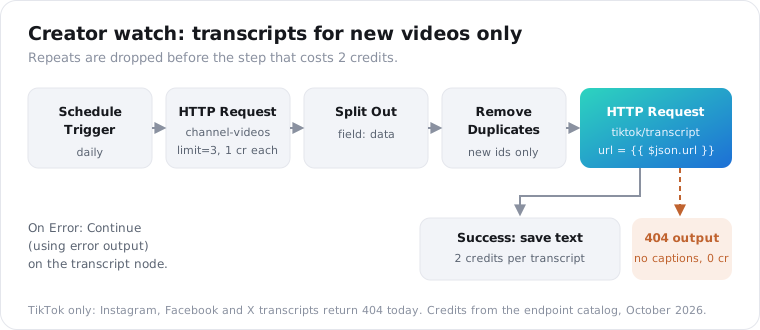
Now the limitation that shapes this whole workflow. The TikTok transcript endpoint reads the caption track TikTok publishes. No caption track, no transcript.
That isn’t rare. Apify’s content team wrote in May 2026 that about a third of TikTok videos have no text data at all.
Those videos come back as 404 not_found, and a 404 costs zero credits. In the transcript node’s Settings, set On Error to Continue (using error output), then wire the error output to a branch that logs “no captions” to the sheet.
This is written for TikTok. Instagram reel transcripts work as well (1 credit plus 20 per started minute of video, plain text without timestamps), but Facebook and X transcript calls return 404 today, so don’t build a cross-platform transcript workflow expecting text back from those two.
Two more details. channel-videos has no cursor, so limit=3 gets you the three latest uploads in one batch.
If you check daily, three is plenty for most creators. Pass the handle with or without the @; both work.
What you do with the text is up to you. Write it to a sheet column, a Google Doc per video, or a Notion page.
If you want a short summary instead of the full text, you have two options. The TikTok summary endpoint returns one for 4 credits a video, built on the same caption track. Or pass the transcript to an n8n AI node with your own model and prompt, which costs the 2-credit transcript plus your model’s tokens.
I’d start with the transcript. Raw text lets you change the prompt later without paying to pull the video again.
Which platforms can n8n social media scraping cover?
The same two workflows run on other platforms by changing one path and one parameter in the HTTP Request node. Every endpoint returns the same { data, meta, request_id } envelope, so Split Out on data keeps working as is. Prices change per platform, from 1 to 3 credits per item for the endpoints below, and two of them have a per-call minimum.
Swap these into the URL field:
| Platform | Endpoint | Input parameter | Credits per item |
|---|---|---|---|
| TikTok comments | /v1/tiktok/comments | url | 1 |
| Instagram posts | /v1/instagram/channel-posts | handle | 1 |
| Instagram comments | /v1/instagram/comments | url | 1 |
| Reddit search | /v1/reddit/search | query | 3, at least 25 a call |
| X search | /v1/twitter/search | query | 1 |
| Threads search | /v1/threads/search | query | 2, at least 15 a call |
| LinkedIn posts | /v1/linkedin/profile-posts | url or handle | 1 |
That’s the real payoff of skipping per-platform nodes. A Reddit keyword watch is the TikTok keyword watch with tiktok/search changed to reddit/search, plus a new column mapping, since Reddit posts carry different fields than TikTok videos.
You can even run both in one workflow. Add a second HTTP Request node off the same trigger, then merge the two branches before Remove Duplicates.
Coverage isn’t even across the board, though. Search, comments and stats differ by platform, so check the endpoint page for each one before you assume a field exists, including the one you dedupe on.
How do you handle errors and 429 rate limits in n8n?
Turn on Retry On Fail in the HTTP Request node’s Settings, with Max Tries at 3 and Wait Between Tries at 5,000 ms, so a 429 rate_limited or a 5xx gets another attempt. Don’t retry 400 or 404: the input is wrong or the content is missing, and asking again won’t fix it. None of those failed calls cost credits.
Rate limits count requests per minute, not results. A free trial key gets 20 rpm, the $5 monthly plan 200, and the annual plan 300, per the rate-limit docs.
One request returning five videos is still one request. You’ll only hit the limit when you loop transcripts over a long list.
For that loop, open the HTTP Request node’s Options and add Batching: Items per Batch at 1 and Batch Interval at 400 ms. That paces you at about 150 calls a minute, under the monthly limit. On a free trial key, use 3,000 ms.
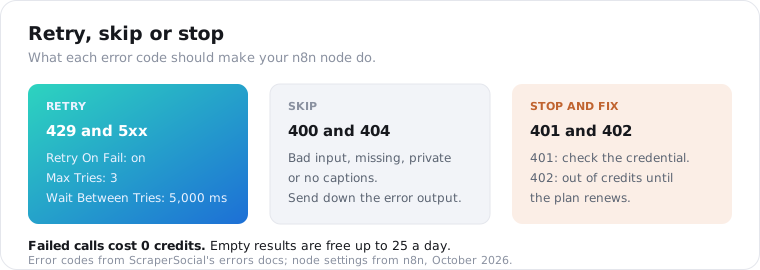
| Status | What it means | What the n8n node should do |
|---|---|---|
| 400 | Bad input, like a URL from the wrong platform | Send to the skip branch |
| 401 | Bad or missing key | Stop and fix the credential |
| 402 | Not enough credits | Stop until the plan renews or a top-up lands |
| 404 | Private, deleted, or no captions | Send to the skip branch |
| 429 | Over your requests per minute | Retry On Fail, then slow the batch |
| 5xx | Temporary upstream failure | Retry On Fail |
One caution worth testing. n8n issue #9236, filed against version 1.35.0, reports that Retry On Fail ignored its Max Tries and Wait settings when On Error was set to a Continue option. Test both together on your version before you trust them. The full code list is in the errors docs.
How does pagination work in the n8n HTTP Request node?
The HTTP Request node pages for you once you add the Pagination option. For an API that returns a cursor, set Pagination Mode to Update a Parameter in Each Request, add a query parameter named cursor with the value {{ $response.body.meta.next_cursor }}, and set Pagination Complete When to Other with {{ !$response.body.meta.next_cursor }} as the Complete Expression.
Some list endpoints return meta.next_cursor only when another page exists. When it’s missing, you’re on the last page, which is exactly what that expression checks.
Turn on Limit Pages Fetched and set Max Pages too. Each page bills per item returned, so an open-ended loop on a busy thread is the fastest way to empty a plan.
Keep limit at 50 or lower on every call. That’s the most a single synchronous response returns.
The two TikTok endpoints in this guide don’t page at all. Search and channel-videos each return one batch of up to 50 with no cursor, so leave Pagination off for them.
n8n hands each page to the next node as its own item, so Split Out still works the same way after a paged call.
How much does n8n social media scraping cost a month?
Both workflows together run about 350 credits a month, which fits inside the 1,000 credits of the $5 monthly plan. The keyword watch costs 130 credits, and the creator watch costs about 220 if every new video has captions. n8n adds nothing for HTTP calls, and failed calls, including caption-less 404s, cost zero.
Here is the math, using the per-item prices on the pricing page:
| Workflow | Schedule | Math | Credits a month |
|---|---|---|---|
| Keyword watch | Mon, Wed, Fri (13 runs) | 13 x 5 results x 2 credits | 130 |
| Creator watch, feed check | Daily, 2 creators | 30 x 2 x 3 videos x 1 credit | 180 |
| Creator watch, transcripts | About 20 new videos | 20 x 2 credits | 40 |
| Total | 350 |
At $0.005 a credit, that’s $1.75 of data. The annual plan, $54 for 12,000 credits, brings the same work down to about $1.58 a month.
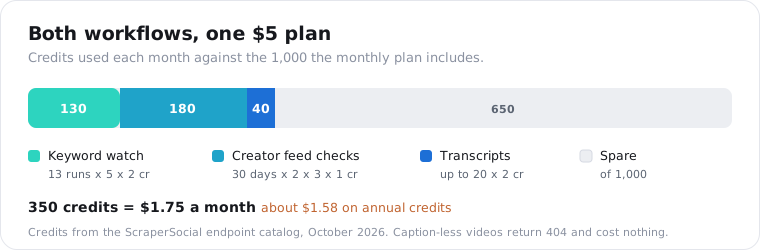
The 40 is a ceiling. If a third of those videos have no captions, they 404 for free and the real number lands closer to 27.
The fastest way to blow past this is a big limit on a schedule. A daily search at limit=50 is 3,000 credits a month on its own. Set limits on purpose, and watch the X-Credits-Charged response header while you test.
Frequently asked questions
Do I need a community node to scrape social media in n8n?
No. The built-in HTTP Request node calls any REST API, so one data API key and a Header Auth credential cover TikTok, Instagram, Reddit, LinkedIn and more. Community nodes save you typing a URL, but they install per instance and depend on someone maintaining them. The HTTP node works the same on n8n Cloud and self-hosted, and it never goes out of date when an endpoint is added.
How much does it cost to scrape TikTok with n8n?
n8n itself costs nothing extra for HTTP calls. The data is billed per item returned: 2 credits per TikTok search result, 1 per video from a creator’s feed and 2 per transcript, at $0.005 a credit on the $5 monthly plan. A three-times-a-week keyword search plus a daily two-creator watch comes to about 350 credits, inside the 1,000 that plan includes.
Can I get TikTok transcripts in n8n?
Yes. Send each video URL to the TikTok transcript endpoint from an HTTP Request node and you get the spoken text back as JSON, at 2 credits a video. Videos with no caption track return 404 and cost nothing, so route that error to a skip branch. Instagram reels work too, at 1 credit plus 20 per started minute of video; Facebook and X video transcripts return 404 today, so this part of the guide is written for TikTok.
How do I stop n8n from processing the same videos every run?
Add a Remove Duplicates node after Split Out and set the operation to Remove Items Processed in Previous Executions, with Keep Items Where set to Value Is New and the video id as the value to dedupe on. It remembers 10,000 ids by default. Put it before any paid follow-up call, such as transcripts, so repeats never reach the step that costs credits.
Can I scrape Instagram in n8n?
Yes, for public data. The same HTTP Request node pulls Instagram profiles, posts, comments and hashtag results by swapping the endpoint path, with no Instagram login or cookies in your workflow. Profiles and posts cost 1 credit each. Private accounts, Stories and reel transcripts are out of reach, so plan around those gaps rather than building a workflow that waits on them.
Can an n8n AI agent use social media data?
Yes. Add an MCP Client Tool to an AI Agent node, point it at https://mcp.scrapersocial.com with HTTP Streamable transport, and pass your API key as a Bearer token. The agent can then call search, comments and stats tools on its own. Field names shift a little between n8n versions, so check the node panel if a label differs from this guide.
Run your first search in n8n
Paste the cURL command above into an HTTP Request node, attach your Header Auth credential, and run it once against a keyword you care about. The 25 free credits cover that test twice. Get your API key, and your first rows land in the sheet on the very first run.