By Nikhil Kumar. Last updated September 2026.
A quarter of a million people a month look for a way to download a Facebook video. Facebook’s own API is not one of the ways that works.
To download a Facebook video with an API, you send one GET request with the public video or Reel URL and get back a direct link to the MP4 on Facebook’s servers. No login, no browser extension, no Facebook developer app. You fetch the file yourself and keep your own copy. On ScraperSocial that call is 3 credits, about 1.5 cents. This guide covers the request, the one thing that trips every first integration, and the legal line that matters more here than anywhere.
“facebook video downloader” draws about 246,000 US searches a month, according to DataforSEO data pulled in September 2026, one of the highest-volume terms in social media. Most of that is people pasting a link into a free website. This guide is for the ones building the tool, not using it.
How do you download a Facebook video?
Three ways, and only one of them scales. A consumer downloader site takes a pasted link and hands back an MP4 for a single video by hand. A do-it-yourself scraper with yt-dlp fetches the file until Facebook changes its markup and breaks it. A download API takes a URL in code and returns the direct file link, maintained for you. For anything scripted or repeatable, the API is the route.
The consumer sites are what most people find first.
Paste a Facebook video URL into SnapSave, FDownloader, or one of a hundred similar pages, pick a quality, and save the MP4. They work for a single public video, and they are fine for that. They are also unusable from code: there is no clean API behind most of them, they wrap the download in ads and redirects, and you cannot wire one into a pipeline. Many of those pages also fund themselves with aggressive ads or push a browser extension, so they are a poor choice for anything you run more than once.
The DIY route is the other end. Point yt-dlp or a headless browser at a public Facebook video and it resolves the file, until Facebook shifts its page structure or its signed URLs and you spend an afternoon patching a 403. It works, but you own every break.
A download API is the maintained middle. The input is a public URL, the auth is one API key, and the output is a direct link to the file, with the markup-chasing handled upstream.
How do you download a Facebook video with an API?
You send the public video URL to the download endpoint and it returns a small JSON object with the file link inside. On ScraperSocial you GET /v1/facebook/download with the video URL, billed 3 credits, and the response carries media_url, a direct link to the MP4 on Facebook’s own CDN. You then fetch that URL with any HTTP client and write the bytes to disk.
Here is the full thing, resolve and save, in one short Python script.
import requests
# 1. Ask the API for the direct file linkr = requests.get(    "https://api.scrapersocial.com/v1/facebook/download",    params={"url": "https://www.facebook.com/watch/?v=1234567890"},    headers={"Authorization": "Bearer sk_live_..."},)data = r.json()["data"]
# 2. Fetch the MP4 immediately and write it to diskvideo = requests.get(data["media_url"])with open("clip.mp4", "wb") as f:    f.write(video.content)
Link in, file out, in two steps.
The endpoint does not host, re-encode, or proxy the video. The media_url points straight at Facebook’s CDN, so you pull the bytes exactly as Facebook serves them, and the API’s job is only to resolve the buried file link the page does not hand you directly.
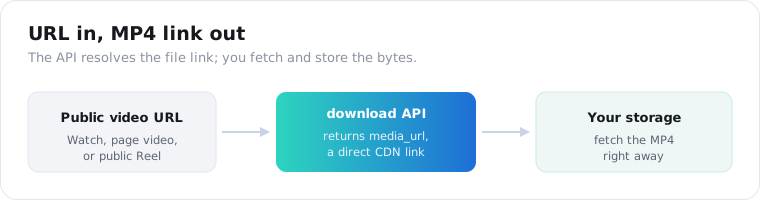
It works on the public video types: Watch videos, page videos, and public Reels. The media_url resolves to the best quality Facebook serves for that video, so an HD upload comes back in HD rather than a downscaled copy; you get the file as the platform stores it, not a re-encode. What it will not touch is a private or friends-only video, which brings us to the two limits that matter.
Why does the download link expire?
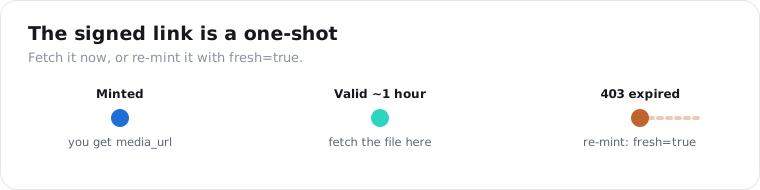
Because Facebook signs its CDN links with a short, deliberate expiry, usually minutes to about an hour, not days. Pull the media_url and sit on it and you get a 403 once the signature lapses. The fix is simple: fetch the file the moment you have the link, store your own copy, and never write the CDN URL into a database as if it were permanent.
Nearly every first integration breaks on this one detail.
It is not a fault in the API. The link’s clock belongs to Facebook, not to whoever resolved it for you. Open-source downloaders have lived with this for years; signed, short-lived media URLs are how every big platform stops people from hotlinking its bandwidth and passing permanent links around. A product that stores a Facebook CDN URL and serves it back an hour later ends up with dead links.
So read the response as a fetch-now instruction, not a link to keep. Resolve, immediately GET the media_url, then write the bytes to your own storage. If a cached response ever hands you a link that has already aged out, call again with fresh=true to force a newly signed URL, at the same 3 credits.
Can the official Facebook API download videos?
Not for videos that are not yours. Meta’s official Video API reaches videos on a Page or account you own and manage, and getting there needs a Facebook app, OAuth, and permission review. It was built to manage and measure your own content, not to pull a public clip from a page or profile you do not control. Reading a stranger’s public video by URL is simply not a thing it does.
That gap is the whole reason third-party download APIs exist.
The official path assumes you are the video’s owner. You register an app, authenticate as the Page admin, and read your own uploads. There is no input on it that means “here is any public video, get me the file.”
A download API inverts that. The input is any public URL, the auth is a single key, and there is no app, no review, and no ownership requirement, because you are reading a public page, not managing an account. Our best Facebook data APIs guide covers how every Facebook surface splits between what the official API gates and what a data API reads.
What can you do with the downloaded file?
Once the MP4 is on disk, it feeds any job that needs the actual file rather than an embed. The common ones are archiving videos to your own storage so a copy outlives the post, feeding clips into transcription or a machine-learning model, and building a competitor swipe file where a team studies rival video creative side by side. For the spoken words specifically, you download the file and run speech-to-text on it.
Archiving is the most common reason people build this.
A page can delete a video or vanish overnight, and with it anything you meant to reference. A scheduled pull to storage you control keeps a copy that does not depend on the post staying up, which matters for compliance teams, journalists, and researchers keeping a record. The video you did not save is the one you will wish you had the day it disappears.
Transcription and analysis is the next one. Frame extraction, a whisper-style transcript, or any model that reads pixels needs the decoded video, not a page to render. The Instagram video download API uses the same request shape when the same clip lives on both platforms, so one pipeline handles both.
Competitive research rounds it out. Ad and content teams archive competitors’ video posts to study hooks and pacing, and holding the files, rather than a wall of embeds that lazy-load and break, is what makes a real review possible. A nightly pull of a watchlist keeps that library current.
One worked loop ties it together. A newsroom tracks a list of public official pages, lists each page’s new posts every hour, and downloads the video from any post that crosses an engagement threshold into dated, page-tagged storage. When a video is later edited or deleted, the newsroom still has the original, which is the whole point of an archive: the record does not depend on the post staying up. The pipeline is a scheduled list call, a filter, and a download, and it captures the source material before anyone can pull it down.
How much does it cost, and how do you keep it cheap?
One video is 3 credits on ScraperSocial, about 1.5 cents on the monthly plan, so $5 covers roughly 330 downloads, and failed calls are never charged. It is cheaper than the Instagram download at 8 credits, because Facebook media resolves more lightly upstream. The way to keep a bulk job cheap is the same on every download endpoint: narrow the list first, then download only what you want.
Download is a fetch tool, not a browsing one, and using it to sift a whole page is how bills balloon.
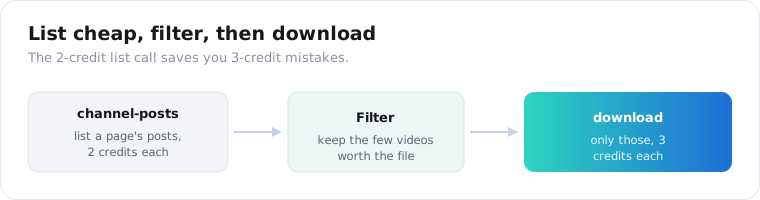
The pattern that keeps the bill sane is two steps. List a page’s recent posts with the cheap channel-posts endpoint at 2 credits, read the view counts and pick the handful of videos you actually want the file for, and only then call download on those. Piping a whole page through download unfiltered pays 3 credits for every clip, including the ones nobody would keep.
Put numbers on it. Filtering a 200-post page down to the 15 videos worth keeping is 200 times 2 credits to list, plus 15 times 3 to download, about 445 credits or under $2.50. Downloading every post blind costs 600, and most of it is footage no one asked for. The saving is smaller than it used to be now that a download is 3 credits, but the list-first habit still pays for itself.
Here is how the routes compare for a developer who needs the file.
| Method | Reach | Login / review | Maintenance | Best for |
|---|---|---|---|---|
| Official Video API | Your own pages | App + OAuth + review | Meta-maintained | Managing your own videos |
| DIY yt-dlp / scraper | Any public video | None | You patch every break | One-off scripts |
| Consumer downloader site | Any public video | None | Not yours to fix | A single video by hand |
| Download API | Any public video | API key only | Vendor-maintained | Scripted, repeatable pulls |
Is it legal to download Facebook videos?
This is where the topic needs more care than the code. Downloading a public video for personal, offline viewing may fall under fair use, which US courts decide case by case on four factors, but the rules are narrow and this is not legal advice. A video being public on Facebook does not put it in the public domain; that is a specific legal status almost no recent video holds. And Facebook’s terms discourage automated collection, so the platform’s contract is a separate question from copyright law.
The line that matters is use, not access.
Reading a public page logged out is a well-trodden path, and a download API reaches only what a logged-out visitor can see, so private videos stay out of reach. But the file still belongs to whoever made it. Archiving your own content, or content you have permission to keep, for analysis or backup is defensible. Reposting someone else’s video as your own, or redistributing it commercially, is copyright infringement that no API waves away.
There is a personal-data layer too. A video shows real people, their faces and voices, which are personal information under GDPR and CCPA the moment you store the file. Archiving at scale means a retention policy and a deletion path, the same discipline you would apply to any dataset of real people. Downloading a clip for private analysis is one thing; building a permanent, searchable library of strangers’ faces is a risk to size before you start.
So use the narrow version. Public videos, your own or permitted content, a retention window, no republishing, and a legal read before anything commercial.
Which method should you choose?
Match the method to who you are. If you want one video saved to your phone, a consumer downloader site is faster than writing any code. If you are building something, a scheduled archive, a transcription pipeline, a research corpus, a download API is the only route that fits in code without breaking every few weeks, and it costs about a nickel a video. The official Video API is for your own pages and nothing else. Name whether you are saving one clip or building a system, and the choice is obvious, and either way the legal line above is yours to respect.
Frequently asked questions
How do I download a Facebook video with an API?
Send a GET request to a download endpoint with the public video or Reel URL and your API key. The response is a small JSON object with media_url, a direct link to the MP4 on Facebook’s CDN, which you fetch with any HTTP client and save to disk. There is no Facebook app, no OAuth, and no permission review. On ScraperSocial the call is /v1/facebook/download at 3 credits, about 1.5 cents a video.
Why does the Facebook video URL expire or return a 403?
Facebook signs its CDN links with a short expiry, usually minutes to about an hour, not days. Once the signature lapses the link returns a 403, the same behavior open-source downloaders like yt-dlp hit on signed media URLs. Download the file the moment you have the link and keep your own copy. If a stored link has died, call the endpoint again with fresh=true to mint a newly signed one.
Can the official Facebook API download videos?
Only your own. Meta’s official Video API reaches videos on a Page or account you own and manage, and getting there needs a Facebook app, OAuth, and permission review. It was built to manage and measure your own video content, not to pull a public clip from a page or profile you do not control. That gap is why third-party download APIs exist.
Can I download a private Facebook video?
No. A download API fetches only what a logged-out visitor can see, so private videos, friends-only posts, and anything behind a login stay out of reach and return an error rather than leaking. If a video does not play for you in an incognito browser window, a public-data API cannot reach it either. Public Watch videos, page videos, and public Reels are what it can resolve.
Is it legal to download Facebook videos?
Downloading a public video for personal, offline use is generally treated leniently, but this is not legal advice and the rules are narrow. A video being public on Facebook does not put it in the public domain, and Facebook’s terms discourage automated collection. Reposting, redistributing, or commercially reusing someone else’s video without permission infringes copyright. Archive your own or permitted content, keep a retention window, and get your own legal read before building commercially.
How much does it cost to download Facebook videos with an API?
On ScraperSocial one video is 3 credits, about 1.5 cents on the monthly plan, so $5 covers roughly 330 downloads, and failed calls are not charged. It is cheaper than the Instagram download at 8 credits because Facebook media is lighter to resolve upstream. To keep a bulk job cheap, list a page’s videos with the 2-credit channel-posts endpoint first and download only the ones you actually want.
Download one video to test the shape
Take one public Facebook video URL, a Watch clip or a Reel. Send it to the Facebook download endpoint, fetch the media_url before it expires, and confirm the MP4 lands on disk. A key comes from the quickstart in a minute, the pricing page lists the per-video credit cost, and the 25 free signup credits pay for roughly 8 real downloads before you commit to anything. If you also pull from Instagram, the Instagram video downloader guide uses the same request shape.