By Nikhil Kumar. Last updated August 2026.
You found a Reel you need a copy of, and Instagram gives you no download button that matters and no way to get the file into your code.
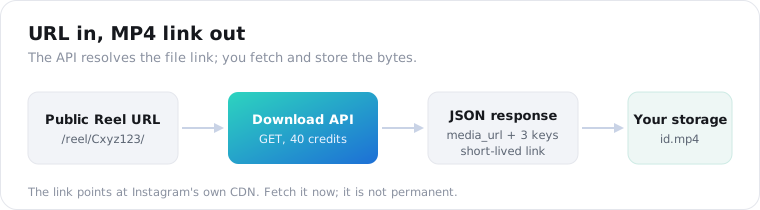
To download an Instagram video with an API, you send one GET request with the public Reel or video URL and get back a direct link to the MP4 on Instagram’s CDN. No login, no browser, no Instagram developer app. You fetch the bytes yourself and keep your own copy. On ScraperSocial that call is 8 credits, about 4 cents. This guide covers the request, the one gotcha that trips everyone up, and what it costs.
How do you download an Instagram video with an API?
Send a GET request to the download endpoint with the post URL and your API key, and it returns a small JSON object with the MP4 link inside. ScraperSocial’s /v1/instagram/download hands back four keys: the shortcode, the media_url, the duration in seconds, and a note that the link is short-lived. You then fetch that URL with any HTTP client and write the file to disk.
That is the whole shape. URL in, file link out.
The endpoint does not host, re-encode, or proxy the video. The media_url points straight at Instagram’s own CDN, and you pull the bytes yourself, so you get the file exactly as Instagram serves it.
Here is the full thing, call and save, in one short Python script.
import requests
# 1. Ask the API for the file linkr = requests.get(    "https://api.scrapersocial.com/v1/instagram/download",    params={"url": "https://www.instagram.com/reel/Cxyz123/"},    headers={"Authorization": "Bearer sk_live_..."},)data = r.json()["data"]
# 2. Fetch the MP4 immediately and write it to diskvideo = requests.get(data["media_url"])with open(f"{data['id']}.mp4", "wb") as f:    f.write(video.content)
The alternative is building your own scraper with a headless browser or yt-dlp, which works until it doesn’t. Instagram changes its markup, the signed links shift, and you spend a weekend patching a 403. An API is the maintained version of that same job.
Scraping an Instagram video is really two jobs stitched together. First you load the public page to find the file link buried in the markup, then you download the bytes before the signature lapses. The DIY route makes you own both halves and every future break in them; the API owns the first half and hands you a link to finish the second.
Why does the Instagram video URL keep expiring, and how do you handle it?
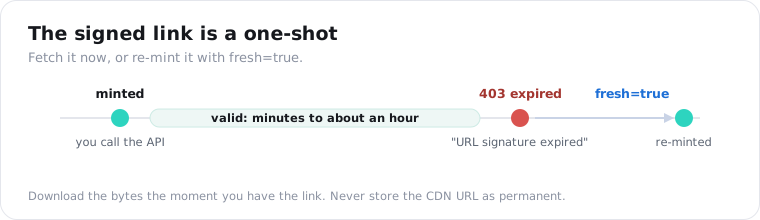
Because Instagram signs its CDN links with a short, undocumented expiry, usually good for minutes to about an hour, not days. Pull the link and sit on it and you get a 403 reading “URL signature expired.” The fix is simple: download the file the moment you have the link, store your own copy, and never write the CDN URL into a database as if it were permanent.
This is the single thing that trips up every first integration.
It is not a bug in the API. The link’s clock belongs to Instagram, not to whoever handed you the URL. Open-source tools have hit this for years: youtube-dl issue #22711 is a plain “403 on public video,” and RSS-Bridge #960 is the same signature-expired error on Instagram media.
The expiry is a feature, not an accident. Signed, short-lived URLs stop people from hotlinking Instagram’s bandwidth and from passing a permanent link around, which is exactly why every serious download tool has to fetch immediately or re-sign. Any product that stores an Instagram CDN URL and serves it back hours later, like a WordPress feed plugin, ends up with black thumbnails once the signature dies.
So treat the response as a one-shot fetch instruction. Call, then immediately GET the media_url, then write the bytes to your storage.
One caveat with caching. This endpoint caches in the near-immutable class, since a Reel’s file does not change, so a repeat call for the same post can return in milliseconds. But a cached response can carry a media_url that has already aged out. If a cache hit gives you a link that 403s, retry with fresh=true to force a newly signed URL. Both calls cost the same 8 credits.
Can the official Instagram API download videos?
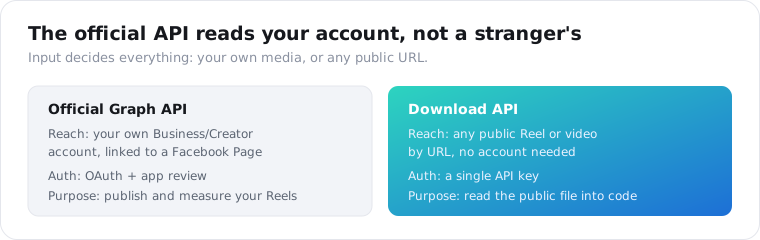
Not for videos that aren’t yours. The official Instagram Graph API only reaches media on Business or Creator accounts you own and have linked to a Facebook Page, and it needs OAuth plus app review to get there. It was built to publish and measure your own Reels, per Phyllo’s 2026 developer guide, not to pull a public clip from an account you do not control.
That gap is the whole reason third-party download APIs exist.
The Reels API launched on June 28, 2022, and it has always been account-owner scoped. Personal accounts get no API access at all, and the endpoints assume you are managing content you posted.
So if your job is “here is a competitor’s Reel URL, get me the file,” the official API cannot help you. It has no concept of a stranger’s public post as an input.
A download API inverts that. The input is any public URL, the auth is a single API key, and there is no Facebook Page, no app review, and no 9:16-and-5-to-90-seconds publishing rules to satisfy. You are reading, not posting.
Can you download Instagram photos or carousels the same way?
No. The download endpoint resolves a video track, so a photo post or an image-only carousel has nothing to return and the call errors rather than handing back half an object. Failed calls are never charged. If you want the still image instead, the Instagram Stats API returns a thumbnail URL alongside the caption and engagement, and it costs 1 credit against the download’s 8.
The rule is clean: a response either has a working video link in it, or it does not exist.
That design is deliberate. A half-object with a null media_url would pass your if response.ok check and then break three steps later when the fetch fails. An outright error at the source is easier to handle.
A mixed carousel with both video and stills returns the video track. A carousel of only photos errors, and that is your signal to route the URL to the Stats endpoint instead.
In code that is a small branch. Wrap the call in a try, and on an error check the post type: if it is a photo or an all-image carousel, send the same URL to the Stats endpoint for the thumbnail and metadata rather than retrying the download. Treating the error as routing information instead of a failure lets a mixed feed of Reels and photos flow through one pipeline without special-casing every post by hand.
What can you actually do with the downloaded file?
Once the MP4 is on your disk, it feeds any pipeline that needs the actual file instead of a page to render. The common jobs are archiving Reels to object storage so a copy outlives the account, feeding clips into transcription or an ML model, and building an ad-creative swipe file where a team watches competitor Reels side by side. For the spoken words specifically, you download the file and run speech-to-text.
Archiving is the most common reason people reach for this.
An account can go private or vanish overnight, and with it every Reel. A scheduled pull to your own storage keeps a copy you control.
Transcription and analysis is the next one. Frame extraction, thumbnail generation, duration-based sorting, or a whisper-style transcript all need the decoded video, not an embed. The TikTok download API uses the same request shape if the same clip lives on both platforms.
The third is competitive research. Ad and content teams build a swipe file of rival Reels to study hooks, pacing, and captions side by side, and that means holding the actual files, not a wall of embeds that lazy-load and rot. A nightly pull of a watchlist of handles keeps that library current without anyone opening the app.
One worked example ties it together. A media team tracks fifteen competitor handles, lists each account’s new Reels every night with the channel endpoint, downloads only the ones that crossed a view threshold, and drops the files into a shared folder tagged by brand. The next morning the strategists scrub a week of rival creative in one place, with no scrolling, no app, and no links that expire on them mid-review.
How much does it cost to download Instagram videos at scale?
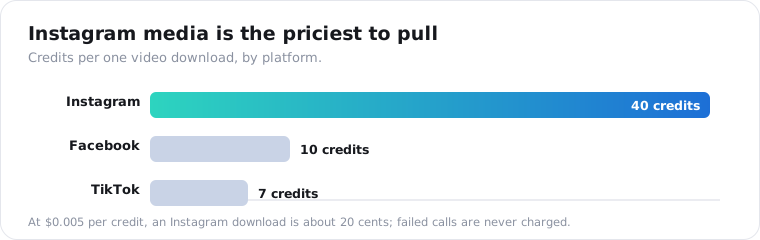
One video is 8 credits on ScraperSocial, about 4 cents on the monthly plan and 3.6 on annual, so $5 covers roughly 125 downloads. It is one of the pricier calls in the catalog, because pulling media costs more upstream than reading text, and it runs higher than the TikTok download at 7 credits or Facebook at 3. The way to control it is to filter first, then download only what you want.
Do not use download as a discovery tool.
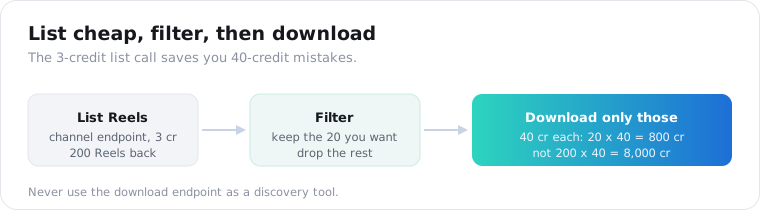
The pattern that keeps the bill sane is two steps. List a creator’s recent Reels with the cheap Instagram Channel Reels API at 1 credit, decide which handful you actually want the file for, and only then call download on those. Piping a whole channel through the download endpoint unfiltered means paying 8 credits for every clip, including the ones you would never have watched.
Put real numbers on it. Filtering a 200-Reel channel down to the 10 you want is 200 times 1 credit to list plus 10 times 8 to download, which is 280 credits, about $1.40. Downloading the whole channel blind is 200 times 8, or 1,600 credits, nearly six times the cost for footage nobody asked for. On this endpoint, the list-first habit is the single biggest lever on your bill.
The math adds up fast. Downloading 500 Reels a month is 4,000 credits, which the $54-a-year plan’s monthly allowance does not cover on its own, so heavy pulling pushes you into top-ups. Filtering a channel of 200 Reels down to the 20 you care about is the difference between 1,600 credits and 160.
Here is how the routes compare for a developer who needs the file.
| Method | Reach | Login / app review | Maintenance | Output | Best for |
|---|---|---|---|---|---|
| Official Graph API | Your own account only | OAuth + app review | Meta-maintained | Own media links | Managing your own Reels |
| DIY yt-dlp / scraper | Any public post | None | You patch every break | Raw file | One-off scripts |
| Consumer downloader site | Any public post | None | Not yours to fix | Manual file save | A single video by hand |
| Download API | Any public post | API key only | Vendor-maintained | Direct MP4 link | Scripted, repeatable pulls |
The cross-platform gap is worth knowing if you pull from several networks.
Is it legal to download Instagram videos?
Reading a public post is generally fine; republishing it is a different question. A download API fetches only what a logged-out visitor can see, so private accounts, Stories, and deleted posts stay out of reach and error rather than leak. But the file still belongs to whoever made it. Archiving for your own analysis or backup is one thing; reposting someone else’s Reel to your account is a copyright and terms-of-service matter that lands on you.
Get your own legal read before you build on any of this. I cannot give you one.
The line that matters in practice is collection versus reuse. Reading a public page logged out is a well-trodden path. Taking a creator’s video and passing it off as your own content is where the trouble starts, and no API changes that.
Instagram added a native Reel download for public accounts back in June 2023, and creators can switch it off. An API does not override that intent; it just gets the public file into your pipeline without a browser. Keep a short retention window, respect deletion, and do not republish what you did not make.
A Reel can also carry personal data, which is the part teams forget. A creator’s face, their handle, and anything they say on camera are personal information under GDPR and CCPA the moment you store the file. If you are archiving at scale, that means a retention policy and a deletion path, the same discipline you would apply to any dataset of real people. Downloading for private analysis is defensible; building a permanent, searchable library of other people’s faces is a different risk you should size before you start.
Download one Reel to test the shape
Take one public Reel URL. Send it to the Instagram download endpoint, fetch the media_url before it expires, and confirm the MP4 lands on disk. Grab a key from the quickstart, check the per-call credit cost on the pricing page before you commit, and let the 25 free credits pay for three real downloads first.
Frequently asked questions
How do I download an Instagram video with an API?
Send a GET request to a download endpoint with the public Reel or video URL and your API key. The response is a small JSON object containing media_url, a direct link to the MP4 on Instagram’s CDN, which you then fetch with any HTTP client and save to disk. There is no OAuth step and no Instagram developer app. On ScraperSocial the call is /v1/instagram/download at 8 credits, about 4 cents a video.
Why does the Instagram video URL expire or return a 403?
Instagram signs its CDN links with a short, undocumented expiry, usually good for minutes to about an hour, not days. Once the signature lapses the link returns a 403 reading “URL signature expired,” which is the documented behavior developers hit on tools like youtube-dl and RSS-Bridge. Download the file the moment you have the link and keep your own copy. If a stored link has died, call the endpoint again with fresh=true to mint a new one.
Can the official Instagram API download videos?
Only your own. The official Instagram Graph API reaches media on Business or Creator accounts you own and have linked to a Facebook Page, and getting there needs OAuth and app review. It was built to publish and measure your own Reels, not to pull a public clip from an account you do not control. That gap is why third-party download APIs exist at all.
Can I download Instagram photos or carousels this way?
No. The download endpoint resolves a video track, so a photo post or an image-only carousel has nothing to return and the call errors rather than handing back half an object. Failed calls are never charged. If you want the still image instead, the Instagram Stats API returns a thumbnail URL alongside the caption and engagement for 1 credit, a fraction of a download call.
How much does it cost to download Instagram videos with an API?
On ScraperSocial one video is 8 credits, about 4 cents on the monthly plan and 3.6 on annual, so $5 covers roughly 125 downloads. It is one of the pricier calls in the catalog because pulling media costs more upstream than reading text, and it is higher than the TikTok download at 7 credits or Facebook at 3. Filter first and you rarely pay for a clip you did not want.
Is it legal to download Instagram videos?
Reading a public post is generally fine; republishing it is a separate question. A download API fetches only what a logged-out visitor can see, so private accounts, Stories, and deleted posts stay out of reach. But the file still belongs to whoever made it. Archiving for your own analysis or backup is one thing; reposting someone else’s Reel to your account is a copyright and terms matter that lands on you. This is not legal advice.