By Nikhil Kumar. Last updated October 2026.
You don’t need an npm package to get a TikTok transcript in JavaScript.
Node’s built-in fetch is enough. To use a TikTok transcript API in JavaScript, point a GET request at /v1/tiktok/transcript, pass the video URL plus a Bearer key, and the spoken text comes back as JSON. This guide adds what the short tutorials skip: TypeScript types, retries with backoff, a concurrency pool, and a server route so the key never reaches the browser.
How do you get a TikTok transcript in JavaScript?
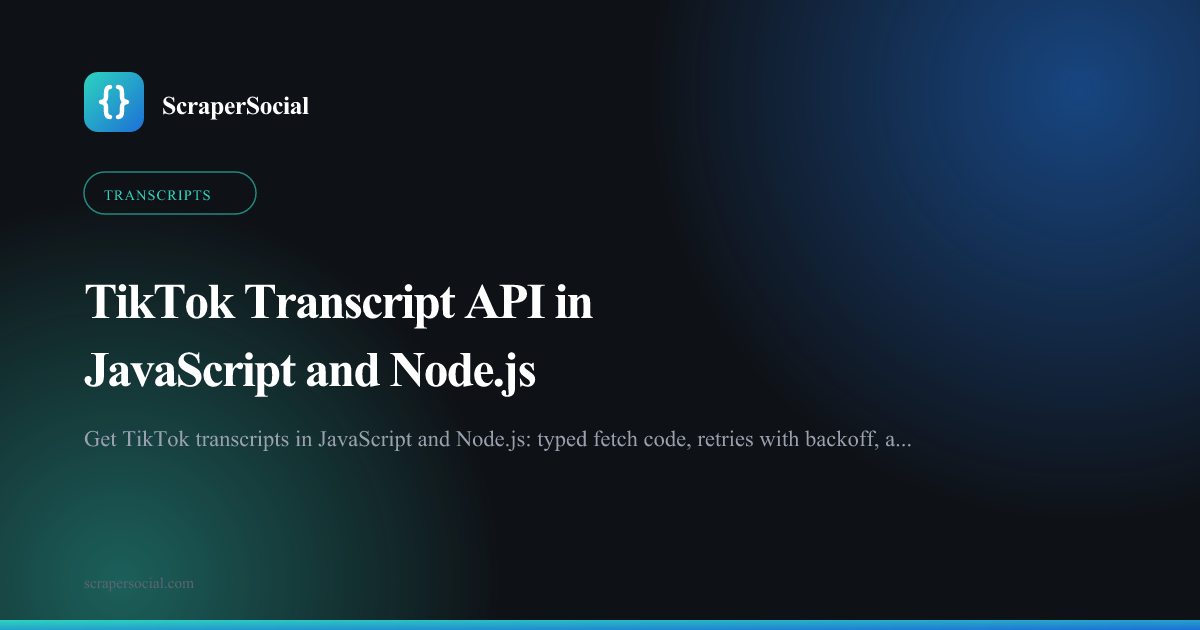
Call the transcript endpoint with fetch. Pass the TikTok video URL in the url query parameter and your key in an Authorization: Bearer header. The response is { data, request_id }, where data.text is the full transcript and data.language is the caption language. No SDK, no TikTok developer account and no OAuth are involved, and each video costs 2 credits.
Get a key from the quickstart first. Signup comes with 25 free credits, which is 12 transcripts to test with.
Save the key in a .env file as SCRAPERSOCIAL_KEY, then create transcript.mjs:
const videoUrl = "https://www.tiktok.com/@creator/video/7431562201857826091";const params = new URLSearchParams({ url: videoUrl });
const res = await fetch(`https://api.scrapersocial.com/v1/tiktok/transcript?${params}`, {  headers: { Authorization: `Bearer ${process.env.SCRAPERSOCIAL_KEY}` },  signal: AbortSignal.timeout(60_000),});
const body = await res.json();if (!res.ok) throw new Error(`${body.error.code}: ${body.error.message}`);
console.log(body.data.language);console.log(body.data.text);
Run it with node --env-file=.env transcript.mjs. The --env-file flag has been built into Node since version 20.6, so you can skip dotenv.
Use Node 22 or 24. Node 18 was the first release with a built-in fetch, but it reached end of life in April 2025. Per the Node.js release schedule, Node 24 moves to maintenance on October 20, 2026, and Node 26 becomes the active LTS line on October 28.
Plenty of teams will run this from Node. In the 2025 Stack Overflow Developer Survey, 66% of respondents used JavaScript, and Node.js topped the web frameworks and technologies list at 48.7%.
What do the TypeScript types for a TikTok transcript look like?
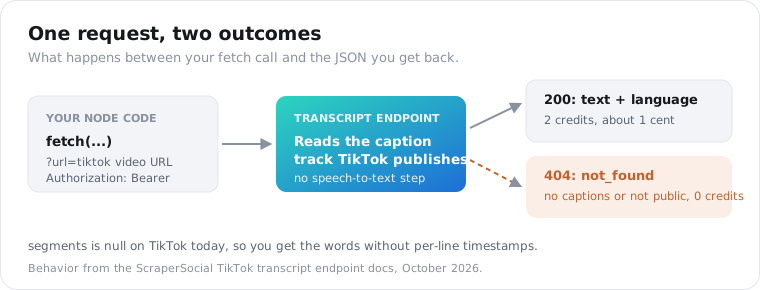
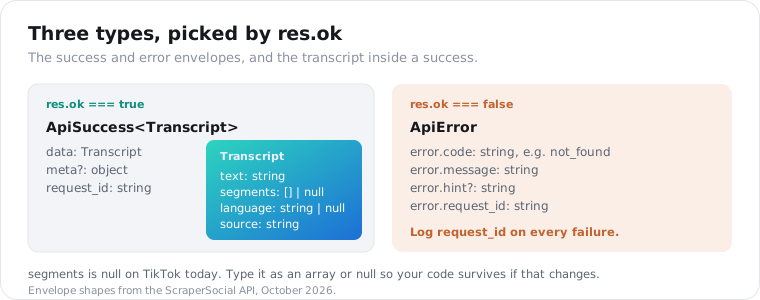
You need three types: the transcript itself, a success envelope, and an error envelope. The transcript has text (string), segments (array or null), language (string or null) and source (string). Success wraps it as { data, meta?, request_id }. Errors come back as { error: { code, message, request_id } } with a non-2xx status, so you can narrow on res.ok.
export interface Transcript {  text: string;  segments: { start: number; end: number; text: string }[] | null;  language: string | null;  source: string;}
export interface ApiSuccess<T> {  data: T;  meta?: Record<string, unknown>;  request_id: string;}
export interface ApiError {  error: { code: string; message: string; hint?: string; request_id: string };}
Here’s the shape of a success body:
{ "data": { "text": "okay so three things I wish I knew before buying a standing desk...", "segments": null, "language": "en", "source": "upstream" }, "request_id": "req_01JZX4M8Q2TE9W"}And an error body, for a video with no captions:
{ "error": { "code": "not_found", "message": "video not found", "request_id": "req_01JZX4MB7Q1N3C" }}Two fields deserve a note. segments is null for every TikTok today, because the caption track reaches the API as flat text. This post explains why.
And request_id is your support ticket. Log it on every failure, and support can trace that exact call.
If you’d rather not cast, add a tiny guard such as const isApiError = (b: unknown): b is ApiError => typeof b === "object" && b !== null && "error" in b;. It checks the body itself, which helps when a proxy in front of your service rewrites status codes.
If you write TypeScript, Node 24 runs .ts files directly. Type stripping has been on by default since Node 23.6, so node --env-file=.env transcript.ts works without a build step, as long as you stick to plain type annotations like the ones above.
Should you use fetch or axios for the TikTok transcript API?
Use fetch. It’s built into Node, Bun, Deno, Cloudflare Workers and every browser, so it adds no dependency and the same code runs anywhere. axios still works, but it throws on any non-2xx status by default, which hides the error envelope unless you change validateStatus. For one GET request per video, axios brings nothing you need.
If your codebase already uses axios, here’s the equivalent call:
import axios from "axios";
const { status, data: body } = await axios.get(  "https://api.scrapersocial.com/v1/tiktok/transcript",  {    params: { url: videoUrl },    headers: { Authorization: `Bearer ${process.env.SCRAPERSOCIAL_KEY}` },    timeout: 60_000,    validateStatus: () => true,  },);
if (status !== 200) throw new Error(`${body.error.code}: ${body.error.message}`);console.log(body.data.text);
validateStatus: () => true is the line people miss. Without it, a 404 becomes an exception and you have to dig the body out of error.response.data.
Set a timeout either way. A video the API has already transcribed comes back in milliseconds, but a first-time read can take several seconds. I use 60 seconds so slow reads finish and a stuck connection still gets cut off.
One runtime difference to watch: in a Cloudflare Worker, the key lives on the env object your handler receives, not on process.env. Everything else in these snippets runs unchanged on Workers, Bun and Deno.
How do you handle TikToks with no captions in Node.js?
Treat a 404 as a normal result, not a crash. The endpoint reads the caption track TikTok publishes, and when a video has none, it returns 404 not_found instead of guessing at the words. That costs zero credits. Return null, mark the video as “no captions”, and move on. Only 429 and 5xx responses are worth retrying.
Misses aren’t rare. In a May 2026 write-up, Apify estimated that roughly one TikTok in three carries no text data. Music-only and wordless clips make up most of them.
Here’s a function that sorts every outcome:
const API = "https://api.scrapersocial.com/v1/tiktok/transcript";const sleep = (ms: number) => new Promise((r) => setTimeout(r, ms));
export async function getTranscript(videoUrl: string, attempt = 0): Promise<Transcript | null> {  const res = await fetch(`${API}?${new URLSearchParams({ url: videoUrl })}`, {    headers: { Authorization: `Bearer ${process.env.SCRAPERSOCIAL_KEY}` },    signal: AbortSignal.timeout(60_000),  });
  if (res.ok) return ((await res.json()) as ApiSuccess<Transcript>).data;  if (res.status === 404) return null; // no captions, private or deleted: not billed
  const body = (await res.json().catch(() => null)) as ApiError | null;  const retryable = res.status === 429 || res.status >= 500;
  if (retryable && attempt < 5) {    await sleep(2 ** attempt * 2000 + Math.random() * 500);    return getTranscript(videoUrl, attempt + 1);  }  throw new Error(`${res.status} ${body?.error.code ?? "unknown"} (${body?.error.request_id ?? "no id"})`);}
The .catch(() => null) matters. A 5xx from a network edge can arrive as HTML, not JSON, and you don’t want the parser to crash before the retry logic runs.
Timeouts are the other failure that never reaches this code. When AbortSignal.timeout fires, fetch rejects with an error named TimeoutError, so wrap the call site in a try/catch and treat that like a 5xx: wait, then try once more.
These are the codes the function sorts:
| Status | Code | What your Node code should do |
|---|---|---|
| 400 | invalid_url, unsupported_platform_url | Fix the input: it isn’t a TikTok video URL |
| 401 | missing_api_key, invalid_api_key | Stop and fix the key |
| 402 | out_of_credits | Stop until the plan renews or you top up |
| 404 | not_found | Return null, no captions or not public |
| 429 | rate_limited | Back off and retry |
| 502, 504 | upstream_failure, upstream_timeout | Back off and retry |
None of these failures is billed. The full list lives in the errors docs.
How do you transcribe many TikToks in Node.js without hitting rate limits?
Run the URLs through a small pool of workers instead of Promise.all over the whole list. Four concurrent requests keep a batch moving fast and stay far below the 200 requests per minute on the $5 monthly plan. The pool below needs no library. Each worker pulls the next URL until the list is empty, and results keep their input order.
async function mapPool<T, R>(items: T[], limit: number, fn: (item: T) => Promise<R>): Promise<R[]> {  const results = new Array<R>(items.length);  let next = 0;  const worker = async () => {    while (next < items.length) {      const i = next++;      results[i] = await fn(items[i]);    }  };  await Promise.all(Array.from({ length: Math.min(limit, items.length) }, worker));  return results;}
const transcripts = await mapPool(videoUrls, 4, getTranscript);const found = transcripts.filter((t) => t !== null).length;console.log(`${found} of ${videoUrls.length} videos had captions`);
next++ is safe here. JavaScript runs one worker at a time between awaits, so two workers can’t grab the same index.
Rate limits count requests per minute, per the rate-limit docs: 20 on a free trial key, 200 on monthly and 300 on annual. On a free trial key, drop the pool to one worker so a long list doesn’t trip the limit.
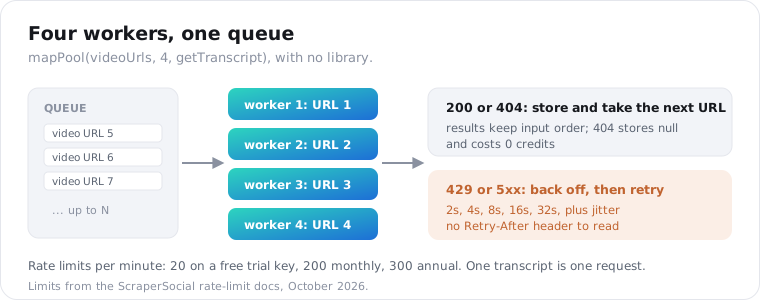
One honest gap. A 429 from this API doesn’t include a Retry-After header today, so the function above backs off on its own schedule, doubling the wait with a little random jitter. The limit counts a one-minute window, and five retries spread over about a minute, so the last ones land after it resets.
Save results as they land, not at the end. Write each transcript to your database inside the worker, and a crash at video 400 costs you nothing you already paid for.
Don’t fire Promise.all(videoUrls.map(getTranscript)) at a list of 500. It starts 500 requests at once, and most of them will hit 429 together and back off in lockstep.
Can you call a TikTok transcript API from the browser?
Don’t. Any key used in client-side JavaScript ships to every visitor, and anyone can copy it out of the network tab and spend your credits. Put the call behind your own server route instead. In Next.js, that’s a route handler that reads the key from process.env and returns only the fields your page needs, with your own auth or rate limit in front.
import { getTranscript } from "@/lib/transcript";
export async function GET(request: Request) {  const videoUrl = new URL(request.url).searchParams.get("url");  if (!videoUrl) return Response.json({ error: "url is required" }, { status: 400 });
  const transcript = await getTranscript(videoUrl);  if (!transcript) return Response.json({ error: "This video has no captions" }, { status: 404 });
  return Response.json({ text: transcript.text, language: transcript.language });}
Your React component then calls /api/transcript?url=... and never sees the key.
Cache at the route too. If ten visitors open the same video page, your route should answer nine of them from your own store, not from a fresh 2-credit call each time.
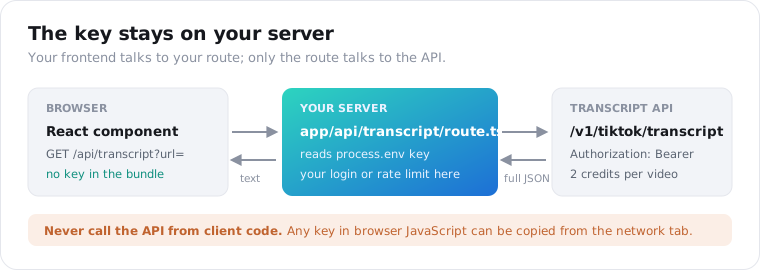
That route is public the moment you deploy it. Put it behind your app’s login, or add a per-user limit, or a stranger can run your credits down through your own server.
The same pattern works in Express, Hono or a Cloudflare Worker. The call is plain fetch, so nothing changes but the file it lives in.
How do you avoid paying twice for the same transcript?
Cache by video id on your side. A transcript never changes once a video is posted, and the API bills a repeat call for the same video at the full 2 credits even when it serves it from its own store. Keep a map from video id to transcript, check it before every call, and save each result as it lands. Use a database table once the list outgrows memory.
const cache = new Map<string, Transcript | null>();const videoKey = (url: string) => url.match(/\/video\/(\d+)/)?.[1] ?? url;
async function cachedTranscript(url: string) {  const key = videoKey(url);  if (cache.has(key)) return cache.get(key)!;  const transcript = await getTranscript(url);  cache.set(key, transcript);  return transcript;}
An in-memory Map disappears when the process exits, so it’s fine for one script run and wrong for a service. For anything long-lived, put the same check in front of a database table keyed on video id, or a key-value store such as Redis or Cloudflare KV.
Storing null too means you never re-ask about a video you already know has no captions. That call was free, but it still uses up a request from your per-minute limit.
The id comes from the /video/ segment of the URL. Short share links like vm.tiktok.com don’t contain it, so they fall back to the raw link as the key. The API resolves short links for you; your cache just won’t merge them with the long form.
The x-cache response header tells you whether the API had the transcript stored already. Watch X-Credits-Charged while you test, too: it shows exactly what each call cost.
How do you send a TikTok transcript to an LLM from JavaScript?
Send it whole. Most TikToks run under a minute, so a transcript is usually a few hundred words, well inside any model’s context window, and chunking only adds code. Put the text in the prompt next to the video URL and language, and ask for one specific output, such as the hook, the claims made, or a product mention.
A small prompt builder keeps that consistent across a batch:
function hookPrompt(url: string, t: Transcript) { return [ `Video: ${url}`, `Language: ${t.language ?? "unknown"}`, "Transcript (auto captions, may misspell names):", t.text, "", "Quote the first sentence the creator says, then name the promise it makes in under 15 words.", ].join("\n");}Pass that string to whichever model SDK you already use. The transcript is plain text, so there’s no WebVTT to strip first.
Tell the model the text came from auto captions. It then treats a misspelled brand name as a transcription slip rather than a fact to repeat.
If all you want is a summary, there’s a shortcut. The TikTok summary endpoint returns a short summary, three to five key_points and the language for 4 credits a video, about 2 cents. It runs on the same caption track, so a caption-less video returns 404 there too, at no cost.
I’d still fetch the transcript first in most pipelines. Raw text lets you rewrite the prompt next month without paying to pull the same video again, and your cache from the previous section makes that free.
How does this compare with other TikTok transcript APIs?
The main difference is output format, not syntax. Most TikTok transcript APIs return a WebVTT string with timestamps, which you parse. Some fall back to AI transcription when a video has no captions. This endpoint returns plain text and a language code, and returns 404 rather than generating text. That suits LLM input and search, but not subtitle files.
Here’s how the main options compare on what a JavaScript developer actually handles, from each provider’s docs as of October 2026:
| Provider | What a call returns | No captions? | Auth header |
|---|---|---|---|
| ScraperSocial | Plain text and language; segments null | 404, no AI guess, not billed | Authorization: Bearer |
| ScrapeCreators | WebVTT string with cue timestamps | Optional AI fallback, videos up to 2 minutes by default | x-api-key |
| Supadata | Segments with offset and duration in milliseconds | AI-generated text in its default mode | x-api-key |
| Dumpling AI | WebVTT string, sent as a POST body | 404 | Authorization: Bearer |
| SociaVault | WebVTT string | Not documented | x-api-key |
WebVTT isn’t hard to parse, but it’s one more job. Before the text is usable in a prompt, you strip the WEBVTT header, the cue numbers and every 00:00:01.200 --> 00:00:03.400 timing line.
If you need subtitle timestamps or text for every caption-less clip, a WebVTT or AI-fallback provider fits better.
If you’re feeding an LLM, a search index or a database, plain text saves you a parsing step. You also never get machine-guessed words you didn’t ask for. And the same key pulls TikTok comments, stats and creator feeds, plus data from 30+ other platforms, all in the same envelope.
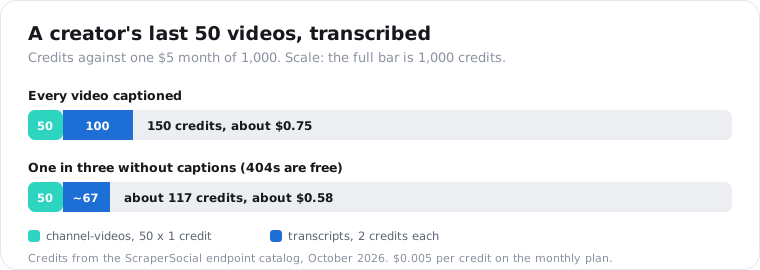
A 50-video creator back catalogue makes the cost concrete. Listing the videos with the channel videos endpoint is 50 credits (1 each), and 50 transcripts are 100 more, so 150 credits, about 75 cents on the $5 monthly plan. If one video in three lacks a caption track, the bill drops to about 117 credits, because those 404s are free.
The TikTok transcript endpoint page has every field and limit in one place. If you’d rather work in Python, the Python version of this guide uses the same endpoint.
Frequently asked questions
Is there an npm package for TikTok transcripts?
There is no official one, and you don’t need one. TikTok has no public transcript API, so every option is a third-party HTTP API. A single fetch call to the transcript endpoint with your key in an Authorization header returns the text as JSON. That keeps your dependency list empty and works the same in Node, Bun, Deno, Cloudflare Workers and Next.js route handlers.
Can I get timestamps for a TikTok transcript in JavaScript?
Not from this endpoint today. It reads TikTok’s caption track, which arrives as flat text, so segments comes back null and you get the words without start and end times. Type segments as an array or null so your code survives if that changes. If timestamps are a hard requirement, pick a provider that returns WebVTT and parse the cues yourself.
How do I get a TikTok transcript in TypeScript?
Define an interface for the transcript with text, segments, language and source, wrap it in a success envelope with data and request_id, and add an error envelope with code, message and request_id. Then call the endpoint with fetch and narrow on response.ok. Node 24 runs the .ts file directly because type stripping is on by default, so you can skip a build step while testing.
Why does my TikTok transcript request return 404?
Because there was nothing to read. A 404 not_found means the video has no caption track, or it is private, deleted or region-blocked. The endpoint never guesses at missing speech, and a 404 costs zero credits. Music-only and wordless clips are the usual cause. Log the request_id, mark the video as no captions, and move to the next URL instead of retrying.
How many TikTok transcripts can I fetch per minute?
As many requests as your plan’s rate limit allows: 20 a minute on a free trial key, 200 on the $5 monthly plan and 300 on the annual plan. The limit counts requests, and each transcript is one request. A pool of four concurrent workers stays well under the monthly limit. A 429 response doesn’t include a Retry-After header, so back off exponentially.
Can I use the TikTok transcript API in Next.js?
Yes, from the server side only. Put the call in a route handler such as app/api/transcript/route.ts, read the key from process.env, and have your React components call your own route. Never call the API from client components, because the key would ship to every visitor’s browser. Add your own auth or rate limit on the route so strangers can’t spend your credits.
Run your first transcript in Node
Copy the first snippet into transcript.mjs, swap in a TikTok URL you care about, and run it with node --env-file=.env transcript.mjs. You’ll see the language code and the full text in your terminal on the first try. Get your API key; the 25 free credits cover 12 transcripts.