By Nikhil Kumar. Last updated August 2026.
Threads has a keyword search API now. The catch is that, on Meta’s version, it will only show you your own posts until you fill out an app review.
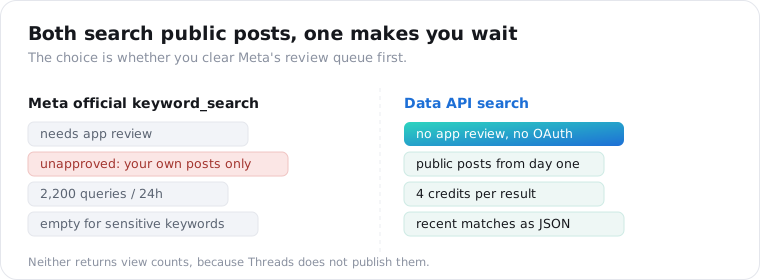
You can search public Threads posts by keyword two ways in 2026: Meta’s official keyword_search endpoint, or a third-party data API. The official one is real but gated, it needs the threads_keyword_search permission through app review, caps you at 2,200 queries a day, and returns nothing for keywords it deems sensitive. A data API searches public Threads with no app review, returning matches as JSON at a per-result price. This guide covers both, with the fields and a code example.
Can you search Threads by keyword?
Yes, and unlike a year ago there are two working routes. Meta shipped an official keyword_search endpoint, so the answer is no longer “you cannot.” But the official route is gated behind app review and a daily quota, while a third-party data API reads public posts with no approval. The right one depends on whether you are willing to clear Meta’s approval queue or would rather skip it.
This is the piece most guides get wrong. They either say Threads has no search, which is now false, or they point you at Meta’s API without mentioning that it shows you your own posts until you are approved.
Our Threads pillar covers why Threads has no general public read API; keyword search is the one narrow exception, and it comes with strings.
What does Meta’s official Threads keyword search API do?
It searches public posts, once you are approved, within a tight quota. The official endpoint is GET https://graph.threads.net/v1.0/keyword_search, per Meta’s documentation. You pass a q keyword and an access token, and optionally a search_type of TOP or RECENT, a search_mode of KEYWORD or TAG for topic tags, a media_type filter, since and until timestamps, and a limit up to 100.
It returns fields like id, text, media_type, permalink, timestamp, and username, plus has_replies, is_quote_post, and is_reply.
There is no view count anywhere in that list, because Threads does not publish view counts. Anyone showing you Threads reach is estimating.
The friction is in the access. The endpoint requires two permissions, threads_basic and threads_keyword_search, and the second one goes through Meta app review.
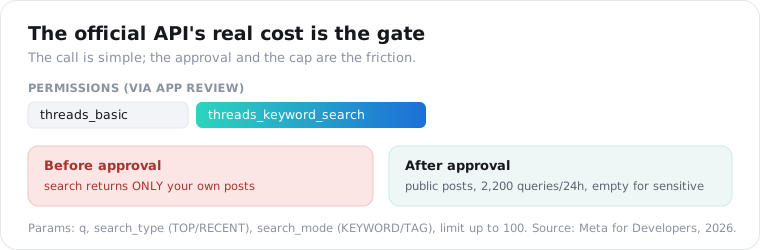
Until that permission is approved, Meta is explicit that a search returns only the authenticated user’s own posts, not public ones. After approval you can search public posts, but only 2,200 queries per rolling 24 hours, and any keyword Meta considers sensitive or offensive comes back as an empty array. It is built for a creator managing their presence, not for reading the public conversation at volume.
How do you search Threads by keyword with a data API?
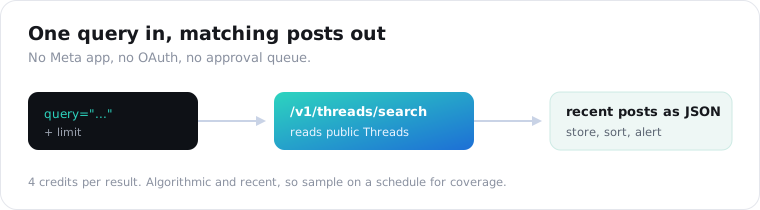
Send a query to a search endpoint and read the matching public posts back. A data API skips Meta’s app review entirely: it reads the public Threads pages a logged-out visitor sees, so there is no threads_keyword_search permission to wait on and no OAuth. On ScraperSocial the call is GET /v1/threads/search?query=..., billed at 2 credits per result with a 15-credit minimum per call, and it returns recent matching posts as JSON.
Here is the whole request.
import requests
r = requests.get(    "https://api.scrapersocial.com/v1/threads/search",    params={"query": "vector database", "limit": 25},    headers={"Authorization": "Bearer sk_live_..."},)for post in r.json()["data"]:    print(post["author"], "|", post["likes"], "|", post["text"][:80])
No Meta app, no OAuth, no approval queue. You pass a keyword and get public posts.
The query is the only required parameter, and limit controls how many posts come back. Because you are billed per result, limit is your budget dial. The endpoint returns recent matches rather than a ranked “top” set, which is what you usually want for monitoring.
A couple of behaviors are worth knowing before you build. The search leans toward recent posts, so it is a live feed, not a back-catalog, and a very small limit is rounded up internally, so ask for a handful and you may get a slightly larger batch. Neither changes the code; both change how you plan a monitoring job, which is why sampling on a schedule beats one big call.
What does a Threads search result look like as JSON?
A flat post object per match, in the standard envelope. Every result carries the post id and shortcode, the url, the text, the author handle, the public engagement counts (likes, replies, reposts, quotes), a posted_at timestamp, the media_type, and two booleans, is_reply and is_repost.
{ "data": [ { "shortcode": "C8xY2zAbC", "url": "https://www.threads.com/@user/post/C8xY2zAbC", "text": "moved our search to a vector DB and latency dropped 40%", "author": "someuser", "likes": 128, "replies": 9, "reposts": 4, "quotes": 2, "posted_at": "2026-08-19T15:02:00Z", "media_type": "TEXT", "is_reply": false } ], "meta": { "count": 25 }, "request_id": "a18e4ef88ad4b00b"}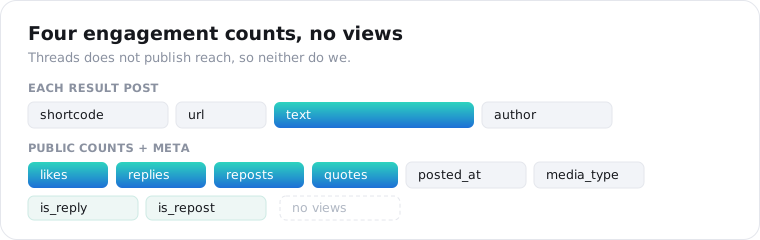
The is_reply flag matters more than it looks. A keyword can match a reply as easily as a top-level post, so branch on is_reply when you only want original posts. And because search is algorithmic, treat the array as a relevant sample, not every post that ever matched.
Keyword search or account search on Threads?
Posts or people, decided by which endpoint you call. Keyword search returns posts that match a term; account search returns the profiles talking about it. On ScraperSocial the search endpoint takes a query and returns matching public posts, while user search takes a query and returns matching accounts, at 2 credits per post (at least 15 a call) and 1 credit per account respectively.
Reach for post search when the question is “what is being said,” and account search when it is “who is saying it.”
A common pattern uses both: run a keyword post search to find the conversation, pull the standout author handles, then pass them to the Threads profile endpoint to size up the accounts behind the loudest posts.
For lead-finding this is the whole workflow. Search a problem statement your product solves, such as “our scraper keeps getting blocked”, collect the authors of the posts that resonate, and you have a list of people actively describing the pain you fix, ranked by how much the community agreed with them. Account search widens that from posts to the profiles that keep coming up, which is a warmer list than any cold export.
How much does it cost, and what are the limits?
2 credits per result, at least 15 a call, and the honest limit is coverage, not price. You pay per post returned, so a 25-result search is 50 credits, about 25 cents on the monthly plan, and a query that matches nothing is free, up to 25 empty results a day. There is no daily query cap the way the official API imposes, but there is a real constraint worth stating plainly.
Threads search is algorithmic. It returns relevant, recent posts, not an exhaustive archive of every match, so one call is a sample of the conversation and not the whole of it.
The way around that is sampling. Run the same query on a schedule, deduplicate on the post id, and you build the coverage over time that a single call cannot give you. Repeat calls hit the documented cache and return fast; pass fresh=true when you are monitoring a live topic and need the current set.
| Official keyword_search | ScraperSocial search | |
|---|---|---|
| Access | App review for threads_keyword_search | API key, no approval |
| Scope before approval | Your own posts only | Public posts |
| Rate limit | 2,200 queries / 24h | Per result, no daily cap |
| Sensitive keywords | Empty array | Public results |
| Sort | TOP or RECENT | Recent |
| View counts | None | None |
What can you do with Threads keyword search?
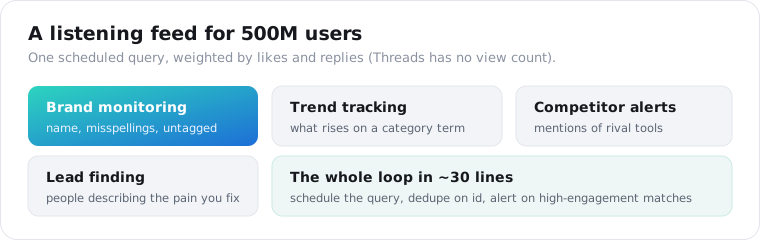
Watch a topic that 500 million people now use. Threads passed 500 million monthly active users in 2026, up from 350 million a year earlier, which makes it a real listening surface rather than a novelty. Keyword search turns that into brand monitoring, trend tracking, competitor mention alerts, and lead-finding, all from one query you can schedule.
Brand monitoring is the obvious first job.
Search your product name plus a couple of common misspellings and untagged variants, because people talk about a brand without tagging it, then weight the results by likes and replies since Threads gives you no view count to rank on. Run it daily and you have a mention feed for a platform most competitors are not watching yet.
Made concrete: schedule three queries a day, your brand name, one misspelling, and “competitor + alternative”, store the results keyed on the post id, and alert on any new match with more than fifty likes. That is a working social-listening loop in about thirty lines, and it catches the complaint or the recommendation the same day it lands rather than a week later in a dashboard nobody opened.
Trend and competitor work follows the same shape: search a category term, look at what rises in the recent set, and use is_quote_post and reply counts to spot the posts driving a conversation.
Is it legal to search and store Threads data?
Reading public posts is generally allowed; storing them is where the care goes. A keyword search returns public posts, and Meta itself offers a public keyword search API, so the data is not off-limits. But Threads posts and handles are personal data about identifiable people, which puts anything you store under GDPR and CCPA, and automated collection can run against the platform’s terms.
None of this is legal advice, and I am not your lawyer; check your own obligations.
The practical posture is the same one we apply across the API: keep only what you need, hash or drop handles for aggregate work, keep a deletion path, and treat public search as a listening tool rather than a way to build a permanent profile of individuals.
The short version
Threads keyword search exists two ways. Meta’s official keyword_search endpoint searches public posts but needs app review, shows only your own posts until then, caps at 2,200 queries a day, and blanks sensitive terms. A data API searches public Threads with no approval, returning recent matching posts as JSON at 2 credits each (at least 15 a call), with no view counts because Threads publishes none. Pick the official API if you can wait on review; pick a data API to start searching today.
Frequently asked questions
Can you search Threads by keyword with an API?
Yes, two ways. Meta’s official Threads API has a keyword_search endpoint, but it needs the threads_keyword_search permission through app review, and until you have that it only searches your own posts. A third-party data API searches public Threads posts by keyword with no app review, returning matches as JSON. Both read public posts once you clear their respective gates; the data API just skips Meta’s approval queue.
Does Meta’s official Threads API let you search public posts?
Only after app review. The keyword_search endpoint requires the threads_keyword_search permission, and Meta is explicit that without approval a search returns only the authenticated user’s own posts. Approved apps can search public posts, capped at 2,200 queries per rolling 24 hours, with sensitive or offensive keywords returning an empty array. It is a real API, but the approval and the quota are the friction.
How do I search Threads by keyword without app review?
Use a data API that reads public Threads pages instead of Meta’s Graph API. With ScraperSocial you send GET /v1/threads/search with a query and get matching public posts back as JSON, no Meta app, no OAuth, and no threads_keyword_search approval. It bills 2 credits per result, at least 15 a call. The tradeoff is that it reads what a logged-out visitor can see, not anything private.
Is Threads keyword search chronological?
No. Threads search is algorithmic, so it returns relevant posts rather than every post that matches, and recent results are weighted toward what the platform surfaces. Treat a keyword search as a sample of the conversation, not an exhaustive archive. If you need coverage over time, sample the same query on a schedule and deduplicate on the post id rather than expecting one call to return everything.
What is the difference between keyword search and account search on Threads?
Keyword search returns posts that match a term; account search returns profiles. On ScraperSocial, /v1/threads/search takes a query and returns matching public posts, while /v1/threads/user-search takes a query and returns matching accounts. Use post search to monitor a topic or brand mention, and account search to find the people and pages talking about a subject.
Can I track brand mentions on Threads?
Yes, and it is the main use case. Threads passed 500 million monthly active users in 2026, so brand conversation there is worth watching. Search your brand name plus common misspellings and untagged variants on a schedule, store the results, and you have a mention feed. Threads does not publish view counts, so weight by likes and replies rather than reach.
Search a keyword on Threads
Pick a keyword you want to watch, a brand name or a topic. Send it to the Threads search endpoint, read the matching public posts back as JSON, and schedule it to build a mention feed. The Threads pillar covers the rest of what you can pull, the quickstart issues a key in a minute, and 25 free credits are enough to run one real search before you decide.